Film cameras
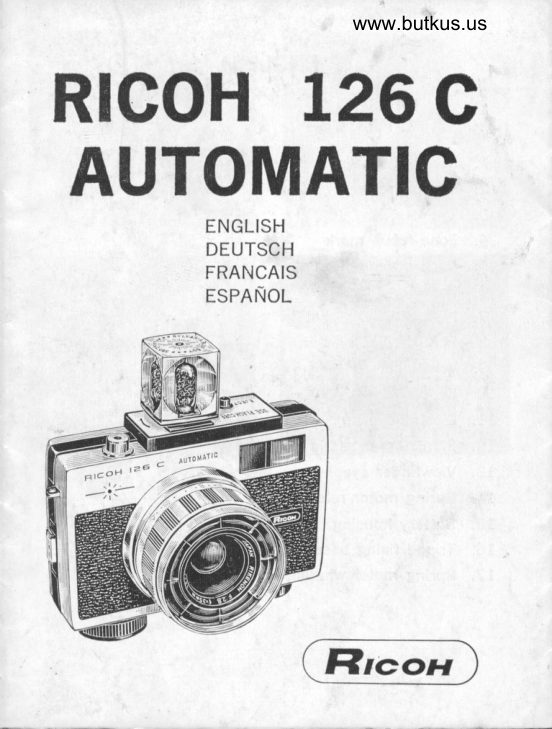
Ricoh 126C Automatic User manual
User manual for Ricoh 126C Automatic. 33 pages in German, French, Spanish, English. Read the original PDF, download or print a copy without registration.
33 pagesGerman, French, Spanish, English3.1 MB PDF
Loading your manual…Open PDF directly
Document details
- Brand
- Ricoh
- Model / document
- Ricoh 126C Automatic
- Document type
- User manual
- Language
- German, French, Spanish, English
- Pages
- 33
- File size
- 3.1 MB
- Category
- Film cameras
- Document date
- Not specified in catalog
Search available document text
Find a term, then jump to its page in the original PDF. Image-only pages may not be searchable; check the PDF for exact wording and diagrams.
Page 1 · Read text
www.butkus.us
RlcoH L26C
AUTOMATIC
              ENGLISH
            DEUTSCH
             FRANCAIS
             ESPANOL


               Flrcolr
View original page 1Page 2 · Read text
Digitally signed by Mike Butkus
                                              DN: cn=Mike Butkus, o=Butkus camera manuals,
                                                   ou=butkus.org, email=mike@butkus.org, c=USMike Butkus   Date: 2023.02.09 20:50:04 -05'00'


           Fig.2
View original page 2Page 4 · Read text
Venmo @mike-butkus-camera  Ph. 2083
PayPal Name  Lynn@butkus.org      www.PayPal.me/lynnbutkus
View original page 4
Page 7 · Read text
CAUTION   !
lf you cannot load or unload the cartridge
easily and smoothly, do not force; Make sure
if Back Cover Button stays in pushed-down
position.
View original page 7
Page 8 · Read text
ENGLISH
f,t!1'
     PRINClPAL PARTS
       1. Cable release socket
t-     2.  Shutter release button
tf     3. Eyelet
      4. Zone focus mark
      5. Back cover button
      6. Focusing ring
      7. FLASHCUBE socket
     B. FLASHCUBE ejector
            Viewf inder,     9.
     10. Lens
     11. Electric eye
     72. Film reference window
     13. Viewfinder eyepiece
     14. Spring motor release lever
     15. Battery housing
     16. Tripod fixing base
     17. Spring motor winding knob


                                             1
View original page 8Page 9 · Read text
www.butkus.us

 SPECIFICATIONS
 Film to be used:  126 type film
 Lens:             Rikenon t 2.8 40 mm 3 sections 4 ele-
                   ments
 S h utter  :           Copal Shutter, 71I25 sec. for automatic
           & 1 30 sec. for manual settings
 Flash   :                Built-in BC Type Flash Unit for FLASH.
               CUBE
 Aperture:           Fully automatic setting coupled to ex-
                  posure from f 2.8 to f 22
Exposure meter:    Built-in Selenium Electric Eye coupled
                   to aperture
Finder:             Parallax Corrected Bright Frame View-
                                                   f inder. Aperture values, exposure warn-
                     ing mark and symbols for zone setting
                can be seen in the Viewfinder
Focusing:         Zone focusing
Film winding:      Automatic Spring.Wound Power System
Size & Weight:      91.4 x 727.4 x 70.O mm 500 g
View original page 9Page 10 · Read text
FILM LOADING
Cornpletely wind Spring Motor Winding Knob. (Fig. 3) CAU-
TION: DO NOT FORCE. One full winding of the spring
motor will advance 10-12 frame of film.
Push down Back Cover Button and swing open Camera
Back. (Fig. 47
When you slip a 1.26 type film cartridge into the camera
and close Camera Back, the film will be automatically
wound until nume(al "I" appears in the Film Reference Win'
dow on Camera Back. (Fig. 5, 6)
You need not worry about film speed setting unlike con'
ventional films, because the cartridge does it automatic-
ally.

CORRECT EXPOSURE
Remember the shutter speed is set aI 7125 sec. as long
as FLASHCUBE is not mounted.
When you aim at the subject you shoot, the lens opening
will be automatically changed and set to correct f-stop ac'
cording to the brightness of the subject. So, the problem
of complicated exposure calculation is eliminated.
 However,  if you want to know the f-stop number, look into
Viewfinder Eyepiece. The numeral indicated by Exposure
Meter Needle in the Viewfinder is the f'stop number' (Fig
7)
 ln case the needle is in the red zone below 2'8, this is
                                                         useinsufficient light to take a picture and you should
FLASHCUBE. (Fie. 8) (See Page 5)
                         3
View original page 10Page 11 · Read text
www.butkus.us
     VIEWING AND FOCUSING
     Turn Focusing Ring and match one symbol to the red dot
     on the lens barrel according to the distance to the subject
       ......Your subject is now in sharp focus. Fig. 9r
      This adjustment can be done through the Viewfinder as
 -    well. while looking into Viewfinder, turn Focusing Ring so
      that the black indicator matches a symbol. rFig. 1O)
     The distance scales are shown on the other side of the     'focusing                 ring. rFig. 11)

    COMPOSING A PICTURE                                      \:
    When composing your picture, keep your subject within the
      bright-frame outline of the Viewfinder. This ouiline will
      help to avoid accidental cropping of your subject. (Fig. lZt
    when you take a picture of the subject in the distance of
   1m r3.3 feetr or nearer, frame it within the inner frame,
     otherwise the upper part of the subject will be cut off.
      (Fie. 13)


    RELEASING SHUTTER
     Hold the camera as steady as you can framing the sub-
      ject within the bright-frame ouiline and press shutter Re.
I    lease Button slowly and smoothly all the way/   Upon release of the Shutter Release Button, the filmdown.will
    b" automatically advanced and the camera is ready for,     next exposure.
                            4

I                                             j
View original page 11Page 12 · Read text
NOTE:
      1. Press shutter release Button all the way down, other'
         wise the shutter will not be released.
                                                           Release      2. When spring motor is unwound, the Shutter
         Button will not oPerate.
      3. To insure positive film advance be sure spring motor
           is wound at all times.

     UNLOADING FILM
     When the last frame is exposed, the film will be wound
                                                                  Re-I     ,p automatically and the film disappears from Film"      ference Window. (Fig. la) No film rewinding is necessary.
      Take out cartridge for development.

      NOTE:
      1.  lf the film is not wound up completely, wind Spring     '     Motor Winding Knob.
      2.  lf your camera will not be used for a long time, the
                                                             RE-        spring motor should be released by pushing the
       LEASING MECHANISM. (Fig. 15)

     FLASH PHOTOGRAPHY
     When the Exposure Meter Needle in the Viewfinder is in
      the red zone, use FLAS#ICUBE. (Fig' 16)
      Put a 1S-volt battery in the Battery Housing (Fig. 17)
      Put a FLASHCUBE into Flash Socket. (Fig. 18) The shut-
       ter speed will automatically be changed to 1/30 sec. Select
                                                                                    f,
View original page 12Page 13 · Read text
www.butkus.us
 one symbol in the same manner as mentioned in VIEW-
 ING AND FOCUSTNG on page 4.
 Hold the camera, aim at the subject and press Shutter
 Release Button.......The expended FLASHCUBE will auto_
 matically eject by pushing Ejector. (Fig. 19)
 NOTE:
 1' The buirt-in frash unit of your Ricoh 726c camera co.
   vers the range from 0.9 m to 5.6 m (3 ft_20 ftr as s66yyn  on the Focusing Ring.
 2. When not using Flash be sure to take off used FLASH-
  CUBE from the camera, otherwise the shutter speed will   not adjust properly for non_flash pnotography.
 3. In general, flash photography requrres a complicated
   calculation for f-stop setting. But your Ricoh I26C ca-
  mera is equipped with an auto.flash mechanism so that
  you can enjoy flash picture-taking as easily as day_light
  photography. No calculations are necessary.

RICOH ACCESSORTES (Fis. 20)
The fo'owing accessories are prepared for giving you morefun.
Ricoh 52 mm Screw-in Lens Hood
Ricoh 52mrn y2, UV, Skylight Fitters
Ricoh Selftimer
View original page 13
Page 14 · Read text
DEUTSCH


HAUPTTEILE
 1. Ausloserfassung
 2. Ausloser
 3. Tragriemenbefestigung
 4. Zeichen fur Einstellung des Entfernungsbereichs
 5. Knopf fur Ruckdeckel
 6. Entfernungseinstellring
 7. Aufsteckschuh fur FLASHCUBE
 8. Auswurfvorrichtung  fur benutzte FLASHCUBE
 9. Sucher
10. Objektiv
 11. Photozelle
 12. Bildziihlfenster
 13. Suchereinblick
 L4. Auslosemechanismus ftir Federmotor
 15. BatteriegehSuse
 16. Teil zur Befestigung des Stativs
 17. AufzugsknoPf ftir Federmotor
View original page 14
Page 15 · Read text
www.butkus.us
 TECHNISC HE DATEN
 Zu benutzender  Film: Type 126
 Objektiv:          Rikenon t 2,8/40 mm, 3 Glieder, 4 Ele-
                   mente
 Verschluss:         Copal-Verschluss, III2S Sek. frjr auto-
                   matische und l/30 Sek. frjr manuelle
                      Einstellung
 Blitzlichtgeriit:     Eingebautes Blitzlichtgeriit Typ BC frir
                 FLASHC U BE
 Blende:            Vollautmatische Blendeneinstellung von
                                   f 2,8 bis f 22, mit Belichtungszeit ge_
                     kuppelt
 Belichtungsmesser: Eingebautes Selen-,,Electric Eye,,(EE),
                  mit Blende gekuppelt
Sucher:        Leuchtrahmensucher mit Markierung
                            frir Parallaxenausgleich, Blendenwerte,
                  Warnzeichen frir Belichtung und ein-
                     gestellter Entfernungsbereich im Su-
                  cher sichtbar
Entfernungseinstellung:  Einstellung des Entfernungsbere-
                      ichs
Filmtransport: Automatischer Federwerkaufzug
Grosse und Gewicht: 91,4x !2L,4X7O,Omm 5OOg
View original page 15Page 16 · Read text
FILMEINLEGEN
Drehen Sie mit dem Aufzugsknopf den Federwerkmotor ganz
auf ! (Fig. 3) ACHTUNG: KEINE GAWALT ANWENDEN!
Eine volle Umdrehung geni.igt, den Film um 1O-12 Bilder
weiterzutransPortieren.
Drticken Sie den Knopf frlr den Rtlckdeckel und offnen sie
die Rrickwand der Kamera I (Fie. 4)
Legen Sie dann eine 126er Filmp.atrone in die Kamera ein
und schlinen Sie den Rrickdeckel wieder! Der Film wird
dadurch automatisch weitertransportiert, bis im Bildzzihl-
fenster auf der Rrickseite der Kamera die Zahl ,,1" sicht'
bar wird. tFie. 5, 6)
Anders als herkommliche Filmen brauchen Sie sich dabei
 nicht um die Einstellung der Filmempfindlichkeit  kuimmern,
da das automatisch durch die Patrone geschient'

 BELICHTUNG
 Solange FLASHCUBE nicht eingesetzt ist, betr,iigt die ein-
 gestellte VerschluBzeit LlI25 Sekunde. (Fig. 5)
wenn Sie die Kamera in Richtung Aufnahmeobjekt halten,
 stellt sich die Blende automatisch auf den der Helligkeit
 des objekts entsprechenden wert ein. Das Errechnen
 von Belichtungszeit oder Blendenwert wird dadurch unnotig.
 Der eingestellte Blendenwert ist im Sucher sichtbar. Die
                                                        ange- von der Nadel des Belichtungsmessers im Sucher
 zeigte Zahl ist die eingestellte. (Fig' 7)
 Wenn die Nadel auf der roten Zone unterhalb von 2,8
 steht, sind die Lichtverhiiltnisse fiir eine Aufnahme nicht
 ausreichend. ln einem solchen Fall empfiehlt es sich,
 FLASHCUBE zu benutzen. (Fig. 8) (siehe S' 11)
                             9
View original page 16Page 17 · Read text
www.butkus.us
 ENTFERN UNGSEINSTELLU NG
 Drehen Sie den Entfernungseinstellring, bis das Zeichen
 frir den der Entfernung zum Aufnahmeobjekt entsprechen-
 den Entfernungsbereich dem roten punkt auf der objektiv-
 fassung gegenribersteht r  Damit ist die Entfernung zum
 Aufnahmeobjekt eingestellt. (Fig. 9)
 Die Einstellung kann auch erforgen, wdhrend Sie durch
 den Sucher sehen. Drehen Sie dabei den Entfernungsein-
 stellring so lange, bis der schwarze Anzeiger auf das ent-
 sprechende Zeichen zeigt! (Fig. 1O)
 Die Entfernungsskala  ist auf der anderen Seite des Ent.
 fernungseinstellrings  ablesbar. (Fig. 11)
 BILDAUSSCHN ITT
 Achten Sie bei der Aufnahme darauf, da8 sich das Auf-
 nahmeobjekt innerhalb der durch den suchereinblick sicht-
 baren Linien des Leuchtrahmensuchers  befindet, da dar-
 tiber hinausragende Teire auf dem photo sp6ter nicht
sichtbar sind | (Fig. 12)
Wenn die Entfernung zum Aufnahmeobjekt 1m oder weni-
ger betriigt, ist statt des iiuBeren der innere Leuchtrahmen
zu benutzen, da sonst der obere Teil des Bildes ,,abges-
chnitten" wr"irde. (Fig. l3)
AUSLOESEN
Achten Sie darauf, daB sich das Aufnahmeobjekt innerharb
des Leuchtrahmensuchers befindet, harten Sie die Kamera
dann moglichst  stiil und drriken Sie ruhig den Ausrdser
ganz durch !  Nach dem Auslosen wird der Film auto-
matisch weitertransportiert;  .die Kamera ist damit bereit
frir die niichste Aufnahme.
                          10
View original page 17Page 18 · Read text
.,.

    ACHTUNG:
    1. Drricken Sie den Ausloser ganz durch, da sonst nicht
       ausgelost wird  !
    2. Wenn der Federmotor nicht aufgedreht ist, wird niiht
        ausgelost.
    3. Achten Sie darauf, dag der Federmotor jederzeit auf-
      gezogen ist, da sonst der Film nicht weitertransportiert
        wird   !

    HERAUSNEHMEN DES FILMS
    Wenn die letzte Aufnahme belichtet ist, wickelt sich der
     Film automatisch weiter auf und ist im Bildz?ihlfenster
      nicht mehr sichtbar. (Fie. 1a) Ein Zurtickspulen ist nicht
      erforderlich. Nehmen Sie die Patrone heraus und lassen
      Sie den Film entwickeln     !

    ACHTUNG:
     1. Wenn sich der film nicht selbstt?itig weiter aufwickelt,
       drehen Sie den Federwerkmotor auf  !
     2. Wenn die Kamera fur liingeie Zeit nicht benutzt wird,
       entspannen Sie die Feder des Motors durch Bet?itigen
       des Auslosemechanismus ! (Fig. 15)
     BLITZLICHTAUFNAHMEN
    Wenn die Nadel des Belichtungsmessers im Sucher auf
     der roten Zone steht, benutzen Sie FLASI]CUBE !  (Fig'
       16)
      Setzen Sie eine 15V-Batterie in die Batteriekammer  ein.
      Setzen Sie eine FLASHCUBE ein. (Fig. 18) Die belichtungs-
   .   zeit wird dann automatish auf 1/30 Sekunde eingestellt.
l.                                  LLI
View original page 18Page 19 · Read text
www.butkus.us
 Stellerr Sie einen Errtfernurrgsbereich eir, wie auf s. Io
 unter ENTFERNUNGSETNSTELLUNG  beschrieben.
 Halten sie die Kamera so, dass das gewunschte Auf nahme-
 objekt im Sucher sichtbar wird, und drL.icken Sie dann den
 Ausloser.
 Die benutzte FLASHCUBE wird durch Drucken des Knopfs
 automatisch ausgestosS€r.1. rFie. 19
ACHTUNG:
 1. Das in lhre Ricoh 126C erngebaute Blrtzlrchtgerat rst,
  wie auf dem Entfernungseinstellring sichtbar, fur Ertfr:rn-
   Llngen von O,9m bis 5,6m benutzoar.
2. Achten Sie darauf, daB bei Aufnahmen ohne Blitzlicht-
   geriit die benutzte FLASHCUBE von der Kamera abgenom-
  men ist, da sonst nicht die richtige Belrchtungszeit ern_
   gestellt ist   !
3. lm allgemeinen ist frir BlitzlichtaLrfnahmen eine um-
   stiindliche Berechu ng der einzustel lenden Blende erforoer-
        f ich. lhre Ricoh 726C ist mit einem Mechanismus aus-
  gerListet, der lhnen diese Arbeit abnimmt und Blitzlich-
  taufnahmen so einfach wie Photographieren bei Tages-
   licht macht. Jedes Rechnen ist Liberf lLissig    !
RICOH ZUBEHOER Gie. 2ot
Durch die folgenden Zubehorteile wird sich lhr Genun beim
Photographieren noch erhohen.
Ricoh 52mm Gegenlichtblende, aufschraubbar
Ricoh 52mm Y2 Filter lGelbfilter, Verldngerungsfaktor 2)
Ricoh 52mm UV Filter, ,,Skylight" Filter
Ricoh Selbstausloser
                           T2
View original page 19Page 20 · Read text
FRANCAIS

     PIECES PRINCIPALES
      1. Douille de lampe du flash
      2. D6clencheur
      3. Poign6e de fixation de la courrois
      4. Signes pour le reglage de la distance focale
      5. Bouton du boitier arridre
      6. Bague de reglage de la distance focale
      7. Douille de lampe de FLASHCUBE
      8. R6flecteur du FLASHCUBE
      9. Visuer
     10. Objectif
     11. Cellule photo6lectrique
     12. Compteur de pellicule
     13. Anneau oculaire du viseur
      L4. Levier de d6brayage du moteur i  ressort
     15. Encastrement des piles
     16. Base de fixation du trepied
     L7. Remontoir de remontage du moteur i  ressort


                                 13
I
View original page 20Page 21 · Read text
www.butkus.us

     CARACTERISTIQUES
        Pellicule i utiliser: Pellicule du type 126
        Objectif :          Rikenon  'f 2,8 40 mm 3 sections 4 ele-
                        ments
     Obturateur:    Copal, 1/125 sec. pour reglage auto-
                             atique et 1,r30 sec. pour reglage ma-
I                            nuel
       Flash:            Type BC'incorpor6 pour FLASHCUBEI    Diaphragme:       Compldtement automatique, couple e
                             I'exposition de f 2,8 d f 22
      Pose-mdtre:        Selenium Electric Eye photoelectrique
                           incorpore, coupl6 au diaphragme
       Viseur:           Cadre brillant ir I'int6rieur du viseur,
                       avec signe de correction du parallaxe.
                     Les indices du diaphragme, le signe
                          d'avertissement pour I'exposition et les
                         signes pour la distance sont indiqu6s
                  d I'int6rieur du viseur
      Mise au point:   Reglage 2r zone
      Bobinage de pellicule: Moteur A ressort automatique
     Format et poids: 91 ,4xI2I,4x70,0mm 500g


                              t4
View original page 21Page 22 · Read text
CHARGEMENT DE PELLICULE
      Tournez a fond la manette de bobinage du moteur e res-
        sort. (Fig. 3) ATTENTION: A NE PAS FORCER. Une 16-
       volution complete du moteur A ressort avancera la pellicule
      pour la prise de IO-72 vues.
      Poussez le bouton du boitier arridre et ouvrez le dos de
        I'appareil. (Fig. 4)
      Ins6rez la cartouche de la pellicule du format 126 dans
        I'appareil, et fermez le dos de'l'appareil; la pellicule sera
      automatiquement bobinee et le chiffre <<1>> apparaitra sur
       le compteur de prises de vues au dos de I'appareil.  (Fig.
      5, 6)
     Vous n'avez pas besoin de vous occuper de 169ler la pose,
     comme c'est le cas pour les pellicules ordinaires, etant
     donn6 que la cartouche le fait automatiquement.

     MISE AU POINT DE L'EXPOSITION
       N'oubliez pas que le temps de pose est fix6 A 1/125 sec.,
      tant que le couvercle du flash est ferm6.
     Quand vous visez I'objet que vous allez filmer, I'ouverture
      sera automatiquement modifi6 et regl6e au <<f-stop>>, con-
     form6ment d la luminosit6 de I'objet. Ainsi le probldme
     du calcul compliqu6 de I'exposition est-il 6limin6.
      Toutefois, si vous d6sirez avoir I'indice du <<f-stop>1, regar'
     dez d I'int6rieur de I'anneau oculaire du viseur. Le chiffre
      indique par I'aiguille du posemdtre i  I'int6rieur du viseur
      est l'indice du <f-stop>. (Fie. 7)
    Au cas o[r cette aiguille serait dans la zone rouge au'
                                15
I
View original page 22Page 23 · Read text
www.butkus.us
     dessous de 2,8, cela signifie que ra rumidre 6tant faibre,
          il vous faut utiliser un FLASHCUBE. (Fig. B.) (Voir page 1g)

    VISEE ET FOCALISATION
     Tournez la bague de focalisation et mettez le signe rouge
     sur le cot6 de I'obiectif face a I'indication voulue de dist-
      ance..'...La mise au point de votre su jet est maintenant
      parfaite. qFig. 9)
     cet ajustement peut se faire 6galement a I'aide du viseur.
    En regardant dans le viseur, tournez la bague de reglage
    de la distance focale, afin que I'indicateur arridre soit con-
     forme au signe. (Fig. 10)
ll   Les chiffres marquant la distance sont indiqu6s de I'autre
     cote de la bague de 169lage de la distance focale. (Fig.
       1 1).

    COMPOSITION D'UN SUJET
t;   Pour la composition, centrez votre sujet a I'int6rieur de la
     bordure du cadre brillant du viseur. Cette bordure vous
     aidera d obtenir une composition parfaite. iFig. 12)
    Quand vous prenez un sujet ) moins d'un mdtre, centrez-
      le dans le cadre int6rieur, sinon la partie sup6rieure du
     sujet sera coup6. qFig. 13)

   DECLENCHEMENT DE L'OBTURATEUR
    Tenez I'appareil aussi fermement que possible pour en.
                                  16
View original page 23From the M. Butkus archive. Original publisher and archive notices are retained.
Check the model and edition against your equipment.
PDF verified 2026-10-10.