Film cameras
Ricoh 35 User manual
User manual for Ricoh 35. 6 pages in English. Read the original PDF, download or print a copy without registration.
6 pagesEnglish0.7 MB PDF
Loading your manual…Open PDF directly
Document details
- Brand
- Ricoh
- Model / document
- Ricoh 35
- Document type
- User manual
- Language
- English
- Pages
- 6
- File size
- 0.7 MB
- Category
- Film cameras
- Document date
- Not specified in catalog
Search available document text
Find a term, then jump to its page in the original PDF. Image-only pages may not be searchable; check the PDF for exact wording and diagrams.
Page 2 · Read text
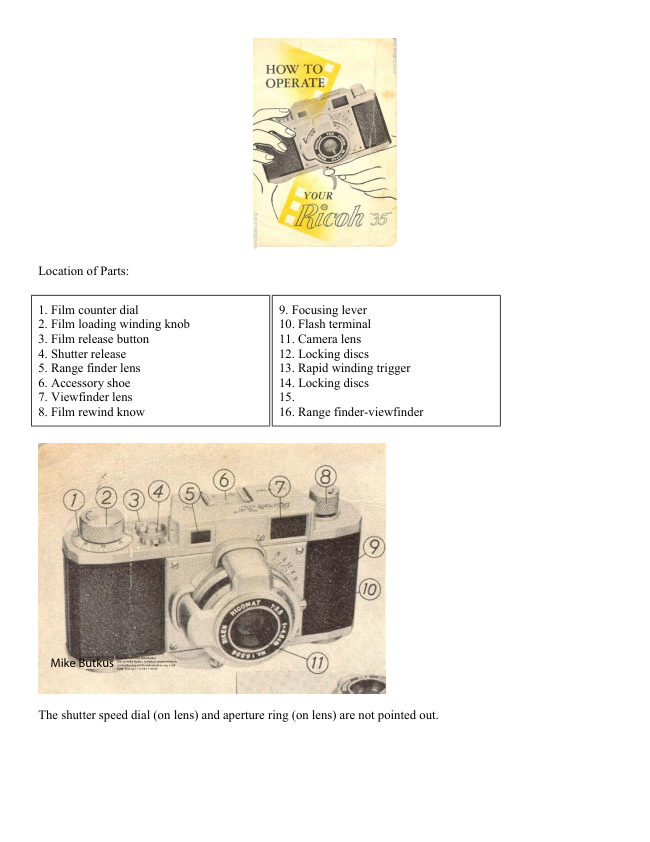
Location of Parts:


1. Film counter dial                             9. Focusing lever
2. Film loading winding knob                 10. Flash terminal
3. Film release button                        11. Camera lens
4. Shutter release                             12. Locking discs
5. Range finder lens                          13. Rapid winding trigger
6. Accessory shoe                            14. Locking discs
7. Viewfinder lens                            15.
8. Film rewind know                         16. Range finder-viewfinder


                                                                     Digitally signed by Mike Butkus
                                                    DN: cn=Mike Butkus, o=Butkus camera manuals,
                                                          ou=butkus.org, email=mike@butkus.org, c=US  Mike Butkus  Date: 2023.05.17 13:59:17 -04'00'


The shutter speed dial (on lens) and aperture ring (on lens) are not pointed out.
View original page 2Page 3 · Read text
LOADING YOUR FILM
1. Turn locking discs (12 & 14) on bottom of camera so that "O" position lines up with triangle. This unlocks
camera back, which you gently slide down to expose rear of camera face.


2. Insert standard 35mm cartridge in left chamber, letting out 4 inches of film leader, which is inserted into slit
in right take-up spool. (Fig. B) Be sure film's dull emulsion side faces the lens.


3. Turn film winding knob (2 ) so that film perforations engage sprocket gears.

4. Replace camera back by placing over front (Fig. A). Lock camera back by turning locking discs to original
position "C".


5. Turn film winding knob (2) completely around twice, release automatic stop after first turn by depressing
shutter release button (4). Line up "O" of film counter dial (1) with triangle mark. Rotate film winding knob one
more complete turn. You're now ready to shoot!
View original page 3
Page 4 · Read text
After you have completed the roll, pull out film-rewinding knob (8), push film release button (3), and rewind
the entire film into the original cartridge.

NOTE: Do not press shutter release button after you finish last exposure. Merely rewind and remove film
cartridge from camera.

HOW TO TAKE PICTURES


Through the eyepiece of the range finder-viewfinder (16), you compose and focus your picture. In a contrasting
colored section at the center of the image, a double image appears. When you turn the focusing lever (9), and
the images coincide, your picture is in focus.
View original page 4
Page 5 · Read text
Set your lens opening and shutter speed, according to the film manufacturer's recommendations. When ready to
shoot, depress release button (4).

TO USE FLASH GUN
Slip flash gun into accessory shoe (6) and attach cable to terminal (10) Shutter synchronizes to SF or SM
flashbulbs at speeds to 1/50th second; or "O" delay electronic flash at all speeds.

RAPID SEQUENCE SHOOTING
When you pull rapid winding trigger (13) with left finger until it stops, film is wound and the shutter is wound,
simultaneously. Compose picture in view-rangefinder and gently depress shutter release button (4). You can
now shoot pictures as rapidly as you pull the lever and click the shutter!

YOUR DEPTH OF FOCUS SCALE
For normal snapshots, it is advisable to use the red line at the distance scale, and the red dot at the stop
diaphragm. That gives you the so-called Fixed Focus (any objects between °° (infinity) and 10 feet are critically
sharp). Also use the Depth of Focus Scale (Fig. 4), to determine the held of sharpness. For example, when
distance is set at 10 feet, you will note that at f :16, all objects between 5 feet and infinity are sharp. At the same
time, if diaphragm is set at f:8, objects between 7 feet and about 25 feet are share.


         HOW TO HOLD YOUR CAMERA
                   Pull both elbows against your body to hold the camera steady (as
                      illustrated).
                 For vertical camera position, release the shutter with your forefingers.
View original page 5Page 6 · Read text
NOTE:
1: When using slow speeds, such as 1/10th sec., be certain to permit full shutter action before
winding for next exposure.

2: Always be certain to wind fully before making exposure.

RIKEN Optical Industries, Ltd. · New York · Tokyo
View original page 6
From the M. Butkus archive. Original publisher and archive notices are retained.
Check the model and edition against your equipment.
PDF verified 2026-10-10.