Film cameras
Ricoh 500ME format User manual
User manual for Ricoh 500ME format. 12 pages in English. Read the original PDF, download or print a copy without registration.
12 pagesEnglish1.4 MB PDF
Loading your manual…Open PDF directly
Document details
- Brand
- Ricoh
- Model / document
- Ricoh 500ME format
- Document type
- User manual
- Language
- English
- Pages
- 12
- File size
- 1.4 MB
- Category
- Film cameras
- Document date
- Not specified in catalog
Search available document text
Find a term, then jump to its page in the original PDF. Image-only pages may not be searchable; check the PDF for exact wording and diagrams.
Page 2 · Read text
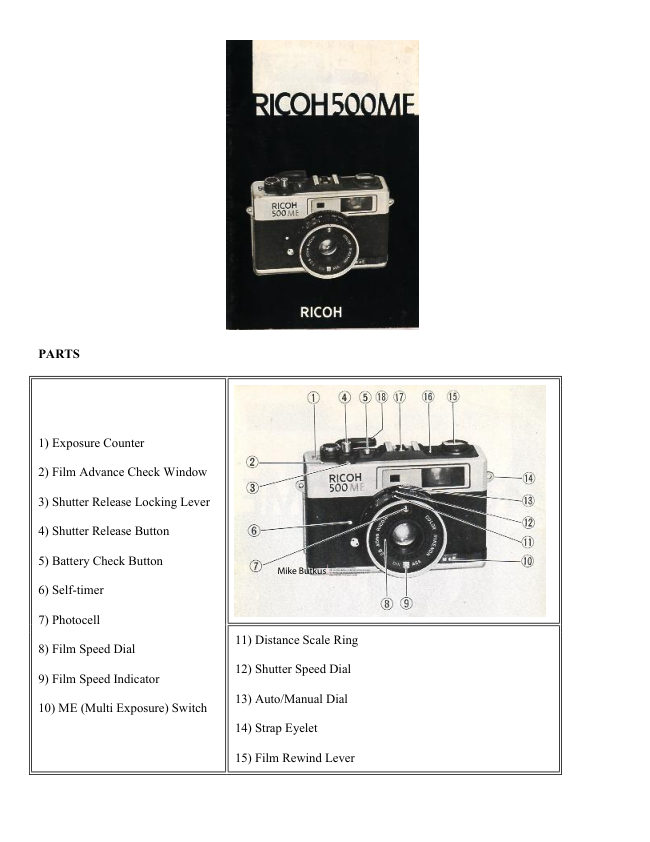
PARTS


1) Exposure Counter

2) Film Advance Check Window

3) Shutter Release Locking Lever

4) Shutter Release Button

5) Battery Check Button
                                                                                                                                                                                                                                                                                     DN:ou=butkus.org,Date:cn=Mike2023.05.17signedButkus,email=mike@butkus.org,by14:28:29Mikeo=ButkusButkus-04'00'camera manuals,c=US                                                 Mike Butkus    Digitally
6) Self-timer

7) Photocell
                                   11) Distance Scale Ring
8) Film Speed Dial
                                   12) Shutter Speed Dial
9) Film Speed Indicator
                                   13) Auto/Manual Dial
10) ME (Multi Exposure) Switch
                                   14) Strap Eyelet

                                   15) Film Rewind Lever
View original page 2Page 3 · Read text
www.butkus.us


16) Film Loaded Indicator

17) Hot-shoe

18) Film Advance Lever

19) Viewfinder

20) Film Rewind Shah

21) Film Chamber

22) Positioning Hole

23) Battery Compartment Lid     26) Film-Rewind Release Button

24) Tripod Socket                27) Film Take-up Spool

25) Sprocket                     28) Winder Coupler

                                29) Back Cover


INSERTING THE BATTERY
· Inserting the battery incorrectly will result in incorrect exposure.

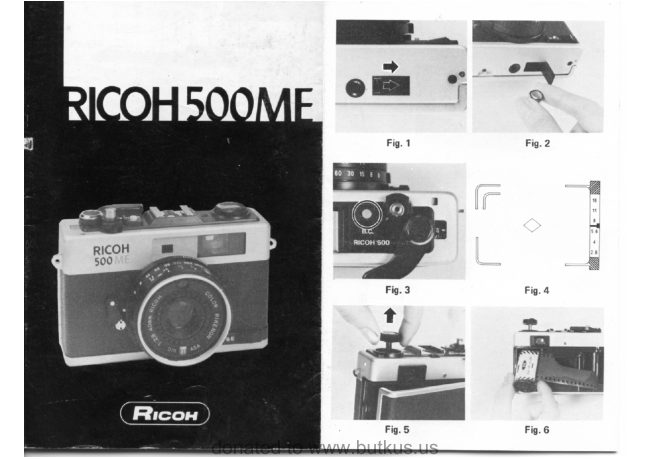
1 ) Push open the Battery Compartment Lid (23) in the direction of the arrow (Fig. 1).

2) Insert the battery as shown in the polarity diagram in the Battery Compartment Lid. (Fig. 2)

* Use one of the following kinds of mercury battery: JIS H-C Mallory PX 675 Eveready EPX 675 or equivalent

See this link on a Wein Air replacement battery.
View original page 3Page 4 · Read text
INSERTING THE FILM
· Avoid direct sunlight when
loading the film.
1 ) Pull the Film Rewind
Knob ( 15) fully until the
Back Cover opens (Fig. 5).

2) Insert the film into the Film
Chamber (21) and push the
Film Rewind Knob back into
position (Fig. 6).

3) Insert the film leader into
the Film Take-up Spool (27)
(Fig. 7).

4) Take up the slack in the
film by winding the Film
Advance Lever ( 18). and
check that the film
perforations are fully engaged
on the upper and lower
sprocket teeth (Fig. 8)

5) Close the Back Cover (29}
firmly and it will lock
automatically. Turn the Film
Rewind Lever (15) in the
direction of the arrow to take
up the rest of the slack in the
film (Fig. 9).


6) Press the Shutter Release
Button (4) until the number '1'
appears in the Exposure
Counter

7). As long as the Film
Rewind Knob turns
counterclockwise as you wind
the film. the film is advancing
correctly (Fig. 10).
View original page 4
Page 8 · Read text
1 ) As you look through the viewfinder. the f-stop is indicated on the right. As long as the Exposure Meter
Needle (H) is between f/2.8 - f/16. a correctly-exposed picture can be taken (Fig. 17)

* When you use the 'B' setting the exposure meter is not activated and the Exposure Meter Needle (H) does not
register


FOCUSING
1) The image inside the yellow diamond in the center of the frame looks off-set like a double image (Fig. 18).

2) When you turn the Distance Scale Ring (11). the faint image will move. When the double image resolves
itself into a single image, the subject is in sharp focus. (Fig. 19).


                                                 Composing The Picture
                                                   Keep the subject within the Bright
                                                    Frame outline (B) in the
                                                                viewfinder.

                                                          For close up shots of up to 1m
                                                                             (3.3ft). keep the subject within the
                                                                  parallax Correction Marks (A).
View original page 8Page 11 · Read text
www.butkus.us


                                      Guide Number (GN)
F-stop =
                                        f-stop camera-to-subject distance (m)

* Please use a Hot-shoe type flash unit.
* There is a ready-reference f-stop table on the flash unit. Please use it to obtain the correct f-stop easily.
* If you use an automatic flash. you don't have to adjust f-stop each time regardless the distance.

USING THE SELF-TIMER

The Self-timer can be used for commemorative occasions etc.. when you want to include yourself in the picture.

1) Turn the Self-timer Lever fully in the direction of the arrow (Fig. 28).

2) From the time the Shutter Release Button is pressed, the Self-timer Lever starts moving. There is a time-lapse
of approximately 10 seconds before the shutter is released.

* Once the Self-timer has been set. it cannot be cancelled.


                          MULTI-EXPOSURE
                                More than one exposure can be put on a single frame.

                           USING THE MULTI-EXPOSURE SYSTEM
                                         1) Take a single shot.

                                         2) Slide the ME (Multi Exposure) Switch (10) in the
                                           direction of the arrow without advancing the film. (Fig.
                                           29).

                                         3) Select and compose the subject for the second shot and
                                           release the shutter.

                                  * When shooting a multi exposure. be sure not to touch
                                          the Film Advance Lever. as this may cause the frame to
                                                slip out of position.


Tips For Better Results
Better shots can generally be taken by selecting subjects with a large area of dark background for the first shot.

SHOOTING WITH SP WINDER
By simply attaching a SP winder (sold separately) to the camera, you can enjoy the facility-of continuous
shooting. (Fig. 30)

PROPER CARE OF YOUR CAMERA
* When using a tripod with a long thread length (more than 5.7 mm), be careful not to forcibly screw in the
thread further than the depth of the socket.

* Always keep the lens clean. To clean the lens, gently wipe it with a lens cleaning paper or a soft clean and
lintless cloth.
View original page 11Page 12 · Read text
* Do not wipe the camera body with chemicals. such as benzine. thinner. etc use only soft cloth or cotton swab
sprinkled lightly with alcohol on the camera body.

* Never expose your camera to excessively high or low temperature for an extended period of time. In
extremely hot climates, do not leave your camera inside closed automobiles during the daytime or indirect
sunlight.

* Protect your camera from dust, dirt. water. rain, dampness, salt air and rough handing.

* When your camera is not used for an extended period of time. remove the batteries and store it in a dry and
cool place.

* Do not attempt to disassemble or repair your camera yourself. If service is necessary, get in touch with your
dealer or authorized Ricoh service station.

MAJOR SPECIFICATIONS OF RICOH 500ME

Lens: 40 mm Color Rikenon f2.8 lens 3 groups. 4 elements

Shutter: Mechanical shutter Speeds B 1/8. 1/15, 1/30. 1/60. 1/125. 1/250 and 1/500

Exposure Meter: CdS exposure meter, fully automatic control and manual override, ASA 25-800 (DIN15-30).
EV6-17 (ASA100/DIN21), One 1.3V mercury battery (JIS H-C. Mallory PX675, Eveready EPX 675 or
equivalent).  See this link on a Wein Air replacement battery.

Viewfinder: Bright frame viewfinder with parallax correction mark. superimposition rangefinder patch. f-stop
scale, exposure meter needle. over and underexposure zones, Battery check mark. "M" for manual operation
also visible in viewfinder Magnification 0.49X, Coverage of actual picture area 85%.

Film Loading: Multi-slip easy loading

Film Advance: Single stroke film advance lever Automatic winding possible by mounting Ricoh SP winder

Film Rewind: Easy-to-operate crank lever

Film Counter: Additive, automatic resetting

Flash Synchronization: Hot shoe (Cordless direct-contact accessory shoe)

Self-timer: Built-in

Filter Size: 46 mm screw-in type

Other Feature: Multi-exposure device, Shutter release lock, Battery checker, Film advance signal window,
Film ''loaded'' (or empty) signal window

Dimensions: 111 (width) x 71 (height) x 55 mm (depth) (4.4x 2.9x 2.2 in.)

Weight: 380g. (13.40 oz.)
View original page 12
Related documents and language editions
From the M. Butkus archive. Original publisher and archive notices are retained.
Check the model and edition against your equipment.
PDF verified 2026-10-10.