Film cameras
Ricoh Hi-Color User manual
User manual for Ricoh Hi-Color. 11 pages in English. Read the original PDF, download or print a copy without registration.
11 pagesEnglish1.1 MB PDF
Loading your manual…Open PDF directly
Document details
- Brand
- Ricoh
- Model / document
- Ricoh Hi-Color
- Document type
- User manual
- Language
- English
- Pages
- 11
- File size
- 1.1 MB
- Category
- Film cameras
- Document date
- Not specified in catalog
Search available document text
Find a term, then jump to its page in the original PDF. Image-only pages may not be searchable; check the PDF for exact wording and diagrams.
Page 1 · Read text
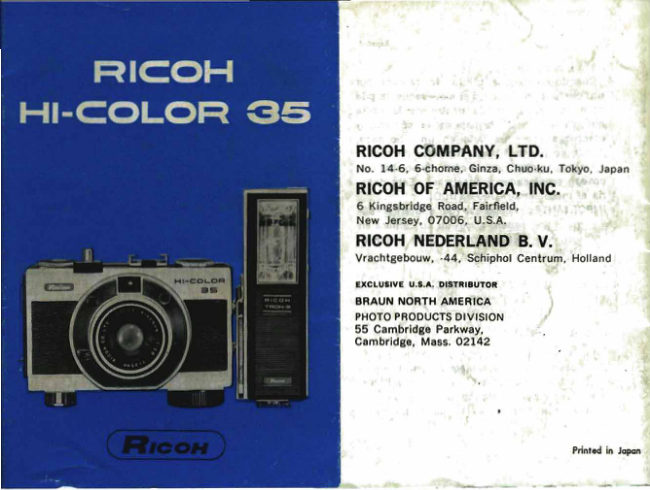
RICOH COMPANY, LTD.
No. 14-6, 6·chorne. Gioza, ChuQ·ku, Tokyo. Japan
RICOH OF AMERICA, INC.
G Kingsbridge Road, Fairfield.
New Jersey, 07006, U.S.A.
RICOH NEDERLAND B. V.
Vrachtgebouw, ·44. Schiphol Centrum, Holland

EXCLUSIYE U.S.A. Dlsn".UTOIt
BRAUN NORTH AMERICA
PHOTO PRODUCTS DIVISION
55 Cambridge Parkway,
Cambridge, Mass. 02142
                                                                               •


                                      •

                               •


                                                     Printed in Jopon
View original page 1Page 6 · Read text
English
 Enelbh
                                                                                  cell (D),  or  set  the  SHUTIER  SPEED  RING
(S)  SPRING MOTOR WINDING KNOB                                 (F) to the FLASH (~) position.
(T)  FILM REWIND BUTION                                        Store the camera away from above normal tern·
(U)  CARTRIDGE POSITIONING SPRING                         peratures or  in a cool place.  When replacing the
(V)  FILM PRESSURE PLATE                                        battery, use Mallory RM-675R. Eveready E675 or
(W)  FILM TAKE·UP CLIP                                          equivalent.
( X)  TAKE·UP SPOOL
                                              LOADING THE CAMERA(Y)  VIEWFINDER EYEPIECE
( Z)  SPROCKET                                                              1.  Open the camera back by pushing BACK CO-
(AA)  FILM REWIND SHAFT                                 VER LATCH (B) to OPEN position. (Fig.  2).
                                                                            2.  Pull out FILM REWIND KNOB (P). (Fig.  3).
LOADING THE MERCURY BATIERY                             3.   Insert  the fHm  cartridge  into  the chamber
  Mercury  battery  is the power source  of  the                  and push FILM REWIND KNOB back so  that
electric eye  automatic  exposure mechanism  of                    the slot of REWIND SHAFT (AA) engages, the
                                                                                   flIm cartridge. (Fig. 4).the camera.
  Unscr~w  the  mercury  battery  compartment                   4.  Turn TAKE·UP SPOOL (X) so that FILM TAKE·
cover and put the mercury battery with "+" side               UP CLIP (W) is in the position  illustrated  in
up  in  the compartment.  (Fig.  1).  Then, screw                         (Fig.  5).
the cover flrmly closed.                                                   5.  Insert the fUm leader into the clip as shown
  The  life of the mercury battery is approximately                          in (Fig. 6) and engage the small raised single
one year under average use conditions.                              sprocket into a hole in the film.
  The battery's  life is not affected by the num-                   6.  Turn SPRING MOTOR WINDING KNOB (S)  in
ber of pictures taken during this period. but  ra-                     the direction of its arrow so that the perfora-
ther by the time which the camera  itself is ex-                      tions of the film leader are engaged  by the
posed to light and the temperature  at which   it                        film advance. sprocket teeth.
 is  stored.  When not in use replace the camera                 Be certain that the sprocket holes in the film
 into th~ carrying case or simply cover the CdS
                                                                                        4
                        3
View original page 6Page 7 · Read text
are properly seated onto the  sprocket  teeth          CORRECT EXPOSURE
    as shown in the circled area of Fig. 7.                     Turn SHUTTER SPEED RING (F)  until the  de·
7  Close  the camera back,  The lock will auto·                sired shutter speed number appears in SHUTTER
    matically latch.                                    SPEED WINDOW (G) (Fig. 9).  Make  certain  tho
B.  Wind SPRING MOTOR WINDING KNOB  (S)              Ring is set at a click stop.
     until the spring is fully wound and repeatedly              The shutter speed setting governs the amount
    depress SHUTTER RELEASE BUTTON (e) un·                of timo the film  is oxposed to light.  "50" (1/60
       til member 1 appears in FILM COUNTER (R).                 of a second) is recommended for sUbject not  in
9.  When the spring is fully wound, you can take              motion.  Where motion exists, the faster shutter
    10 to 15 shots before you have to wind  the               speeds, 1/125 or 1/300 should be usod.
    motor again.                                             Turn AUTO/MANUAL RING (l) until "AUTO" is
                                                               opposite the markor. (Fig. 10).  When tho Auto!
SELECTING THE PROPER FILM SPEED                                                       Manual Ring  is  set  at AUTO position, the CdS
  Every roll of film has enclosed an  information              exposure meter automatically sets the  f·stop  to
sheet.                                                              control the amount of light striking the fllm and
  The ASA rating of the film  is  indiceted on   it               the proper exposure is always set. automatically.
 or on the film box.  Turn FilM SPEED DIAL (K)             When  there  is enough  light,  there  will be a
 so that the ASA number of the  film  is opposite               white dot over the upper center of the viewflnder
 the .... to mark (Fig. e).                                                  (Fig.  11).
  The dots between the numbers on  the FILM             When there is  not enough  light  for  taking a
SPEED DIAL (K) indicate the following ASA num·                picture the dot becomes red (Fig. 12). When the
 bers                                                          dot is red, either flash or other artiflcial  lighting
         (32X40)  (64XSO)   (125XI60)   (250X320)    (500)                     is needed. (See page 10 for flash phatogrephy). ASA       2S  •    • 50       • 100        200        '00
       15  •     . 18   •     21         2'         27
 DIN    (10YI7)  (19X20)   (22)(23)   (25X26)       ( 28)

                      5                                                       6
View original page 7Page 8 · Read text
English
MANUAL EXPOSURES                                            flnder. While looking through the viewflnder rotate
  For special effects or other situations when you          DISTANCE SCALE RING  (M)  until  the  proper
went to .et the lens manually, turn AUTO/MANU·             distance  setting  appears  in the small window
AL RING (L) until the f·stop you want is aligned               just below the viewtlnder (Fig. 13).
with the indicator marker
                                              RAPID SEQUENCE PHOTOGRAPHY
SETIING THE DISTANCE                                                   If you set DISTANCE SCALE RING (M)  at  th.
  Your HI·COLOR 35 has a medium  wide·angle            green "@" mark, your subjects from 2·10m (7ft.
lens which  enables you to use "zone focusing"            -30ft.) will be in sharp focus.  Also  set AUTOI
for picture·taking convenience and  still keep your         MANUAL RING  (L)  to  green "AUTO"  and  the
subject areas in ultra·sharp focus.                  SHUnER SPEED RING at green 1/125 sec.  You
  The 3 marks on  the DISTANCE SCALE RING           can make  rapid  sequence  pictures  by  merely
(M) correspond  to the average distances for the            pressing  the SHUnER RELEASE 8UnON  (Cl
subjects shown below (these are indicated on the            without  adjusting exposures and  distance  (Fig.
 back of your camera for your ease of reference)'            14) between  pictures.  Therefore,  for fully auto.
                                                               matic, rapid sequence,  photography,  simply  set ~ Approx. 3 feet...close·up·-head and shoulders.                                                                                         all controls to the green positions!
@ Approx. 8 f.et...full·length portrait/group
                      shots.                         HOLDING THE CAMERA
 00 Inflnity         Iandscape & distant scenery.
                                                      Be sure that flngers and the camera  strap are
  Turn DISTANCE SCALE RING (M) and  set the            not  in  front  of the lens or the CdS  cell when
 proper distance at marker.  You may set the dis·           you take a picture.
 tance by means of either one of the  three  zone             Hold the camera steady, and gently  press  the
 focus symbols or by estimating actual  distance.        SHUnER RELEASE 8UnON (C) all the way down.
 The  distance can  also be set through the view·                      If  the  spring  is not wound,  Shutter  Release
                                                           Button  cannot  be  depressed-wind  the  spring
                      7                                                      8
View original page 8Page 9 · Read text
F.nglish

motor winding knob (S) fully.                       FLASH PHOTOGRAPHY
   If the Shutter Release Button will not go down,                                                   Mount the  flash  gun on  the  accessory shoe
check the following:                                    and connect the cord  to  the FLASH TERMINAL
1.   Is the spring motor still wound?   If  it is, then             (N).  (If your flash has a direct contact shoe (Hot
    you have taken the last picture on the roll of                                                         Shoe) you do not need  to  connect  the cord  to
     film. proceed to page 12  for  unloading  in-                                                            the  flash  terminal.)  The  direct  contact  type
    structions.                                                RICOH POCKET FLASH UNIT or RICOHTRON·3
2.   If the  spring motor  is  not wound, wind   it         ELECTRONIC FLASH  UNIT  is recommended for
    again  as you  did when loading the camera.                                                                     this camera.
   Remember,  one  full winding  is enough for                                                          Turn SHUTIER SPEED RING (F) 10 (1)  mark.
    only 10 to 15 shots and most fllm  roll cart·                                                 Move lhe AUTO/MAN UAl RING (l) off AUTO posi·
    ridges are for 20  or 36  exposures.  Check                                                                     tion and set the f-stop.  The  proper  f·stop  can
    the film counter number.                              be calculated  in the following manner.
                                                             Find  the  guide number which  is always givenUSING A FILTER                                                                    for  all fllms on  the  flash  bulb packages  or on
  The RICOH HI·COlOR 35 has three  accessory            electronic flash units.
flIters-UV,  Y2 and NO 4.  When using the UV,
 it is not necessary to make an adjustment in the                                Guide number                                                                                   f·slopexposure, but when using a Y2 filter,  it is advis-                               Distance to subject
able  to  lower the FilM SPEED DIAL  (K) by 3
clicks (example, if set at 100. change by 3 clicks          Example: ~ =11.4  Henceclosestf·stopisfl1.
to 50) (Fig. 15).   If you ere using en ND4 filter,
lower your FilM SPEED DIAL (K) by 6 clicks (ex·            Another way  of  stating  this  is; assume the
ample,  if set et 100, chenge by 6 clicks to 25).             flash bulb package states that for  the  film you
                                                             are  using the guide number is 40, and that the

                                                                        10                      9
View original page 9Page 10 · Read text
distance from the  flash  bulb  to the  subject  is         AFTER YOU LAST EXPOSURE
3'6',  (3.5  feet),  divide the  distance  (3.5  feet)             You  will know when you have taken  your  last
into  the  guide number  (40)  for  an answer  of                                                          exposure in two ways:
fl1.4.  Because there  is no f11.4, use the closest                1.  The film counter should read "20" if you use
i-stop setting which  is marked on the  auto ma-                a 20·exposure cartridge or "36"  if that was
nual ring (L) 11 (f.ll).                                               .                 the type of cartridge you  put  into  your  ca-
                                                              mera.RICOH FILTERS                                                                        2.  The SHUnER RELEASE BUnON (C) can no
  Filters  are  very  useful  in  certain  situations.                 longer be depressed.
The  fllt8r  is screwed onto the front of the lens
and changes the  color  or the amount  of  light         UNLOADING PROCEDURE
which reaches the film:                                                  1.  Set red mark on SPRING MOTOR WINDING
   UY filter:  used when  photographing land-            KNOB  (5)  at  ..... mark (Fig. 16) and then
    scape  scenes, to reduce the haze and make               push FILM REWIND BUnON  (Fig. 17).   Lift
    distant objects more clear.                               up the crank of FILM REWIND KNOB (P) and
   Y2 filter:   is used in black and white photo-                  turn  it in a clockwise direction until the  en·
    graphy only, to make the sky darker and  to                      tire  roll  has  been rewound-tension on the
    emphasize, somewhat. clouds, also to increase                 crank  will decrease noticeably (Fig. 18).
     contrast.                                                             2.  Open the camera back as you  did  for  load·
   ND4 filter:  when  using  a  very  sensitive                   ing the camera.
     film  In  exceptionally  bright sunlight the ca·                 3.   Pull up the flIm rewind knob and remove the
    mera may not be able to adjust  for the pro·               fUm cartridge from  its chamber.
     per exposure.  An ND4 (Neutral Density)  flIter
                                            TAKING CARE OF YOUR CAMERA    simply  reduces the amount  of  light which
    reaches  the  fllm  by 75%.   Useful in snow                         If you wish to keep your camera  in top  condi.
    and beach photography.                                       tion  so  that you can use  it  at any time, you

                      II                                                      12
View original page 10Page 11 · Read text
must take reasonable care of  it when   it  is  not             camera,  and keep  it in a dry place where  it
being used.  These hints will help you get better                   will not be exposed to direct sunlight.
results from your camera:                                00 not place your camera  near anything
1.  When  not  in  use keep  your camera  in  its              that has a magnetic field,  like  hi·fi speakers.
    case.  The automatic exposure system con·                     It will harm the AUTO mechanism.
    tinues to function whenever light  strikes the             Dampness will damage your camera.
   CdS cell (0).  While the power taken from the           IMPORTANT:  Be sure to keep  a  record  of
    battery is exceedingly slight,  this  precaution                             the  serial  number  of   your
      will extend the  life  of  the  battery and also                          camera.
    help to keep the camera free of harmful dust
    and  grit.
2.  Keep the lens clean.
   Wipe the lens softly  with  a  lens  brush.    If
    there are fingerprints on the lens, use a soft
    gauze cloth or chamois soaked  with  alcohol
    to wipe them off.
3.    If you  have used your camera at the beach
    or on a rainy day, wipe the entire body, par·
     ticularly the metal  parts,  with  a  soft  cloth
    before you put  it away.
4.  Always keep the lens cap on the camera when
       it is not in use.
5.  When you do not intend to use your camera
     for some period of time, remove the mercury
    battery and put the camera into  its box along
    with the silica gel bag which came with  the

                    13                                                    14
View original page 11From the M. Butkus archive. Original publisher and archive notices are retained.
Check the model and edition against your equipment.
PDF verified 2026-10-10.