Film cameras
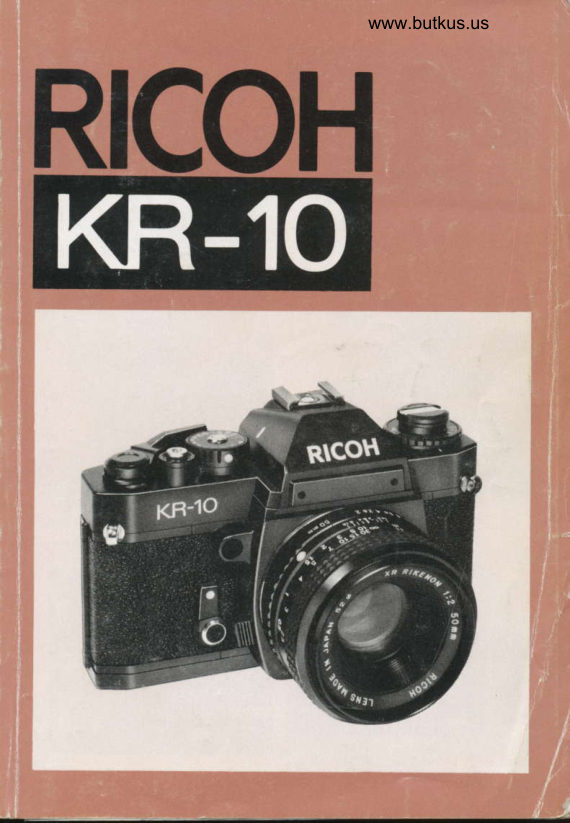
Ricoh KR-10 Ricoh KR-10 Direct User manual
User manual for Ricoh KR-10 Ricoh KR-10 Direct. 57 pages in French. Read the original PDF, download or print a copy without registration.
57 pagesFrench5.3 MB PDF
Loading your manual…Open PDF directly
Document details
- Brand
- Ricoh
- Model / document
- Ricoh KR-10 Ricoh KR-10 Direct
- Document type
- User manual
- Language
- French
- Pages
- 57
- File size
- 5.3 MB
- Category
- Film cameras
- Document date
- Not specified in catalog
Search available document text
Find a term, then jump to its page in the original PDF. Image-only pages may not be searchable; check the PDF for exact wording and diagrams.
Page 2 · Read text
DN:email=mike@butkus.org,Date:cn=Mike2024.03.04signedButkus,by18:03:05Mikeo=ButkusButkusc=US-05'00'camera manuals, ou=butkus.org,Mike Butkus DigitallyView original page 2
Page 4 · Read text
Merci de faire un don de 2,50 € pour soutenir ce site via E-bay ... www.PayPal.me/butkusView original page 4
Page 11 · Read text
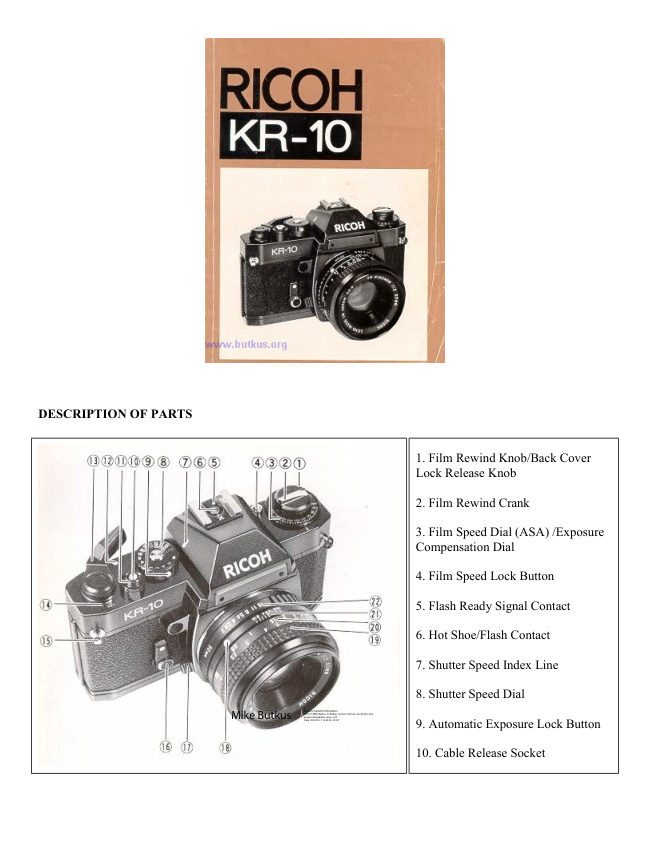
DESCRIPTION OF PARTS
  1. Film Rewind Knob/Back Cover Lock Release Knob
 2. Film Rewind Crank
 3. Film Speed Dial (ASA)/Exposure Compensation Dial
 4 Film Speed Lock Button
 5. Flash Ready Signal Contact
 6. Hot Shoe/Flash Contact
  7. Shutter Speed Index Line
 8. Shutter Speed Dial
 9. Automatic Exposure Lock Button
10 Cable Release Socxet
1 1 . Shutter Release Button
12. Shutter "ON-OFF" lndex Mark
13. Film Advance Lever
14. Exposure Counter                                                                                                                 rti
15. Neck Strap Eyelet
16. Self-timer Lever
 1 7. Lens Release Lever                                                                                                                                      , '18id
 1 8. Lens Locator Node
19 Focusing Ring
20. Distance Scale
21. Deoth of Field Scale
22. F-Stop Ring
23. Sprocket Teeth
24. Viewfinder Eyepiece
25. Flash LED
26 Frlm Rail
27. Film Rewind Shaft
28. Film Chamber
29. Battery Compartment Cover
30. Trrpod Socket
31. Winder Contacts
32. Shutter Release Connection

                                        l-
View original page 11Page 12 · Read text
www.butkus.us

      33 Film Rewind Release Button
         34. Winder Coupler
        35. Positioning Hole
         36. Film Take-up spool
      37 Back Cover
         38. Film Pressure Plate
         39. Microprism-image Band
         40. Split-rmage Spot
         41. Exposure Meter Needle
         42. Shutter Speed Indicator
         43. Viewfinder Eyepiece CoP


      We are most gratif ied that you have selected the KR- 1 O which we are
          sure will give you many delightfull years of picture-taking pleasure.
        The KR-10 is a 35 mm fully automatic electronically controlled ex-
         posure system (aperture-priority) SLR camera which assures you of
         superb optics and outstanding mechanical performance and reliability
        and which will justify your choice for years to come.

         Before Using Your KR-1O
          Please read this instruction booklet carefully and familiarize yourself
         with the equipment and its features thoroughly. Your pleasure in us-
          ing your KR-10 will be greater if you know your camera properly.


                           -2-
u
View original page 12Page 13 · Read text
BATTERY LOADING
The built-in through-the-lens CdS exposure metering system of your
KR-10 operates on power activated by two 1.5V LR-44 alkaline
 batteries, which are supplied together with your camera.
  1. Remove Battery Compartment Cover (29) by unscrewing it
    counterclockwise with a coin (Fig. 1).
 2. Place the two batteries into the compartment with the plus @
    side down, as illustrated in the battery holder of Battery Com-
    partment Cover (29) (Fig.2l. Make sure that the batteries are
     correctly placed.  lf incorrectly placed, Exposure Meter Needle
    (41) in the viewfinder will not move at all.
 3. Replace Battery Compartment Cover (29) by screwing  it
    clockwise until it stoos but do not force.

Tips for Better Results
 *  lf the shutter release button is pressed when there are no
     batteries or they are worn out, the mirror will stay up and the
     shutter cannot be released. To put the mirror back to its proper
     oosition. turn the shutter soeed dial to "X" or "B", and be sure to
     insert new batteries immediately lf you wish to take pictures
    without using batteries, use "X" (1/90 sec.) or "8".
 *  Before loading, wipe off the surfaces of the batteries with a clean
   and dry cloth to ensure they are free of fingerprints or stains.
 * When your camera is not used for a long period, remove the
    batteries and keep them in a cool. dry place.
 * The batteries will last for about half a year in normal use.
 * The batteries may explode if disposed of in frre


                     -3-
View original page 13Page 14 · Read text
www.butkus.us


    FILM LOADING
       your K R- 1 O is designed to accept any standard 35 mm color or black
      andwhitefilmrollincartridge.fi2'20.24or36exposures)'
         1. First of all, press Shutter Release Button (11) to see that the
           shutter has been released. (Refer to "METER/SHUTTER ON-
        OFF CONTROL'').
        2. pull up Film Rewind Knob (1)until Back cover (37) snaps open
           (Fig.3).Then,pu||itouta||thewaytoa|lowforinsertionofthe
             film cartridge.
        3. Swing open Back Cover (37)and place a film cartridge into Film
          Chamber (28) (Fig. a).
        4. push down Film Rewind Knob (1)to itsoriginal position byturn-
            ing Film Rewind crank (2) clockwise or counterclockwise so that
           Film Rewind Shaft (27) engages the film cartridge and that the
             film cartridge is seated in place (Fig 5)'
        5. Draw the film leader across the camera back and insert it into
          one of the slits of Film Take-up spool (36) (Fig. 6) To bring the
                slit into a convenient position, rotate Film Take-up Spool (36) in
           the direction of arrow with your finger'
        6. Rotate Film Take-up Spool (36) by advancing Film Advance
            Lever (13) to take up any slack in the film and checkto see that
          thefilmtipisfirm|yhookedontoFi|mTake.upSpoo|(36)(Fig.7}
          and that sprocket holes on the film are fully engaged on Sprocket
           Teeth (23) (Fig. 8)'
         7. Close and press Back Cover (37) firmly until it snaps shut'
         g. Advance Film Advance Lever (13) two or three times' after
           depressing Shutter Release Button (11) each time' until the
          number "l"  is opposite the index line in Exposure Counter (14)
           (Fig.9),becausethefirstportionsofthefi|mcannotbeusedfor
             picture taklng as they have already been exposed to light and
          two or three blank exposures should be made before taking your
                first picture. Now it is ready for your first picture'

                             -4-
a
View original page 14Page 15 · Read text
Tips for Better Results
 * Always load your camera in the shade or in a poorly-lit place'
    never in direct sunlight or other bright light.
 * As you advance the Film Advance Lever (13), the Film Rewind
    Knob (1 ) will simultaneously rotate counterclockwise indicating
    that the film is advancing properly.
  * When making blank exposures with Shutter Speed Dial (8)set at
    "AUTO", set F-Stop Ring (22) to the smallest f-stop (the largest
     lens opening) so that you can make next blank exposure quickly,
    otherwise a slower shutter speed will be result which could be an
    annoyance.

SETTING FILM SPEED
Each type of film, color or black and white. has its own sensitivity to
 light. This sensitivity is assigned by a numerical value described as an
ASA rating (U.s.A. Standard) or a DIN rating (Europe and most other
countries). ln most cases, both ASA and DIN ratings are imprinted
on the film package, as well as the data sheet packed with the film
and the film cartridge  itself. The higher the film speed raling, the
more sensitive the film is to light; that is, less light is required for a
proper exposure. The film speed. therefore, is an important element
 in insuring that the through-the-lens metering system of your camera
determines the correct shutter speed and f-stop combinations for a
 given lighting situation.
 1. Depress Film Speed Lock Button (a) (Fig. 1O) and rotate Film
    Speed Dial (3) until the ASA number of your film is exactly op-
     posite the index line and click stops. For example.  if the film is
   ASA 1OO, make the correct setting at "100" (Fig. 11).
 2. Take your finger off Film Speed Lock Button (4) to lock the film
     speed setting in the camera.


                         -5-
View original page 15Page 16 · Read text
www.butkus.us

        Tips for Better Results
         * Each time a film with a new film speed rating is loaded in your
            camera. the film speed must be set to assure accurately exposed
             photographs.
         * The scale represents the relation between ASA and DIN numbers
                is illustrated on the inside of Back Cover (37) (Fig. 12).

     METER/SH UTTER "ON-OFF" CONTROL
         Film Advance Lever (13) controls shutter release "LOCK-UNLOCK"
         to protect your camera from accidental shutter release when not tak-
          ing pictures and Shutter Release Button (1 1)controls exposure meter
       "ON-OFF" to avoid unnecessary depletion of the batterres.
       1. When Frlm Advance Lever (13) is moved to "ON" position (Fig.
                 '13), Shutter Release Button (1'l) is unlocked.
       2. When Shutter Release Button (1 1) is pressed half way down. the
               electric circuit is switched on and Exposure Meter Needle (41)in
            the viewfinder starts to move.

         Tips for Better Results
                                                                      Film Ad-       * Whenever picture-taking is completed, be sure to move
           vance Lever (13) to "OFF" positron (Fig. 14)
          To prevent unnecessary consumption of the  batteries, do not
            press Shutter Release Button (11) often.
          * The Film Advance Lever can be set at two angles in click stage
              positions. Choose the one suitable for your own shooting style.


                              -6-
{
View original page 16Page 17 · Read text
SETTING SHUTTER SPEED DIAL
The shutter controls the length of time the light is allowed to strike
the film. The speed at which the shutter opens and closes is measu-
red by the numbers on Shutter Speed Dial (8). In automatic exposure
operation, correct shutter speed is set automatically.


 I Simply turn Shutter Speed Dial (8) until the desired shutter speed
   is set opposite Shutter Speed Index Line (7).
O  ......... "AUTO" stands for AUTOMATIC. Setting the dial at
       "AUTO" makes the camera ready for automatic exposure
            control.
@     The numbers 1000, 500 etc to 2 stand for 1/1000 sec.,
         1/5OO sec, etc. to 1/2 sec.
@     The numbers 1,2,4, stand for 1 sec,,2 sec., and 4 sec.
(Q      This button locks the dial at "AUTO" setting. When you
        move the dial off "AUTO", Dress the button and rotate the
              dial.
@ ...... "X" stands for mechanical shutter for the speed of 1/90
         sec. This setting is used when the batteries have not suf-
           ficient power or taking picture without batteries. Flash
         photography is also possible at this setting,
@.......... "B" stands for Bulb. The "B" setting is used for long night
         exposure using street lights or electric signs as a light
          source, or under poor lighting conditions when flash can
          not be used. When set at "B", the shutter will remain open
       as long as Shutter Release Button (11) is depressed
          (preferably by a cable release).
                        -7-
View original page 17Page 18 · Read text
www.butkus.us


Tips for Better Results
 * Do not set Shutter Speed Dial (8) between marked speeds, but at
    a click stop in accordance with indicated speeds only'
 * Shutter Speed Dial (8) does not revolve between "AUTO" and
     "8".
  * When Shutter Speed Dial (8) is set at "B" or "X", set the desired
     f-stop and expose manually because metering with the built-in
    exposure meter is not possible.
                                                                      setting'  * When making extremely long time exposure at "8"
    remove the batteries to avoid unnecessary consumption of the
     batteries.

SETTING APERTURE
The lens opening determines the amount of light entering the lens
and exposing the film. The smaller the f-stop $/2'O' f/2 8 etc )' the
 wider the lens opening and the greater the amount of light entering
 rhe fens. The larger the f-stop lf/16,f/11  etc.), the smaller the lens
 opening and the smaller the amount of light entering the lens. As the
 lens opening is moved from l/16 to t/11, the amount of light entering
                                                                                                                                                                                               f /2.8, the fens is doubled. As the lens opening is moved from t/2.o to
 the amount of entering light is cut in half (Fig 15)'
  I Rotate F-Stop Ring (22) until the desired f-stop is opposite the
    aperture index line (Fig. l6). click stops are provided to prevent '    accidental movement from the setting made

 Tips for Better Results
  *   lf necessary. you may set F-Stop Ring (22) between two f-stops'


                       -8-
View original page 18Page 19 · Read text
CORRECT EXPOSURE
Automatic Exposure
Your KR-10 has a built-in through-the-lens full aperture CdS exposure
meter coupled to aperture-priority automatic exposure control system
which selects and sets correct shutter speed automatically for correct
exposure.

 Set the camera to "AUTO"
 1. Turn Shutter Speed Dial (8) until the "AUTO" is set opposite
    Shutter Speed Index Line (7) (Fig. 17). Shutter Speed Indicator
     (42l. in the viewfinder indicates "A", showing that the camera is
    set for automatic exposure control (Fig. 18).

 Preselect the aperture
 2. Preselect the desired aperture by rotating F-Stop Ring (22). For
    preselecting the aperture, refer to the following rough guide
   when using ASA lOO film.
        Outdoors in bright sunlight        l/8.O -  f/16
        Cloudy weather or in shade       l/2.8 -  f/5.6
                                                                t/4.O      lndoors                           f/1.4 -

 Exposure checking
 3. After moving Film Advance Lever (13) to "ON" position, press
    Shutter Release Button (11) lightly half way down until the Ex-
   posure Meter Needle (41) begins to move. The Exposure Meter
    Needle (41) in the viewfinder indicates the shutter speed you will
   be shooting at. ["1OO0" is 1/1OOO sec.. "125" is 1/125 *c.,
   "4" is 1/4sec., "1" is one full second and" 2 " is 2 seconds.l.  lf
    the needle goes above " 1OOO" (Fig. 1 9), close down the aperture
     until the needle moves below "1OOO".  lf the needle goes below
    "8.X." (Fig.2O), open up the aperture until the needle moves
   above "8.X.".

                        -9-
View original page 19Page 20 · Read text
www.butkus.us
I        Tips for Bett€r Results
           * At slow soeeds(below 1/30 sec.). use a tripod or other firm sup-
              port to prevent camera movement and blurred pictures. In
                shooting with a telephoto lens, be careful to minimize the camera
             shake especially. When using telephoto lenses. a good rule of
             thumb is "use a shutter speed faster than   'l /focal length of the
               lens". For example, with a 135 mm lens, use a shutter speed
                 faster than 1/125 sec. Otherwise. a tripod is suggested.
           * Coupling range of the exposure control for ASA 1OO film is from
             1/2 sec. at f/2 to 1/1OOO sec at t/11 (EV3 -   17).
           * The shutter speed is automatically determined at any speed
               within the range of approx. 8 sec. to 1/1O0O sec., according to
              the lighting conditions of your subject.

         Manual Exposure
                                                         photography orI'        Manual exposure setting is used when taking flash
         when you wish to preselect the shutter speed.
                  1 . Press Automatic Exposure Lock Button (9) and move Shutter
            Speed Dial (8) off "AUTO" (Fig. 21). Then, set the desired
                shutter speed opposite Shutter Speed lndex Line (7) by rotating
             ,   Shutter Speed Dial (8). Shutter Speed Indicator @2l,in the view-
                 finder indicates the shutter speed you just set.
           2. Move Film Advance Lever (13) to "ON" oosition.
           3. Hold your camera, look at your subject through the Viewfinder
               Eyepiece Q4l and press Shutter Release Button (11)lightly half
           way down.
            4. While keep pressing Shutter Release Button (1 1)half way down,
               rotate F-Stop Ring (22l. and align Exposure Meter Needle (41)
              with Shutter Speed Indicator (42) (Fig. 221. ll Exposure Meter
              Needle (41 ) goes above Shutter Speed lndicator (42), thls means
               "overexposure"; select a faster shutter speed or a smaller lens
              opening. On the contrary.  if the needle goes below Shutter
            Speed Indicator (42), this means "underexposure"; choose a
               slower shutter speed or a larger lens opening.
View original page 20Page 21 · Read text
EXPOSURE COMPENSATTON DIAL
 The dral is used when exposure compensation (intentional over_ or
 under-exposure) is necessary in AUToMATIc EXposuRE ooeratron.
  In unusual lighting conditions, the desired effect or the correct ex-
 posure will not be obtained in the final picture and exposure compen-
 sation is necessary.
  r  Lift up the outer ring of Exposure Compensation  Dial (3) and rotate
      it until the index line on the ring is opposite the corresponding
   number (+2, + 1,                    -1,  -2]l and click stops (Fig. 23).
 When the light is behind the subjects
   Set the dial at *1 or -lZ.
 Spot-lighted subjects and dark backgrounds
   Set the dial at -i  or -2.
 Tips for Better Results
  * When exposure compensation is unnecessary, be sure to set Ex_
    posure Compensation Dial (3) at ,,0,..
  * Do not set Exposure Compensation Dial (3) between marked
    numbers. but at a click stop in accordance with indicatecl
    numbers only.

VIEWING AND FOCUSING
Since you are viewing through the lens, there is no parallax
problem.....
what you are viewing in the viewfinder wiil exactry appear in your
picture. This enables you to determine the exact composition of your
subject before pressing Shutter Release Button (l l). Even when you
shoot close-ups, there is no danger of accidentaily cutting off a por-
tion of your subject. To assure the sharpest possible pictures, your
KR-10 has a three way focusing screen with dtagonal Split_image
Spot (40), Microprism-image Band (39) and Fresnet fietd, and you
can select three way focusing according to your subject.
                              -  l1-
View original page 21Page 22 · Read text
www.butkus.us

 1. Look into viewfinder Eyepiece l24l to compose your picture'
 2. Split-image Focusing.....is  helpful for the subject with either ver-
    tical or horizontal lines.
    Rotate Focusing Ring (19) until the split image in Split-image
   Spot (40) forms a single image. When  it is out of focus' your
    subject is split into two parts (Frg 24)
 3. Microprism Focusing.....is good for the subject which lacks clear
    vertical or horizontal lines.
    Rotate Focusing Ring (19) until the image in Microprism-image
   Band (39) appears sharP (Frg 24)'
 4. You can also focus with any part of the area surrounding
    Microprism-image Band (39). This is most useful when taking
    pictures with ultra telephoto lenses or in close-up photography
    with bellows unit, macro lenses or extension rings because the
    other focusing aids may darken appreciably.

UNLOADING FILM
After the last picture on the roll of film has been taken, rewind the
film and unload your camera.
  1. Press Film Rewind Release Button (33) (Fig' 25)'
 2. Lift up Film Rewind crank (2) and turn it clockwise until Film
    RewindRe|easeButton(33)stopsrevo|vingandyoufee|thefi|m
    tension released (Fig. 26). This indicates that the film has been
    completely rewound into the cartridge.
  3. Open Back Cover (37) by pulling up Film Rewind Knob (1)'
 4. Remove the film cartridge and have the film processed as soon
    as possible.

Tips for Better Results
  * Always unload your camera in the shade or in a poorly-lit place,
    never in direct sunlight or other bright light'
  * when you reach the end of the roll film, Film Advance Lever (13)
      will tighten and refuse to advance. lf this happens' do not-ad-
                     -12-
View original page 22Page 23 · Read text
vance Film Advance Lever (.|3) by force for ,,just one more shot,,,
     otherwise the film will be torn out of the cartridge.
  * Film Rewind Release Button (33) will remain in place once it is
     pressed, and return automatically to its original position when
     Film Advance Lever (13) is advanced.

TAKING FLASH PICTURES
You can use a flash at night or in a dimly lit room as well as for
 supplementary  lighting in outdoor photography. The camera and
 electronic flash will be fully synchronized with the shutter speed at
"8","X" and 4 sec. to 1/125 sec. Since proper flash exposure may
not be obtained by automatic exposure setting, always override
Shutter Speed Dial (8) from "AUTO" setting.
The RICOH XR Speedlite 24O is available exclusively for use with the
RtcoH KR-10.
How to Use the RTCOH XR Speedlite 24O
  1. Attach XR Speedtite 24O to the KR-lO.
  2. Turn on the power source switch on the flash unit.
 3. When the flash unit is fully charged, the FLASH LED (25)on the
    frame of the view-finder eye-piece will turn red indicating  it is
    ready for use.
 4. When the shutter speed on the camera is set to "AUTO", it is
    automatically synchronized at 1/90 sec. This avoids the trouble
    of having to set the correct speed yourself.
 5. With ASA  l OO film, the F-stop should be set at 5.6, and the flash
     unit will automatically control the amount of light to give the cor-
    rect exposure.
Tips For Bettar Results
 * Do not use other makes of flash units that have a special signal
    pin exclusively  for their cameras, as this will result in incorrect
    exposure or may even damage the circuitry.
 * The XR Speedlite 24O has a range of synchronization  of .,AUTO,..
    "8", "X", and from 4 sec. to 1/125 sec.
                  _ 13 _
View original page 23Page 24 · Read text
www.butkus.us

 In Cases where You Do not Use the XR Speedlite 2tO
 Use a flash unit with a built-in hot shoe contact only because the
 camera is not equipped with flash terminal for a flash unit with con-
 necting cord.
 Exposure for Flash Photography
 The exposure is determined by the guide number of the electronic
 flash unit. The guide number repersents a relationship between the
 light outprt of the flash and the speed of the film. Guide numbers for
 electronic flash units are found in the technical specifications. Using
 the guide number, you can determine the correct f-stop for a given
 flash situation using the following formula:
   F-stop :  Guide number + Flash-to-subject distance
 For example,  if your flash unit has a guide number of 16 (m) or 52.8
 (ft.) for the type of film you are using, and your subject is 2 meters
 (6 6 ft.) from the flash unit as indicated on Distance scale (20) after
focusing, divide 16 (52.8) by 2 (6.6). The answer is B; set F-Stop
 Rins 122; to 8 (f/8).

Tips for Better Results
  *  lf you are using an auto electronic flash unit with power ratio
     control, follow the instruction sheets packed with the flash unit.
  * Most electronic flash units have a built-in dial or exposure table
    which enables you to quickly compute f-stops based on flash-to-
     subject distances.

VIEWFINDER EYEPIECE CAP
when shooting with the self-timer or cable release where you will not
be viewing through Viewfinder Eyepiece l24l at the time the ex_
posure is made, viewfinder eyepiece cap should be used to prevent
stray light from entering through the eyepiece and affecting the
automatic exposure system. (Fig. 27l,.

                     -14-
View original page 24Page 25 · Read text
USING SELF-T!MER
 Your KR-10 has a built-in self-timer which delays the shutter release
 about maximum of 1O seconds. This enables you to include yourself
 in your own picture and is also of benefit in taking close-ups or
photomicrographs where camera movement must be avoided.
 1 First. advance Film Advance Lever ('l 3).
 2 Merely move Self-timer Lever (16) counterclockwise (Fig 28).
    According to the degree you have moved  it down, you can adjust
    the operating time. For the maximum delay, move it until it
    stops
 3. Press Shutter Release Button (l t;1e start the self-timer moving.

Tips for Better Results
 * To clear the self-timer setting. turn the lever back to its former
    position with your finger. (Fig. 29)
 * You can set Self-timer Lever (16) firstly and then advance Film
   Advance Lever (13).
 I The camera should be placed on a tripod or other firm support
   when using self-timer.
 * When using a tripod with a long thread length (more than 5 7
   mm), be careful not to forcibly screw in the thread further than
    the depth of the socket.
 * Shield the Viewfinder Eyepiece Qal by viewfinder eyepiece cap
   when using self-timer.


                         - 15 -
View original page 25Page 26 · Read text
www.butkus.us

CHANGING LENSES
To mount the lens on the camera
  1. Mount the lens by lining up the red dot on the lens mount wrth
    the matching dot on the camera mount (Fig 3O).
 2. Grasp the lens firmly around the lens barrel and turn itclockwise
     until it clicks into place. (Frg 3'l)
To remove the lens from the camera
  1. Grasp the lens firmly around the lens barrel in one hand.
 2. Wrth the other hand, hold camera body and press Lens Release
     Lever'(17) and turn the lens counterclockwise until it stops (Fig
    32) The lens now can be removed.
You can also change lenses without looking even in the dark by
means of Lens Locator Node (18)  Line up Lens Locator Node (18)
with Lens Release Lever (17]r and turn the lens clockwise for moun-
ting the lens. For removing the lens, press Lens Release Lever (17)
and turn the lens counterclockwise until Lens Locator Node (18) and
Lens Release Lever (17) 11n" ,O
Tips for Better Results
  * Whenever a lens is mounted on the camera. make sure that the
     lens is perfectly mounted, and clicks into position,
  * Do not touch any of the internal parts or permit dust or dirt to
     enter the camera body when removing or attaching lenses.
  *  Protect the inside of the camera by putting on the body cap
    whenever the camera is carried or kept with the lens removed.

DEPTH OF FIELD
When you focus on a specific subiect. an area in front of and behind
the subject will appear acceptably sharp in your picture This area of
acceptable sharpness is called "Depth of Field". The depth of field is
determined by the f-stop )'cu select and the distance from the in-
focus subject to the film pland. As you get closer to your subiect, or
                            - 16 -
View original page 26Page 27 · Read text
, 1


 as you open your lens (for example, froml/16 to f/2.g1  , the depth of
  field becomes shalrower. by stopping the rens down (for exampre,
  trom l/2 8 to  f /16],, the depth of fierd becomes deeper. The depth of
  field can be pre-determined in the followtng ways:
 Depth of Field Scale
 After you have set the lens opening and have focused the camera, the
 area of acceptable sharpness in front of and behind your subject can
 be also determined on Depth of Field Scale (21).
 Locale on Depth of Field Scale (2 1) the two numbers corresponding
 to the f-stop you have set on F-Stop Ring 122y. The drstance between
 these two f-stops on Distance scale (20) will be an area of acceptable
 sharpness in your picture. For example. if your lens is focused at 2
 meters (6.7 ft.) and you shoot at 16 (f/116), the area of acceptable
 sharpness will be from 1.5 m (5 fr.) to 3.2 m (10.7-ft.), by reaorng
 Distance Scale (20) opposite the both sides of the "l6" numbers on
 Depth of Freld Scate (21)(Frg.33)

INFRARED PHOTOGRAPHY
 For infrared photography using infrared films. a correction of Distance
 scale (20) is necessary because "infrared light rays" focus on a firm
 plane slightly behind that of "visjble light rays,,.
   l  Normally focus on your subject and note the camera-to-subject
    distance ppposite the distance index line on Distance scale (20)
  2. Turn Focusing Ring (19) untrr this camera-to-subject distance
    setttng rs opposite the infrared index line. For example,  if
    Distance Scale (20) reads 5 m ('16.5 ft.) after focusing, merely
     shift the "5" scale to the "O" (red) position (Fig 34)

Tips for Better Rasults
 *  Infrared radiation varies with the degree of infrared light rays in
    the atmosphere.

                      -17-
View original page 27Page 29 · Read text
PROPER CARE OF YOUR CAMERA
 * Always carry your camera with its carrying case and neck strap.
 * Use the rens cap to protect the rens when not taking pictures.
 * Protect your camera from dust, dirt, water, rain, dampness, salt
     arr and rough handling.
 * Never expose your camera to excessively high or low tempera_
     tures for an extended period of time. In extremery hot crimares,
   do not leave your camera inside crosed automobires during the
    daytime or in direct sunlight. ln extremely cold climates, expose
    your camera to the outer air only when in use..... When using,
    expose your camera gradually to the outer air to prevent the lens
   from clouding.
      lf exposed to an extremely cold climate, the exposure meter
    batteries may fair to operate properry. Keep your camera inside
    your clothing until taking a picture.
 * Never touch the surfaces of the rens, metal focal plane shutter
    curtain, reflex mirror, etc. with your fingers.
 * To clean the lens, gently wipe it in a circular motion with a lens
   cleaning paper or a soft, clean and lintless cloth.
 * Do not wipe the camera body with chemicars, such as benzine,
   thinner, etc., use only soft cloth or cotton swab sprinkled
   LIGHTLY with alcohol on the camera body. Do not use them on
   the lens because it can affect coating.
 * When your camera is not in use for an extended period of time.
   put the lens cap, remove the batteries, place your camera in its
   carryrng case together with silica gel or other desiccant and store
     it in a dry and cool place.
   Never store your camera in places where the temperatures are
   excessively high or low.
* Do not attempt to disassembre or repair your camera yourserf.  rf
   service is necessary, get in touch with your dealer or authorized
   Ricoh service station.
* Do not leave your camera near the magnetic objects like radio.
   television set etc.
                 _ 19 _
View original page 29Related documents and language editions
From the M. Butkus archive. Original publisher and archive notices are retained.
Check the model and edition against your equipment.
PDF verified 2026-10-10.