Film cameras
Ricoh KR-5 Super II User manual
User manual for Ricoh KR-5 Super II. 15 pages in English. Read the original PDF, download or print a copy without registration.
15 pagesEnglish1.3 MB PDF
Loading your manual…Open PDF directly
Document details
- Brand
- Ricoh
- Model / document
- Ricoh KR-5 Super II
- Document type
- User manual
- Language
- English
- Pages
- 15
- File size
- 1.3 MB
- Category
- Film cameras
- Document date
- Not specified in catalog
Search available document text
Find a term, then jump to its page in the original PDF. Image-only pages may not be searchable; check the PDF for exact wording and diagrams.
Page 2 · Read text
BACK TO MAIN CAMERA MANUAL PAGE

            [Webmaster: The main difference with this camer and the KR-5 (1/500 shutter max)
                 and KR-5 Super is the TTL wide open metering and the 1/2000 shutter]

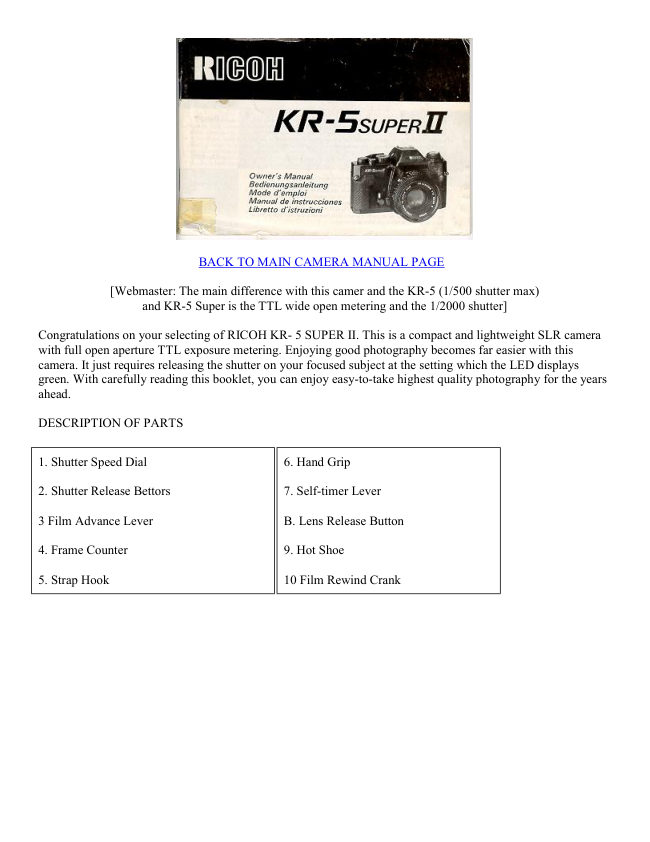
Congratulations on your selecting of RICOH KR- 5 SUPER II. This is a compact and lightweight SLR camera
with full open aperture TTL exposure metering. Enjoying good photography becomes far easier with this
camera. It just requires releasing the shutter on your focused subject at the setting which the LED displays
green. With carefully reading this booklet, you can enjoy easy-to-take highest quality photography for the years
ahead.

DESCRIPTION OF PARTS


1. Shutter Speed Dial                             6. Hand Grip

2. Shutter Release Bettors                        7. Self-timer Lever

3 Film Advance Lever                       B. Lens Release Button

4. Frame Counter                                 9. Hot Shoe

5. Strap Hook                           10 Film Rewind Crank
View original page 2Page 5 · Read text
www.butkus.us

Inserting Batteries


                                          1. Turn the battery compartment cover (21 ) counter
                                    clockwise using a coin or something similar.

                                          2. Two LR44 type alkaline batteries or two SR44 type silver
                                          batteries are used with this camera.

                                3 Place the batteries so that both positive (+) sides are at the
                                     top of the compartment

                                          4. Turn the battery compartment cover clockwise until it
                                       closes firmly.


Battery Check

        1. Move the film advance lever (3) to the ready position.

        2. Partly press the shutter release button (2) Now the exposure metering system is switched on. Next,
       look through the viewfinder When one of three LED lamps ( +, 0 or - ) lights, then battery condition is
        satisfactory. If no lamp lights, the batteries need replacing or have been (loaded incorrectly.

        3. Renew both batteries as necessary.

        4. When not using of the camera, always return the film advance lever to the original position to prevent
       accidentally releasing the shutter.
View original page 5Page 6 · Read text
Loading film


                                            1. To open the back cover (25), fold out the film rewind
                                     crank (10), then pull knob (11) out. When the back cover
                                      opens, the frame counter (4) automatically resets to "S''.

                                            2. Insert the film cassette into the film chamber so that the
                                        projecting end of the film cassette is downward. Do this in
                                     a place away from direct sunlight.

                                            3. Fold out and lift up the film rewind crank (10) Then
                                           rotate the crank carefully while pushing it down lightly
                                             until the film locks on the film rewind shaft (19)

                                            4. Return the film rewind crank to its original position

                                            5. Insert the film leader into the groove of the take-up spool
                                       (28) and place it so that the film perforations engage with
                                        the spool teeth.


                                            6. Check that the film perforations engage properly with
                                        the teeth of sprocket (24) and the film slides smoothly
                                     along the film guide bars (23) by operating lightly the film
                                   advance lever (3) to advance the film.

                                            7. Turn the film rewind crank gently in the direction of the
                                   arrow to properly tension the loaded film, Stop turning the
                                     crank when it becomes stiff, and return the crank to its
                                          original position.

                                            8. Close the back cover and push it until a click is heard.

                                            9. Advance the film a couple of frames, pressing the shutter
                                         release button each time until the frame counter indicates
                                                                   ''1'' between 0 and 2. (In this case, the film advance lever
                                     should be at the ready position, because the shutter release
                                                 is interlocked when the lever is in the stored position). The
                                       film rewind knob rotates each time the film is advanced
                                 meaning that the film is advancing properly.
View original page 6Page 7 · Read text
www.butkus.us

Film speed Setting


                                                1. Film speed is indicated on the outside of the film
                                      package or in the film instructions


                                                                         2. Set the film speed index (13)
                                                       by turning the film speed dial
                                                                  (12) according to the value
                                                                    indicated by the film.


Exposure Setting (shutter speed priority)

                                                         1. Place the film advance lever (3) in the ready
                                                     position and turn the shutter speed dial so that
                                                    the indicator white line aligns with the desired
                                                       shutter speed value. If the dial is set at the
                                                   intermediate positions of the index, shutter
                                               speed will be incorrect Be sure that the dial
                                                       clicks at the position where the white line
                                                      aligns with the desired value. With setting at
                                           "B" (bulb) position, exposure monitoring is
                                                   impossible.
View original page 7Page 9 · Read text
www.butkus.us


When the red mark lights, meaning that the exposure is too great, turn the aperture ring in the direction to
greater (higher number) F-stop.  If the red  ( - ) mark shows, exposure is below what is necessary, so turn the
aperture ring (14) to a smaller (lower number) F-stop value.


Exposure setting (Aperture priority)


                                                                  1. Place the film advance lever (3) in
                                                             the ready position and turn the
                                                             aperture ring (14) until the index on
                                                             the lens barrel indicates the desired
                                                                  f/value.

                                                                  2. The suitable aperture value changes
                                                         according to the brightness of the
                                                                 subject, the depth-of-field desired or
                                                            film speed of the film in use, and
                                                                typical settings of the aperture with
                                               ISO 100/21°
                                               (ASA100/DIN21 ) film are as follows:


                   Subject                            F-value

                  In subdued light                         F/1.4 to F/2

          To narrow depth of-fieId                     F/1.4 to F/2

           Indoors in normal condition                   F/2 to F/4

            Outdoors on a cloud day                F /4 to F /8

             Outdoors on a fine day                     F/8 to F/11

              Seaside in midsummer                    F/11 to F/16

           Mountain areas with snow                  F/11 to F/16


3. To monitor the exposure, partly press the shutter release button (2) and turn the shutter speed dial until the
green ( 0 ) mark lights in the viewfinder. If the red ( + )mark lights, turn the shutter speed dial to the higher
shutter speed setting and if the red ( - ) mark lights, then turn the shutter speed dial to the lower setting. When
the green ( 0 ) mark lights at intermediate positions between click, first set the dial at a click on either side and
make fine control by operating the aperture ring afterwards.
View original page 9Page 11 · Read text
www.butkus.us


                                                        3. To focus through the microprism collar
                                                   outside center spot, a broken shimmering image
                                                               is seen when it is out-of-focus and correct focus
                                                               is at the setting in which the image becomes
                                                      clear and sharp.


                                                        4. Focusing through the entire matte surface of
                                                    the viewfinder is also possible. In this case, at
                                                    the setting where the sharpest image is
                                                   obtained, precise focusing is secured .


5. Choose the most effective focusing method from the above according to the shooting situation, such as the
lens used, the subject, etc.

Rewinding the film


                                              1. When the film advance lever no longer operates
                                        smoothly, check the frame counter (4) display. If the
                                     frame counter shows that the all frames of the loaded
                                          film have been exposed, replace the film.

                                              2. Press the film rewind button (27) on the camera base.

                                              3, Fold out the film rewind crank (10) and turn it in the
                                            direction of the arrow,

                                              4. Once the pressure eases, the film is completey wound
                                             into the cassette.


5. Lift up the film rewind knob (11 ) and pull it out to open the back cover (25). Now the film cassette can be
taken out.

6. Do this in a place away from direct sunlight,
View original page 11Page 12 · Read text
"B" (bulb) Setting


                                             1. With the shutter speed dial ( 1 ) set at "B" position, the
                                           shutter will remain open for as long as the shutter release
                                        button (2) is pressed. (Fig. 22)

                                  2 This setting is useful when an exposure longer than one
                                     second is required, such as in landscape photography at
                                            night. Or it can be used for the special effect photography
                                 by employing the flash test button together with very dim
                                              light conditions

                                             3. Be sure to use a tripod and/or remote shutter release
                                          control when using this shutter speed setting.


Self -Timer

        1. Wind the film advance lever (3) and fully turn the self-timer lever (7) counter clockwise.
      Now the self-timer is ready to use (fig. 23)

        2. Press the shutter release button (2) and the self-timer operates to release the shutter in
         approximately 10 seconds later.

        3. Once the sef-timer becomes ready it is impossible to return it manually. So operate it only
       when you really need it.

        4. The self-timer is very useful when you wish to include yourself in a picture, or, you can use it
          in order to prevent camera movement in shutter releasing instead of using the remote
          shutter release control.

Flash Photography
        1. You only have to directly fit the flash unit in the hot-shoe (9).

      2 Set the shutter speed dial (1 ) at 1/125 sec. or lower.

        3. Set the corresponding aperture value from the Guide Number (G N.) of your flash unit by operating
       the aperture ring (14). For details on how to determine the correct aperture value to use, follow the
        instructions given in the manual of your flash unit.
       (Mike: If you have an Auto flash, place the flash in Auto and the flash should have an indicator as to
      what to set the F-stop on the lens to. This F-stop will be useful to the auto distances located on the
        flash.)
View original page 12Page 13 · Read text
www.butkus.us

Depth-of -Field


                                               1. When you are focusing on a given subject, objects in
                                           the foreground and background will appear acceptably
                                         sharp in the picture. The range in which all objects
                                        appear acceptably   sharp in the picture is called
                                                   ''depth-of-field.''


2. To obtain the depth-of-field range at different aperture settings, the depth of-field scale (15)
   is used. The depth-of-field scale is positioned between the focusing ring (17) and aperture
  ring (14) The distance covered by the range between pairs of the same f/stops on the
   depth-of-field scale as the f/value used is the depth-of-field. To obtain the actual distance
  values of the depth-of-field, read the values within the range off the focusing scale

3. For instance, when the lens is focused on a subject at a distance of 3 m (9 8 ft.) with the aperture
   set at f/8, the depth-of-field can be obtained by using the depth of field scale as follows the values
  on the distance scale corresponding with the f/values shown on the depth-of-field scale are
  approximately 2 4 m (7.9 ft.) and 4 5 m (14.8 ft.) respectively. This means that all objects within
  the range between 2 4 m (7 9 ft ) and 4.5 m (14 8 ft ) distance can be reproduced acceptably
  sharp in the picture with the aperture set at fl8.

Infrared Photography


                                               1. The dot mark engraved in red on the depth-of-field
                                            scale (15) is the infrared distance indicator. This is used
                                             for reading the distance scale in infrared photography
                                         using infrared film and filters. [Mike: this applies to
                                      Black and White IR films, color focuses as regular
                                               film.]

                                               2. First, secure focus in the normal manner Then, read
                                             off the subject distance on the normal distance scale
                                              (16), then align it with the infrared distance indicator.

                                   3 For instance, when you focus on a subject at 3m in the
                                     normal manner, read off the value ''3" on the focusing
                                            scale and move the focusing ring until the infrared
                                           distance indicator points to ''3''.


      4 Always use the red filter when attempting infrared photography. For other details concerning infrared
       photography, follow the instructions of the infrared film used.
View original page 13Page 14 · Read text
Mounting/Removing the Lens

                                               1. The lens mounting of this camera is the ''K'' mount
                                         All other lenses with a ''K" mount can be mounted on
                                                 this camera.
                                       [Mike: as with the other K-mount KR-5's you can use
                                    any type of K-mount lens.

                                               2. To mount the lens, after matching the red mark on the
                                     camera body with the red mark of the lens barrel, insert
                                           the lens in the camera body and turn the lens clockwise
                                                until it clicks.


3. To remove the lens from the camera body, turn the lens all the way counter clockwise while
  keeping the lens release button (8) pressed, then lift it straight out of the mount.

SPECIFICATIONS


                35mm SLR camera with focal plane shutter and TTL metering
Type:                       with 3 LED display, exposure setting obtained by
                     matching "0" mark.

Film format:       24mm x 36mm

Mount type:          Bayonet "K" mount

                      Metal focal plane shutter operating vertically - B to 1 - 1/2000
Shutter release:
                         sec.


Flash                  Hot-shoe, X contact, synchronized at l/125 or lower shutter
Synchronization:     speed

                       Eye-level finder with use of pentaprism image
                       magnification ratio on the finder 0.86x (with standard 50mm
                        focal length lens at infinity
                        field-of-view 93°0 horizontally and vertically to the actual
Viewfinder:           picture area.
                     Focusing method; Matching the divided image through
                        horizontal split image prism center spot,
                     Focusing through microprism collar or entire matte surface is
                        also possible

                       red ( + ) mark LED overexposure warning;
Displays in
                      green " 0 ", mark LED good exposure indication,
viewfinder:
                       red ( - ) mark LED underexposure warning
View original page 14Page 15 · Read text
www.butkus.us


Exposure metering:   Full aperture TTL metering system. Center weighted area
                    measurement
                      Display overexposure, underexposure warnings and good
                     exposure indication
                      Desired setting is obtain by matching " 0 " Mark, (zero method}
                    Measurement range: ISO 100/21° EV5 (F2,1/8s) - EV19
                      (F16,1/2000s)

Film speed setting:   ISO 25/15° 1600/33, by 1/3 steps

                 One frame advance by single-lever action with 135° throw and
                     30° stand-off Safety mechanism prevents double-frame advance
Film advancing:
                       or double exposure, shutter release button is interlocked with the
                     advance lever stored at unused position

                   by operating the film rewind knob and film rewind crank, the
Film rewinding:      button returns automatically to the original position at the
                     completion of film winding

Frame counter:        Progressive type with auto reset by opening the back cover

Self Timer:          Mechanical self-timer, approx. 10 sec duration

Power source: Two  1.5V alkaline batteries (LR44} or silver batteries (SR44)

Size and weight:}    133 x 85 x 50mm, 410 9 (camera body only)
View original page 15From the M. Butkus archive. Original publisher and archive notices are retained.
Check the model and edition against your equipment.
PDF verified 2026-10-10.