Film cameras
Ricoh ks 2 User manual
User manual for Ricoh ks 2. 21 pages in English. Read the original PDF, download or print a copy without registration.
21 pagesEnglish1.5 MB PDF
Loading your manual…Open PDF directly
Document details
- Brand
- Sears
- Model / document
- Ricoh ks 2
- Document type
- User manual
- Language
- English
- Pages
- 21
- File size
- 1.5 MB
- Category
- Film cameras
- Document date
- Not specified in catalog
Search available document text
Find a term, then jump to its page in the original PDF. Image-only pages may not be searchable; check the PDF for exact wording and diagrams.
Page 4 · Read text
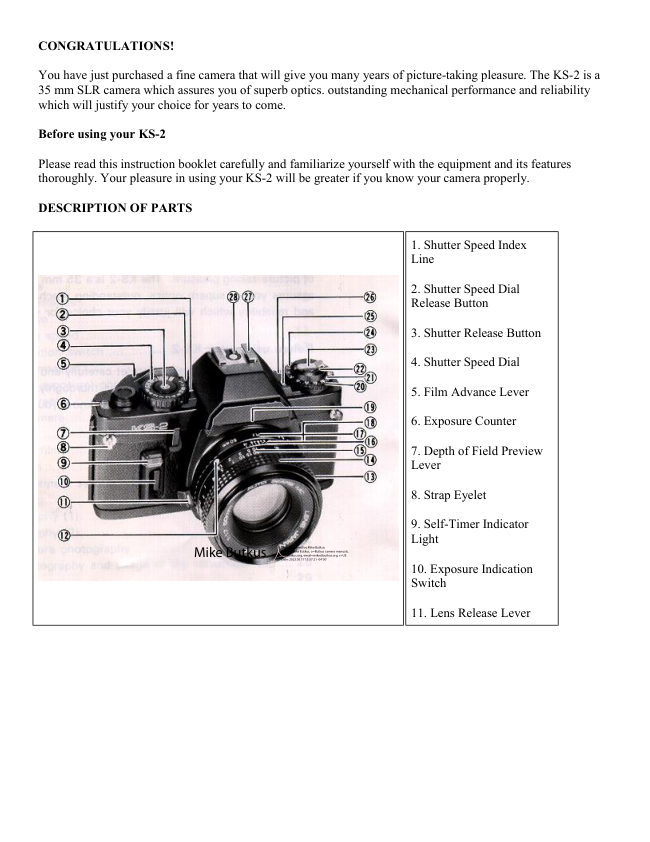
SPECIFICATIONS: Sears KS-2

TYPE ..... 35 mm SLR with automatic electronic exposure control focal plane shutter

FILM FORMAT AND FRAME SIZE........... 35 mm film: 24 x 36 mm

LENS MOUNT........................................... K mount

STANDARD LENSES................................. 50 mm AUTO SEARS f/1.4 (Multi-coated)
50 mm AUTO SEARS f/1.7 (Multi-coated)
50 mm AUTO SEARS f/2.0 (Coated) SHUTTER .......... Electronically controlled, vertically moving metal
focal plane shutter Automatic from 16 to 1/1000 sec.

Manual from 16 to 1/1000 sec. plus B SELF-TIMER ............ Operating delay about 10 seconds during
operation the red LED light pulsates and an electronic sound is emitted.

VIEWFINDER ....... Field of view covers 93% horizontally and vertically Viewing Magnification 0.88X (with
50 mm f/1.4 lens) Indicators in the viewfinder— Exposure Adjustment. Bulb, Manual, Overexposure,
Underexposure, Shutter Speeds. Slow Shutter, Long Time Exposure, Battery Low Warning, Flash Ready LED
Light, F-Stop Number, AE Lock.

FOCUSING .............................. Split-image spot in microprism band

EXPOSURE METER .................... TTL full open metering for center-weighted average
light reading coupled automatically to f-stop.

EXPOSURE COUPLING RANGE... EV 0 - EV 18 (with ASA 100 film 50 mm f/1.4 lens)

FILM SPEED RANGE..................ASA 12 - 3200

FLASH TERMINAL........ X synchro contact

ACCESSORY SHOE...................................Hot Shoe (with Flash Ready Signal Contact) Flash Synchro
Terminal EXPOSURE ADJUSTMENT...... Exposure adjustment system (+2 ~ - 2. in 1/3 steps) AE Lock
System (Memory)

FILM ADVANCE..........Single stroke film advance lever with 135° winding angle and 35° stand-off
Automatic winding possible by mounting Sears Autowinder

EXPOSURE COUNTER......Additive, automatic resetting

FILM REWIND.................... Film Rewind Crank System

MIRROR ................ Quick return mirror

BACK COVER...... Hinged type. opened by pulling up Film Rewind Knob

POWER SOURCE................(Mallory MS76, Eveready S76 or equivalent) Two SR-44 1.55V Silver Oxide
batteries; or Two LR-44 1.5V Alkaline batteries
View original page 4
Page 5 · Read text
www.butkus.us

DIMENSIONS ...................5.4" (W) x 3,4N (H) x 2.0" (D) (body only)

WEIGHT...........................16.6 oz (body only)

WEIGHT OF STANDARD LENSES...........

   50 mm f/1.4 9.2 oz 50 mm f/1.7 7.4 oz
   50 mm f/2 4.9 oz


1. ATTACHING THE VIEWFINDER CAP AND STRAP


                            Viewfinder Cap

                           For instructions on how to use the Viewfinder Cap. read the section
                         on Self-Timer Photography and Usage of the Viewfinder Cap.

                                  1. Attach the Viewfinder Cap to the strap.

                                  2. Put the strap through the Strap Eyelet and adjust it to the correct
                                length.


2. CHANGING LENSES

To Remove the Lens from the Camera

        1. Keep the Lens Release Lever pressed in. and turn the lens in the direction of the arrow.
To Mount the Lens on the Camera
View original page 5Page 6 · Read text
1. Line up the red dot on the lens mount with the matching red dot on
                               the camera body. or alternatively. match the red (dot) mark on the
                          Depth of Field Scale to the red dot on the camera body.
                                         2. When the lens has engaged. turn it in the direction of the
                                 arrow until it clicks into place.

                               * For convenience when mounting the lens in the dark. you
                                  can line up the Lens Mounting Locator Node with the Lens
                                   Release Lever.

                               * Since the body cap has the same mount as the lens. You can
                               remove or mount lens cap in the same way as the lens.


3. INSERTING THE BATTERIES


                       The exposure metering and shutter operation of this camera are
                         powered by batteries, so it is important to insert the batteries correctly
                               for correct operation.

                                1. Remove the Battery Compartment Cover by turning it
                            counterclockwise with a coin.

                                2. Place the two batteries on top of each other as shown in the
                                 illustration on the battery holder of the Battery Compartment Cover.


Batteries for the KS-2 [NOTE: click here for a listing of most Chinon Camera Batteries]

Two LR-44 Alkaline batteries; life-span about 6 months; or two SR-44 Silver Oxide batteries; life-span about
12 months.

* Since dirt or sweat on the batteries may cause a bad contact, wipe the batteries clean with a dry cloth before
inserting them.

* When your camera is not used for a long period of time, remove the batteries.
View original page 6Page 7 · Read text
www.butkus.us

      * Generally. in cold conditions, the voltage of the batteries decreases. and this will impair the
       functioning of the shutter and exposure meter. In these cases, either warm up the batteries or keep a
       spare set of batteries warm in your pocket ready to insert just before shooting.

      * If no batteries are inserted, if they are incorrectly inserted, or if they are worn out, the camera will not
        operate. Check that the batteries are correctly inserted, and if they are and the camera does not operate,
       replace them with new batteries.

      * When the voltage of the batteries is getting low, the BAT (Battery Low Warning Signal) in the
       Viewfinder will blink on and off.

Please change the batteries without delay.

4. INSERTING THE FILM


                             (Always avoid direct sunlight when inserting the film.)
                                      1. Pull up the Film Rewind Knob until the Back Cover snaps
                               open.


                                     2. Insert the film in the Film Chamber and push the Film Rewind
                         Knob down to its former position.

                                     3. Insert the film leader into the slit on the Film Take-up Spool.

                                     4. Advance the film, making sure that the sprocket holes on the
                                 film are fully engaged on the Sprocket Teeth.

                                     5. Close and press the Back Cover firmly to lock it. Pull up the
                             Film Rewind Crank and turn it gently in the direction of the arrow
                                      until the slack in the film has been taken up.

                                     6. Advance the film and press the Shutter Release Button a few
                                times until the number "1" appears in the Exposure Counter.

                         As you advance the Film Advance Lever, the Film Rewind
                       Knob rotates indicating that the film is properly advanced.
View original page 7Page 8 · Read text
* When inserting the film, it is more convenient to set the Shutter
                             Speed Dial to a high speed rather than A (Auto) for advancing
                                   the film to the number "1" position, to avoid firing and waiting
                                    for a slow shutter speed to finish (the slowest is 16 seconds).
                       When you are ready for shooting, be sure to set the Shutter Speed
                                 Dial back to A (Auto).

                            * When inserting the film in cold conditions, the Film Leader
                        may become hard and brittle. Keep it warm in your hand before
                                      insertion, and insert it quickly.


5. SETTING THE FILM SPEED


                           The film speed is the basic element for determining the exposure,
                                so please be sure to set the film speed correctly.

                                              1. Pull the Film Speed Indicator outer ring up, and set it
                                          against the film speed number you are using.
                               For example, if the film speed is ASA 100, set the indicator to
                            100 on the Film Speed Dial.
View original page 8Page 9 · Read text
www.butkus.us


6. EXPOSURE INDICATION SWITCH
When you press the Exposure Indication Switch, the liquid crystal indication of shutter speed, will appear in the
Viewfinder. After shooting, the power source will cut off automatically after 8 minutes in order to preserve the
life of the batteries.


                                                       7. VIEWFINDER INFORMATION

                                                       1. Microprism Band

                                                       2. Split-image Spot

                                                       3. Shutter Speeds

                                                       4. F-Stop Number

                                                       5. Exposure Adjustment

                                                       6. Bulb

                                                       7. Manual

                                                       8. Overexposure

                                                       9. Shutter Speed Indicator (pulsates when on AE
                                                  lock)

                                                  10. Slow Shutter

                                                  11. Long Time Exposure

                                                  12. Underexposure

                                                  13. Battery Low Warning Signal

                                                  14. Flash Ready LED Light


The Shutter Speed, Slow Shutter and Long Time Exposure indications are always present in the
viewfinder. The parts indicated by the liquid crystal show the information relative to a particular moment.

      * In cold conditions the response speed of the liquid crystal may get slower. This is due to the nature of
       the liquid crystal, and not to any camera malfunction.
      * When using a polarizing filter, depending on the angle of rotation, there may be cases in which you
       cannot see the liquid crystal indications.
View original page 9Page 10 · Read text
8. AE (AUTOMATIC EXPOSURE)


                         PHOTOGRAPHY
                              (NOTE FROM MIKE B. - This is will apply to any
                                        Chinon, Pentax or Ricoh automatic camera)

                                   Your KS-2 camera enables you to use automatic
                                        exposure where the shutter speed is automatically
                                               selected, or manual exposure where you may select the
                                               shutter speed yourself.

                                 [NOTE: Mike B. - The shutter speed is chosen by the
                                        meter reading what the lens F-stop is set too at that
                                             time. Change the F-stop and a different shutter speed
                                               will be chosen.]


                              Press the front button to turn on the metering system (most cameras
                           have the meter only stay on for a few minutes. Other brands require
                         you to just gently press the shutter button to activate the meter
                              system.)


 1. Set the "A" on the Shutter Speed Dial against the Shutter Speed Index Line.

        2. Use the F-Stop Ring to set the desired f-stop number against the Index Line.
        3. When you press the Exposure Indication Switch, the correct shutter speed for automatic exposure.
        will be shown by the Shutter Speed Indicator in the Viewfinder.

        4. When the Shutter Speed Indicator is within the orange band. this means a slow shutter speed. You
       should either select a different f-stop setting. or pay particular attention to camera shake.

        5. When the (up triangle) Overexposure mark or the (down triangle) Underexposure mark appears, you
       should select another f-stop number, as the exposure is incorrect.
View original page 10Page 11 · Read text
www.butkus.us

* When set to "A". the Shutter Speed Dial is locked into position.


                                  F-stop number
Lighting Conditions
                                 range
Indoors
                                 F/2  - F2.8
Outdoors, cloudy
                            F4  - F5.6
Outdoors, sunshine
                            F8  - F11
Beach in mid-summer and snow
                            F11  - F16
scenes

With film speed ASA 100

9. MANUAL PHOTOGRAPHY


                                               1. Press the Shutter Speed Dial Release
                                          Button. and set the Shutter Speed Dial to the
                                           desired shutter speed.
View original page 11Page 12 · Read text
2. The letter "M" in the Viewfinder will
                                           pulsate to indicate Manual mode.


                                              3. If the (up triangle) (Overexposure mark) or
                                           the (down triangle) (Underexposure mark)
                                              pulsates, you should select another f-stop
                                  number as the exposure is incorrect. If the
                                        (up triangle) or the (down triangle) marks do
                                         not disappear, even after selecting a different
                                             f-stop number, you should select a different
                                             shutter speed.


SHUTTER SPEED REFERENCE TABLE

                                   Shutter speed
Lighting conditions
                                 range
Indoors
                                 1/30  - 1/60
Outdoors. cloudy                 1/60  - 1/125

Outdoors, sunshine               1/125  - 1/250

Beach in mid-summer, snow       1/250  - 1/1000
scenes
View original page 12Page 13 · Read text
www.butkus.us

10. HOLDING THE CAMERA
Holding the camera correctly when shooting is very important.


                                   1. The camera should be positioned on the palm of your left hand
                              so that you can use your fingers to turn the Focusing Ring of the
                                 lens easily

                                   2. The index finger of your right hand should rest lightly on the
                                Shutter Release Button, while your right hand holds the camera
                          body lightly.

                                   3. Your right arm should be in a comfortable position.

                                   4. Keep your left arm resting lightly against your body, and the
                            camera should just touch your forehead when you look through the
                                viewfinder.


* It is important to shoot with the correct body posture, to avoid blurred or tilted shots.


11. FOCUSING


                         Look through the viewfinder to compose your picture and focus by
                                turning the Focusing Ring. You can focus either by using the
                                 center Split-image Spot or the Microprism Image Band that
                              surrounds the center circle.

                               Split-image Focusing

                      When the split image in the Split-image Spot forms a single image,
                                 the subject is in focus.

                            Microprism Focusing When the subject loses its "shimmering"
                                   effect and becomes very sharp, the subject is in focus.
View original page 13Page 14 · Read text
12. REWINDING THE FILM


                           (Always avoid direct sunlight when unloading the film).

                               After the last picture on the roll of film has been taken, rewind the
                                  film.

                                   1. Press the Film Rewind Release Button, and it will remain locked
                                 into position.

                                   2. Pull up the Film Rewind Crank and turn it in the direction of the
                              arrow. When the film has been completely rewound, the tension of
                                the Film Rewind Crank is released and it will revolve freely.

                                   3. Pull up the Film Rewind Knob to its fullest extent and the Back
                           Cover will open. Remove the film, push the Film Rewind Knob
                            back into position and close the Back Cover.

                          * Never open the Back Cover during rewinding, as light will get in
                           and ruin your film.


13. AE LOCK SYSTEM


                               This camera has an AE Lock system. When shooting against the light on
                                automatic exposure, the contrast in the brightness of the background and the
                                  subject means that you cannot obtain a correct exposure of the subject. In
                                      this case you should use the AE Lock which retains the exposure of the
                                  subject regardless of the changes in the background lighting conditions. The
                               exposure will not change until you cancel the AE Lock.

                                             1. Move up close to the subject to measure the exposure, and press
                                         the AE Lock. The Shutter Speed Indicator in the viewfinder will
                                          pulsate to indicate that the exposure is locked onto the subject.

                                             2. Compose the picture and shoot. The AE Lock is then automatically
                                          cancelled.

                                             3. If you wish to cancel the AE Lock before pressing the Shutter
                                      Release Button, press the AE Lock Button again.
View original page 14Page 15 · Read text
www.butkus.us


 14. EXPOSURE ADJUSTMENT SYSTEM


                              According to shooting conditions, the camera may be affected
                           more by the background light than the light of the subject itself.
                                This will result in under (or over) exposed pictures. In these
                                    cases, you should use the Exposure Adjustment system. You can
                                   also use the system when you wish to create a deliberate effect
                                  of over (or under) exposure.

                                      1. Turn the Film Exposure Adjustment Dial to set the required
                            number against the Exposure Adjustment Index Line.

                          [NOTE: from Mike B. - Always bracket if you need the
                                     shot. Expose a frame over-exposed then another under-exposed
                             and then one the correct exposure according to the meter. This
                               exposure adjustment is tricky and remember to turn the exposure
                                adjustment setting back to 0 (zero) when needed for normal
                                 metering. What you are doing is metering, but making the meter
                                  think it is darker then it really is and giving the film more light
                                with the + and less light when you set it to a - number]


Subject                         Exposure Adjustment

Scenery with a lot of sky
                            +1 to +2
Figure against the light

Figure with a snowscape or
                           + 1
seascape background

Spot-lit figure            —1 to —2

* The Exposure Adjustment Dial can be set to click stop (1/3
steps) between the numbers indicated.


* Be sure to set it back to the "O" position after use.
View original page 15Page 16 · Read text
15. B (BULB) SETTING


                             The B setting is used for shooting night scenes or long time
                                   exposures.

                                        1. Keep the Shutter Speed Dial Release Button pressed down
                               and set the "B" against the Shutter Speed Index Line. The "B"
                             mark in the Viewfinder will pulsate to indicate that the shutter
                                 speed is set to B (bulb).

                                        2. When you press the Shutter Release Button, the shutter will
                                remain open as long as the button is pressed.

                              * For long time exposures, use a tripod and cable release to
                                   prevent camera shake.

                                   [Note: from Mike B. - The self timer can fire off long
                                  exposures (1/4 - 16 sec.) without a shutter release cable. For
                                   longer exposures a locking cable release is rather cheap and
                                 time exposures can give interesting nighttime
                                         effects. WARNING: Some electronic shutters (like this
                                camera) use the battery to keep the shutter open. This long
                                 exposure can drain the battery big time and could cause you to
                                     lose firing ability if the battery dies after a few shots. Keep
                                   spare batteries if you do this with an electronic shutter. Spring
                                  loaded (manual shutters) are great for long time
                                   exposures. Their batteries only power the meter.]


16. FLASH PHOTOGRAPHY

The Sears Auto/Thyristor electronic flash 48025) is available exclusively for use with this camera. [Note: Mike
B. - This is basically a Ricoh camera. A Ricoh dedicated flash will work the auto functions just like this
dedicated Sears flash.]

With this flash unit, you can leave the shutter speed set on "A''. Also the Flash Ready red LED light
conveniently lights up in the Viewfinder, so that you don't have to take your eye away from the Viewfinder.

[Note: Mike B. - any "automatic" flash (one with an electric eye) can be used with some excellent results. You
must set the shutter to 1/125 and the lens aperture to whatever the back of the flash states. Usually you get two
or three different F-stops to choose from depending on the flash make, the different F-stops will also state, on
the flash unit, the maximum distance you can have to your subject. Usually any F-stop that is allowed can be
used just 2 or 3 away also.  I usually tape a thin tissue over just the flash tube to diffuse the light for a softer
effect when very close. Be careful not to cover that electric eye. Yes, you can shoot at 25 feet @ F/2.8 but the
limited "depth of field" can cause you blurry images in front and behind what you focus on. Bigger flash units
provide more lighting power and smaller apertures. Many mid size units have bounce and swivel capability for
less "deer in the headlights" looks. See my other web pages with tips on flash units. ]
View original page 16Page 17 · Read text
www.butkus.us

< With the Special Flash Unit >

1. Attach the flash unit to the camera Hot Shoe. Screw it on just snug.


                                 2. Set the ''A'' on the Shutter Speed Dial against the Shutter Speed
                           Index Line.

                                 3. Set the f-stop number to the designated exposure for automatic
                              shooting. The flash unit will automatically control the amount of light
                                for subjects within the distance range for automatic flash
                            photography.

                       [NOTE: Mike B. - some flash units have only one "auto" F-stop
                                  setting, some provide 3 or 4 different F-stops by adjusting switches
                         on the flash unit. See the users manual of the flash unit]

                                 4. Turn the flash unit's power source switch on, and when the flash is
                                 fully charged, the Flash Ready red LED Light will light up and the
                              Shutter Speed Indicator will show 1/125 sec. and change
                              automatically to the synchronizing speed.

                                 5. Press the Shutter Release Button and shoot.


* For further details. please refer to the instructions with the flash unit.

* Do not use other makes of flash units that have special signal pins exclusively for their cameras. as this
will result in incorrect exposure and may damage the circuitry of the camera.

* If the Shutter Release Button is pressed before the Flash Ready LED Light lights up, the shutter speed will be
the one indicated by the Shutter Speed Indicator.

[NOTE: Mike B. - Wait for the ready light or you will get underexposed and most likely extremely blurry
images as the shutter will remain open in the dim light.]


17. FLASH PHOTOGRAPHY

< With Flash Units Other than the Sears Auto/Thyristor (8025)
 1. Set the Shutter Speed Dial to the synchronizing speed of 1/125 sec. 2. The guide number is indicated on the
flash unit. Use the guide number in the following equation to obtain the f-stop number and set that number to
the f-stop index line.
View original page 17Page 18 · Read text
For example. with a flash unit with guide number 40 for ASA 25, and camera-to-subject distance of 5 feet:

f-stop number (8) = Guide number (40)
                             --------------------------
                Camera-to-subject distance 5 feet

With automatic flash units, set the f-stop number designated for automatic flash photography.

      * It is convenient to use the quick reference table on the flash unit, which shows the f-stop numbers
       already calculated.

      * When using other automatic flash units, please follow the instructions with the flash unit.


18. MULTIPLE EXPOSURE PHOTOGRAPHY

Order for Multiple Exposure

Multiple exposure is a device to put more than one exposure into the same frame.


                     [NOTE: Mike B.  If you really want to try this, gently rewind the
                         rewind knob to tighten the film, then follow the instructions
                          below. Remember, you must divide the number of shots by your
                           exposure. e.g. for two exposures stop down one full stop (half the
                       amount of light) after finding the correct metering for each
                              picture. This is due to the fact you are adding light to each shot from
                            the previous shot.]


                               1. Press the Shutter Release Button to obtain the first exposure.

                               2. Slide the ME Lock Lever to the left until the red dot appears.

                               3. Advance the Film Advance Lever while keeping the ME Button
                           pressed down.

                               4. Take the second exposure.

                       * Repeat actions 3 and 4. If you wish to continue adding exposures to
                            the frame. At this time, the Exposure Counter will not advance.

                       * Better results can generally be obtained by taking subjects that
                           include a large area of darker parts.


      * When multi-exposure shots are not required. be sure to slide the ME Lock Lever back into position.

      * It is better to inform the camera shop that you have taken multiple exposures when you take your film
        for printing, as sometimes they do not print these pictures, mistaking them for accidental double-
       exposures.
View original page 18Page 19 · Read text
www.butkus.us


19. SELF-TIMER PHOTOGRAPHY


                 USAGE OF THE VIEWFINDER CAP

                      The self-timer enables you to include yourself in your own photographs
                              for commemorative occasions etc.

                                1. After advancing the film, press the Self-Timer Switch.

                                       2. The Self-Timer Indicator Light will pulsate with an electronic
                                 sound, and about 10 seconds later, the shutter will be released.

                                       3. If you wish to cancel the self-timer once it has started
                                    operating, set the Shutter Speed Dial to L (Lock) or B (Bulb).

                       * If the film has not been advanced, the self-timer will not operate.


Viewfinder Cap

When using the self-timer with the A (Auto) setting, to avoid incident light reversal from the light entering the
viewfinder eyepiece and causing incorrect exposure, use the Viewfinder Cap attached to the strap to cover the
viewfinder eyepiece.

[NOTE: Mike B. - This item is useful if you are metering those longer shutter speeds (1/4 to 16 sec.) in "Auto"
mode as you normally are not looking through the viewfinder. Light from the rear can effect the meter reading.
View original page 19Page 20 · Read text
20. DEPTH OF FIELD


                       When you focus on a specific subject, an area "in front of" and
                               "behind" the subject will appear acceptably sharp in your picture.
                              This area is called the ''Depth of Field".

                          The depth of field can be determined in the following ways:

                                            1. Each lens has a depth of field scale. For example with a
                                        distance of 10 ft and using f/16. the area within the two
                                         f/16 marks on the scale (about 6.6 ft ~ 26.3 ft) will be in
                                      sharp focus.

                                            2. When you press the Depth of Field Preview Lever. it
                                           will set the lens diaphragm to the corresponding opening
                                       previously set on the F-Stop ring. This enables you to
                                    preview the depth of field of the picture.


                           * Please do not press the Shutter Release Button while pressing
                                 the Depth of Field Preview Lever.


21. INFRARED PHOTOGRAPHY


                          The infrared index mark is an index to correct the focusing point
                         when you use (Black & White film) infrared film and red filters.
                              Since infrared light rays have a longer wave-length than visible
                                     light rays, after focusing normally on the subject, you have to set
                                    that distance against the infrared index mark.

                             Taking Infrared Photographs

                                    1. Attach the red filter and focus on the subject.

                                    2. Shift that distance to the infrared index mark. According to the
                                   instructions enclosed with the film, set the f-stop. shutter speed
                            and release the shutter.

                           * Infrared light rays are invisible to the eye and the light meter, so
                                please refer to the instructions with the film for setting the f-stop
                           number and shutter speed.
View original page 20Page 21 · Read text
www.butkus.us

22. SPECIAL ACCESSORIES


                                                  If you attach the Sears Autowinder to this camera, the film
                                   can be advanced automatically so that you can take
                                     continuous shots (2 frames per second).
                                 * Before attaching the winder, wipe the contact points on
                                     both the camera and the winder with a dry cloth.

                              [NOTE: Mike B. - An eraser on these contact points as well
                                       as the contacts on the underside of the camera body can fix
                                   problems if the winder does not function due to poor metal
                                          to metal contact.


23. PROPER CARE OF YOUR CAMERA

      * Never touch the surface of the lens with your fingers. If the lens is dirty, either use a blower to blow
       the dust away or wipe it gently with a soft cloth.

      * Camera malfunction can be caused by shock, humidity, salt air, etc. Avoid using the camera at the
      beach or in places that use chemicals. Wipe it carefully.

      * Do not use chemically-treated dusters to clean the camera.

      * Take care not to expose your camera to sudden changes in temperature, as this may cause camera
       malfunction.

      * Do not expose your camera for a long period of time in extremely high temperatures, such as in the
      back of your car or on a beach, as this may cause camera malfunction.

      * When using a tripod. do not try to force a long screw into the socket. (The screw length should be less
       than 5.7 mm. , JIS 5.5 mm).

      * Do not place the camera near equipment that has strong magnetism such as television or radio.

      * Remove the batteries before storing the camera. and keep it in a place free of dust and humidity.

      * Do not attempt to disassemble or repair your camera yourself. If service is necessary, bring it to the
       nearest Sears store.
View original page 21Related documents and language editions
From the M. Butkus archive. Original publisher and archive notices are retained.
Check the model and edition against your equipment.
PDF verified 2026-10-10.