Film cameras
Ricoh L 108 date back User manual
User manual for Ricoh L 108 date back. 3 pages in English. Read the original PDF, download or print a copy without registration.
3 pagesEnglish0.1 MB PDF
Loading your manual…Open PDF directly
Document details
- Brand
- Ricoh
- Model / document
- Ricoh L 108 date back
- Document type
- User manual
- Language
- English
- Pages
- 3
- File size
- 0.1 MB
- Category
- Film cameras
- Document date
- Not specified in catalog
Search available document text
Find a term, then jump to its page in the original PDF. Image-only pages may not be searchable; check the PDF for exact wording and diagrams.
Page 2 · Read text
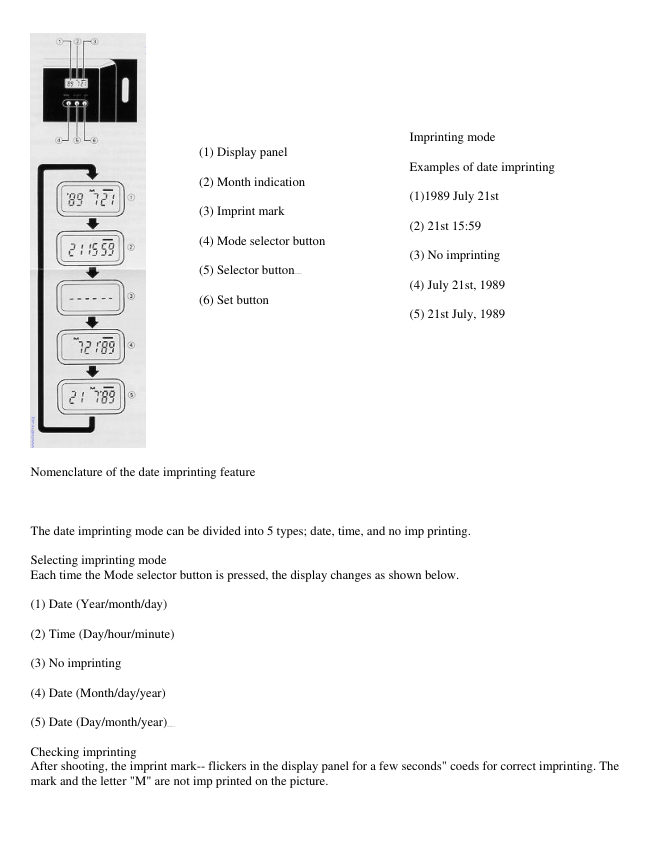
Imprinting mode
                                  (1) Display panel
                                                            Examples of date imprinting
                                  (2) Month indication
                                                                  (1)1989 July 21st
                                  (3) Imprint mark
                                                                            (2) 21st 15:59
                                  (4) Mode selector button
                                                                            (3) No imprinting
                                  (5) Selector  button4www.butkus.org
                                                                            (4) July 21st, 1989
                                  (6) Set button
                                                                            (5) 21st July, 1989


Nomenclature of the date imprinting feature


The date imprinting mode can be divided into 5 types; date, time, and no imp printing.

Selecting imprinting mode
Each time the Mode selector button is pressed, the display changes as shown below.

(1) Date (Year/month/day)

(2) Time (Day/hour/minute)

(3) No imprinting

(4) Date (Month/day/year)

(5) Date (Day/month/year)4www.butkus.org

Checking imprinting
After shooting, the imprint mark-- flickers in the display panel for a few seconds" coeds for correct imprinting. The
mark and the letter "M" are not imp printed on the picture.
View original page 2Page 3 · Read text
Resetting the date and time -

(1) Each time the Selector button is pressed, the flashing digits change in the order of year,
month, day, hour, minute and colon (:).

(2) When the digits to be reset flash, press the Set button until the desired digits appear
When the Set button is kept pressed, the digits change rapidly.


Accurately setting seconds
(1) Press the Mode selector button for Time display mode.

(2) Press the Selector button so that the colon (:) flickers.

(3) Press the Set button according to the radio or telephone time signal. The time count
starts from 0 seconds.

· It is recommended that the second digits be adjusted after adjusting the minute digits.


Battery Replacement -

(1) Open the back cover

(2) Remove the screw from the date feature battery compartment cover with a small (+)
screwdriver

(3) Remove the battery compartment cover holding the roller section.

(4) Insert the screwdriver tip into the slot on the side of the battery, and lift up the battery.

(5) Load the new battery with the side marked (+) facing upwards. Then, close the battery
compartment cover using the (+) screwdriver. (Use lithium battery CR2025. The service
life is about 3 years    )4www.butkus.org

· When the battery is exhausted, the imprinted digits become faint. At that time, replace the
battery.

· Do not open the date battery compartment lid except when replacing the battery.

· Keep the battery out of reach of children. If a child swallows the battery, contact your
doctor immediately
View original page 3
From the M. Butkus archive. Original publisher and archive notices are retained.
Check the model and edition against your equipment.
PDF verified 2026-10-10.