Film cameras
Ricoh XF-30 User manual
User manual for Ricoh XF-30. 12 pages in English. Read the original PDF, download or print a copy without registration.
12 pagesEnglish1.3 MB PDF
Loading your manual…Open PDF directly
Document details
- Brand
- Ricoh
- Model / document
- Ricoh XF-30
- Document type
- User manual
- Language
- English
- Pages
- 12
- File size
- 1.3 MB
- Category
- Film cameras
- Document date
- Not specified in catalog
Search available document text
Find a term, then jump to its page in the original PDF. Image-only pages may not be searchable; check the PDF for exact wording and diagrams.
Page 4 · Read text
We are most gratified that you have selected a RICOH 35mm camera. Before using your camera, please be sure
to read these instructions carefully.

                       Click on the pages below to see images from the manual
View original page 4Page 7 · Read text
www.butkus.us


INSERTING THE BATTERIES

The camera will not operate unless the batteries are installed. It is important that the batteries are inserted
correctly.

1. Push the Battery Compartment Cover in the direction of the arrow to pull open. (Fig. 1)

2. Insert two batteries, checking that the (+) and ( - ) on the batteries are lined up correctly according to the
polarity diagram inside the battery compartment. (Fig. 2)

3. Close the Battery Compartment Cover by pushing it in the direction of the arrow. (Fig. 3)

Batteries for Use

Two Alkaline penlight batteries, or two Manganese penlight batteries.

Do not use Nickel Cadmium batteries.

Please remove the batteries from the camera when you do not use the camera for a long period of time.

OPENING THE LENS SHIELD

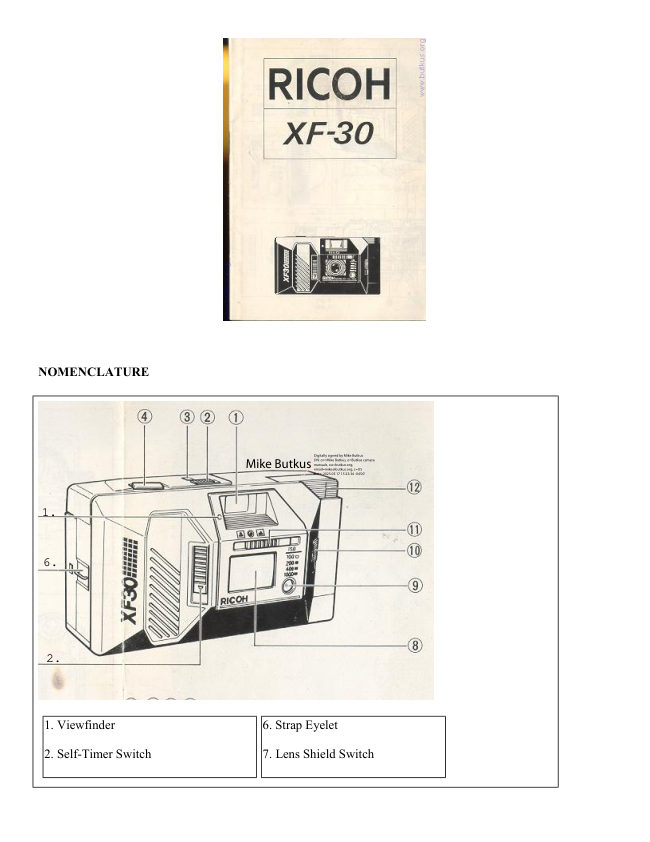
1. Open the Lens shield by sliding the Lens Shield Switch in the direction of the arrow. (Fig. 4)

The Lens Shield is interlocked with the safety mechanism of the camera. You can fire the camera only when the
Lens Shield is completely open. This feature prevents wasted shots!
View original page 7
Page 8 · Read text
2. If the Lens Shield is opened while the Shutter Release Button is pressed down, a frame will be exposed.

CHECKING THE BATTERIES

1. Cover the Photocell with your hand and press the Shutter Release Button down halfway. (Fig. 5)

2. If the Flash Unit pops up, then the batteries are in working order. (Fig. 6)

3. Push the Flash Unit back down. (Fig. 7)
In normal temperature (at 20 degrees C, with new Alkaline batteries)

Without using the Flash Unit:
More than 100 rolls of 24 exposure film can be shot.

Using the Flash Unit for all shots:

More than 10 rolls of 24 exposure film can be taken.

Please replace both batteries for new ones of the same kind in the following cases:

a. The Flash Unit does not pop up when you have covered the Photocell with your hand and the Shutter Release
Button is pressed in halfway.

b. The shutter cannot be released (apart from when the Lens Shield is closed).

c. The Flash Ready Lamp takes more than 30 seconds to light up.

d. The Film Advance or Film Rewind does not operate.

e. The batteries have been in the camera for more than one year. (Even without using the camera, the batteries
will lose power naturally).

* Generally, in cold conditions, the capacity of the batteries decreases, and in some cases, the camera may not
operate correctly. You should either warm the batteries or keep a spare set in your pocket, inserting them just
before you use the camera. Incidentally, if the capacity of the batteries has decreased in cold temperatures, it
will regain full capacity in normal temperatures, so do not throw the batteries away.

SETTING THE FILM SPEED

1. The film speed is indicated on the outer packaging (or inner container) of the film. E.g. ISO 100.

2. Slide the Film Speed Selector to set the speed of the film. (Fig. 8)
Please set the Film Speed Selector only to click-stop position. Do not use mid-way positions.

Please be careful when you take a picture with ISO 1000 film in bright sunlight, the picture may be
overexposed.

Applicable Films
Use films with ISO 100, 200, 400 or 1000.
View original page 8
Page 9 · Read text
www.butkus.us

LOADING THE FILM
1. Push the Back Cover Lever downwards in the direction of the arrow to open. (Fig. 9)
2. Load the film into the Film Chamber, pull out the film leader, press the film container's outlet so that the
surface becomes level with the rail surface, and place it over the Film Take-Up Spool. (Fig. 10)
3. Please make sure that the film is within the Film Guides. (Fig. 11)
4. Press the Back Cover shut so that the Back Cover Lever returns to its original position. The film is
automatically advanced until number "1" appears in the Film Counter Window. (Fig. 12)
5. If the Film Loading Monitor (small window) rotates rapidly, then the film is advancing correctly. If the
monitor does not rotate, the film has not advanced correctly, so please reload the film. (Fig. 13)

Always avoid direct sunlight when loading the film.

The Film Loaded Window is to confirm whether film is in the camera or not.

If the film leader end tip is bent, correct it before loading.

If film container does not fit well into the Film Chamber, insert it in while rotating slightly.

If the Flash Unit is popped up, snap it down before loading.

* Film can be loaded even when the Lens Shield is closed.

VIEWFINDER (Fig. 14)

1. Measure the approxi mate distance to the subject with the eye.

2. Slide the Focus Control to set for the marking according to the distance.

    Long distance (suppose to be mountains)

     Middle distance (2.5m: 8.2ft) (not sure)


      Short distance (suppose to be a person close up)

Pay attention not to smudge the viewfinder with fingerprints, etc.

Focusing is not possible for distances of Em (3.25 ft) or less with necessary close-up lens.


SHOOTING AND FILM ADVANCE

1. Press the shutter Release Button gently so as not to shake the camera: The shutter is released and the film
automatically advances by one frame.

In a dark place, the Flash Unit pops automatically up when the shutter Release Button is half pressed. In this
case, the shutter cannot be released until the Flash Ready Lamp lights. (Refer to "Flash Photography".)
View original page 9Page 10 · Read text
REWINDING THE FILM (Auto reverse)

After the end of the film has been reached, the film is automatically rewound.

As the film is being rewound, the Film Loading Monitor will rotate and the Film Counter will run backwards.
(Fig. 15)

When the film is fully rewound, the motor stops automatically and "S" is seen in the Film Counter. You can
now open the Back Cover to unload the film.

If you wish to rewind the film before the end of roll is reached, (to change to faster film for indoor shots etc.)
push the Manual Film Rewind Switch with a ball point pen, etc. (Fig. 16)

You can close the Lens Shield when the film is being rewound.

UNLOADING THE FILM

1. Gently slide down the Back Cover Lever and take out the film container.

2. Press to shut the Back Cover. At that time, the auto set mechanism is automatically activated and the motor is
operated until number "1" appears in the Film Counter Window.

The motor is operated when the Back Cover is closed: This is to reset for film advance mode and is not a
malfunction.


FLASH PHOTOGRAPHY

When flash is requited, the Flash Unit automatically pops up into vertical position.

1. Check that the Flash Ready Lamp is lit, then take the picture. (Fig. 17)

2. When you have completed flash photography, please be sure to push the Flash Unit down. This turns off the
flash.

Flash Photography Distance

Shooting Range: 1--3 m (3.3--9.8 ft)

If the Shutter Release Button is kept pressed halfway down before the Flash Ready Lamp comes on, the Flash
Unit will not be charged.

Be careful not to put your finger in front of the flash window. If the Shutter Release Button is pressed before the
Flash Ready Lamp lights, the shutter will not be released.

* You can use the Flash Unit as a fill-in light for daytime photography too. Cover the photocell with your hand
and press the Shutter Release Button in halfway. Then the Flash Unit pops up.
View original page 10
Page 11 · Read text
www.butkus.us

USING THE SELF-TIMER--

Now it's you turn to cut into the shot!

1. Slide the Self-Timer Switch fully in the direction of the arrow. Then the Self-Timer LED (red lamp) on the
front of the camera blinks on and off. The LED starts to blink more rapidly two seconds before the shutter is
released, to indicate that the shutter is going to be released. The shutter will be released about 10 seconds later.
(Fig. 18)

If you wish to clear the self-timer once it has started, close the Lens Shield.

When using the self-timer with flash photography, put the Self Timer Switch on after the Flash Ready Lamp is
lit. (When the surrounding light is not sufficient, the Flash Unit pops up immediately after the Self-Timer
Switch is activated.)

PROPER CARE OF YOUR CAMERA

Take the case off the camera, remove dirt, dust, film waste from the camera, wipe it with a silicon-processed
cloth, etc. and store in a well-ventilated place that is as dry as possible.

If there is dirt on the lens or viewfinder, do not touch directly with your fingers. Use a blower to blow the dust
away, or wipe the surface gently with a soft cloth.

Camera malfunction can be caused by shock, humidity, salt, etc. After using the camera at the beach or places
where there are chemicals, wipe it particularly carefully.

Take care not to expose the camera to sudden changes in temperature, as they may cause malfunction.

Do not expose the camera for a long period of ti me i n extremely high temperatures, such as in your car or on
the beach, as this may cause malfunction.

* Do not place the camera near equipment that has strong magnetism such as television or radio.

Remove the batteries before storing the camera, and keep the camera in a place that is free of dust and humidity.

Avoid keeping the camera in a closet, etc. where the camera may be affected by mothballs, insecticides, etc.

Do not attempt to disassemble or lubricate the camera. This should be done in a specified service center.

MAJOR SPECIFICATIONS

Type: 35mm lens electronic shutter type

Lens: 35mm color Rikenon f4.0 lens

Focusing: By zone-focus marks from 1.0 to infinity

Shutter: Programmed type electronic shutter, 1/30 - 1/500 sec.

Self-Timer: Built-in electronic type. Operating delay of approx. 10 sec.

Viewfinder: Reverse Galilean viewfinder
View original page 11
Page 12 · Read text
Magnification 0.53X, Field of view 80%

Exposure Adjustment: With CdS photocell, Exposure Coupling Range EV9 - EV17 (ISO 100)

Film Speed Range: ISO 100 -1000.

Film Advance/Rewind: Electric motor with Film Transport Monitor.

Automatic 1st frame setting. Automatic film rewind at the end of film

Film Loading: RICOH Auto-Load system

Exposure Counter: Additive, automatically resets to zero when the camera back is opened

Built-in flash: Automatic pop-up electronic flash in dim light

''Guide Number: 10 (ISO 100, m)

Exposure adjustment through flashmatic system

Interval Between Flashes: About 6 seconds

Number of Shots Possible: With new Alkaline batteries (under normal temperature of 20°C) without using the
flash unit: more than 100 rolls of 24 exposure film; when using the flash unit repeatedly; more than 10 rolls of
24 exposure film

Power Source: 2 penlight Alkaline batteries or 2 penlight Manganese batteries (Nickel Cadmium) batteries
cannot be used.

Dimensions: 121mm, 4.8"(W) x 66mm, 2.5"(H) x 45mm, 1.8"(D)

Weight: 225g, 7.9OZ. (without batteries)

Specifications and appearance are subject to change without notice.
View original page 12
From the M. Butkus archive. Original publisher and archive notices are retained.
Check the model and edition against your equipment.
PDF verified 2026-10-10.