Film cameras
Ricoh XR-P Pocket Product booklet
Product booklet for Ricoh XR-P Pocket. 8 pages in English. Read the original PDF, download or print a copy without registration.
8 pagesEnglish0.9 MB PDF
Loading your manual…Open PDF directly
Document details
- Brand
- Ricoh
- Model / document
- Ricoh XR-P Pocket
- Document type
- Product booklet
- Language
- English
- Pages
- 8
- File size
- 0.9 MB
- Category
- Film cameras
- Document date
- Not specified in catalog
Search available document text
Find a term, then jump to its page in the original PDF. Image-only pages may not be searchable; check the PDF for exact wording and diagrams.
Page 2 · Read text
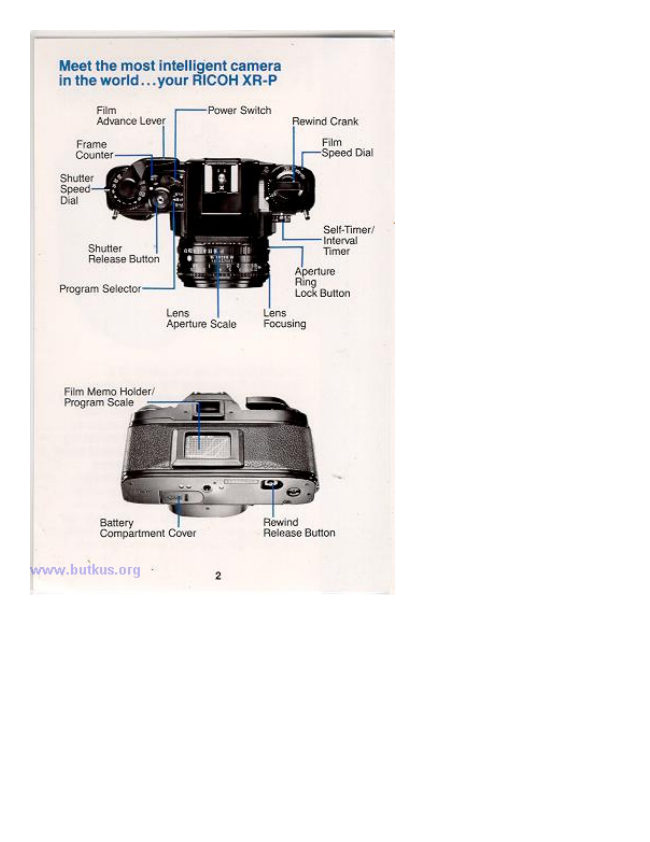
Meet the most een camera
in the world...your RICOH XR-P

Film r——Power Switch

Rewind Crank

Frame

Release Button

Aperture
Ring

Lock Button

Program Selector

Aperture Scale Focusing

Film Memo Holder/
Program Scale

Battery Rewind
Compartment Cover Release Button
View original page 2
Page 3 · Read text
Operating the camera

Once the camera is loaded and the exposure index
entered into the metering system of the XR-P, you are

ready to take pictures.

Getting Ready

A. Insert Batterios: Side

feet of compartment
‘open, then Wiser four LPs

orwo GH TaN batteries,

being sure to observe + and
— positions as marked on the
cover, then close.

®

ea

B. Mount Lens: Remove rear
lens cap. Then remove camera
body cap which covers lens
‘mount. Align red dot on lens
barrel with red dot on lens
‘mount, then insert lens and
tur until lens is seated firmly.
You'll hear a click when this
happens.

C. Set Camera: Set shutter
speed dial to "A setting. Set
rogram selector to “P”

8s lock button and set lens _

ure to"P")
bor xe-P 8 now in base,
automate program ready for

Eo)

www.butkus.org
View original page 3
From the M. Butkus archive. Original publisher and archive notices are retained.
Check the model and edition against your equipment.
PDF verified 2026-10-10.