Film cameras
Roamer I and II User manual
User manual for Roamer I and II. 15 pages in English. Read the original PDF, download or print a copy without registration.
15 pagesEnglish1.8 MB PDF
Loading your manual…Open PDF directly
Document details
- Brand
- Roamer
- Model / document
- Roamer I and II
- Document type
- User manual
- Language
- English
- Pages
- 15
- File size
- 1.8 MB
- Category
- Film cameras
- Document date
- Not specified in catalog
Search available document text
Find a term, then jump to its page in the original PDF. Image-only pages may not be searchable; check the PDF for exact wording and diagrams.
Page 2 · Read text
The ROAMER Cameras


                The universal requirements of the vast picture. taking public are reflected in the
                   design of both the Roamer I and Roamer II folding cameras.

                The versatility of these folding c cameras makes them ideal for the photo fan
               who requires a highly effective camera, yet one which is easy to carry and easy
                      to use. Our Design Engineers have developed these precision picture-taking
                    instruments, which require only a minimum of adjustment on the part of the
                  camera user. The exacting construction, and the many built-in features make
                    these Roamer cameras outstanding recorders of family, friends, and other
                     "kept-for life" events.

                            It was with the realization that photography has long been graduated from a
                    "pastime", and is now a necessity, that the Roamer I and Roamer II cameras
                 were developed.

                            It is advisable to practice with empty camera, after you have read the
                      instructions outlined ill this manual.
 Mike Butkus                     Digitally                                                                DN:email=mike@butkus.org,Date:cn=Mike2023.05.17signedButkus,by15:51:48Mikeo=ButkusButkusc=US-04'00'camera manuals, ou=butkus.org,
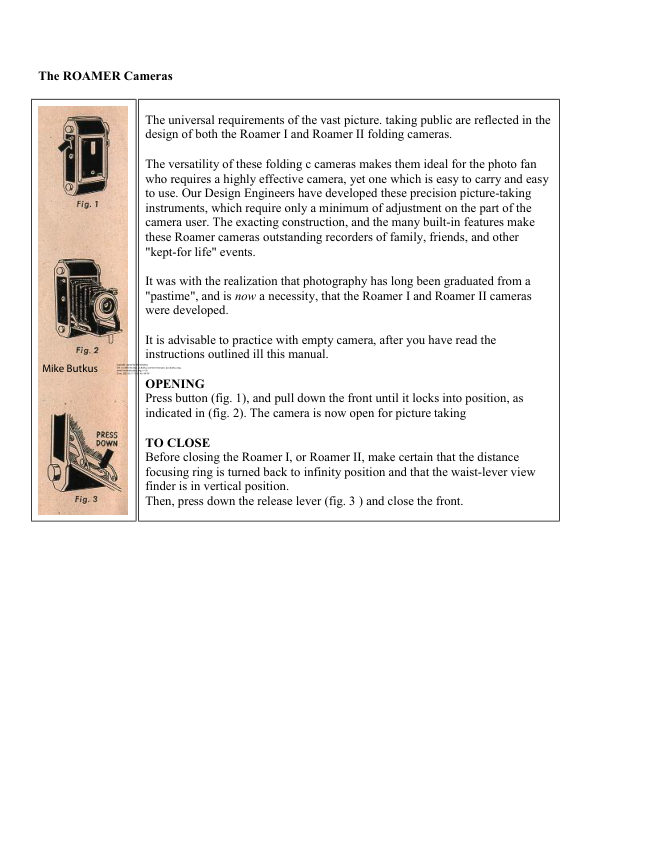
             OPENING
                    Press button (fig. 1), and pull down the front until it locks into position, as
                     indicated in (fig. 2). The camera is now open for picture taking

            TO CLOSE
                   Before closing the Roamer I, or Roamer II, make certain that the distance
                    focusing ring is turned back to infinity position and that the waist-lever view
                     finder is in vertical position.
                  Then, press down the release lever (fig. 3 ) and close the front.
View original page 2Page 6 · Read text
· DISTANCE FOCUSING


                                       To set the lens for the distance between the
                                              camera and subject to be photographed, rotate
                                                      the knurled focusing ring (figs. 4 and 5) until
                                                      the distance required is opposite the distance
                                                  marker.
View original page 6Page 7 · Read text
www.butkus.us


                                                      Settings for distances other than those
                                                      indicated on the focusing scale can be made
                                           by approximating the distance setting desired.


· LENS OPENING


                                 ROAMER I

                            The Roamer I has an Achromat (color corrected) coated lens.

                          To set the diaphragm opening through which the light passes
                           when the shutter opens for the exposure, rotate the f stop
                                     indicator ring. (fig. 6 shows setting at fl6.)

                             Each stop opening, from f32 to F11 permits twice as much light
                                      to reach the film as the preceding stop.


                                 ROAMER II

                            The Roamer II has an f4.5 anastigmat, color corrected, coated
                                       lens. The f stop marks are indicated on the top of the lens
                               mount. The f stop indicator can be moved in either direction for
                                    the desired aperture. Figure 7 shows the lens set at f8.

                          To use f stops not marked on the scale of the Roamer I or
                            Roamer II, set the indicator between the two nearest numbers.
View original page 7Page 8 · Read text
· SPEED ADJUSTMENT


                                 ROAMER I

                               There are two positions on the Roamer I shutter,
                                   "Instantaneous" for snapshots, and "Bulb" for long exposures.
                                For all ordinary pictures keep the speed indicator on "I" (fig. 8 )
                                                           . For time exposures move the timing lever to "B" (fig. 9 ) . It is
                            recommended that a cable release and a tripod or other firm
                                  support be used for "B" exposures.

                                 ROAMER II

                                   Shutter speed markings are indicated on the front of the lens
                              mounting for convenient, time saving adjustments. Turn the
                                      shutter speed ring until the indicator is opposite the desired
                                   speed. The Roamer II scale is marked for speeds from 1/25 to
                                  1/200th of a second, "B". Figure 10 shows the shutter set at "B".

                                    In using Bulb, the camera should be placed on a tripod or other
                                  firm sup port. Use of a cable release is recommended.
View original page 8Page 9 · Read text
www.butkus.us


· THE VIEW FINDERS


              WAIST-LEVEL VIEW-FINDER
                    This viewfinder enables you to take full length pictures of subjects without
                     stooping. To take horizontal pictures with this finder, simply turn the camera
                  and finder to the side (fig. 11).

              EYE-LEVEL TELESCOPIC VIEWFINDER
                    This finder is ideal for action and candid shots. Hold the camera firmly at eye
                       level and frame the subject in the viewfinder window (fig. 12).


· RELEASE


                            ROAMER I - The Roamer I is equipped with
                                             an automatic self winding shutter. It is
                                                 important that the camera be held steady during
                                                 exposure, otherwise a blurred picture will
                                                            result. Press down the shutter release, slowly
                                            and smoothly. The release will return to its
                                                       original position as you remove your finger--
                                                    the picture is taken on the first down stroke.

                            ROAMER II - The Roamer II is equipped with
                                                a unique trigger shutter release. When using the
                                                   eyelevel finder, hold the camera steady and
                                             push the trigger release smoothly downward
                                                with the index finger of the left hand (fig. 13).
                                      To trip the shutter trigger when using the waist
                                                      level view-finder, it is most convenient to use
                                                    the index finger of the right hand.
View original page 9Page 10 · Read text
For horizontal pictures, using the waist level viewfinder, is advisable to use the thumb of the left hand. A few
moments practice with this shutter trigger and you will soon discover the full advantage of this release.

When taking Bulb pictures, make certain that the camera is held steady on a tripod or other solid support.
Locate the subject in the viewfinder. Press the shutter lever to open the shutter. Hold for the required length of
time, and then release. The picture is now taken, and the film should be advanced for the next exposure.

· LOADING


                                     Both the Roamer I and Roamer II are especially
                                        designed to use either 120 or 620 size film.

                                To load, push button sideways, in direction of the arrow
                                                     (fig. 14), and open the back. Pull out the film roll
                                             retaining knob, and place the full roll of film in the
                                       lower film chamber (fig. 15). Put the take up spool in
                                            the upper c chamber The retaining knobs will
                                           automatically center the film rolls.

                            Now break the seal on the film roll and pull the end of
                                            the paper across to the empty spool. Thread the end of
                                            the paper through the longer slot in the take-up spool as
                                                 far as it will go (fig. 16). Turn the winding knob two or
                                             three turns in the direction of the arrow, and then close
                                            the back cover.
View original page 10Page 11 · Read text
www.butkus.us


                                Push up the safety film window guard (fig. 17), and turn the
                                 winding knob until the figure "1" appears in the window. The
                                     film is now ready for the first exposure. After each exposure,
                                      turn the wind knob until the next number appears in the
                               window.

                                                    It is advisable to slide open the film window guard only when
                                  advancing film.


· UNLOADING
After the 8th exposure has been made, turn the winding knob until the end of the protective paper is completely
wound onto the take up spool. Now, as you did in the loading operation, open the back of the camera. Do not
pull the end of the paper to tighten the film roll--this may scratch the film. Pull out the film roll retaining knob,
and remove the exposed roll of film. Moisten the gummed sticker and seal the roll. The film is now ready to be
developed.

PHOTOFLASH UNIT


                                        The Roamer I and Roamer II have built in flash
                                                  synchronization. For taking flash pictures, an
                                                accessory flash cable and flash unit must be slid
                                                      into the synchronizing clip. The camera
                                                synchronizer in

                                           camera synchronizer Insures perfect t timing
                                            between the opening of the shutter and the flash
                                                  of the bulb.

                                            Follow the instructions that accompany each
                                       Roamer Cable l lash, and Mercury Photoflash
                                                   Unit, for setting up, and battery and bulb
                                                   loading. Do not use the exposure data in the
                                          Mercury Photoflash Instruction Sheet, however,
                                                  as it does not apply to either the Roamer I or
                                       Roamer II. See pages 18 and 19 for all flash
                                               bulb exposure data which applies to these
                                                  folding camera.
View original page 11Page 12 · Read text
To determine the proper distance and lens setting for photoflash exposure with the Roamer I and Roamer II:

1. Locate the speed rating of the film you are using under the column marked Tungsten Weston.

2. Read across until you reach the distance in feet between camera and subject to be photographed.

3. In the lower section of the exposure chart find the G. E. or Wabash bulb number you are using.

4. Read across the flash bulb line you have located. The point at which the distance column and the flash
bulb line meet is the diaphragm opening to be used.

For example, with the ROAMER I, if the Tungsten Weston film speed you are using is 32, the distance from the
camera to subject is 10 feet, and the bulb being used is a G. E. #22, then the diaphragm should be set at f32.

An example with the ROAMER II: If the Tungsten Weston film speed you are using is 32, the distance from the
camera to subject is 16 feet, and the bulb being used is a G. E. #11, then the diaphragm should be set at F11.

If there is no diaphragm number listed at the point where your readings meet, the distance between camera and
subject must be altered.


· CABLE RELEASE


                                        The location of the Roamer I cable release
                                                connection is shown in figure 18, and the
                                       Roamer II cable release connection is shown in
                                                    figure 19.

                                  Two of the many cable release types for the
                                       Roamer cameras are:

                                                Leitz cable release

                                               Ellen cable release (with solid end)

                                               Consult your local photographic dealer--he has a
                                             complete selection of cable releases.
View original page 12Page 13 · Read text
www.butkus.us


· TRIPOD SOCKETS
Both the Roamer I and Roamer II are equipped with two tripod sockets for convenient picture taking in
horizontal or vertical position.

PHOTOFLASH UNIT
With the photoflash unit and flash cable adapter you can get those "impossible" pictures, day or night, indoors
or outdoors.

UNIVERSAL ROAMER FLASH CABLE ADAPTER
This compact flash cable adapter together with the Photoflash Unit keeps your Roamer camera active day or
night, indoors or outdoors.
View original page 13
From the M. Butkus archive. Original publisher and archive notices are retained.
Check the model and edition against your equipment.
PDF verified 2026-10-10.