Film cameras
Rolifix User manual
User manual for Rolifix. 12 pages in English. Read the original PDF, download or print a copy without registration.
12 pagesEnglish1.5 MB PDF
Loading your manual…Open PDF directly
Document details
- Brand
- Rolifix
- Model / document
- Rolifix
- Document type
- User manual
- Language
- English
- Pages
- 12
- File size
- 1.5 MB
- Category
- Film cameras
- Document date
- Not specified in catalog
Search available document text
Find a term, then jump to its page in the original PDF. Image-only pages may not be searchable; check the PDF for exact wording and diagrams.
Page 4 · Read text
SPREAD OUT THIS DOUBLE PAGE

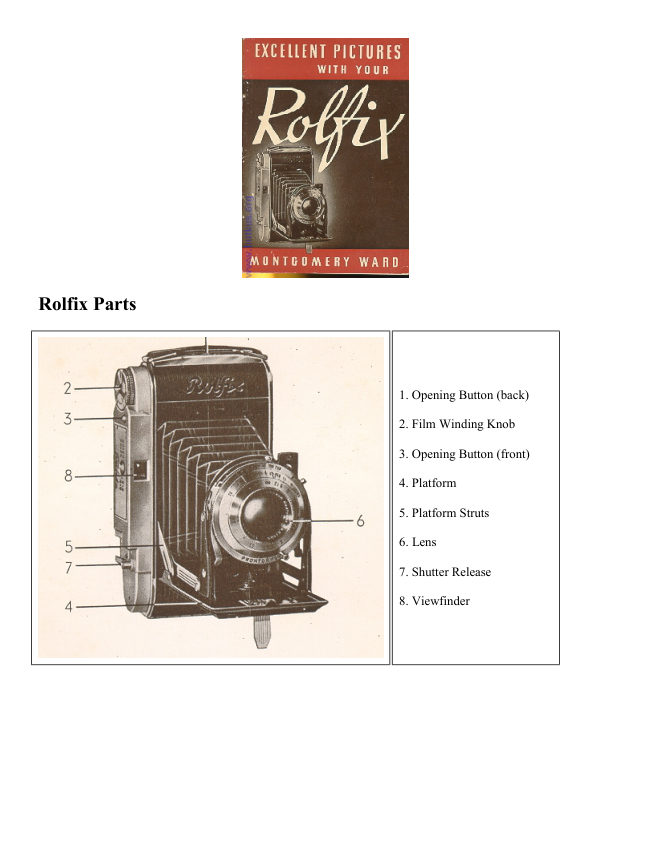
              AND HAVE THE CONTROLS OF YOUR ROLFIX VISIBLE

                        WHILE YOU READ THIS BOOK

                         INTRODUCING THE ROLFIX

It is easy to take pictures, day or night, with your ROLFIX folding camera. Beautifully designed and:-
constructed, your ROLFIX has a top. quality coated lens and a shutter that is internally synchronized for flash
exposures. Learn to operate your ROLFIX so as to get maximum enjoyment: of the precision workmanship and
performance of this fine German camera.

Use only standard black and white or color roll film size No. 1 20.

The ROLFIX is equipped to take two different sizes of pictures. You will get the following number of pictures
with these No. 120 films: - -

                                         8 exposures, size 2 1/4" x 3 1/4"
Black and White films
                                         12 exposures, size 2'/4" x 2 1/4"

                                         6 exposures, size 2 1/4''x 3 1/4"
Ansco and Extachrome Color films
                                         9 exposures, size 2 1/4" x 2 1/4"

                                          8 exposures size 2 1/4''x 3 1/4"
Kodacolor films
                                         12 exposures size 2 1/4''x-2 1/4"


The directions for loading are included in this part of the text as the first step in the picture taking routine as a
whole. HOWEVER, we recommend that you read this book through and learn the complete operation of your
ROLFIX before actually loading the camera with film.

1. Open the back of the camera by pushing the opening button (back) in the direction of the arrow. Inside you
will find a removable metal frame. This is a picture mask which, if left in place , will give you 12 pictures, size
2 l/4''x 2 1/4''. Use the upper film window for keeping track of exposures: If you want full size 2 1/4 x 3 1/4"
pictures, remove this picture mask-entirely and use the lower film window for counting exposures. :
View original page 4Page 5 · Read text
2. You will find an empty spool at the winding knob end of the ROLFIX. Leave it in its chamber. it is on this
take-up spool that the film is wound. Insert the new roll of film into the other film chamber.

3. Break the seal and pull the film across the camera back. toward the empty spool, making sure that the black
side of the paper faces down. Insert the narrowed end of the paper into the longest slot of the empty take-up
spool. Give the winding knob one turn to securely engage the film, making sure the film is running straight
across the camera back


4. Close the camera back. Push the film window button on the back of the camera upward to uncover the
windows. Now wind the film by turning the winding knob in the direction of the arrow until the number "1"
appears in whichever film window corresponds with the size picture you are taking. (Upper window, 2 1/4" x 2
1/4" lower window, 2 1/4" x 3 1/4.). Close the windows again by sliding the button down. NOTE: To protect
the film from light and possible fogging keep windows covered except when winding film.

ALWAYS LOAD CAMERA IN SUBDUED LIGHT.


                          OPENING THE FRONT

To open the ROLFIX, press the opening button (front). The front platform will spring open. Pull the platform
down until both struts catch and click. (To close, press down on the struts and push platform in until it clicks
shut.)

                              FOCUSING

The accuracy with which you focus depends upon your ability to judge distances. It is best to set up a
"yardstick", such as one walking step equals about three feet. When you have judged your camera-to-subject
distance in feet,
turn the lens until the indicator- is opposite the desired number on the footage focus scale. When taking distance
pictures (beyond 50 feet) set the lens at "Infinity" (no) to attain universal focus. NOTE: It is best to set the lens
at "Infinity" before closing the camera. Otherwise the lens wilt protrude and may be damaged as you close the
camera.

                            LENS OPENINGS

The size of the lens opening regulates the amount of light which reaches the film. Set the size of the lens
opening by. moving the lens opening indicator to the desired number on the engraved lens opening scale.
NOTE: fi22 or f/32 is the smallest lens opening; fi3.5 or f/4.5 is the largest lens opening; therefore, the lowest
numbers on the lens opening scale allow the greatest amount of light to. reach the film during exposure.

                             DEPTH OF FIELD

When the footage focus scale is set for a given camera to-subject distance, the ROLFIX will focus sharply upon
any object at that distance. Objects closer to or farther from the camera are acceptably sharp. The depth of this
secondary zone, that of acceptably sharp focus, is called the Depth of Field. NOTE: The Depth of Field zone
increases as the lens opening becomes smaller, that is, as the lens opening indicator is moved toward the highest
numbers on the scale. (See Depth of Field Guide, page 19.)
View original page 5Page 6 · Read text
DEPTH OF FOCUS ADJUSTMENT RING

ROLFIX and ROLFIX II. On the front of the shutter there is the ring for adjusting the depth of focus means of
which the effective depth of focus may be ascertained:

To LEFT and RIGHT of the indicator are the diaphragm values in the same order from 3.5 resp. 4.5 through 22.

Underneath it is the distance-setting ring with numbers in feet. The depth of focus is thus limited by the
indicated feet under the diaphragm value on the left and the feet indicated under the equal diaphragm value on
the right. Obviously the values of depth of focus will change with any alteration in the setting of the lens.

                          SHUTTER SPEEDS

The shutter speed scales of the ROLFIX cameras are marked as follows:

Rolfix Junior... Bulb, 25, 50, 200

Rolfix..............Bulb, 1, 2, 5, 10, 25, 50, 100, 250

Rolfix II .........Bulb, 1, 2, 5, 10, 25, 50, 100, 250, 500

These markings designate one second or the fractional part of a second the lens will remain open when the
shutter has been released. Set the shutter speed by turning the large collar on which the speed scale is engraved
until the desired number is opposite the pointer.

                    TIME EXPOSURE SHUTTER SETTINGS

Rolfix Junior.... When the shutter is set at "B" (Bulb), it will remain open as long as the shutter release is being
pressed and will close when pressu're is lifted. Use "B" for any exposure requiring a longer time (slower shutter
speed) than is marked on the shutter speed scale. Open flash pictures may be taken on "B" setting.

Rolfix Use "B" as directed above. When the shutter is set at "B" (Bulb), it will remain open after release, as
long as the release is being pressed.

Rolfix II Use "B" as directed above. "T" Time Exposures. For long exposures, when taking pictures at night, of
interiors, with insufficient illumination, or operating with flashlight powder etc., a wire release with adjusting
screw is used, which is mounted in the wire release socket of the shutters Set shutter on "B", press wire release
and tighten adjusting screw. The shutter will stay open as long as the adjusting-screw is not loosened again.
These long exposures can be made only with a tripod or-some other firm and steady support.

NOTE: Always use a tripod or other firm support when taking pictures with slower shutter speeds than 1/25th
second.
View original page 6Page 7 · Read text
OUTDOOR EXPOSURE GUIDE

FOR VERICHRO ME, PLENACHROME, SENSACH ROME, PLUS X AND SUPREME FILMS

(Under ordinary light conditions with black and white film, the average camera setting is f/11 at l/50th second
or f/16 at l/25th second.)

For faster films (Super XX, Superpan Press, etc.) use the next smaller lens opening (next higher number).


For color films use the next larger lens opening (next lower number). For brilliantly lighted subjects use the
next smaller lens opening; for close-ups and pictures in the shade use the next one or two larger lens openings.

                          SHUTTER RELEASE

The ROLFIX cameras are equipped with a shutter winding lever which prevents double exposures. The shutter
release will work only if this lever is pushed to the left, or wound.

Release the shutter by pressing the shutter release button. NOTE: Use a slow steady pressure on the release
button to avoid moving or jerking the camera and thereby blurring the picture.

The Roltix Junior and Rolfix have a shutter cable release socket. A cable release is used primarily for remote
control release of the shutter or for extremely long exposures. Any standard cable release with tapered threads
(# 5) will fit the socket.

                               SELF TIMER

                         (DELAYED SHUTTER ACTION)

A self timer release is built into the shutter mechanism of the ROLFIX. This timer delays shutter action after the
release button has been pressed, enabling the person who is taking the picture to be in the picture also. When
using the self timer, place the camera on a tripod or other firm support. Operate the self timers as follows:

Rolfix .... Make the proper distance, Shutter and lens adjustments. Then push the self timer lever down and to
the left as- far as it will go. Wind the shutter, press the shutter release and get into the picture. You will have
approximately 10 seconds in which to get into the picture before the shutter is actually released and the picture
snapped. NOTE: The self timer can be used for any shutter speed except Bulb.

Rolfix II .... Make the proper distance, shutter and lens adjustments. Push the shutter winding lever to the right
until it winds. Push the self timer button back, then push the shutter winding lever on over to the right as far as
it will go. Press the shutter release and get into the picture. You will have approximately 10 seconds. NOTE:
The self timer can be used for any shutter speed except Bulb and 1/500 sec.
View original page 7Page 8 · Read text
DOUBLE EXPOSURE PREVENTION

The Rolfix 11 (Deluxe) is furnished with a catch preventing double exposures.

After each exposure the shutter release is locked; therefore do not use force. The catch is opened only by
winding the film to the next number. The red signal beside the shutter release indicates that the catch is removed
and the camera ready for the next picture.

Attention! When handling the camera without a film, mind that after the appearance of the red signal you must
give the film winding knob one more turn. This is not the case with the film installed, for then you always wind
as far as the next number.

                          FILM RECORDING DISK

As a means of recording what film is loaded in the camera, there is a film record disk mounted on the film
winding knob.


                                   Rating

Example: Super XX Film          100

Kodachrome                     10

Kodacolor                      25


After the camera is loaded, turn the disk until the index marker points to the proper film speed. The outer ring is
set for DIN ratings and the inner ring for ASA ratings.


The Rolfix jr (Deluxe) is equipped with a telescop viewfinder. Aim the camera by looking through the small
square of the finder and "framing" your picture in the large square. If taking 12 pictures size 2 1/4" x 2 1/4'', use
the smaller frame which is limited by the inner straps. On the top of the finder there is a holder for accessories.

The Rolfix (Deluxe) and Rolfix II (Deluxe) are furnished with a new finder body with telescope-finder and
adjustable window. Aim the camera by looking through the small square of the finder and "framing" your
picture in the large square. If taking 12 pictures 2 1/4"x2 1/4" push the button on top in direction of arrow to the
indicated size. On the top of the finder there is a holder for accessories. What you can see through the frame of
the viewfinder will be the picture.
View original page 8Page 9 · Read text
If the subject to be photographed is vertical, hold the ROLFIX upright with the finder on the right hand side.
Hold the camera firmly in both hands, cradling the platform in the palm of the right hand so that the shutter
release can be pressed with the thumb of the right hand. If the subject is horizontal, hold the camera on its side
with the viewfinder at the top, still cradling the platform in the palm of the right hand, but so that the shutter
release can be pressed with the index finger.

With the camera in either position, put your eye very close to the viewfinder and hold the camera straight and
steady against your face while aiming through the finder and pressing shutter release.

                         TAKING THE PICTURE

It is best to practice the following picture-taking routine before actually loading your ROLFIX with film. In this
way you can become familiar with the ROLFIX controls and avoid forgotten details.

1. Select your subject. Carefully estimate the camera-to-subject distance and focus the camera lens by setting
the footage focus indicator.

2. Set the shutter speed and lens opening as indicated by the exposure guide in this book, a calculator or light
meter.

3. WIND THE SHUTTER!

4. Aim the camera accurately, making sure all of your subject is in the viewfinder. Have your picture well-
balanced according to the size and shape of the finished picture desired. (Vertical, horizontal, amount of
background, etc.)

5. Hold the camera as directed previously, keeping it level and steady against your face. (or waist.)

6. Press the shutter release slowly and steadily, trying not to jerk the camera.

7. Wind the film immediately after taking each picture, being careful to use the right film window.


                 CLOSING THE FRONT

                                     It is best to keep the front of the ROLFIX closed at all times except while actually
                           adjusting the camera-setting or taking pictures. Carrying the camera with the front
                          platform open endangers the entire working. mechanism and lens to bumps and
                             scratches.

                        Learn to operate the camera quickly, so that you will not be tempted to keep the
                          platform open in order to take a "fast" snapshot.

                         Before closing your ROLFIX, remember to turn the front lens back to "Infinity". Do
                          not close the camera while the shutter and self timer are wound.

                    To close the ROLFIX, press down on the struts and push the platform in until it
                             clicks shut.
View original page 9Page 10 · Read text
REMOVING THE FILM

After the last picture has been taken, wind the film until you can no longer see the paper through the film
window. Then open the back of the camera and wind the film up tight on the spool. Fold the pointed end of the
film paper under and seal the spool with the "Exposed" sticker. Remove the exposed roll by pulling out the film
winding knob and lifting the roll out of its chamber.

Transfer the empty spool from the film supply chamber to the take-up chamber so as to be ready for the next
roll of film.

                           FLASH PICTURES

The ROLFIX cameras have built-in synchronization for flash; that is, a special switch in the shutter which
automatically fires the flash bulb when the shutter is released. With built-in flash synchronization a battery
holder and reflector with the proper connecting cord are all that is necessary. Use the European type (sometimes
called the "Prontor S") connecting cord.

Specific instructions for flash are as follows:

Rolfix Junior (Vario Shutter) .... Use only midget flash bulbs (SM or SF). Set shutter speed at 1/50th for all
flash exposures. See Flash Exposure Guide, page 18, for correct distance and lens opening settings.

Rolfix (Prontor M-X Shutter) .... The Rolfix shutter is equipped with settings for two flash synchronization
contacts: M Contact (yellow dot) and X Contact (red dot).

M Contact .... Set M-X indicator at M. Use any class M (wire-filled) flash bulb (# 5, 25, 11, 22, 0, 40). Use any
shutter speed. SET SELF TIMER AT M. (This self timer M setting is necessary, as it compensates for the delay
between release of shutter and peak of flash.) See Flash Exposure Guide for correct · distance, shutter speed and
lens settings. NOTE: M flash synchronization is most commonly used because it operates at any shutter speed
and accommodates bulbs with greater light output.

X Contact .... Set M-X indicator at X. Use any class F (gas-filled) bulb (SM or SF). Set shutter speed at 1/50th
or slower. See Flash Exposure Guide, page 18 for correct distance and lens settings. NOTE: Use X
synchronization when taking self timing pictures. An electronic strob gun may be used with X synchronization.
With strobe gun use any shutter speed.

Roltix II (Synchro Compur-Rapid Shutter) .... The Rolfix II, like the Rolfix, is equipped with M-X flash
synchronizer contacts. See instructions for the Rolfix, above, for operation of the M-X synchronizations, with
this exception:

M Contact .... Set M-X indicator at M, but DO NOT WIND THE SELF TIMER. (The timer that compensates
for the delay between shutter release and peak of flash is built into the shutter of the Rolfix II and therefore sets
automatically.)
View original page 10Page 11 · Read text
FLASH EXPOSURE GUIDE


How to use the above guide: For example, the guide number for A # 5 bulb using Verichrome film and '/2sth
shutter speed is 130. If the camera-to-subject distance is 10 feet, divide 130 by 10, which is 13. Use the f stop
closest to 13, or in this case f/11. For additional information see the outside of your flash lamp carton.
View original page 11
Page 12 · Read text
HINTS FOR BETTER PICTURES

1. Always keep the camera lens clean. Use only very soft lens tissue when cleaning to avoid scratching the lens.

2. Always load and unload your camera in subdued light NEVER IN DIRECT SUNLIGHT.

3. Learn and adopt the correct picture-taking routine. (See page 14.)

4. Do not take a picture directly into the sun.

5. Focus accurately. Pace off the distance. (One step equals about three feet.) The minimum camera-to-subject
distance for sharp focus is about four feet, unless you use a special portrait lens

6. Estimate light conditions carefully. Use an exposure table, a meter or calculator whenever possible. If in
doubt, tend to over-expose.

7. For photographing a subject in motion use a faster shutter speed (about l/100th second) or choose a camera
position so that subject movement will be toward or away from the camera.

8. Hold the camera level and steady when pressing the shutter release. Always use a tripod or other firm support
when taking pictures at a slower shutter speed than 1/100th second.

9. Wind the film after each picture.

10. Keep the film windows closed except when winding film.

11. Do not use exceptionally old film. It is best to have film developed before the expiration date.marked on the
box.

                              CARE OF YOUR ROLFIX

The front and rear elements of your ROLFIX lens should be carefully cleaned from time to time with soft lens tissue or a camel's hair
brush. If dust particles accumulate inside the camera, blow them out carefully. Protect your camera from sand, snow and rain.

                               REPAIR AND REPLACEMENT

To obtain service on your ROLFIX contact your nearest Wards Retail Store, Mail Order House or Catalog Office. Provide the Model
Number of the camera.
View original page 12From the M. Butkus archive. Original publisher and archive notices are retained.
Check the model and edition against your equipment.
PDF verified 2026-10-10.