Film cameras
Rollei 35SE 35TE Quick Guide Quick start guide
Quick start guide for Rollei 35SE 35TE Quick Guide. 22 pages in English. Read the original PDF, download or print a copy without registration.
22 pagesEnglish1.8 MB PDF
Loading your manual…Open PDF directly
Document details
- Brand
- Rollei
- Model / document
- Rollei 35SE 35TE Quick Guide
- Document type
- Quick start guide
- Language
- English
- Pages
- 22
- File size
- 1.8 MB
- Category
- Film cameras
- Document date
- Not specified in catalog
Search available document text
Find a term, then jump to its page in the original PDF. Image-only pages may not be searchable; check the PDF for exact wording and diagrams.
Page 1 · Read text
ROLLEI 35 SE/TE

‘wwow.butkus.us

Anderungshinweis

Im Rahmen der von Rollei standig betriebe-
‘nen Modelipflege erhielten diese Kameras
‘zwei Detailénderungen, die der Erieichte-
rung-und Sicherheit im Gebrauch dienen.

Die Blendenriegettaste
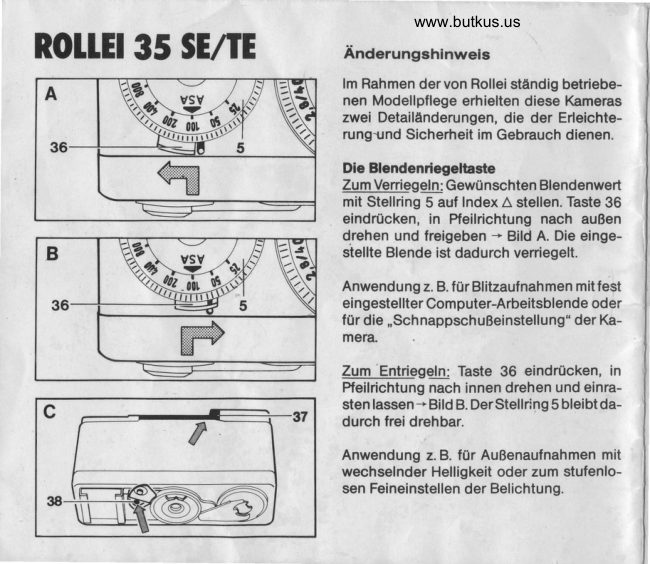
ZumVertiegeln; Gewanschten Blendenwert
mit Stelling 5 auf Index A stellen. Taste 36
eindrOcken, in Pfelrichtung nach auBen
‘drehen und freigeben ~ Bild A. Die einge-
stelte Blende ist dadurch verrieget.

‘Anwendung z.B. for Blitzaufnahmen mitfest
‘eingestelter Computer-Arbeitsblende oder
{Or die .SchnappschuBeinstellung” der Ka-
mera.

Zum Entriegeln: Taste 36 eindrocken, in
Preliichtung nach innen drehen und einra-
stenlassen-~BildB, DerStelling bleibt
durch frei drehbar.

‘Anwendung 2.B. for AuSenaufnahmen mit
wechseinder Helligkeit oder zum stufenlo-
‘sen Feineinstellen der Belichtung.
View original page 1Page 2 · Read text
Die Rickwandmarkierung
Bild C zeigt die Rotmarke 37 an der oberen
Ruckwandkante und die Rotmarke 38 fOr
den Rickwandriegel 21. Diese beiden Rot-
rmarken verschwinden beim richtigen Ein
‘setzen und Verriegeln derROckwand. Sicht-
bare Rotmarken zeigen dagegen an, da8 die
RUckwand nicht bis zum Anschiag einge-
‘schoben und noch nicht verriegelt

Modification advice

In line with Rolle’s constant concern with
the design of their camera models, two
‘modifications have been made tothe above
Cameras with a view to improving operating
‘ease and reliability.

‘The aperture stop lock button
To lock: Set the required aperture using
aperture ring 5 on index A. Depress button
36, turn outwards in the direction of the
fartow, and release ~ fig. A. The aperture
setting is then locked in position.

Possible use: Flash photographs with fixed
‘computer operation aperture, or to set
‘camera to "Snapshot"

‘To release: Depress button 36, turn inwards
inthedirectionofthearrow, andallowtolock
inplace ~tig. 8. The aperture ing 5 willthen
tum freely.

Possible use: Outdoor photographs with
variable brightness, or continuous fine
adjustment of exposure.

‘The rear panel marking
Fig. C shows red mark 37 on the top rear
panel edge, andredmark38 forbacklock21.
‘These two red marks disappear when the
‘back is correctly replaced and locked. ithe
redmarksare visible, therefore, he backhas
rot been pushed in far enough to reach the
Seating position, and is not yet locked in
position,
View original page 2
Page 9 · Read text
Merci de faire un don de 2,50 € pour soutenir ce site via E-bay ... www.PayPal.me/butkus


Als u deze handleiding nuttig vindt, doneer dan $ 3 aan https://www.paypal.com/paypalme/butkus


Bitte spenden Sie 2,50 Euro, um diese Website über E-Bay zu unterstützen ... www.PayPal.me/butkus
View original page 9
Page 22 · Read text
Merci de faire un don de 2,50 € pour soutenir ce site via E-bay ... www.PayPal.me/butkus


Als u deze handleiding nuttig vindt, doneer dan $ 3 aan https://www.paypal.com/paypalme/butkus


Bitte spenden Sie 2,50 Euro, um diese Website über E-Bay zu unterstützen ... www.PayPal.me/butkus
View original page 22
Related documents and language editions
From the M. Butkus archive. Original publisher and archive notices are retained.
Check the model and edition against your equipment.
PDF verified 2026-10-10.