Film cameras
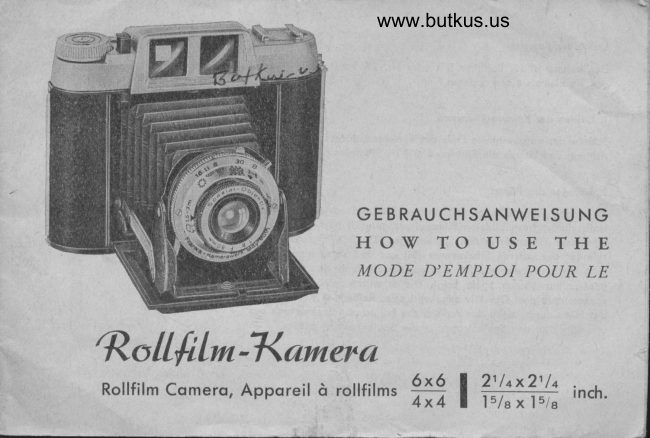
Rollfilm Kamera User manual
User manual for Rollfilm Kamera. 21 pages in German, French. Read the original PDF, download or print a copy without registration.
21 pagesGerman, French4.1 MB PDF
Loading your manual…Open PDF directly
Document details
- Brand
- Various brands
- Model / document
- Rollfilm Kamera
- Document type
- User manual
- Language
- German, French
- Pages
- 21
- File size
- 4.1 MB
- Category
- Film cameras
- Document date
- Not specified in catalog
Search available document text
Find a term, then jump to its page in the original PDF. Image-only pages may not be searchable; check the PDF for exact wording and diagrams.
Page 3 · Read text
loden der Komero
Die Komero ist fOr Rollfilme B ll oder Nr. ]20 konstruierf' Verwen-
den Sie niemols einen onderen Film.

'| . Uffnen der Komero-RUckwond
Schiebe dos oufgewinkelte Ende des Rrickwondschlosses (27) in Pfeil-
richtung und kloppe die R0ckwond (31) im Schornier ouf.

2. Einlegen des Filmes
Ziehe den Filmspulknopf (23) noch ou8en und schwinge den ols
Holbzylinder ousgebildeten Filmspulenlrciger (33) noch oben. Setze
eine leere Filmspule in' den Spulentrciger (33). Schwinge den Holb-
zylinder der unteren Filmkommer (36) ous und sefze einen neuen
Film ein, und zwor so, do8 dos ongespitzte Ende des Filmschutz-
popiers zur oberen Spule zeigt. Die schworze Seite des Schutz'
popiers mu8 dem Obiektiv zugekehrt sein. Rei0e den Klebeslreifen
des Films durch, ziehe den Anfong des Filmschutzpopiers  eiwos ous
und schwinge den Spulentrciger in die Spulenkommer zuriick.

                                                                  Abbildung / Picture / Photo 2


                                                                                                                                                                                                                                                                                                                                                                       1,2                     -a
View original page 3Page 4 · Read text
www.butkus.us FOhre dos ongespitzte Ende des Schutzpopiers  (35) in den lcingeren                                                                              Schlirz (34) der oberen Leerspule, so do0
es bei dem kleineren Schlilz wieder hervorlrilt. Kloppe den oberen Spulentrciger (33) mit der Leerspule  in
 die Spulenkommer zur0ck, wozv der Filmspulknopf (23) nocJr ou0en gezogen werden muB. Drehe den Film-
spulkopf (23) in Pfeilriclrtung, bis der Mitnehmer desselben in den Schlitz der Leerspule greift, wodurch
 der Filmspulknopf in seine olte Loge zuriickfedern konn.
 Drehe zwei bis drei Logen Schutzpopier ouf die Leerspule (34) und beochte, do0 dos Filmpopier  obsolpt
gerode lcluft, ohne on den Rcindern der Spule zu knittern. Nun kloppe die Komero-Rockwond  (3.;) zu.
Drehe den Film weiier, bis Punkte im Filmfenster (37) sichtbor sind; jetzt drehe vorsichtig weiter, bis die
Zohl I erscheinf' Der Film ist nun fiir die erste Aufnohme bereit. Noch der Aufnohme ist es zweckmciBig,
den Film sofort weiterzudrehen.

Loadlng the camera
The Camera is constructed for rotl films B If or No 120. Never use any other size films.
(1) OPENING CAMER,A BACK
Open the badr by pushing the end of the back loek (2?) in the direction of the arrow andfold the back (31) upwards on its hinge.
(2) TNSERTING I.ILM
Pull out ttre ftlm winding knob (23) and swing upwards the film spool carrier (3g) that has
the shape of a halr cylinder. Place an empty spool in the spool carrier (gB). Swing out the half
cyllnder of the lower film ctramber (36) and place a new film ln lt in sueh a way that the
pointed end of the protectlve paper polnts to the upper spool. The black side of the protecflve

                                                                    3
View original page 4Page 5 · Read text
paper must face tlre lens. Break ttre adhesive strlp of the film, pull out somewhat the beginning
of the protective paper and swing the spool carrier back into the spool chamber.
Bring up the pointed end of the protective paper (35) into the longer slot (34) of the upper
empty spool, so that it protrudes from the smaller slot. FoId the upper spool carrier (33) wlth
the empty spool back into the spool chamber; for this purpose it is necessary to pull out the
lllm winding knob (23). Turn the film winding knob (23) in the direction of the arrow until its
catctr clutches the slot of the empty spool, thereby enabling the film winding knob to spring
baclr into its old Posltion.
Wlnd 2 to 3 layers of the protective paper onto the empty spool (34) and mind that the film
paper is running absolutely straight without crumpling at the edges of the spool. Now fold
down the camera back (31).
Wind the film further untll dots become visible in the film window (37); now wind cautiously
until the number 1 is appearing. Then the film is ready for the first exposure. After taking
a picture, it is advisable to wind on the film at once to the next number.


Chargement de I'aBparell
Le Camera e6t congu pour I'emplot de dUilms B II ou tzo. N'employez lamais d'autres films.
I  Comment ouorir le dos de I'appareil?Ttuez le bout repli| ile la fermeture (2fl ilans le sene ile la flt&e et oous pouocz ouprir le ilot (jt),
z) Placement du fitm
Tlrez Ie bouton il'entninement (4) et foites sortir Ie porte.bobine cylindrique  bil'  Placez ilans Ic porte'

1
View original page 5
Page 6 · Read text
www.butkus.us
 bobine (n) ane bobine oide. Faitce soilir alors le pofte.boblne cllindrique inltrieur ($) et placez 11 an
nouoeau lilm, ile telle sorte que le bout pointu du papier protecteur soit ilirig€ oers la bobine suptrieure
oide. Le cOtE nob du papier protecteut iloit Afte tournd oers I'obiectif. D|bobinez un peu Ie papier protecteut
et lentrcz Ie pofte.bobine dans son ancienne position.
Entrez alours Ie bout pointu ilu papier protecteur  (jfl   ilans Ia plus longue fente (3fi de Ia bobine oide,
jusqu'l ce qu'll rcsofte par la petite fente ile cette bobine. Rentrez le pote=bobine sup&ieur (3!  aoec Ia
bobine oide, Pout y arrioer, tirez le bouton il'entiainement (4) vers I'exttrieur, Tournez, ilans Ie sens ile Ia
flddte, Ie bouton il'entrainement (zj) jusqu'd ce que son pignon rcntre dans I'encodte de Ia bobine oiile'
ce qul fera rcntrer Ie bouton il'entrainement dans sa position initiale,
Bobinez quelques touts ?ou/ oous assurer que le lilm se bobine bien drolt, sans accrodter sur. Ies c6tds'
Fermez Ie dos de I'appareil (V).                                                                                                                                            ,
Continuez alors I bobiner le film, iusqu'd ce que iles poitts apparaissent ilans Ie ooyant rouge (3fl;  ensuite
toutnez lentetnent jusqu'd ce que le &iffre t apparalsse ilans le ooyant touse. L'appareil e* prAt d prendte
la premidre photo. Aprls aooir pris une oue, il est utile il'aoancer le fllm ile suite iusqu'au chtflre suioant.


 Entfernen des belichteten Filmes
Noch der letzlen Aufno.hme drehe den Filmspulknopf  (23) weifer, bis sich kein Schutzpopier mehr im Filq'
fenster zeigt. Nun 6ffne die Rijckwond (31), spule den Film dicht ouf die Spule. Ziehe den Filmspulknopf (23)
noch ou0en, schwinge den Spulentrclger mit der vollen Filmspule noch oben, nimm den Film herous und
klebe mit dem ongebrochten Klebestreifen zu.

                                                                                        5
View original page 6Page 7 · Read text
Wechreln der LeersPule
Nimm die Leerspule ous der unteren Filmkommer und setze diese, wie eingongs beschrieben,  in die obere
Filmkomme  r.

Removlng the exPosed ftlm
After the tast exposure turn the film windlng knob (23) until no more protective paper ts
visible through the film window. Then open the back (31), wind the film tlght on the spool
and close it wlth the attaetred adheslve strip. Pull out the film winding knob (23)' swing the
spool carrler wlth the full spool upward and take the film out.
CEANGING THE EMPTY SPOOL
Take the empty spool out of the lower film dramber and lnsert it into the upper film dramber
as descrlbed above.

Enlevement du fllm exBos6
 Aprds aooir pris Ia ilernidre photo, on contiflue I  faire uodncel le lilm iusqu'd ce qu'on ne ooit plus  ile
papier protectew ilerrilre le ooyant rouge. Ouorez alors le dos $t),  bobinez le film complltement et collez
Ie bout gommC. Tirez le bouton il'entrainement (4),  laites sorth le porte.bobine aoec la bobine pleine et
rctirez Ie film.
Changement  ile la bobine oide
 Tlrez la bobine oiile ilu porte=bobine inflrieur et placez le  ilans le porte.boblne eup*tiew, comrne ll a E#
 au dtbut.

6
View original page 7
Page 8 · Read text
www.butkus.us
 Offnen der Komero                         (Abb.3)
 Durch Druck ouf den Knopf (28) springt der Loufboden (21) ouf. Ziehe den Loufboden (21) noch unten, bis
beide Streben h6rbor in die Rost einschnoppen,  sonst steht der Loufboden nicht fest und dos Obiektiv be-
 findet sich nicht in der richtigen Entfernung vom Film. Dies konn die Ursoche unschorfer Bilder sein.
                                                                                                                                                                                          Digitally signed by mike butkus
                                                                                                                                           DN: cn=mike butkus,                                    mike               o=orphancameras, ou=29,

                                                                                                                                                                   Date:                                                                                                                                                                   2018.12.27 14:03:33
                                                                                                                                                                                      -05'00'Opening of camera                    (picture  3)     butkus          email=mike@butkus.org, c=US
After pressing the button (28) the baseboard (21)
will  fly  open. Pull down the base-board (21)
until both struts click audibly into the notch,
or else the baseboard will not be fast and the
lens is not in the correct distance from the film.
This may cause unsharp pictures.

Comrnent ouvrir le devant de l,appareil?
(photo j)
   pousantEn                           (zB)                                   couoercle                                Ie                                              (zt) s'cuare           sur Ie bouton                                                               .'a5                                        jusqu'dTirez                                dessous,      Ie couoercle                   (zt) oers                                        ce que                           Ie
Ies tiges d'attache renfient dans les crans d'arrAt (oous
perceoez un d€clic). Il laut bien y oeiller, car autrentent
Ie coupercle ne tient pas bien et I'objectif ne se trouae
pas d la distance conaenable du film; ceci pourrait
cttuser des photos moins nettes.                                  Abbildung  / Picture / Photo 3
View original page 8Page 9 · Read text
Obiektiv                     (Abb. 4)

Einstellung der Entfernung (5)
Portrcii, filr Enlfernungen                 ffi,         von 1,5-3 Meier
Gruppe, fUr Entfernungen
          von 3-8 Meter
Londschoft,  fiir Enifernungen
            vo,n 8-o   Unendlich

Je noch Bedorf stelle mon die Obiektiv-
morke 'l ouf eine dieser Zohlen.


                                                              Abbildung  / Picture / Photo 4
View original page 9Page 11 · Read text
23    22
 Einslellen der VerschluRzeifen  (3)
M :  Momenloufnqhme (r/so Sek.)
B :  Zeitoufnohme
Bei B 6ffnet sich derVerschluB so longe,
wie der Gehciuseousl6ser gedrUckt wird.
Aufnohme mif B nur ouf Stotiv oder
fester Unterloge, do dos Bild sonsl ver-
wockelt wird.


Einstellen der Blende (4)
Blendendffnung: Anwendung bei:
    16           Sonnenschein
             I I             bedeckt. Himmel
    8            trObe, Regen

Einstellung konn ouch zwischen den ein-
zelnen Werten erfolgen, do der Ver-
schluB die hochwertige lrisblende be-
s  i lzt.                                                     Abbildung / Picture / Photo 5
l0
View original page 11Page 13 · Read text
B  I  i tzl icht-Synch ronisie rung
Die Blitzlicht-Synchronisierung bzw. der A'nschlu0nippel
hierfOr befindet sich rechts oben om Verschlufj' Um die-
selbe zu verwenden, ist es erforderlich, dos Kobel der
Blitzlicht-Vorrichtung  in den AnschluS-Nippel (2) zu
stecken und die Blitzlichtlompe in dos Stotivgewinde der
Komero zu schrouben oder in den Holter (26) zu schie-
,ben (Abb.5 und 6). Beim Ausl6sen des Verschlusses
erfolgt outomotisch die synchronisierte EntzOndung der
Bliizlichtlompe.


Achtung   !
Elektronenblilzgerdte k6nnen mit der Komero nicht ver'
wendel werden. Benutzen Sie doher ousschlieBlich  Blitz-
ldmpchen der Gruppe M, z. B' PF oder XM 1 oder 5.

Holter fijr Zusotzgeriite
Oben ouf dem Suchergehduse befindet sich ein Holter
 fiir Zusotzgercite (26), wie Bliizlichtlompe, Enlfernungs'
 messer usw. Diese Teile besitzen enlsprechend genormte
 Fiihrungsleisten zum Einschieben in den Holter.                    Abbildung  / Picture / Phofo 5

 12
View original page 13
Page 14 · Read text
www.butkus.usFlash syndrronizing                              Sync,bronisation pour lampe-eclair (flasb)
The flash syndrronizer respect. its connectlng   La prise pour syndtro.flash se trouoe h droite au
nipple is on the right upper part of the shut-     ilessus ile I'obturateur, Pour s'en sercir, iI laut entrer
ter. fn order to use same it  ls necessary to    le cible ilu syn&ro.flash dane Ia prise (z) et oisser
                                                 Ia lampe.|clair (synchro.t'Iash) dans le pas de oisinsert the cable of the flashlight device lnto
                                                                                                                        glisser  lathe connecting nipple (2) and to screw the    pour pied, prdou d I'appareil, ou encore,                                                        lampe.{clair (flash) dans I'attadte (26)flash bulb            lnto               the                           socket                     tripod                                            ea-                                   of                                  the                                                                  les photos                                                                                        cette                                                                                                               dtclen,                                              S et 6 de                                                                                       brochure, Le fait de           pushmera,                                            (26)                                                (ptc-      or to                              it lnto                            holder                        the                                                               I'obturateur                                                                   opdre                                                  dter                                                                        automatiquement                                                                                                            I'allumage
tures 5 and 6). When the shutter is released    synchronisd de la lampe.6clair,
the synchronized flash bulb is automaticalty
ignited.
                                                              Attentionl
Attention                                             Les lampes Llectroniques ne peilaent pas Atre usds
Electronic flash guns are not to be used wlth    par les appareile.
the cameras. Therefore only use flash bulbs   Employez donc exlusioement les petites lampes
such as General Electric, Westinghouse No. F,     Cclair de la groupe M, par exemple pF ou AM 7 ou s
lL, 22, Sylvani,a No. 8, etc.                             (ooir photo fl,
Ilolder for supplementary equlpment
On the top the finder body there ts a   Attache pour accessoires
holder for  supplementary equipment  (26),    Sur le boitier se fiouoe une attadte pour iles acces,
sudr as a flash gun, rangefinder etc. These    soires (2fl tels que lampe,\clair, tdlemdtre etc. Ces
parts have standard guide plates tobeinserted    accessoires possbilent un rail, qui permet ile  leeinto the holder.                                            glisset ilans I'attadre ile I'apparcil
                                                                                   l3
View original page 14Page 16 · Read text
www.butkus.us
the ftlm to the next number. The red signal beslde the shutter release lndlcates that the
catdr ls removed and the camera ready for the next picture.
Attentlon: When handling the camera without a film, mind that after the appearanee of thered slgnal you must give the film winding knob one more turn. This is not the case wtth the
ffIm installed, for then you always wind as far as the next number.
When using a cable release ln the shutter the double exposure prevention does not work.

Blocage contre double exPositlon
Le Camerd possdile un  blocage eoitunt la  ilouble exposition. AprDs dtaque photo le  iltclendtementsur le boltier'est bloqu6; ne poussez ilonc pas aoec oiolence, Le blocage est seuleftent leot par I'apancement
du film au num|ro suioant.
Le ooyant rouge, I c6t/ du d1clendteur au le boitier, inilique le blocage est leoe et que l'apparell est ilenouoeau prit a prenilre une photo,
ATTENTION I Ea maniant I'appareil sans film, il faut tenlr conpte du tait-_qu'aprls  l'apparitlon -iluooVant rouge il faut encore tournbr enoiron 7. tour au.bouton d'entrainement du film. S'il y a un film ilans
l'apparell, ce cas ne se pr€sente pas, car on toutne autornstiquement iusqu'au num|ro suioant.

Zweibild-Einrichtung
Die Komero besitzt Zweibild-Einrichtung,  Bei Verwendung des Formotes 6 x 6 ist nur dos mittlere Film-
fensler zu beochten.
Bei Verwenduns des Formoles 4 x 4 ist v o r Einleqen des Filmes die Bildmoske einzusetzen. Die oboewin-
ke_lten Enden oin der Schmolseite der Mcske wer-den zwischen Komerogehiiuse und Filmgleitrolle iinge-
schoben. Bei Arbeiten mit dem Formot 4 x 4 wird dos du3ere Filmfenster 6enutzt.
Dos Formqt 4x4 hot den Vorteil, do8 Sie ouf dem 6x9-Film 16 Bilder oder Diqs in Schworz-WeiB oder
Color erholten,.sogenonnte Gro3-Dios, welche in den normolen Dio-Rcihmchen und Kleinbild-Proiekioren  zu
verwenden  stnd.
                                                                                   l5
View original page 16Page 17 · Read text
Two-slze equlpmcnt
The camera boasts a two-slze devlce. If slae 6XG ls used rnerely the eentral fllm-window  is
to be consldered.
                                                                                       ends                                                                             The--angUla:                                                               the film.                                                           loading                                             inserted before                              must be                a   size            used      4X4 lsff                     picture-*.rlf;i;mask                                                                                                                         roll.                                                              casing                                                           and the                                                                                fllm slide                                                 the camera                                     between                                    inieited                              fir"    ttre smari             side                 otiiIf operatlng with slze 4X4, the outer film-window  is used.
Slze 4X{ has the advantage that, on a 6X9 film, you obtain-16_p1ctu-res or transparencles lnblaclr and whtte oui'cororir, io c'attea eiini ii;ftdarEncieJ-wfricf wm be used in-ttre normal35 mm slldes and 35 mm sllde-projectors.

M6canlsme  i deux lmages
                                                                           {rllrmat                                                                          r  6- es-t employt,            posslde              un m\canisme, d ileux img1gs, Si le   camtraLa                                                                                     !                                                          employ|,                                                                                                    il'fait   instrer. seuleme,ntIe masquela fen|t'eile                    est prtse"Ti-iiiiiaeiotiiri."sii'fe'foriit centrate                                      + est                                                                                          i   i       du fitm                                                                                          insdrdes entre Ia boite"i't;;;;r;"';;i-i;'dr;-r;;e;-ii;.-        Lr; iri-ongiloi,tru ai coti ttroit du masque sont
ile la-camhra et le rouleau Slissant du film.
                                                                                                                   il'obtenb,                                                                 4 a.l'aoantace                                                                       format 4 x                                                                                que I'on emplovera                                                                                    aii diapositiis                                                                                 s&antsEn;;;;'ii;1ieoptrant aoec i-qi"Li'iioi"iiiitJ';;';5i;',;7t;;;-;;;'-;;;:i;;,,'-i.h.a.le-normales'format 4 r 4.on emploi lqfunAtre ert|rieurc ilu film..Le ilans les famettes              ile iliapositils et Ie proiecteur en miniature.


Aufnqhme
Um einwondfreie Aufnohmen zu erzielen, ist die richfige,Holfung-der Komero Vorousselzung- Abbildung 7 i"ioi Jiu kJrrekte Holtunq der Komero wcihrend der Aufnohme. Bei den Formoten 6 x 6 und 4 x 4 gibt es
 t"ii"  UUeit"ounq, ob Hoih, oder Quer-Aufnohme. Mon holte die Komero fest mit beiden Hdnden, filhre
den Sucher di-chti'ns Ause und brinse dos Aufnohmeobiekt in die Bildfeldmitte. Donn drEcke mon longsom
una iuiis den Geheuseiusl6ser  (22f durch. Aufnohmen-mii mehr ols Vso Sek. Belichtungsdouer modre mon
stets mit_Stotiv oder ouf fester Unterloge.
t6
View original page 17Page 18 · Read text
Takingwww.butkus.uspictures
                                         fn order to achieve perfect pictures it  is
                                            essential to hold your camera right. Pic-
                                          ture ? shows ttre correct way how to hold
                                   your camera while taking pictures. With
                                                     t}:e 2tlqx2rla or 15/e x 15/e indr size of picture
                                  you have long tlouble whether you shold
                                               ctroose the long or the narrow side as the
                                      base of the picture. Hold the camera fast
                                         with both hands, bring finder close to eye,
                                 and focus your object into the center of
                                     the picture area. Then press the body
                                    release (22) slowly and  gently  right
                                       through. For pictures with B exposures
                                      always use your tripod or another steady
                                          support.
                                          Prise de vues
                                       Pour obtenir des photos impeccables  il  est une
                                              condition indispensable de tenir conoenahlement
                                                       I'appareil L'image Z montre la fagon indispensable
                                     de tenir I'appareil conoencorrecte de tenir I'ap'
                                                      pareil pendant Ia prise de oues. Les formats 6 x 6
                                                 et 4 x 4 prisente I'aoantage qu'on ne doioe pas
                                                     h|siter pour faire une photo en hauteur ou en
                                                                               Iar geur.Abbildung / Picture I Photo 7
                                                                             17
View original page 18Page 19 · Read text
On tient I'appareil aoec les deux mains, on met Ie oiseur tow pr\s de I'oeil et on chercha d aooir Ie sujet au
milieu ilu champs il'image. Alors on pousse Ie d|clenchew (d d fond, Ientement et sans oiolence. pour les
photos d un temps d'exposition supdrieur  i  tljo de seconde prenez touiours un pied ou mettez ootre appareil
sur uile base immobile.

SchlieBen der Komerc                          (Abb. 8)
Stelle die Frontlinse (5) vor dem SchlieBen des Apporo-
les sfets ouf oo zurilck. Durch Druck ouf den hellen
Knopf ouf dem schworzen Quersteg des Loufbodens
unterholb des Verschlusses wird die Arreiierung der
Streben ousgel6sf, so do8 sich der Loufboden hochklop.
pen lci3t. Der Obiektivtrciger legt sich outomotisch  in die
Komero.

Closing of camera
Before closing your camera, always turn  the
front lens (5) baelr to infinity. pressure on the
light button on th.e black traverse of base-board
underneath the shutter releases the struts in suctr
a way that the base-board can be folded up. The
lens front folds automatically into the camera.           Abbildung  / Picfure / Photo 8

18
View original page 19
Page 20 · Read text
www.butkus.us
Fermeture de I'appareTl (ooir photo 8)
Mettez la lentille frontale (fl aoant la fermeture du couoercle sur position x, En appuynnt sur le bouton brillant
de la tige transoersale placCe en ilessous ile I'obturateur, on libbre l'arrAt et on peut facilement  releoer Ie cou'
oercle. Le porte=obiectif rentle automatiqilement dans le boitier de I'appareil.


Rolsdrtiige fijr bessere Bilder

Holte dos Komeroobiektiv imtner souber und reinige nur mit Obiektivtuch. Verwende niemols gew6hnliche
Stoffe, dq sie dos Obiektiv verkrotzen kdnnen.
Versuche nichi, Bilder ous geringerer Enlfernung ols 1,5 Meter oufzuhehmen, dq diese unschorf werden.
Bei B-Aufnohmen verwende slets ein Stotiv oder eine feste Unlerloge. Die Komero besitzt Stoiivgewinde.
Unter normolen Lichtverhdltnissen ist die giinstigste Komero-Einstellung f  : ll  und M r/so Sek. An trUben
Togen 6ffne die Blende ouf 8.
An sehr hellen Togen mit Sonnenschein ouf Wosser oder Schnee schlieBe die Blende ouf f :16.


                                                                                       l9
View original page 20Page 21 · Read text
Advice on better Pictures
Always keep the lens clean, wiping  it with the lens-cloth only. Never use ordinary cloths
for they might scratctr the lens.
Do no try ta take pictures at distances under 5 feet as they will be unsharp.
1lor exposures at B always use your tripod or some other means of steady support.
The camera has a bush for triPod.
Under normal light conditions the most favourable camera setting is f  : 11 and M.
On dull days open the diaphragm to 8.
On very bright days with sunshine on water or snow close the diaphragm to f


Quelques conseils pour mieux reussir
Tenez toujouts ootre objectil bien propre et ne Ie nettoAez qu'aoec une |toffe sp|ciale pour obiectifs' N'utilisez
jamais une \toffe ordinaire, oorrs risquez de faire des gtattes sur I'obiectif.
N,essayez pas ile photographier d une distance infdrieure h t,5 mdtre, car les oues manqueront  ile nettet6'
Pour les oitesses plus longues que M utilisez toujours un pied ou tlettez ootre appateil sur une base immobile.
lJn pas ile pis est priou d I'appareil.
Dans des conilitions normales lumidre, la mise au point iil€ale est: t:  tt  et M (llso sec.).
Par temps sotnbre ouorez le diaphragtne I 8. Par temps trds clair, aoec le soleil donnant sur I'eau ou sur Ia neige,
lermez le diaphragme i f  : fi.

20
View original page 21
From the M. Butkus archive. Original publisher and archive notices are retained.
Check the model and edition against your equipment.
PDF verified 2026-10-10.