Film cameras
Sawyer's Nomad 620 User manual
User manual for Sawyer's Nomad 620. 17 pages in English. Read the original PDF, download or print a copy without registration.
17 pagesEnglish1.4 MB PDF
Loading your manual…Open PDF directly
Document details
- Brand
- Various brands
- Model / document
- Sawyer's Nomad 620
- Document type
- User manual
- Language
- English
- Pages
- 17
- File size
- 1.4 MB
- Category
- Film cameras
- Document date
- Not specified in catalog
Search available document text
Find a term, then jump to its page in the original PDF. Image-only pages may not be searchable; check the PDF for exact wording and diagrams.
Page 2 · Read text
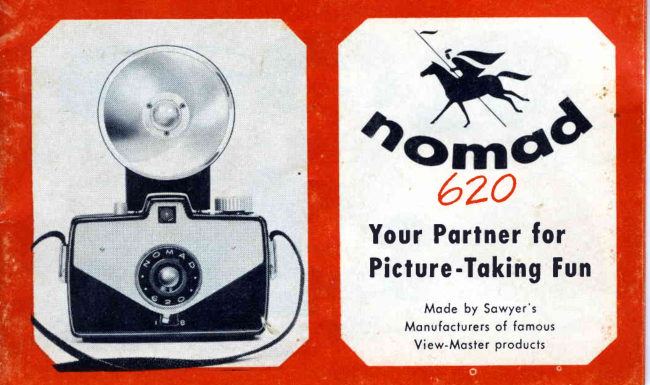
6zo
YourPortnerfor
      -TokingFunPicture

      Mode by Sowyer's
     Monufocturersof fomous
      View-Mosterproducts
View original page 2Page 4 · Read text
YOU'REALLSETTO SNAPUP THEFUN
when you've leornedthese7 eosyrulesfor toking pictures
with your NOMAD. Remember-procticemokesperfect!
 l. Move lens-settinglever to "1"  or "B", depending on the kind of pic-
    ture you're toking. (Leornmore obout this on poge 5.)
2. Keep the sun behind you for best results.
3. Stond ot leost 4 leel from your subiect.
4. Keep your picture subiectsimple; use simple bockgrounds.
5. Frome the picture corefullyin the finder.
6. Hold the comero steody os you snop the picture.
7. lmmediotelyofter toking the picture, wind the film oheod for the next
   picture. (Your Nomod 620 hos o speciol mechonismthot prevents
  double exposures.This mokesit impossibleto toke onother picture until
   the film is wound oheod.)
View original page 4Page 6 · Read text
SETTINGTHE LENS
T h e s m o l l l e v e r u n d e r t h e  l e n s i s o s p e c i o lf e o t u r e
of your NOMAD 620. lt controls the oction of the
lens shutter, ond lets you toke "time"  exposures
os well os regulor snopshols.
 W h e n  t h e   l e v e r  i s s e t o t                                                                                 ' ' l "   { l n s t o n i o n e o u s l
t h e s h u t t e rc l i c k so u t o m o t i c 6 l l y .W h e n  i t   i s s e t o t
"8"  (Bulb) the shutter opens when you press the
releose down, ond closes when you  let  it come
u p o g o r n .
S E T T H E L E V E RA T " I " _
  F o r o l l s n o p s h o t se, x c e p t i n v e r y d i m  l i g h t .
  F o r o l l  f l o s h s h o t s .
S E T T H E L E V E RA T  " B ' ' _
When you wont to tqke o picture of o non-moving
s u b i e c t ,i n v e r y d i m  l i g h t .
  (Hold the shutterreleosedown for the time sug-
  gested in instructionsthot come with the film.
  Do NOT move the comero.)
View original page 6Page 13 · Read text
PICTUREHELPS
SIMPLICITY Unnecessoryobiectsclutter
up your picture. For pleosingsnopshots
ovoid using more bockgroundthon you
needto tell the story.


CLOUD EFFECTSBy usingo cloudf ilter,
you con mokethosefluffycloudsstondout
ogoinstthe sky.Your deolerwill help you
selectthe properfilter. Use it with block-
ond-whitefilms-  never with color.

 www.orphancameras.com
View original page 13
Page 14 · Read text
CLOSE-UPS For close-uppictureswith
your Nomod,you con get os closeos 4 feet
from your subiect.To toke pictureseven
closerthon 4 feet, use o close-upottoch-
ment.(Askyour deolerobout size.)Close-
upsore excitingond fun to toke!


INTERESTTo hovethe mostfun with your
Nomod, try to moke every picture"tell o
story". Let your subiectsbe doing some-
thing, rother thon iust looking into the
comero.Or, hovesomeonepose,odmiring
the sceneryyou wont to copture.
View original page 14
Page 15 · Read text
Justo word obout the core of your
      comero. For the best resultsfrom
       y o u r N o m o d , k e e p i t c l e o n .W h e n
      looding,blow out the dustfrom the
       inside. Brushoff ony dust or lint
             f r o m t h e  l e n s-  o n d c l e o n g e n t l y
      with lenspoper.Never oil ony port
       of your comero.Keep your looded
     comeroowoy from hot oreos,such
      os glove comportmentsor the reor
     window shelfin o cor"

www.orphancameras.com
View original page 15Page 16 · Read text
620 NOMAD FEATURES
FfLM: 620 Roll Film; picture size2t/ax2t/a;
1 2 e x p o s u r e ps e r r o l l .
L E N S : N o m o d m e n i s c u sf - l 5 ,  f i x e d f o c u s
from 4 feet to infinity.
SHUTTER: Single speed; flosh synchro-
n i z e d ; i n s t o n t o n e o uosn d b u l b s e t t i n q s .
FINDER: Hooded, eye-leveltype.
DOUBTE EXPOSURE PREVENTIVE:
A u t o m o t i cs h u t t e rl o c k .
FTASH UNIT: Nomod Flosh; uses two,
s i z eA A ( p e n l i t e )b o t t e r i e sw i t h M - 2 l o m p s ;
eiectorsocket.
ACCESSORIES: See your deoler for o
c l o s e - u po t t o c h m e n ot n d f i l t e r s .
View original page 16
Page 17 · Read text
WARRANTY
Your comero corries ihe unconditionolworronty of the monufoc-
turer ogoinst defectsin workmonshipor moteriol for o period of
90 doys ond will be repoired or reploced (our option) without
chorge within this period.
   The,worronty is void in the event the comero hos been dom-
oged through misuse,occidents,or for other reosonsbeyond our
control.
          SAWYER'SINC.
                    P O R T L A N D O, R E G O N
        Mode by the Monufoclurersof View-MosterProducts
 rn)Sowyer'sInc., Portlond 7, Oregon.
Trodemorkreg. U. S. Pot. Off.    Morco Registrodo    Litho in U'S.A.

                  www.orphancameras.com
View original page 17From the M. Butkus archive. Original publisher and archive notices are retained.
Check the model and edition against your equipment.
PDF verified 2026-10-10.