Camera accessories
Sears KS- Winder User manual
User manual for Sears KS- Winder. 7 pages in English. Read the original PDF, download or print a copy without registration.
7 pagesEnglish0.6 MB PDF
Loading your manual…Open PDF directly
Document details
- Brand
- Ricoh
- Model / document
- Sears KS- Winder
- Document type
- User manual
- Language
- English
- Pages
- 7
- File size
- 0.6 MB
- Category
- Camera accessories
- Document date
- Not specified in catalog
Search available document text
Find a term, then jump to its page in the original PDF. Image-only pages may not be searchable; check the PDF for exact wording and diagrams.
Page 2 · Read text
| KS Auto WINDER

wwew. butkus.org

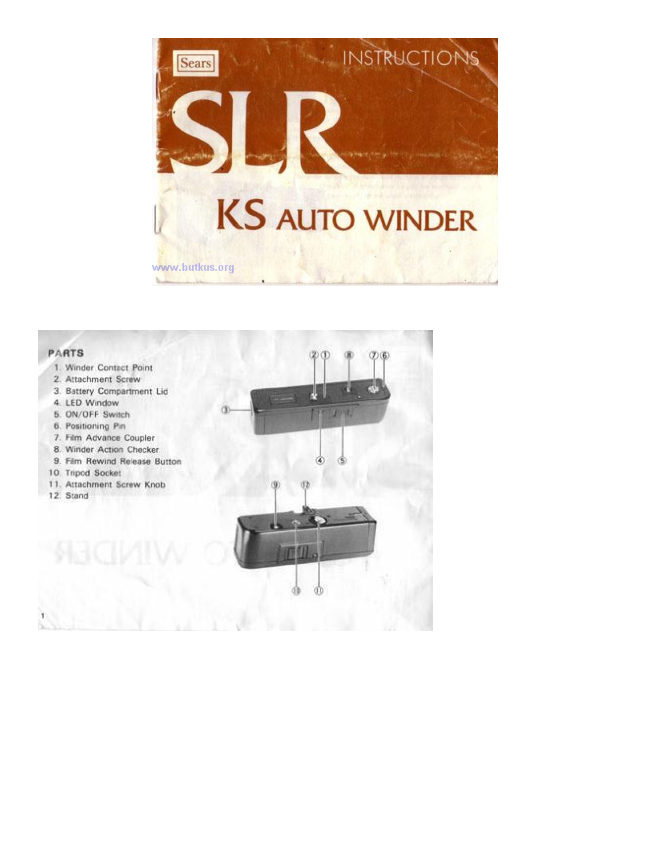
PARTS:

Winder Contact Point
Attachment Serew
Battery Compartment Lic
LED Window

‘ON/OFF Switch
Positioning Pin

Fam Acvance Coupler
Winder Action Checker
Fém Rewind Release Button oo
10. Triped Socket

11, Attachment Screw Knob e

12. Stand

Servegaens
View original page 2
Page 3 · Read text
INSERTING THE BATTERIES

1, Push in the Battery Compartment Ud on the side of the
Winder. and pull it downwards in the direction of the
arrow.

2. Insert four batteries according to the polarity diagram in-
side the battery compartment

3. Push in the Battery Compartment Lid and slide it upwards
to close.

if the Batteries
operate

Keep the switch at OFF position when not in use

# In cold conditions, the voltage of the batteries may
decrease so that the described number of shots cannot be
taken. Therefore the batteries should be warmed. and
spare sot kept warm to be used

inserted incorrectly, the Winder will not

CHECKING THE OPERATION

1. Set the ON/OFF Switch t0 ON so that the red band is vist
ble

2. When you depress the Winder Action Cheek. the lm Ad-
vance Coupler will operate and the red LED Winkow lights
ve.

& If it dows not operate, check that the batt
eeorted

If the batteries are correctly inserted but it stil does not
operate, replace all four batteries with new ones of the
same make and kind

# Nevor touch the Fim Advance Coupler while itis in action,

‘are correctly
View original page 3
From the M. Butkus archive. Original publisher and archive notices are retained.
Check the model and edition against your equipment.
PDF verified 2026-10-10.