Light meters
Sekonic L-408 Quick Guide Quick start guide
Quick start guide for Sekonic L-408 Quick Guide. 9 pages in English. Read the original PDF, download or print a copy without registration.
9 pagesEnglish0.4 MB PDF
Loading your manual…Open PDF directly
Document details
- Brand
- Sekonic
- Model / document
- Sekonic L-408 Quick Guide
- Document type
- Quick start guide
- Language
- English
- Pages
- 9
- File size
- 0.4 MB
- Category
- Light meters
- Document date
- Not specified in catalog
Search available document text
Find a term, then jump to its page in the original PDF. Image-only pages may not be searchable; check the PDF for exact wording and diagrams.
Page 2 · Read text
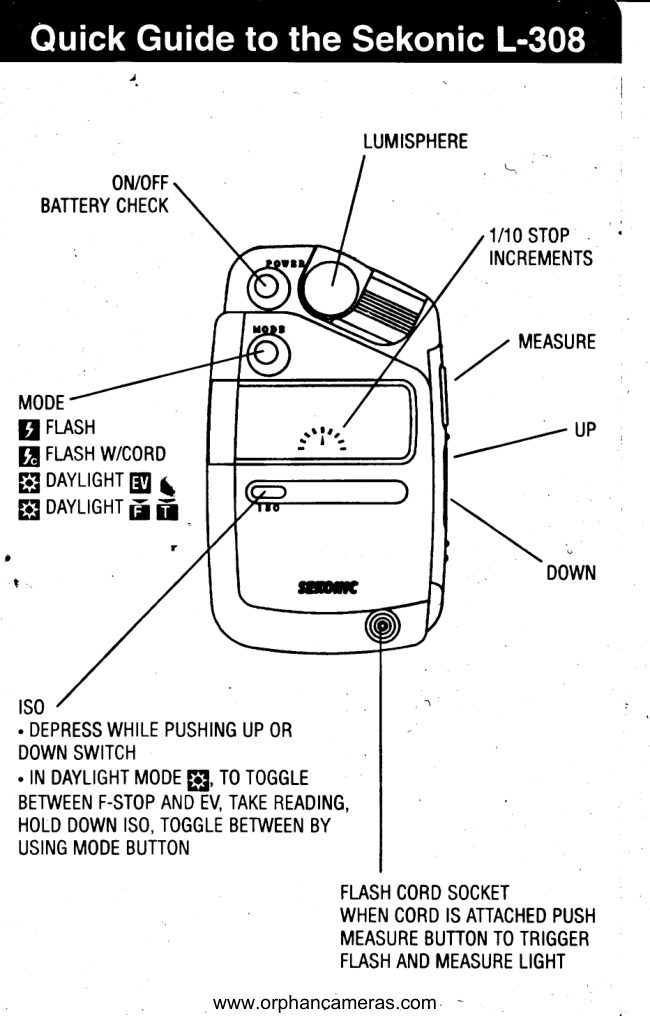
ON/OFF
BATTERY CHECK

ope

FLASH
LASH W/CORD

FE] DAYLIGHT Bg
DAYLIGHT 3p i

1so

LUMISPHERE

1/10 STOP
INCREMENTS

4 MEASURE

ee P

DOWN

+ DEPRESS WHILE PUSHING UP OR

DOWN SWITCH

+ IN DAYLIGHT MODE

TO TOGGLE

BETWEEN F-STOP AND EV, TAKE READING,
HOLD DOWN ISO, TOGGLE BETWEEN BY

USING MODE BUTTON

FLASH CORD SOCKET

WHEN CORD IS ATTACHED PUSH
MEASURE BUTTON TO TRIGGER
FLASH AND MEASURE LIGHT

www.orphancameras.com
View original page 2
Page 3 · Read text
Basic Operation - Sek

On/Off/Battery Check
Press Power button. To check battery power hold down
button. Power is indicated in 1/10th steps

Set ISO
Hold down ISO button while depressing Up or Down button

Use as Reflected Meter
Slide Lumisphere away to expose meter cell

Use as Incident Meter
Slide Lumisphere over meter cell

Measure Brightness /Contrast Difference
Clip in flat Lumidisc over meter cell

Daylight Reading
* Select gs3 Daylight Mode, depress Measure button

Cordless Flash Reading
Select gq Flash Mode, depress Measure button, manually
trigger flash

Flash Reading Using Flash Cord
Select gq Flash with Cord Mode, insert flash cord, depress
Measure button

EV Reading

Select §53 gy Daylight EV Mode. In Daylight Mode, toggle
between F/Stop and EV readout by holding down ISO button
and depressing Mode button

www.orphancameras.com
View original page 3
Page 9 · Read text
Basic Operation - Sekonic L-508             AdvancedFeatures


                                           Memory FunctionOn/Off
                                                               Take measurement, depress Memory button. Up to 3 readingsPress Power button.     Icon monitors battery level.
                                                            can be stored and displayed on the analog memory scale. A
Set ISO or ISO 2                                                   fourth measurement can also be displayed.
Hold down ISO or ISO 2 button while turning the Set/Change
dial. Measurements are calculated for main ISO. Take            Averaging Function
                                                                          After two or three measurements are memorized, depressmeasurement and hold down ISO 2 button to display
                                                                 Ave./EV button. Averaged exposure will be displayed in digitalexposures converted to ISO 2 setting for Polaroid or other
                                                          and analog readouts. Operates in spot or incident.films.
                                                     Brightness Difference FunctionUse as Zoom Spot meter
                                                             Using Incident operation, with Lumisphere “Down,” after oneTurn Spot / Incident Selector Switch to    to select Spot. Turn
                                                         measurement is memorized, press the Ave./EV button until the1° to 4° zoom spot ring to select measuring angle.
                                                     EV A displays. Depress and hold down the Measure button.
Use as Incident meter                                     The difference between the last memorized reading or
Turn Spot / Incident Selector Switch to    to select Incident.          averaged reading and new area measured is displayed in +/-
Turn collar around Lumisphere to “Up” position.                EV in 1/10 steps.
Measure Brightness / Contrast Difference                                           DAYLIGHT MODE
Select Incident operation. Turn collar around Lumisphere                                   FLASH W/CORD          INCIDENT/SPOT
to”Down” position.                                                                  CORDLESS FLASH             ISO SPEED
Ambient Reading                                                MULTI-FLASH MEMORY/
                                                                 MULTI-COUNT                                             +/- COMPENSATION
Select   Ambient mode by holding down Mode button and                                                       INDICATOR
turning Set / Change Dial. Depress measure button. Turn Set /
Change Dial to select alternate shutter / aperture settings.            BATTERY
Cord Flash Reading                                         SHUTTER SPEED                                  1/1OF/STOPDIGITALREADOUT
Select   Cord Flash mode. Insert flash cord, depress measure
button.                                                       SHUTTER
                                                                    PRIORITY
Auto-Reset Cordless Flash Reading                 M MINUTES
Select   Cordless flash mode. Depress measure button,            S SECONDS                  ANALOG MEMORY SCALE
manually trigger flash.                                                       F/S FRAMES PER
                                                            SECOND                                                                                           NOTE: DISPLAY WILL NEVER SHOW WITH ALL
                                                                                      ICONS DISPLAYED - FOR ILLUSTRATION ONLY
View original page 9Related documents and language editions
From the M. Butkus archive. Original publisher and archive notices are retained.
Check the model and edition against your equipment.
PDF verified 2026-10-10.