Film cameras
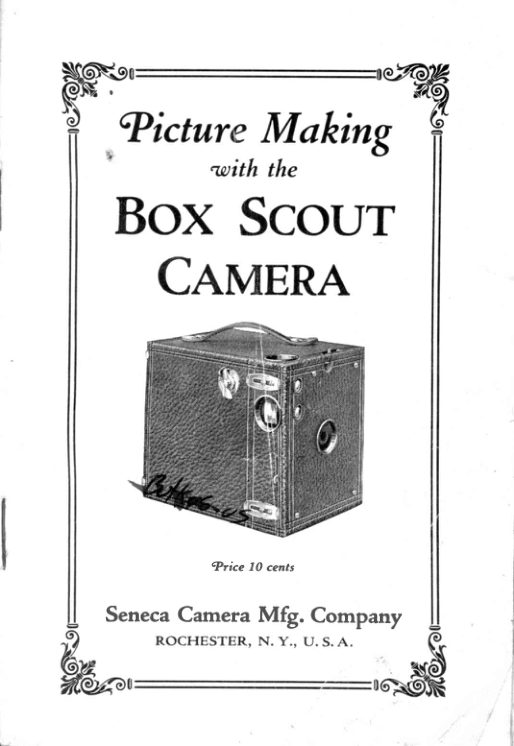
Seneca Box Scout User manual
User manual for Seneca Box Scout. 20 pages in English. Read the original PDF, download or print a copy without registration.
20 pagesEnglish1.4 MB PDF
Loading your manual…Open PDF directly
Document details
- Brand
- Seneca
- Model / document
- Seneca Box Scout
- Document type
- User manual
- Language
- English
- Pages
- 20
- File size
- 1.4 MB
- Category
- Film cameras
- Document date
- Not specified in catalog
Search available document text
Find a term, then jump to its page in the original PDF. Image-only pages may not be searchable; check the PDF for exact wording and diagrams.
Page 3 · Read text
No. 2 Box Scout
     Indicator   for  operating  the  shutter  is located
 at side of Camera.
     Slide  or  indicator   in  front  of Camera. above
 the lens, is ad.justable for "Time,' and (,Instantane-
 ous" or snapshot exposures. When  this slide is at
 bottom  of  opening, shutter  is set  for  ,,Time,, ex-
 posures; whe_n it  is  at  top  of opening, shutter  is
 set for snapshots.
        2 Box Scout has one diaphragm  opening  in   ,   iIo slrutter.
        Nos. 2A and 3 tsox Scouts
    Indicator   for  operating  the shutter  is located
 at side of Camera,
     I'hese Carnertrs have tlrree diaphraEm openinEs
 in slrutter, nirrrrely:Large-Lcv€r(No. f6);  Mediuin (N"o.'dia- 32);  Small  (\o.                      -6t).           fof  ad.iusting
 plrrtrgrn openings is located at top of Camera-.
    Slide  or  indicator   in  front   6f  Camera,  above
 the lens, is adjustable  for  ,,Time,, and  ,,fnstanta-
neous" or snapshot exposnr.es. When  this slide  is
 at  bottorn  of  opening,  shuttcr  is  set  for  ,,Time"
 exposures; when  it  is at top  of opening, shutter  is
 set for snapshots.
       Nos. 2C and 3A Box Scouts
    Indica_tor for operating  the shutter  is the lower -
levt,r at the side oi Carnera.
       t hese Cameras have three diaphraqm  oneninss
in..shutter. namely: Large-f,ever(No.  lo),  frediuin  1N-o.'di,r_:JJ), Snrall  (.No. 6a).           for'ad,iusting
p_hlagrn openings is upper. lever located at s-ide of('irnrera.
    Indicator   or  slide  in  front  of Camera, above
the lens, is adjustable  for  ,.l.ime" and ,,Instantane_
ous" exposures.  When  this  slide is  at bottom  of
          shutter  is set for  ..Time" exposures; when!.p9ning_,
it  is at top of opening, shutter  is sct for snapshots.
                        3
View original page 3Page 4 · Read text
Before   Loading
   Before plaeing a roll  of film  in the Camera, re-
move the inner  p-art  (this  is called the film cham-
ber)  from  the Camera and see what  takes placg
when the various  indicators  or  levers are moved.
Examine  the shutter  for  the diaphragm  openings;
look  for  the  slide which  tells how  to change the
Camera from  snapshots to  time  exposures; then
push the  shutter  indicator  and see ho'v   it  works
?or both snapshots and time exposures.  (The de-
scription  on page 3 rvill give the exact  I rcation  of
the various indicators. )
   Although  the Camera may be loaded  in  direct
sunshine, i1 is safer  to perf orm  this part  in sub-
dued  light.-a    Sufrcient  light  wilJt pass through   tlt"
lens in    small  fraction  of a second to change the
sensitized surface.   In the same amount  of time a
ray  of sunshine may penetrate  the loosened w-1ap-
pirg  and destroy the result  of much patient  effort.
   Again we say it-read   the directions  carefully
and investigate  the use of  every part  bef ore the
film  is loaded in the Camera.   Finally,  see that the
shutter  is closed before loading.

  Loading
     the
  Camera
  I-Place  the
camera upo1l
a   t a b l e  a n d
pull  back  the
c l i p s   u p o n
einher  corner.
See Fig.  I.

         www.butkus.us                   L
View original page 4Page 5 · Read text
slide the other elip toward  the front  of camera.
  ( rhe'e  are tr,vo clips- on Nos. zc, g and BA sizes.)
        I l-Remove    the  film  chamber  at  the  side by'l pulling  out upon the u'inding  I."y.  See Fig.  II.


                          Fis.  II
    III-Place    the empty spool at the winding  k"y,
nraking sure  to ad.fust  tfre^slot of the spool {o the
flange of the rvinding key.


                           Fis.   Irf

                                         5
View original page 5Page 6 · Read text
IV-Insert    the film cartridge  in the now ernptv
 cornpartment.  See Fig.  III.
   V-Break    the gummed  sticker  around  the  cart-
 ridge  and wind  the black  paper  around  the back
 of the  film chamber,  taking  care that  the printing
 on the  protecting  paper  appears on the  outside.
  If  the printing  does not appear  on the outside,  re-
 verse  the  loaded  cartridge   or  the  sensitized  sur-
 face  rvill  be turned  away  from  the  lens, making
 pictures impossible.   In threading  the paper through
 the  slot  of  the empty  spool, be careful  that   it  is
 started perfectly  strzLight. Should this be neglect-
 ed, the  film  will  run  over  the flanges  of the spool
 and  sive  considerable  trouble.   Turn  the windinq
 key  iivo  or  three  times  to  bind  the  fiIm upon  tlrE
 spool.
      VI-Lift     the  film  chamber  across the  shorter
 distance and  insert   it  in the outer box  rvith a dip
  to  the  right.   This  draws  the paper  tight  trround
 the corners  and  allows  the  film  chamber  to  drop
  into position.   Replace the catches in their  original
i positions  so as to lock film chamber securely.
     VII-Turn     the winding  key  until  a hand  ap-
 pears  in the ruby  v'indow.  A few rnore turns  will
  bring  No.    I  into  the  center  of  the  window,   at
 which  time  the  film  is  in  position   for  tal<ing  the
  first  picture.   After  taking   first  picture,  then turn
 winding key until  "2" appears in the ruby window,
  etc., until  I'ou have used up the entire  roll  of  fill.
                    '          Making the Exposure
    The Scout Camera  is always ready  to take  pic-
 tures  of ob.fects six feet or more away.    It  is un-
 necessary to make any  adjustments;  no focusing
 is required.
    To  take  a vertieal  picture,  aim  the Camera  at
 the  object  and  look  dor'vn into  the  view  finder.

                                    6
         www.butkus.us
View original page 6Page 7 · Read text
'I'he     irnage shorvs those objects included  in the pic-
ture.
    Tlo take a horizontal  picture,  turn  the Camera
over on the side and proceed the same as  for  a
vertical  picture.
    For  snapshots, see that  the indicator  or slide in
front   of Camera,  directly  over the  lens,  is  at  the
top  of opening.  One operation  of  shutter  release
lever  is necessary for  snapshots.
    For  time  exposures,  see that  the  indicator   or
slide  in  front  of Camera,  directly  over the lens, is
at  the bottom  of  opening.  One operation   of  the
shutter  lever  opens  the  shutter, and  then  after
giving   sufficient  time  to  the  exposure,  push  the
Iever again to close the shutter.
   The  largest  diaphragm  opening  (No.  16)  is
uped for  all snapshots and these must be made in
#- bright   light  with  the sun  falling  directly  on the
object  to be photographed;  otherwise, you  will  not
get a  fully  exposed negative.  The medium  open-
ing  (No.  32)  is used when photographing  an ob-
je-t  on the water  and you  'wistr an instaitaneous
or- snapshot exposure.  Do not use this opening  to
tal<e an instantaneous exposure of a landscape or
a portrait.  The smallest opening (No. 6a)  is never
used for snapshots; use it  for time exposures, such
as interiors  or outdoor work whenevei the Camera
can be rested on a table or some stationary  ob,fect.
    Little  aid can be given  to the beginner  in  re-
gard to the proper  exposure, excepting to say that
a  portrait   ordinarily   requires  an exposure-three
times as long as a laldscape,  because the subject
o_r group-is close to the Camera.  When the sky  is
cloudy,  the exposure needed  is about  three  tiines
a5 lgng  as when  the sun  is  shining.   Unless   it  is
shining-brightly,   an instantaneous  o1 snapshot  pic-
ture  will be under-exposed.
View original page 7Page 8 · Read text
When  taking  a snapshot,  it  is advisable, when-
ever practicable,  to  rest the Camera on solnething
solid.   Amateur   photographers   sometimes  think
that  they need only  to press the shutter  lever, but
the practice  of the more expert  is to rest the Cam-
era on something when.making  snapshots.   If  the
Camera  is moved  while  the picture   is being  taken,
it  is very  apt  to produce a blurred  picture.
   The  following   table  is figured  for  indoor  time
exposures made between the hours  of 10:00 A. M.
and 3:00 E. M., using the largest  diaphragm  open-
ing.     If  the medium  opening  (No.  32)  is used,
dolrble the length  of  time;    if  the smallest opening
(No. 64)  is used, give four  times the exposure.
    White  W'alls and More Than One Window
Bright  sunlight outside.                     ...  4 seconds
H a z y s u n . . - .                                      . . . . . . . 1 0    < s , I '
                                                                                     'irCloudy bright                                ....   . .20      "
C l o u d y d u l l  . .                                       . . . . . . 4 0             ' (
       White  Walls and Only One Window
B r i g h t s u n l i g h t o u t s i d e                         . . . . 6 s e c o n d s
H a z y s u n . .                                       . . . . . . . . 1 5       "       ,
Cloudv  bright                                        . ..  .. .30      '(                                                                            ( (C l o u d y d u l l . .                                       . . . . . . 6 0
   Medium  Colored  \il'alls and Hangings and
           More Than One Window
B r i g h t s u n l i g h t o u t s i d e                         . . . . 8 s e c o n d s
H a z y s u n  . .                                       . . .  . .  . .  , 2 0     "
Cloudy bright                                  ..  ..  . .40    s(
C l o u d y d u l l . .                                       . . . . . . 8 0      "
    Medium  Colored  \il'alls and Hangings  and
               OnIy One W-indow
Bright  sunlight outside                          . . . .12 seconds                                                                            ( (H a z y s u n . .                                       . . .  . . . . . 3 0
Cloudy  bright                                  ..  . . . .60      "
C l o u d y d u l l  . .                                       . . . . . r 2 0             ' 3
                                                 ;
         www.butkus.us
View original page 8Page 9 · Read text
Dark  Colored Walls  and Hangings  and
            More Than One Window
 Bright  sunlight outside.                           . . .20 seeonds
 H a i y  s u n . . l                                       . .  . . .  . . 4 0    s (
 Cloudy bright                                ..  . ...80       ..
 Cloudy  dull..                  ..2 minutes, 40      ..
      Dark  Colored  Walls and Hangings  and
                Only One Window
 Bright  sunlight  outside.                       .,. .40 seeonds
 H a i y  s u n . . I                                       . . . . . . . 8 0     s .
 Clou{y  b_right                         . .2 minutes, 40     's
 Cloudy dull..                  ..5 minutes, 20      ..
        !   The  lens  is  carefully   corrected.  to make-ana
 go-od picture  but    it  is  not  designed  to mak"
 enfargement            much  larger  than  fbur  or  five  times 'ne      original  size of  the picture.     It  is also *"nrl
 ated  for  ordinary   light^ conditions.   fake  snip_
 shots from  ten  uitil,  fwo-thirty   in  the  wi"i""    uria
 from  nine  until   four-thirty    in  the summer  when
 the. object  is               _in bright  sunshine.  Turn  your  back
 to  the  srr1-flep'f    pbint  the camera  at   it.  When
 the light  gets weak^er, make time exposures.
          Removing the Film
     I-After    making   all                         .the_exposures on the  roll,
                     keJ'until  all the paper  is *;;pp"d 9l_rl",lindingaround the exposed film.
   ff-Remove    the film chamber as instructed   forloading  and take  out the exposed  roll.                    I
    III-Use     the  gummed   sticker   in   the  now
empty  spool to keep the exposed roll  tighily
   IV-Do    not twist-the   film on the spool in "oii"a.order
to tighten   it;    it  is  likely  to rub  the 6mulsion  and
consequently  to spoil your  pictures.
   V-Place    the empty  film  spool  in  the Camera,
opposite winding  key.
                         0
View original page 9Page 10 · Read text
Vl-Replace     the  film  chamber  in  the camera
in readiness  for use upon the next occasion.
    YII-In    case you are developing your own pic-
tures, the  film  is reacly for  the dark  ioom.     If  lou
are having  your  pictures  developed and  priniecl,
ask your  dealer to show you how you may secure
mor_e pleasure  frorn  the time spent in photographic
l'orl< by doing your  o\\'n finishing.
                Important
    I-Film    should be developed as soon as possi-
trle after  exposure.   This is necessary to obtain  the
best results.
    II-Make    sure  the  film   is  rolletl   tightly   be-
trveen the spool flanges before sealing arnd removal
from  camera.
    Ill-Examine     the lens frequently  to see that   it
is clean.   Ihis  can be done  b,l' opening the shuttei',
as for time exposures, and rernoving the film cham-
ber (rvhen there  is no film  in  it),  holding the cam-
era so that you can look thtough  the lens.   If  the
lens is found  to be dirtv,  wipe calefully  flont  ancl
back with  a clean soft handlccrchief.
          Developing the Film
   These directions  for  developing  are not  to be
regarded  as  absolute,  but  only  as general  hints
from  which  the amateur  should deviate  ert the  first
moment he obtains ruore pleasing results.  Remem-
ber  that  the value  of any  rule  in  photography-  is
gauged by the excellence or mediocrity  of the re-
sult  secured by  follou'ing   that  rule.     If  you  {ind
another way  of  getting  a better  or even the sanre
result, use the new way  at once; you ar.e wideniilg
your acquaintance in picture  making.
   I-Empty     the  contents  of  the  Seneca M.  Q.
tube  (both  chemicals)  into  ten ounces of  water,
mix as p-er printed  directions and place  in a tray
irt r our left.
                          ro
         www.butkus.us
View original page 10Page 11 · Read text
II-In    the  center  place  a  tray  of  clear,  cool
         water  for  rinsing
                III-AI     the  riqht  set the  trav  of  acid hvno
          solution, for rnakin-g which complete directions "a're
         given upon  the box.
              IV-Ilxclude       all  layq  of  r,vhite light  from  the
        room  and  let  the ruby   light  be  at  l6ast one and
         one-half feet from  the developing tray.
                           Developing
                 I-tlnroll     the  film  and detach  the  entir.e  strip
        from  the protecting  blacl< paper.
              II-With    one end  of  the  strip  in each hand,
         held                 a firm   clip,  pass   it  continuously  through                  !y
         the  developer.    In  about  one minute  ihe   blaik
               between        lpaces                         _the pictures   will  begin  to  show.
          In  about two minutes the images rvili'shor,v some-
        what  clearlv.
              Ill-Continue     the development  for  five  or  ten
        minutes   until  the  contrast  lJetween the  lisht  and
         clark parts  of  the negative has become vErv  dis-
           tinct  or the irnage begins to show on the back of
         the  fiInr.     If  some  of  the  negatives,  as you  holcl
        them between your  eye and ruby  light,  ar"e darker
        than others. tliey have been            for  a longer
         time, but  this difference  will "*pos"ibe easilv tal<en cire
           o,f in  llre printing.     It  is only  n.,.".so.y  to rvatch
         the degree of contrast

           r-Afi"r  developiffTil""t"nu-y,rinsethreeorIi         four  times  in the -iaaTe  tray  of #ut""   Ulf"""-y".i
                   desired, the exposures may be cut apart             JL-I{       and fixcd sr,par,rrtely
                               Fixing
            I-Pass   the  negatives  face- down  through  the
         solution  two  or  thrie  times before completel-y sutr-
        merging  them  in the hypo  solution.
                                                                t t
View original page 11Page 12 · Read text
II-If     the negatives  have not  been cut  apart,
fold  the  strip  several times  without  allowing    it  to
crack  at  the ends.  Press these down  so that  the
solution    l'ill  reach  all  parts  of  the  film.  Two  or
three minutes  after  the  last  trace  of milkiness  has
disappeared,   it  is safe to admit  white  light  to the
room.   Allow  the negatives  to remain  in  the hypo
solution  for  ten minutes  longer.
   III-Remove     the  negatives  to  running  water
and  alloq' them  to remain  there  for  an hour.   In
case running   water   is  not  available,  change  the
water  five times  the  first  ten minutes,  moving  the
negatives  occasionally.  Then  allow  them  to soak
foi an hour.    If  desired, the water may be changed
four  or  five times during  a half hour  of washing.
 It   is  essential  that  the  negatives  be  thoroughly
washed.
    IV--Suspend   the wet  negatives  in such a way
 that  neither  side  rvill come  in  contact  with  any-
thing  while  drying.   The Seneca Film  Clip  will  be
found  to be very  convenient  for  this  purpose  as
well as for  handling  the fihns while  developing.
               Defects  in Negatives
Veiled Whites  or Fog
    Film  handled  too close to ruby  light.
   Exposed  to rays  of white  light.
Muddy  Effects
    Exhausted  developer.
    Forcing  under-exposed  negatives   in  develop-
       ment.     'l'oo         lvarm  a developing  solution.
 Irregular  Light  Spot,s
    Llneven development  due  to  failure  to keep  all
        parts  of the negative  evenly moistened  dur-
        ing  development.
   Uneven  immersion  in the developing  solution.
       ' Over-exposure.
     Air  bells upon the  film  during  development.

          www.butkus.us
View original page 12Page 13 · Read text
Milky  Spots on Negatives
             Failure   to keep  negatives  entirely  covered  bvr                  fixing  bath  or  iniufficient  time  for  fixing.

                               Don'ts
            Don't  start  until  the chemicals  are thoroughly
        dissolved.
            Don't  use a tray  for  developing  if   it has pre_
        viously been used fbr hypo sotution' or  final  *i.n-
         rng.
            Don't  use  chemicals   after   their   strength    is        gone.-              4  -bypo solution   is exhausted when  ,ir*"*_
       ous air bells settle around                                  _the_edgeof the tray and        remain  there.  When  the develofing  solution"loses
           its strength,   it  turns  brown.
            Don't  allow one ray  of white  light  to enter  the       room.
           Don't  hold the strip too close to the ruby lamp;
              it may cause fog.
           Don't  let a trace  of hypo reach the developer;
                        spoil                            the                                wtrbie                                          solution.                                             Wip"                                                            5loui        *^gi"^pnands uponT"y  a                       clean                             towel                                     errch                                         time  aftei                                                       taking
      them from  the hypo solution.
           Don't  remove the netatives  from  the hypo  until
           j!9f                 thoroughly   fixecl.  Too long  is better  than                ,u"",       roo snort..
           Don't  blame the materials;  read the  clirections
       over again  or ask your  dealer.
;*
               Making  the prints
            I-Mix                    the contents                                       of  the                                   Seneca                                           M.                                                              e.  tube        (both              chemicals)                          thoroughly                                                wittr-                                                    six                                                           o,,n-"",                                                                       oi
       water  at about  20"  Fahr.  and place  tray  at  the          left.
              II-In     the  center  have  a  tray   of  elear,  cool-"--
       water  for  rinsing  the prints  after "devet"pi;;:
                                                                            l 3
View original page 13Page 14 · Read text
III-Dissolve    thoroughly  the acid hypo accord-
irg  to directions  upon  the box and  set the tray  to
the right.
   IV-Darken     the room  to semi-darkness.     It  is
unnecessary  to  have  the  room-- c-ompletely  dgk
since Senecu pup""  can be handled  safely- ten  feet
from  an ordiniar]  gas jet  or incandescent  bulb.

                        Printing
    I-Place   the smooth side of the negative against
the glass of the printing  frame,  allowing  the dull
or pYcture side oi the  film  to face up.
    II-Take    one  sheet  of  the  der''eloper  paper
from  its  liEht-proof  u'rapping- and  laf    it concave
side clown ilpon tne negaiive.  This allows the dull
surface  of  the negative  to come into  contact  with
the emulsion  side of the Paper.
   For  a negatioe of normal  contrast wse Med'ium
Seneca to  o|tain  be'st results'  When the neclatio,e'
 is weak  or  thin', usa  lIard'  Seneca.    If   the' dark
places  (the  lfigh  l"i,ghtsof  the negatiae)  &re- DerY
 hnntt  nid, thu"contiast  betzoeen the I'i'ght q,nd,d'ark
 portions oeru mtarkecl, uso Soft Seneca.   It  is ztery
 irnportant   t-hat paper  zaith the eorrect de.gree of.
 contrast be wsed' zi;ith each class of negatiaes.  A
 sof t or zueak p&per,  f or instance, zti,th u contrasty
 nasat'iae uill  pioilwce  the sdnxe result  as a  con'
 tr6,sQ peper  zaith a weak  negatioe.  The  Harcl
 SeneZa tneets the aoerage requirements of an amcl-
 taur  rnore closely than any  other  d,egree of con-
 trast.
    III-Clamp     the back  of the p{rnling -forframe  into
 place  and  eipose  to  artificiai   light       several
 seconds.
    With  an  ordi,nary gas  ldqht and' a negatizte of
 auera,ge d,ensi'ty erposb Senicu Paper- about -eight
 ,n"onht-touniing    bne hundred,  tztso hund,recl, etc.
 fncandescent  electric bulb  i's a  trifl'e  f aster.
                                                          t 4
          www.butkus.us
View original page 14Page 15 · Read text
r-Arter                        right,hidethe         exposed paper"*nor,,3""1;1il:T.,*htuntil  the room  has bein  darkened
        enough  to  permit   its  being handled  safely  aEain.
       Remove the paper  frorn thE frame and immerle   it
            in  the developer  with  a quick  sidewise motion  so
          that  the solution reaches all parts  at approximate-
             ly  the same time.  The  rooni may  ,rori'be  liEhted
         again  to enable  the operator  to iollow   the devel-
         oping more  closely.
             II-Leave    the paper  in the developer  until  the
           pjc'ure                ha9-cope                                    tq                                    more                                                          tlran                                                        the                                                                     right                                                 lligtrtly-        shades of                    black and.white."q                                The                                                                           rvill                                                        Ue[in                                              picture-
           to appear in about six seconds.
              .  _  If- the _shadozps are  tight-'notor  f oggy  and, aTtpear
         slously, the. puper  has       biei"brposed.'llong
        enough.    If  , on the other  hand,, the shad,ozo, o/n
         oery-intense  aniL colte- up  quickl,y, the enTtosure
            l:.as.been too                             Ref ore rnaki,n{'&ny  erposures,                         ^long.
          "cut a, sheet of pq,per i,nto striTts oia  ,rnlake tri,ctt eul
         p_osu_re.s.You  zt:ill-soon  fi,nd- ruthat ereposure gi,oes
         the best results.  Not  on[y  wlitt this sclue a consi,d,_
         elgble amount  of paper, but  i,t zoill enable you. lo
         obtain  plen,sin(t results more qui,cktE.

                             Rinsing
               I-At    this point  take  the  print  from  the de_                  -
         veloper quicl<I;' and rinse in the middle  trav.

                                 Fixing
           I-Submerge   the print  in  tlre hypo solution and              --
         the prints do not become matted, since in that caseIt      allow   it  to remain  for  fifteen  miirirtes.  See that
         the hypq  solution  will  not  fix  ttrem evenly.   Ri;;;
         the hands  in  clean  water  before  touchifig   d";;_
        oper again, as hypo  in the developer causei stains.
            II-'Wash    the  prints   in  running  water   for  anf      hour, taking  care again  that  they"do  not  becorne
                                                                t 5
View original page 15Page 16 · Read text
matted.     If  running  water  is not  available, change
the water  ten  or twelve  times  during  a half  hour.
Be sure that  the prints  are thoroughly  washed.
    III-Place     the   prints   face  down  on  either
stretched  cheesecloth or a blotter.  The time neces-
sary  for  drying  may be shortened  by  first  laying
them upon  a piece  of clean glass and pressing  out
the  surplus  water.   Then  dry  them upon  cheese-
cloth  or  blotters  as before.

                 Defects in  Prints
Foggy  Whites
   Paper  handled  in too strong  a light.
   Paper  too old.
Muddy  Effects
    Forcing  development  of under-exposed  prints.
   Exhaustecl  devdloper.
Irregular   Light  Spots
   fJneven  development  due  to  failure   to  keep
        print   fully  submerged  during  development
        or  to immerse  print  evenly.
   Over-exposure  to light.
Stains
   Over-development.
   Forced  development.
   Chemically   dirty  dishes or hands.
    Failure  to  fix a sufficient length  of timee     ;'   ) .
Round White  Sp'ots in Clusters
    Air  bells upon  the  print   after  being immersed
         in  developer.   Rub  the  print   lightly   with
       the  finp;er to scatter  them.
Oval Dark Spots in Clusters
    Air   bells upon  the  print   after  being immersed
        in the fixing  bath  face downward.   Immerse
      them  face upward  and move  about  to  dis-
      plaee the bubbles.
                                                                                    l 6
         www.butkus.us
View original page 16Page 17 · Read text
Don'ts
            Don't  start  until  the chemicals are thoroughly
        dissolved.
            Don't  use a. tray  for  developing   if   it has been
       used  for  pyro  developer, hypo  solution  or  final
        washing.
            Don't  use  chemicals  after   their  strength   is
        gone.  A hypo  solution  is exhausted when numer-
       ous air bells settle around  the edge of the tray and
        remain  there.  When  the developing  solution loses
           its strength,   it  turns brown.
            Don't have the lights  too bright  while  tlte print
          is in the developer;  it may cause fog.
           Don't  fix the prints  too long;  it has a tendency
         to  turn  them brorvn.
           Don't  let a trace  of hypo reach the developer;
          -!re drop may  spoil the whole solution.  Rinse the
       hands  in  clean  water  everv  time  vou  tonch  the
       hypo.
           Don't  blame the materials   if  your  first  results
        are not as good as you expected; read the direc-
         tions over again or ask your  dealer.

                         Portraits
                         By the use of the Seneca Por-
                                       trait  Attachment,   excellent por-
                                     trait  pictures  can be made  at
                          a distance  of  three  feet  from
                            the subject.
                              This attachment  is a Supple-
                         mentary  lens that  is fastened in
                        an instant  to the front  of Cam-
                            era.
               Price  with  instructions
                     (Mention  size of  your Camera)
                                                                         t 7

I
View original page 17Page 18 · Read text
Seneca f)eveloping and Printing  Outfit
    Suitable  for  the 3l^ x 5r,/" ( post card ) and  all
smaller sizes.


          //
        I
          EI, - ,
   Each  outfit  contains:
   Two 4x5  Japanned. Travs,
   One 4-ounce MeasurinE Glass
    9r"  3_5A*  I  Printing - Frame  u,ith glass,
   One Candle Larnp,
    I'wo M. a. Developing Powders,
    9r"  package, Y+ pound, Acid  Fixing  Pow'der,
       package_(\Z sheets) 3Y+*51, Se,necaPaper,    9r"
   One Seneca Exposure Meter,
      Price, complete                      $2.,00
         Seneca Metal Tripod


   Madt   of heavy gauge seamless brass  tubing.
The  lower  legs, which  telescope, are  finished  ln
polished brass-the  upper,  in black enamel.
No. 300 (3 sections)                                 $ 2 . 1 0
No. 400 (4 sections)                                  2 . 75
No. 500 (5 sections)                                      3.0t)
                                                                                    l 8
         www.butkus.us
View original page 18Page 19 · Read text
Non- C urli ng-O  rtho ch ro matic-H  on-Halat io n
         The Sen-x roll  filrn has a wide exposure latitude
      which  eliminates the chance of  failure  from  under
        or  over-exposure.     It   fits  all  standard  makes  of
      Cameras.
         Get a  roll  of Sen-x film  from  your  dealer.    If
      he does not stock  it, send us your order  with  your
       dealer's name.  We  will  see that you are .supplied
       with   it.  Then  t"y  the  film.    If   it  is not  satisfac-
       tg*y  to you  in everv way,  \r'e will refund  the pur-
      chase price.
                 Sen-x Film  for Box Scouts
      No. 360 (-t!o.f 20) for No. Z  Box Scout, 2bc per roll, 6 ex.      No. 348                           for              (No. tr6)                        No. 2A                           Box                                BOc                                    Scout,                                                    6                                                           ex.                                             ber roll,                   tZA)  .     No.         372 (-{".                            Box                                     Scout, 45c                                                                      roll,                                     O ex.                            g _                                              ber                            for No.
      No. 390 (-t!o.rB0) for J!o. zC Box Scout, 45c ber roll, 6 ex.      No. 3Zi (No. tZE) for No. BA Box Scout, 55c ber roll, 6 ex.
          (Be  sure  to order  the  film  by number.  Then
       fou  are . sure of  getting  the correct  size for  your
      Camera. )
       catalog_ deseribing  our  eomplete  iine  of cameras
          and, Accessories u,:ill be sent upon request.
      Seneca Camera Mfg. Company
               ROCHESTER, N. Y.
t                                                                                                     l 9
View original page 19Page 20 · Read text
Greater Possibilities
            with the
    SENECA
FOLDING SCOUT

    VERY  one who owns a Box  Scout
     Camera  is sure  to be Pleased with
            it  and  the  pictures    it  t-akes. -. .$"
will  alpreciate    its many  good  qualities
and  wil   feel as though  something  were
missing when he goes on a trip  without   it.
  The  Seneca Folding  Scout, equiPPe&
with  Rapid  Rectilinear  lens, is- a Camera
of  oreco-ofirrtsreater  possibilities.'it     We unhesitating-
lva/                       to  the  amateur   wli'o
#ish"s  to gradubte  from  the box type  of
Camera.   For  one who  wants  a more
speedy, compact instrument,  the Folding
Scout  fills  the  bill.
  This  popular  model   is made  in  fi-ve
different  sires.  You  will  be sure to  find
a Foldin'g  Scout  that   rvill   fit  your  taste
and youi\pocketbook.
  No. 3A  (post card)  size Foldilg  Scout,
fitted  with- Rapid  Rectilinear  lens and
Deltax  or Marvel  shutter, $19.50 list.
   Full  information  agd  prices on  other
sizes will be mailed.upon  request.


     www.butkus.us
View original page 20From the M. Butkus archive. Original publisher and archive notices are retained.
Check the model and edition against your equipment.
PDF verified 2026-10-10.