Film cameras
Shepherd DM-170 User manual
User manual for Shepherd DM-170. 5 pages in English. Read the original PDF, download or print a copy without registration.
5 pagesEnglish0.9 MB PDF
Loading your manual…Open PDF directly
Document details
- Brand
- Shepherd
- Model / document
- Shepherd DM-170
- Document type
- User manual
- Language
- English
- Pages
- 5
- File size
- 0.9 MB
- Category
- Film cameras
- Document date
- Not specified in catalog
Contents
Search available document text
Find a term, then jump to its page in the original PDF. Image-only pages may not be searchable; check the PDF for exact wording and diagrams.
Page 2 · Read text
INSTALLING THE NECK STRAP

1. Pass the small loop end of the neck strap through
the Neckstrap Lug (9)

2. Pass the large loop end of the neck strap through
the small loop and pull snug,
Note: A hole in the carrying case allows the meter
to be used without removing the case from the
neckstrap

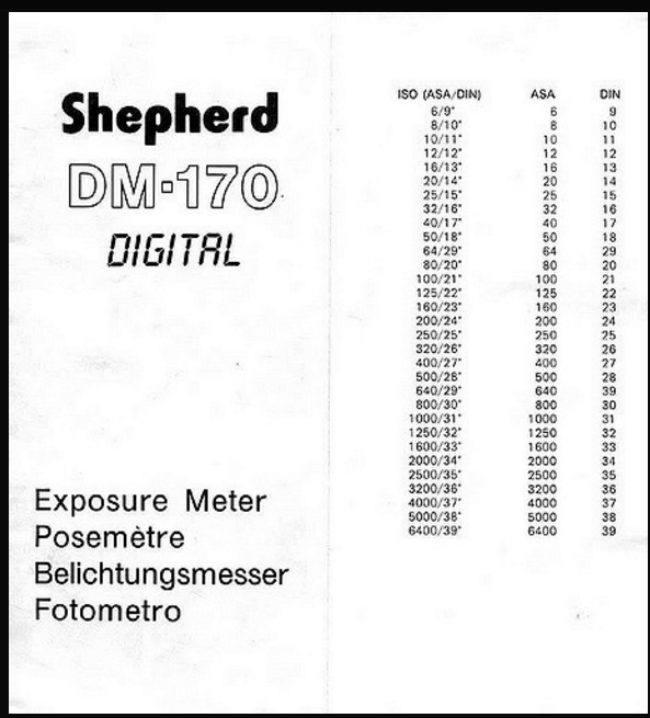
SETTING THE FILM SPEED

1. Rotate the Film Speed Setting Disk (6) using the
‘small knob, until the Film Speed Set Mark (12) points
the desired tim speed you are using

INTERMEDIATE VALUES ON THE FILM SPEED INDEX

ies Ps) fe, Pind Ga), cm 6 a ("#2 500
(280) Om ao ta) {tone (1201, (2000) (2600)
(4000) (#000)
3200 - + 6400

TAKING EXPOSURE READINGS

Incident Light Measurement

This measurements are made by measunng the light

falling on the subject

1. Set the Diffuser Control Switch (17) to the incident
position

2. Place the meter directly in front of the subject to
be lighted
The Sensor (2) should point towards the camera lens.

3 Depress the Measuring Button (5) to take a reading
The meter will continue to take and display readings
‘as long as the button is depressed. To hold a display
reading, release the button.

4. Read the number indicated by the illuminated LED
Display (16).

5. Rotate the Computer Dial (7) until the same number
is aligned with orange Index Number Set Mark (14).

6. Full range of exposure combinations are indicated for
the right circumstances. Select a desired exposure
combination by matching the Shutter Speed Scale
(11) and the F/Stop Scale (10) at the buttom of
the computer dial

7 Be careful that no essential light to the Sensor (2)
being obstructed

This method is particularly recommended for backlight
shots, subjects of heavy contrasts and colour reversal
films.

Reflected Light Measurement

This measurements are made by measuring the light

reflected back from the subject towards the camera,

1. Set the Diffuser Control Switch (17) to the reflected
position

2 Place the meter close enough to the subject with
the Sensor (2) pointing directly to the important
part of the subject.

3. Follow steps 3 through 6 under incident light
measurement

4. Be careful not to cast any shadows or reflections
‘on the subject

This method (s particularly recommended for subjects
of normal contrasts, measurements in the close-up
range from 20 to 50 cm. ete

EV READING

1. Take a exposure reading as descnbed in preceeding
pages.

2 EV. measurement will be indicated directly by the
EV. Set Pointer (4) on Index Number Scale (15)

OVER AND UNDER RANGE WARNINGS

1. If the LED Display indiates "0.0". the light intensity
is too week

2. It all the LED Display extmguishes, the light intensity
is too strong LED. Dot in the middle will remain
tumed on
If this happens, change to incident light measurement
or use ND filter

BATTERY SAVING CIRCUIT

To save battery energy. the meter will turn itself off
in approximately 20 seconds. If the Measureing Button
(5) is depressed before the LED. Display extinguishes,
the meter wil remain operate for another 20 seconds.
View original page 2From the M. Butkus archive. Original publisher and archive notices are retained.
Check the model and edition against your equipment.
PDF verified 2026-10-10.