Flashes & lighting
Sims Flash Unit D-1 User manual
User manual for Sims Flash Unit D-1. 21 pages in English. Read the original PDF, download or print a copy without registration.
21 pagesEnglish4.9 MB PDF
Loading your manual…Open PDF directly
Document details
- Brand
- Leica
- Model / document
- Sims Flash Unit D-1
- Document type
- User manual
- Language
- English
- Pages
- 21
- File size
- 4.9 MB
- Category
- Flashes & lighting
- Document date
- Not specified in catalog
Search available document text
Find a term, then jump to its page in the original PDF. Image-only pages may not be searchable; check the PDF for exact wording and diagrams.
Page 1 · Read text
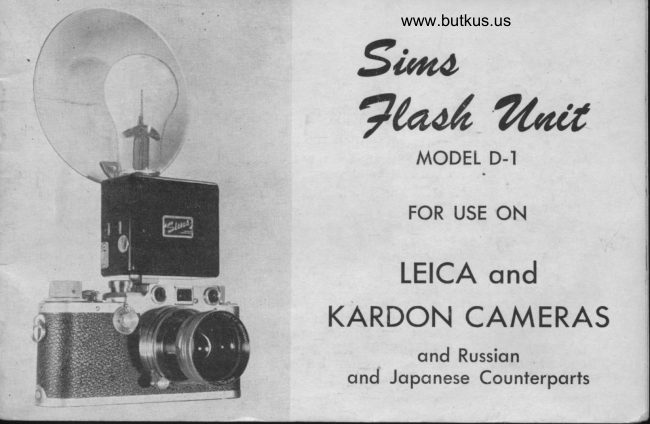
www.butkus.us
 Saona
            ?r/'ait Thoi
       MODEL D-I

      FOR USE ON

     LEICA ond
K,ARDON CAMERAS
        ond Russion
  ond Jopqnese Counterports
View original page 1Page 2 · Read text
A BRIET' HISTORY OF SIMS TLASH UNITS
*'l'he  IirsL Sinrs Sytrchlonizer  \r':ls rlcsigne<l anrl lruilt in 1939. It incorporated a
   retr;rctalrle nickei silvet'sprins crrntact"activaterl lry a s1>cciil ring fitting ovcr the
  speecl irttlicator dial of the Leica canrera. It l'as liekl-icstecl by leveral-arlvancecl
   ltrofessiottirl photographers and follou'ing a study of their conunents, the Sims
  N{odel R tlas prorluced.
*'l'his  set:tltttl rtr<ttlel containecl fe:rtures unkuonn t() any othcl synchr'ouizcr at. the
   tirne-lrtrilt-in  pilot. light, provision for extension flash u'ork, incl four pcrr-light
   cells. 'I'hcse features are still otrtstandine on Sirns Flash flnits.
* Sirrrs N{orlel C calriecl sornc  t'clincrncnts, btrt the  lrasic oireratiort lcrnainecl
  unclranged.
*'I'he Model  l) Sims clinrinatecl the retractalrlc sttline anrl sullstitutecl a halrlcnetl
  lrronze ball for tlre contact merlirrrn. 'l-he ball pbsiti"vell  plr,rt.rrtcrl clamage to the
  contact itnrl thousands of thesc uuits in use today pt'ove thc c{fectiveness of this
   irrstallation.
*The Sirns Model D-l rvas irrtrocluced early in t948 and trtrly represenls the ulti-
  tnate itr flash synchronizers.  It embodies all the typical Sims Features-built-in
  pilot light, safety switch, fotrr penlight cells, cornpactncss, ancl simplicity. All
  these features are describerl antl illustrated on the follorving pages ahd EVERY
 FEATURE has been TIME TESTED. If you have any questions relative to the
  operation of the Sims, please do not hesitate to make your inquiry.  It  r,vill be
  ars\vered with promptness and dispatch.
                                                                                rwo
                                                                           'AGE
View original page 2Page 3 · Read text
www.butkus.us
     BASIC OPERATING
 PROCEDURE FOR THE SIMS
       FLASH UNIT
 l'o insure complete familiarity with
the Sims, it  ii recommended that
lhese steps be practiced rvithout
lilm or flash bulb.
(l) Select the desired shurrer speed,
   and set the lens diaphram-.
(2) Locate the split ring on rhe
    dial as shown.
(3) Slip the Sims into rhe camera
    accessory clip. (See next page.)
(4) Insert a flash bulb and rhe
     reflector.
(5) Lock in the safery switch.
(6) Release the camera shutter.             NOTETOBACKARROWSIDEONCF TIIESPLITACCESSORYRING IN RELATIONCLIP.
(7) Release the safety switch.
In- Step 3, above, it is important that the narning pilot light burn as the unit  TS
being seated. When the Sims is completely in the clip, the light will go off.
PAGE THREE
View original page 3Page 4 · Read text
Venmo @mike-butkus-camera  Ph. 2083
PayPal Name  Lynn@butkus.org      www.PayPal.me/lynnbutkus
View original page 4
Page 5 · Read text
THE SPLIT RING
'Ihe propcr location of the split ring governs the lighting of the photograph antl
nhile the ring rn:ry lle reaclily relocated or remove(l from the speed inclicator clial,
thc seneral practice is to select one shutter speed for all flash 'lvork and leave
thc ring at this speed. It is also advisable to cletermine the flash bulb best suited
for y'ortr work anrl correlate all factors ({ilm speed, developer uscd, shutter speed,
etc.) in such a mannct as to insure perfect pictures ;rt all times.
The illustration on page 3 shor\,s the split ring properly located for taking flash
shots at  I /l00th seconcl. The ring may be easily located on the shutter speedinclicator dial by placing the ring on the ball of the thumb, hooking the lorver half
of the ring over the dial, and plessing it into place. 'I'he inside shoulder of the
ring should bear against the speed indicator dial at all points to insure a firm
seating.
When changing shutter speeds, rclocate the ring on the shutter speed indicator dial
so that lhe back side of the split is in line u,ith the new shutter speed.
Replacement split rings are available direct from the manufacturer at 50c each,
postpaid. These rings fit all late model I-eica cameras, the Kardon, Russian Leica,
and the Nicca. Leica cameras of series II and older must be sent to the factory for
special ring htting. See page 16,


                                                                                 PAGE FOUR
View original page 5Page 6 · Read text
www.butkus.us
    ATTACHING TO THE CAMERA
After the shutter has been lvound and the ring
located at the selected shutter speed, the Sims
is slippecl into the accessory clip on the camera.
'l-he spring-loaded ball assembly rvhich protrudes
slightly from the bottom of the case should just
lightly riclc over the split ring while the syn-
chronizer is being seated. The rvarning pilot
bulb in the flash unit nill light until the syn-
chronizer is in position for use. When the Sims
is correctly positioned on the camera, the ball
shorrld protrude into the gap of the ring, but
should not touch any part of the ring or speed
inclicatol dial. To raise or lon'er the ball assem-
bly loosen the large screrv on the side of the
case (a thin coin makes an excellent screrv driv-
er), correct the position of the ball assembly,
then tighten the screw again. Positioning the
ball assenrbly is not a precision acijustment. The
onlv reouirement is that the ball must ride
ligtitly over the split ring rvhen the synchron-
izer is placed on the camera and during the rota-
tion of thc speed indicator dial.
PNGE FIVE
View original page 6Page 7 · Read text
UNBALANCED LIGHTING
Gra<ltratecl negative contrast, from thc left to tlie right side of prints, indicates the
Sinrs is filing t<io soon. 'fhe necessary correction  is to relocate the ring to delay the
actic;n of tlrE uuit. llelelv nrovc the'ring counter-clockrt'ise so that the back side of
the e;ap is rilightly lrack of'the inciicatinglrrorv on the accessory clip. (For a positive
clrcck, r'carl lrirge tlJ, "'l'o (lheck Synchronization.")
If ncgative cotrtlast is grarluated frorn the right to the-left side of priuts, the correc-
tit.nr is to a<h.'ance the gap of the split ring slightly clockrvise.
G.E. #6, (;.E. #31, Sl'lvania 2A,-sylvania Press 40, Sylvania FP, \Vestinghousef{i,  \\'csrirrghotrse f3l,  antl all other btrlbs specifically designed for focal planeopcration lvill proviile eveu illumirration over the entire frame and no colnpensa-
tion shottlcl be neccssary in the location of the ring.
                                                                                                asIn carefullv concluctecl tests it has been determined that short peak lxrllls such
                                                                             secondtlre Press Zir nray be usccl at shtrtter spectls from  I /20th throttgh l/l00thtvith cntirely saiisfactorv restrlts. Hounever, you are catttionecl to use these short
peak lrullts ivith cliscretit-rn since the rnanufacturer did not rlcsigrr these bttlbs for
focal Pl..e operati'r-r.                        Exposu*E
Whenever availaltle, technical data sheets on the various flash bulbs as compiled
lty the munufacttrrers are incltrrled with each synchronizer. Frorn this information
                                                                           backthe photop;rapher can reaclily select _the lrulll best suited for his ttse. f'he                                                                                                                                   ispagei of this- ltook coutain talltrlatecl restrlts to be usecl as a gtride. Provision
all<-ru,ed for yortr ourn ttotes oll yotlr hrst telv exposures'
                                                                           PAGE SIX
View original page 7Page 8 · Read text
www.butkus.us

       EXTENSION FLASH
l-o file one or more adclitional llullls a tlis-
tance from the catnera, take any auxiliary
lamp or lighting device (a lrriclge lamp rvill
tlo)-direct the shade to illuminate the sttll-
ject, tuln  it to "ON," then retnove the
corul from the rvall socket and replace the
lrulll in the larnp 'lvith a flash bulll. l'ltrg
the lamp cord into the slots on the sicle of
the synihronizer case, set the lamp at the
dcsired location, and take the photograph
rr,ith the Sims in the ttsual manner.                     si:
-[-he     extension flash feature provicles the
photographer rvith unlimited lighting possi-
ltilities. It is not neccssary to have a flash
lrulb in the synchronizer case rvheu using
extension flash. Horvever, suitable exposttre
cornpensation  is requirecl since the erposttre
is governed by the distance of the light
sorlrce to the subject and not the clistance
of the camera to the subiect.

PAGE SEVEN
View original page 8Page 9 · Read text
R.TI'If) ACTION PHOTOGR,A.PI{Y
()nc 'r'cr'1' rlcsilalrlc aclvant.age of the Sims lies in rapid action photography in u'hich
thc srrlrjcct rnav, rvithout any notice, change location frorn an interior to a lt'ell
lightcrl cxtclior. In tlris event, irssuming the photographer has beeu taking all his
flash lights at l/l00th second and has reloaded the synchronizer rvith a frcsh bulb,
tlrc photoglapher rnay follou' the sultject, change only his diaphrzrrtr stop, attcl take
an olrlinar\' photograph lvith the Sirns in place and WI'fHOU'I- FIRING THE
FLASH BtlLB. Thele is no need to removc thc Sinrs from the camera in taking
usual pictules under perfect natural illumination. Ho$'ever, the many advantages
in supplenrcnting  srrrrlight l'ith  flash bulbs cannot be stressed too gl'eatly and the
plrotoulaphcl shoultl rrot ovcrlook the benefits of this practice.
                    BULB EXPOSURE-I'o    take a "brrlb" e\llosr.ll'e n'ith an,v llash bulb, set the shtttter spccd indicator  tlial
for "bulb," r'clocate the ring so that the back sicle of the split is in linc lvith the
ill-l'o\v on thc accessoly clip. Insert the Sims conrplete with reflector ancl bulb, focus
tlrc carrrera and set the diaphrirm stop, and take the picture by
    FIRST, pressing the shtrtter release and while maintaining constant pres-
          sure on this button. then.
   SECOND, pless the synchronizer safety sr,vitch ancl after the bulb has fired,
         remove both fingers.
   The rnethod of taking "bulb" exposures is not confined to the use of the flash
bulbs in thc synchronizer. The extcnsion flash method may be ttscd and in either
case, ANY flash bulb empioyed regardless of flash peak duration.
                                                                   PAGE EIGHT
View original page 9Page 10 · Read text
www.butkus.us
                       REFLECTOR
f'he etched satin surface of the Sims reflector couplecl rvith the adjustable height
bracket, enables the photographer  to use ANY SIZE of flash bulb to obtain pictures
free from "hot spots."


                           LEICA lllc WITH SIMS
                                 FLASH UN IT
                      AND PRESS 40


                           LEICA lllc WITH SIMS
                                 FLASH UN IT
                        AND G. E. NO. 6

                             Mike Butkus                                  Digitally                                                                                                                                                                                                      DN:email=mike@butkus.org,Date:cn=Mike2023.10.31signedButkus,by17:50:08Mikeo=ButkusButkusc=US-04'00'camera manuals, ou=butkus.org,
IAGE NINE
View original page 10Page 11 · Read text
.          BATTERY
                                                       : Four fresh penlight cells are supplied
                                                  rvith the Sims Flash Unit and fuinish
                                    a full six volts. The life of these cells          ?l                                                 is clirectly dependent upon the num-
                                         ber of bulbs fired and aging. As many                                             vs 50 bulbs may be fired within a short           II
                                         tr.        period and then, after a rest, the bat-
                                                 ii..        tery may again fire as many bulbs. In                                          ,'i.fu,,      g eneral practice, a fresh set of  cells
                                  $.:*     should fire more than 500 flash bulbs
                                          *.u;$;,,::ii over a total time lapse of  several
                                     months. No recommendations can lte
tnatlc t'cEat'tlirrg; tlrc Iiii-' of thc battcry, lxrt it is suggested that u'hen the pilot ltrrlll
shorvs a loss of l;riiii:-rrr.t, thc l;;rtter-y be r.eplaced-with fresh cclls.
                    BATTEI{Y REPLACE,MENT
Btrttcr'y'cells alc'rcarlilv reular:etl bl'unscreu'ing the back cover scret\', removing the
plate, atttl lul;i;irtg thc srncirronizcr casc on the palm of the hand. The cells will
clt'o;r ottt {'ieeiv.  lrr, il,ll irlrv rells in a series elec^trical circuit. That is, the DIAG-
ON.'\LI-\' Ol'l'OSl'l'li  cells nrust he:rrl in the same direction.
(1.\tl'l'ION: Neret'allotv <;ttttllttc(i ol exhaustecl cells to remain in the synchronizer
c:lse   .

                                                                                  PAGE TEN
View original page 11Page 12 · Read text
www.butkus.us

      Every cletai, ," ,JT::H:":::;"*,       F,ash Unit has
      been carefully engineered in orcler to produce the ultimate
       synchronizer. In this connection the flexillility of the reflector
      cannot be overemphasized-any  size of flash llulb may be used
       n,ithout producing "hot spots" and the light has a certain
       quality softness so essential to color rvork.
       F{ou,ever, for those photograptrers rvho may specialize in black
       ancl l'hite and may desire the maximum light otrtput from
      the rniclget type bulbs, \ve can recommen(l the Victor No. 6-1
     and No. 67 reflectors. These are available at any photo strppll'
       store or may lle obtainecl on special order through yotrr dealer
       clirect to the James H. Smith & Sons Corporation. These
      units combine a midget ltulb adapter rvith reflector. They
r     have proven highly satisfactory in rigicl rests and are relatively        LEICA IIIC WITH SIMS       inexpensive.                                                              FLASH UNIT AND
                                                                                   V|CTOR NO. 64
                                                                                        REFLECTOR
      PAGE ELEVEN
View original page 12Page 13 · Read text
srMs sYNcHRoNrzER, MODEL D
All directions in this book apply to the
Sims Flash Unit, Model D-1. However,
the Sims, NIodel D, is operated basically
the same as the D-l EXCEPT that after-
preliminary adjustments of the shrtttct:
speed, diaphram, and focusitrg, etc., the
picture is taken as follorvs:
  Press the safety button on the right
  side of the synchronizer case arrrl
  while maintaining constant pressure
  on the button, release the cauret-a shut-
  ter u'ith the seconcl finger. Aftcr thc
  pictule has been taken, release bollr
   fingers.-I-he     safetv srvitch on thc Nlodel D Sims
is alrvays'on "Safety" ancl canllot be
lockerl in place.
NOTE: The N{odel f) Sims CANNOT
be changed or alterecl in any way to
pror.ide the lock-in featrrre of tlic D-1.


                                 PAGE TWELVF
View original page 13Page 14 · Read text
www.butkus.us
        KARDON CAIT,IERA AND THE SIN,IS
                  FLASH UNIT
tf            I hc illustlatiotr shou,s the Atnericau Kardou Cam-        cla l'ith a Sinrs Flash Unit. It is important to note
          tlrat no special littings or attachtnents are reqttirecl
        to r.lse thc Sinrs on a Kaldon Canrera. The Sirns is
          rrsccl in the usual nlanner rvithout special attach-
          llrcrlts or precantions.
        l'hc Kartlon is a plecision lluilt carnera and all
        nrantrfilcturiug tolerances have been maintained to
        crccptionally close lirnits. 'fhe "shoe" of the Sims
        is als<l nrarnrfacturecl unrler controlled methods
         n'ltich kecp all physical tlimensions to u'ithin five
       ten-thousandths of an inch (0.0005"). Accordingly,
       the Sirls rvill slip into the Kardon accessory clip
            {ilrrrl\', tvithout ltinding ancl u,itl-r a smoothness of
       action inherctrt rvith precision equipment.
A
        'l'he Sirns is approved for use rvith the Karclon
         (lan.rcla and provides portable auxiliary lighting
 t      PAGErurrlerTH]RTEENarlverse conclitions.
L
View original page 14Page 15 · Read text
NICCA CAMERA AND RUSSIAN COPY
                                                        a'I'he illtrstr:rtiorl shows the Nicca Camera lvith
Sim.s Flash Unit.  'fl-re opetation of- the Sims on
;hi;".;;;ta   atrtl the Rtrsiian coPy is iclentical toit-r" ,t-t"tt-tutls otttlinetl fol using the Sirns on the
(iennan Leica.
                                           neces.sary                                                                     -rnHorvever, sofiie atljttsttnetrt may lle           the llali assernllly itr'order to effect the
                                                        casesii"tr"t"r.,riti""i"ecorltact rvith the splii ring' In isolated'u,r 'r.l i,,ttttrctrt of the accessoly clip may lte -neces-
s:rr'\. "l lre Sinrs shottl<l slidc flcely into this. cllp
rrjiti-t.,,,t cxcessive pressul'e and yort -ale catttionecl                                have our Serv-                                  tlesilc to                               tf         ttsing force.against                       .you                                                          this                                        adjtrstmettt'                               rtecessaly                      thc                lnake     l)ct;artrlrenticc
rv:ll  lri' cottrpletecl lvithottt charge providing trans-
Doll.iltioll clrarees are paid lloth rvays' The camera
ir.riitt tt,r, Ire sEnt in tb trs tttttil tve have acknowl-
etlgerl yotrt' lettcr reqllcsling this,service'
                                                           as't ll-c aliove t'ctnarks .shotrld not lle cons(rttetl
nrcanitrg that the Nicca ancl Rttssian copies ar5 i1-
fcrior cri canlrot lle synchrotrized. Foreign standards
shou, slight accepta6le variances. Our tests have
proclucecl excellent rvork rt'ith these cameras'
                                            PAGE FOURTEEN
View original page 15Page 16 · Read text
www.butkus.us
              SPECIAL FITTING
        Leica camera N{odels A, C, (I), and E all re-
       quirc special fitting. The camera illttstrated
        shorvs the Sims Flash Unit provicled rvith the
       higher "shoe" n'hich is necessary n'hen using
       Leica cameras n'ithont the lltrilt-in ral-rfJe
        finder. It  is also necessaty to use a special
        oversize ring rvhich must be custom fitted.
     The charge for this special fitting is $3.00
       over the base price of the Sims. The service
         consists of properly fitting a Sims rvith a spe-
          cial shoe and the larger split ring. 'l'he startd-
         arcl Sims, l\{odel D-1, cannot be litted to cam-
       eras lithotrt the lange fincler. For further
         details, 'u,rite to our Ser-vice Department for
       additional information.
    A Sims Flash Unit fittecl to cameras rvithout
       range finders CANNOT be used on cameras
     WITH range finders. If  it is desirecl to have
     a specially fitted Sims operate on a camera
      with a range finder, the unit may lte re-
         tr.rrned to us for re-conversion. The charge
       for this service is $3.00.
        PAGE FIFTEEN
.L_
View original page 16Page 18 · Read text
www.butkus.us
                            SUGGESTIONS
     The purpose of this book has been to familiarize the user with the manv features
      of the Sims. While the advanced photographer  will be able to alter certain proced-
        ul'cs to suit. his req.uirements, a few added-notations may be helpful.      'lhc opelalion of th-9
      I                              !im^s is foolproof. The compactness of the'rugged polysryrene
       case prov.ides a handful of dependable synchronize-r. The Sims was d6signed io meet
      the requirements of the average user having the stantlard 50nm lens. ilowever, for.l                       use              must      those who                               having                                         another-focal                                                   length                                                  and                                              who                                                                        use                                                                              an                                                                      prefer                                                                            to       auxiliary                 finder,                      the                             follo-wing^a-fens.                                        tecfinique                                                                  h-etpfut:                                                   will prove                                                                     the                                                                     Sims                                                                                        place                                                    With                                                                                   in
      and.the arrxiliary finder hand helrl and set for the proper lens, determine the^field
      oJ view etrcompassed by the camera lens. Note the tenter of this view. Then, with
      the camera finder determine this same center without regard to the field of view
       shorvn, and take the picture, {hile  this may seem arvkwa"rd, it is indeed relatively      simple and should lte practiced for best results.
    A few sample exposures are given at the back of this book. We do not publish guicle
     numbers since too many-variables determine EXACT numbers. Howe^ver, once you
     have reviewed the tested_ exposur^es as given and madb any acljustments indicaied,
     you will be able to establish definite exposure data propbrly'correlated. for your    own use.
    To rtse electronic flash (speed flash) with the Sims, it is only necessary that the relay
     employed be activated by a maximrrm of six volts. It may be plugged into the slots
      in the side of the synchronizer case. Under no circumstances^ str6[ta a speed flash
       circuit travel through the Sims. set the shutter speed at  | /20th second.
      PAGE SEVENTEEN
View original page 18Page 19 · Read text
TO CHECK SYNCHRONIZATION
Remove filrn and lens ft'om camera. Set sl-tutter for 'timc' exposure.
Place ring on speecl inclicator dial so that the back sicle of the split is in line with
    the arrou' on the accessory clip.
Slip the Sims into the clip. Release shutter of camera.
SLb\VLY rer,r,intl catncra shutter an<l ollserve cttrtain.
Stop when shrrtter completely covels negative frame. ll-he pilot llulb should continue
    to burn.
J-urn shutter rewincl knob so that the curtain travels approximately an additional
       | /32".
't'ne filot bulb shoultl stop burning;  if .it does-not, note position of ball in relation    tb the split ring, r'embve synchronizer and relocate ring so that the b-ack side
    of the split almost touches-the ball but does uot make contact. Rewind shutter
     colnlrletely.
Check tljis reiocation by going through the above steps.
FINALLY: Rernove the.'Sims from the accessory clip ancl note the position of the    Sack sirle of the split relative to the arro\\r on tle clip. This relative position is
       tl're proper location for the ring at any sclected shutter.speed.
This mcihocl of checking sy'rrchronization may be completecl in a few minutes with-
61t tools or expert skill. Since the flash clttration of lltrlbs ds5igned for focal plane
operation is ample, the shutter need not lte movecl exactly^ | /32." as stated above.
It is only necess-ary to have the flash bulb start lturning before the cttrtain exposes
the negative frame.
                                                                              PAGE EIGHTEEN
View original page 19Page 21 · Read text
MAINTENANCE AND SERVICING
Cther thon removing ond replocing exhousted bottery cells,
no speciol precoution,s ore required with fhe Sims. The worn-
ing pilot light will lost indefinitely, but if it should ever need
replocement, one moy be secured of ony locol rodio or hord-
wore deoler. Specify o six volt rodio ponel minioture screw
bose bulb.
For other servicing, olwoys write directly to the monufocturer
        forword your equipment until your letter hos been-NEVERocknowledged'
                  cusroMERsERvrcE DE'ARTMENT
                  R. A. SIMERL MFG. CO.
                     MADlsoN 5' wlscoNslN
                                                              4rH EDrrroN
View original page 21From the M. Butkus archive. Original publisher and archive notices are retained.
Check the model and edition against your equipment.
PDF verified 2026-10-10.