Lenses & filters
Tamron 35 70mm F3.5 lens Tamron Adpatall-2 User manual
User manual for Tamron 35 70mm F3.5 lens Tamron Adpatall-2. 21 pages in English. Read the original PDF, download or print a copy without registration.
21 pagesEnglish3.7 MB PDF
Loading your manual…Open PDF directly
Document details
- Brand
- Tamron
- Model / document
- Tamron 35 70mm F3.5 lens Tamron Adpatall-2
- Document type
- User manual
- Language
- English
- Pages
- 21
- File size
- 3.7 MB
- Category
- Lenses & filters
- Document date
- Not specified in catalog
Search available document text
Find a term, then jump to its page in the original PDF. Image-only pages may not be searchable; check the PDF for exact wording and diagrams.
Page 1 · Read text
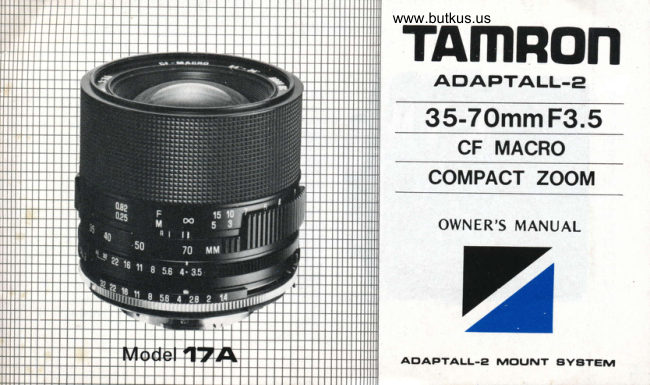
www.butkus.usTAMRON
   Atr'APTALL-E
  35-7Omm F3.5
    CF MACRO
   COMPACT ZOOM

     OWNER'S MANUAL


         -
 AE,AFTALL-ET MctUNT C]YBTEM
View original page 1Page 2 · Read text
Thonk you for selecting the new
Tomron Adaptall-2 35-70 F|3.5
zoom lens os the lotest oddi-
tion  to your  PhotograPhic
equipment. Before using your
new lens, please reod the con-
tents of this Owner's Monuol
thoroughly to become fully ac-
quainted with the proper tech-
niques thot will give you the
best results possible.
 llith proper hondling ond core
your Tamron Adoptall-2 lens
will give you many yeors of
beautiful ond exciting pictures,
View original page 2
Page 11 · Read text
opposite              directlyis provided
              indicator    aperture                   window                (l)  Focusing             Theing andrelationshipzoom rings.between the focus-the
which, when depressed,  releases
the mount. Therefore, while    Focus by rotating the focusing ring    As described above, this zoom lens
keeping the L'shaped mount      until the subject appears sharp in the      provides a minimum object distance
release lever depressed, turn the     viewfinder. Focusing is continuous     (M.O.D.) of 0.9m from 35mm to
custom mount counterclockwise     from infinity to the macro range with    70mm, a M.O.D. oJ 0.3m  ('l 1.8 in.)
all the wdy until it stoPS and     its minimum object distance of     from 50mm to 70mm and a M.O.D.
then lift the mount off the    0.25m (9.8 in.)                              of 0.25m (9.8 in.) at 70mm.
lens.                        Due to the us of the M.o.D. selec-     For example, when the lens is set al
                                     tor System, however, the zoom ring     the 35mm position the zoom ring
                                 couples when the minimum object       will shlft to the 70mm position i{ the
                                   distance for any zoom focal length      lens is focused at 0.25m (9.8 in.) In
                                    as exceeded and sets the lens to a      this case, the zoom ring cannot be
                               focal length at which focusing  is     moved toward the wide-angle range.
                                         oossible at that distance.                                           I hus, when using a short focal length
                                                                                                             it is necessry to move the focusing
                                                                                    ring to a distance farther away than
                                                                  the subject. ln other words, if we
                                                                    reverse the  relationship betwen
                                                                             focal legth and minimum object dis-
                                                              tance (M.O.D.) given above, the
                                                                       usable focl  length range will be
                                                      50mm -70mm at a distance of O.25m
                                                                                 (9.8 in.),35-70mm at a distance of
                                                                    0.9m (35.5 in.).
View original page 11Page 13 · Read text
(b)                                                               AE setting            zoom ring is set          the{b) When                                   at the          (31 Aperture Control                                                            When                                                                                        using your lens on cam-           wide-angle                               Position,  35mm
    zooming is unrestricted at anY                                                        eras which incorporate a shutter
    minimum object distance above     {a) Set tne requrred aperture by           priority automatic mode, turn
    0.9m (35.5 in.). But when the lens           rotating the aperture ring untrl        the aperture control ring on
      is focused closer than0.9m.the          the desired f-stop is aligned wrth         your lens to the AE position
    M.O.D. Selector System couPles          the index lire.    Intermediate         which also serves as F/32 when
    the zoom ring to the focusing           click stops are provided from        the lens is used on other cam:
     ring to set a longer focl length           I/3.5 to 1116 for precise expo,             eras.
    at which that minimum obiect           sure control.
    drstance is possrble. This also
     serves to pr'event the drstortron
    which otherwise would appear
    when close-ups are taken w|th a
    w ide-angle lens.
View original page 13Page 15 · Read text
(7) Checking 0epth-of-Field           (8) 0epth-of-Field Tables

  The depth-of  -f ield can be checked   To ascertain the depth-of-field for
   using the depth-of-f ield preview but-    example when you shoot at a dis-
   ton provided on your camera. (ln the    tance of  i meter (3.3 ft.) with the
   case of Olympus, the mount has a   35-70mm lens whose aoerture and
   built-in depth-of-f ield lever).            focal length are set to F/8 and
                                f-50mm, read where the figures
                               shown on the   f /8 horizontal row
                                              intersect with the 1 meter (3.3 ft.)
                                           value shown on the vertical distance
                                    column. In this case, the depth-of-
                                                 field is from 0.914 meters (3.01 feet)
                                           to 1.107 meters (3.65f1.).


13
View original page 15Page 20 · Read text
www.butkus.us

1. Avoid touching the sur-                                 3. When carrying a zoom    5. Always store your lens In
   face of your lens. When                                  lens mounted on your     a cool, dry place. During
   not usrng your lens, be                              camera, hang  it  from      humid or wpt weather  il
   sure to put the lens cap                                your shoulder with  the          is an espe<;ially good idea
   on for protection.                                            lens towards your body       to store  it with the silica
                                                                to protect 11 f16rrr ob1ects      gel packet that was sup
                                                                     rhar it might hit.                 plied with your lens.ffil
   }\*'
2. Cleaning your lens:
   a. Use a  Photograph  ic
       lens brush to remove
      dust or dirt   f rom the
        su r face.                                                            .t"t
   b. Moisten a lens clean-
      ing tissue with  one
      drop of cleaning solu-
       tion and clean the
       surface gently.                                         4.  F ine photograph ic equ ip-
   c. Remove excess mois-                                men t  can be  delica te.                                                             Protecl    it  from  any       ture from the lens sur-
       face with a dry tissue.                                     avoidable irnpact.                                      tt
View original page 20From the M. Butkus archive. Original publisher and archive notices are retained.
Check the model and edition against your equipment.
PDF verified 2026-10-10.