Film cameras
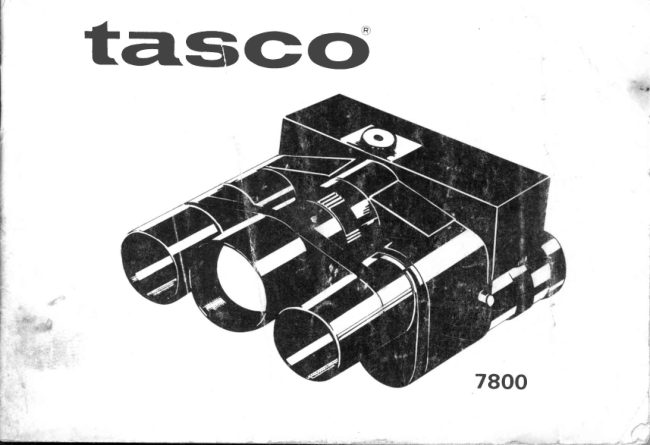
Tasco 7800 Binocular / camera User manual
User manual for Tasco 7800 Binocular / camera. 15 pages. Read the original PDF, download or print a copy without registration.
15 pagesOriginal document1.3 MB PDF
Loading your manual…Open PDF directly
Document details
- Brand
- Tasco
- Model / document
- Tasco 7800 Binocular / camera
- Document type
- User manual
- Language
- Check the original document
- Pages
- 15
- File size
- 1.3 MB
- Category
- Film cameras
- Document date
- Not specified in catalog
Search available document text
Find a term, then jump to its page in the original PDF. Image-only pages may not be searchable; check the PDF for exact wording and diagrams.
Page 8 · Read text
PRINCIPAL PARTS

   1  Taking Lens

     :   luleltive.Lens   3  EyepieceLens
   4  Shutter ReleaseButton
   5  FocusingRing
   6  Wind Knob
  7  Film Counter Window
     I  T ripod Sscket
     I  Diaphragm Ring
 1O Neck Strap Fitting
 1 1  Film Cornpartment
 12 Back Cover
 13  Back Cover ReleaseButton
View original page 8Page 10 · Read text
tffiLOADING

     O p e n   t h e B a c k C o v er ( D b y p u s h i n g  t h e      Y o u m a y n e e d  t o p r e s s S h u t t e r R e l e a s e
      B a c k C o v e r R e l e a s e B u t t o n @ a n d g e n t l y      B u t t o n @ b e f o r e y o u c a n w i n d   t h e  f t l m .
                 l o w e r   t h e B a c k C o v e r ( D    ( F i g - 1 )             T h e  n u m b e r   t h a t  a p p e a r    i n    t h e  F i l m
     D r o p   i n a  1 1 O - s i z e F i l m C a r t r r d g e a n d      C o u n t e r W r n d o w O  c o u n t s  e x p o s u r e s .
       c l o s e t h e B a c k C o v e r b y p r e s s i n g f i r m l y           *  A l w a y s o p e r a t e  t h e  f r l m w i n d  u n t i l   i t
      a g a r n s t  t h e  c e n t e r o f    t h e  B a c k C o v e r                  l o c k s, o r  y o u c a n n o t d e p r e s s  t h e s h u t t e r
      u n t i l  i t   l o c k s w i t h  t h e c a m e r a b o d y  ( F t g - 2 )           r e l e a s e b u t t o n .
      T h e  f i l m n a m e a n d n u m b e r o f e x p o s u r e s          * D o  n o t  a p p l y e x c e s s i v e f o r c e   t o   t h e
      a p p e a r r n  t h e F r l m C o u n t e r W i n d o w O    i n               f i l m w i n d .
            t h e b a c k c o v e r   ( F i g- 3 )                                      * W r n d  t h e  f i l m a d v a n c e u n t i l   i t     l o c k s .
    W r n d   t h e W i n d  K n o b G ) r e p e a t e d l y u n t i l      Y o u  a r e  r e a d y t o  t a k e t h e n e x t p r c t u r e .
          r t  l o c k s  ( F i g- a )
View original page 10Page 11 · Read text
rcADJUST     EYEWIDTH

      Hold tfie binocular to your eyes and     Now your  binocular is  properly ad-
      swing the barrels together or apart until      justed to your eye width.(Fig-S)
      you see a single crrcularimage.


ffiEYEPIECE     SETTING

        First set the Focusing Ring @ to "@"       time are peculiar to you, so remember
      and look at an object in the far distance.     them for your convenience.
      Turn the Eyepiece@ and stop  it when       After setting the  left Eyepiece to  your
      you can see the obiect most clearly.(Fig-6)        left eye set the other side in the same
      The scale number of the Eyepieceat thts      way.


      t0                  www.orphancameras.com
L
View original page 11Page 12 · Read text
ffiDIAPHRAGM     SETTING

     B y   t u r n i n g D i a p hr a g m  R i n g @ s e t   t h e      speed  and  diaph rag.m  number     f rom
      p r o p e r d i a p h r a g m n u m b e r ( F 5 . 6  t o F 3 2 )       1 , ' 1 2 5 s e c . s p e e d a n d  t h e n u m b e r r a n g i n g
             t o  w h i t e  c o l o u r e d p o i n t    ( F i g - 7 )                              f r o m F 5 6      F 3 2 .
    W h e n  y o u  t a k e a p h o t o g r a p h ,  c h o o s e a      Y o u m a y c h o o s e  t h e c o m b i n a t i o n  j u s t a s
       c o m b i n a t i o n  y o u    t h r n k    f i t     t o   s h u t t e r        y o u d o w i t h o r d i n a r y c a m e r a s .


     F o c ust h e B I NO CUL A R CAMERA on your              t h e   i m a g e  i s  f o u n d s h a r p e n o u g h . ( F i g - 8 )
     subject by turing the Focusing Ring O      C l o s e  s u b l e c t u n d e r  1 O m  ( 3 O f e e t s ) w i l l
     with the finger of your left hand until       b e o u t o f  f o c u s .
              ,
View original page 12Page 13 · Read text
-TAKING      PICTURE(GAUTION)

      (1)Square Bright-Frame in  view-finder     (3) In order to keep high efficicncyof  its           I
        seen through  rig ht  Eyepiece Lens         high  magnification fix  your  elbows
          indicates the range of photographing.         firmly to your body when you hold
        The Subject appears inside of  the         the BINocULAR CAMERA.
         frame is actually photographed.(Fig-9)     (4) Do not look directly at the sun throu-
        Whenever taking  pictures, you  are        gh the binoculars because the retina
        recommended to  focus the  subject          of the eye can be seriously burned.               t
         always inside of the frame.
       (2) When you carry or use your BINOCU-
       LAR CAMERA, pass the strap around
         your necK.


     12                  www.orphancameras.com
View original page 13Page 14 · Read text
j::EUNLOAD!NG

     Wh en you h ave taken th e last p i ctu re o n      Do not force the advance any further.
        a film cartridg e operate the film advance      Open the Back Cover @ and remove the
        u n t r l b l a c k p a p e r  a p p e a r s   i n    t h e   F i l m       1 1 O - s i z e f i l m c a r t r i d g e .
       Counter Window O and you  feel a  stiff      D o n o t o p e n  t h e 1 1 O - s i z e f i l m c a r t r i d g e .
       resistance on the advance.

-MAINTENANCE


         Always keep the lens clean.               AR CAMERA by the seasrde or  in wet
        B r u s h   l i g h t l y w i t h  a    l e n s b r u s h  a n d          weather, never fail to clean  it thorou-
         wipe  fingerprints  or   dirts  off  with           ghly before you replace it in the case.
           soft chamois, cotton or gauze.               3 Whenever you do not take photographs,
                         l f p o s s i b l e , a p p l y a l c o h o l .                     place lens caps over the lenses.
      W h e n  y o u h a v e u s e d y o u r B I N O C U L -

                                                                             r3
View original page 14Page 15 · Read text
@IINFORMATION

    You can use 12 or 20 exposure-film,11O-sizecartridge type, color or black and v"hite.
      " K O D AK (Ma d e in U. S . A.)
    Kod a c ol or-I I        C-11O-12EX& 2OEX(ForColor Pr i n t s )
     Ektachrome-X       EX-l 1O-2OEX      (For Color Slides)
    Kod a c hro me -X     K X -110-2OEX     (For Color Sli d e s )
     Veri c h ro me -P a n   V P - 11O-12EX      (For Black & W h i t e P r i n t s )
     * AGFA (Made in W. Germany)
                                                                            &
     Agf ac ol or         CN- l 1O-12EX& 2OEX(ForColor P r i n t s )
     Agf aC hro me         110-2OEX       (For Color S l i d e s )
     * SAK U R A (Ma d e in Ja p an)
    Sak ura c olo Ir I        1 1 O-12EX& 2OEX   (For Color Pr i n t s )
     * F U J I (M a d e in Ja p a n )
     F uj i c ol orF- I I         1 1 0-12EX& 2OEX   (For Color P r i n t s )


                                           Specifications are subject to change without  notice.
          t 4                   www.orphancameras.com
View original page 15From the M. Butkus archive. Original publisher and archive notices are retained.
Check the model and edition against your equipment.
PDF verified 2026-10-10.