Film cameras
Traveller Reflex User manual
User manual for Traveller Reflex. 12 pages in English. Read the original PDF, download or print a copy without registration.
12 pagesEnglish2.6 MB PDF
Loading your manual…Open PDF directly
Document details
- Brand
- Traveller
- Model / document
- Traveller Reflex
- Document type
- User manual
- Language
- English
- Pages
- 12
- File size
- 2.6 MB
- Category
- Film cameras
- Document date
- Not specified in catalog
Search available document text
Find a term, then jump to its page in the original PDF. Image-only pages may not be searchable; check the PDF for exact wording and diagrams.
Page 1 · Read text
www.butkus.us
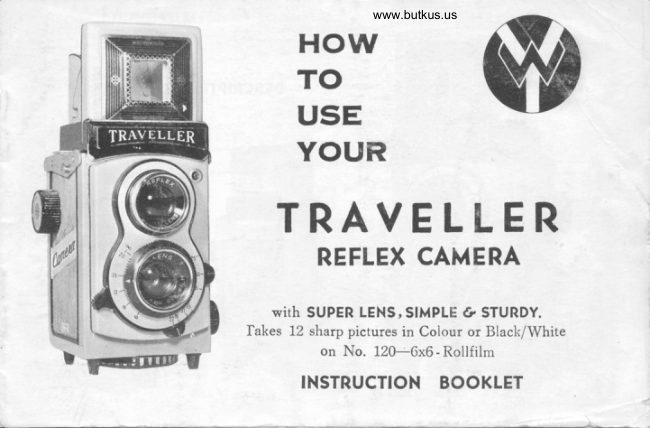
    HOW
      T o
        E      U s
      Y o UR
   TRAVELLER
         REFLEX CAMERA

           with SUPER LENS,SIMPLE Cl, STURDY.
        fakes 12 sharp pictures in Colour or Black/White
                on No. 120-6x6 - RollfilmU
          INSTRUCTION BOOKLET
View original page 1Page 5 · Read text
5. Draw out the backing paper of the film and insert
          the tapered end into ihe slot.of the empty Gk;:;;                _S_pool in the Upper Film Chamber, then tir- *"  pitH
           Winding. Knob. Make sure that ihe backing p"d, ;I            the film is properly placed.
         6. Turn the Filr! winding Knob three or four times so\                                -held           that the film leader is       securely on the f;t;-;;             Spool.
         7. To close the Back cover, turn the Tripod socket in         the 'Close'direction until it rtops.
         8. carefully and gently t_qrn the Film winding Knob until
            the Film Indication Window shows numb"er-it- V;;           are now ready to take the first picture.


                                            G)
                                              --


                                                                www.butkus.us

                                          <,r&
View original page 5Page 6 · Read text
www.butkus.us
                     SIGHTING THE SUBJECT
                     Your Traveller Camera No. 102 SUPER-LENS
                            is a new model with 2 viewfinders. One is the
                        Reflex Glass and the other is a Sportsfinder for
                         viewing picture at eye-level. The Upper Lens in
                             front of the camera is used for viewing the subject
                      on the Reflex Glass and the Lower Lens takes the
                             picture.

When obstructions are
in your way you can                                                                Rest your camera on
holo your camera over                                            the ground for  lo'.vhead viewing the                                                                   subjects.picture from below.


                             Hold the camera at
                                                                                                         usePlace the camera on               stomach level & view             For high subiect                                                                                                                    forvour knee when taking                  straight down to the             the Sportsfinder
 i picture from a lower                 Reflex Glass for clear                  vielving the picture on level.                                         subjects.                            the eye-level.
View original page 6Page 7 · Read text
For best results with y-our TRAVELLER SUPER-LENS CAMERA you have to check
                     th,e Lens Opening, Shutter gpeed and Distance Scale before               Th;                  following suggestions are helpful.                            "a.h "*porntu.
                                  T}IE LENS OPENING                                                                                                                                         t
               The.Lens Aperture controls the amount of light that will pass through the lens onto                 \
                             ,tlre                         light sensitive film. Your Traveller SuperLens offers openings at fit1, f:t A-aia tZi.
             To set the Lens Openings, move the Lens Aperture Control L"n"."to the desired                         ;               on the Lenp Aperture Scale. It is suggested that Setting f:16 should be used for ""*bernormal                                                                                                                                                                                                                                                                                                                                                                                .                t                sunny conditions. When,the weather Glloudv ahd the.su-n is partially obscured, f:8 f:11
                    srrould be selected. The Lens Opening of. f.:22 is advised for eiceptionally brighi scenes.
                     \              SHUTTER SPEED
                 Th.. F-Lgtle1_Sp_eed controls the duration of the exposure. Shutter Speeds on'your           TRAVELLER SUPER-LENS CAMERA are 1f25, t/50 of a second and b'. The speed                         of. Il25 of a second is recommended for general photography. Taking pictures of fast                                                                                         '"ipornt"                   sybjecf _is not ad_vised. The 'B' sett!1g is lor taking pictuiej with an           longer
                 than                 U25 second. This se_tting shouldbnly be used wlie.r the camera is firmly r,rpport""d
                         o:r. a Tripod or on a table and should not be used to take pictures of moving subiects.
             When you press the Shutter Release Button by 'B'position the shutter stays open until
              you release pressure on the button.


                                                                                                                                                                                                                                                                                             I                         THE DISTANCE SCALE                                                                                                                                                          {
                 Blt accurately rotating the White Mark t   o.r the Lower Lens Ring to the correct
                  distance number on the Distance Scale results in exposing sharp picture"s. Do not take
                   pictures at a distance less than 6 feet from the subject 1o the iamera. For excelient
                    portraits use distance scale gf6.tzfeet, and15feet for groups and scenes. Infinity 'o'
                    indicates distance of over 30 feet.
     5

\I
View original page 7Page 8 · Read text
www.butkus.us

                 PICTURE TAKING PROCEDURE
              Read the following instructions carefully before exposing
                 1.                      Cover Hood bv lifting it with your right hand thumb.           Q..  the              Press the sports viewfinder Hood inward to cloie.,
               2. Remove the lens cap. Look into the Reflex Glass you will see the
                picture which you can take *itJt your camera bi following the
              ways:
             a, As the Picture Taking Lens of your TRAVELLER REFLEX
           CAMERA is not a fiied focus lins. You must adjust the lens
                  to the distan-ee of your subject by turning the l.n'r-ti"g io-i["
                  appropriate distance on the Distance Scale.
             b, Set the required Lens Aperture.
I               c, Set the required Shutter Speed.
                                                                          ReleaseI              3. Hold the camera steady, then gently press the Shutter              Button downwards and the picture is then taken.
          4. Turn the Film_ Winding Knob until the next number appears in
              the Red Film Indication Window and it is for your tte"l- picture.
              Repeat this procedure until 12 pictures have been taken.
                                                                                         6
View original page 8Page 9 · Read text
UNLOADING FILM                    TAKING FLASH PICTURES

                 Ft


                                www.butkus.us


                                                                                  For taking pictures at night or in dark ptace,
                                                                               your TRAVELLER SUPER-LENS CnMeRe      After all 12 pictures have been taken, .roll
    the Film Winding Knob to rake up the                             flashis fittedgunwithinto FlashAccessorySvnchronization.Shoe. rhen connectInsert     remaining film eniirely on ro the Tafe-up                     the cord with the Flash Svnchronization
                                                                  Contact Your Camera can be used frlr the    spool- Open the camera as instructei
                                                                                                                                           Flash      elready, and pull out the Upper Film Spool                  Gunwholecandaybeofused24 withhours.TRAVEILAny kindER SUpER-of
     Locking Spriirg Knob to the end to loisen               LENS CAMERA. When buying-ani   bulbs,     the Take-Up Spool and remove the exposed                      choose a well-known brand.     ask for      film.                                                     Tvpe "M". Full Aperture f : I I and borh                                                                                              shutter speeds of. l/ i5 and l,/5O of a secondnI                                                            mav be used.
View original page 9Page 10 · Read text
www.butkus.us
                       I}IPORTANT TIPS
     I              Don't obstruct the lens by blocking it with your finger or with
t?          the camera strap
              Above all be sure that the lens cap is taken off, and replaced
          when your camera is not in use.

a.1'l             Keep the lens and viewfinder clean. Always use blowing cleaner.

   I                Don't get nearer than 5 feet from the subject.
 lu
    I            Remember to advance the film after each shot, otherwise you
              will have a double exposure.  1,.
           When loading or unloading film do so in the shade, never in II              strong, direct sunlight.
           Do not wipe the lens with a dirty handkerchief. Always wlpe
            very lightly by using proper lens paper or lens cleaning cloth.
           Do not snap the shutter when your camera is not in use.  Keep
            the Cover Hood and Cap close to protect the Reflex Glass & Lens
               clean.
View original page 10From the M. Butkus archive. Original publisher and archive notices are retained.
Check the model and edition against your equipment.
PDF verified 2026-10-10.