Film cameras
UNICUM Shutter User manual
User manual for UNICUM Shutter. 4 pages in English. Read the original PDF, download or print a copy without registration.
4 pagesEnglish1.0 MB PDF
Loading your manual…Open PDF directly
Document details
- Brand
- Unicum
- Model / document
- UNICUM Shutter
- Document type
- User manual
- Language
- English
- Pages
- 4
- File size
- 1.0 MB
- Category
- Film cameras
- Document date
- Not specified in catalog
Search available document text
Find a term, then jump to its page in the original PDF. Image-only pages may not be searchable; check the PDF for exact wording and diagrams.
Page 1 · Read text
www.butkus.us
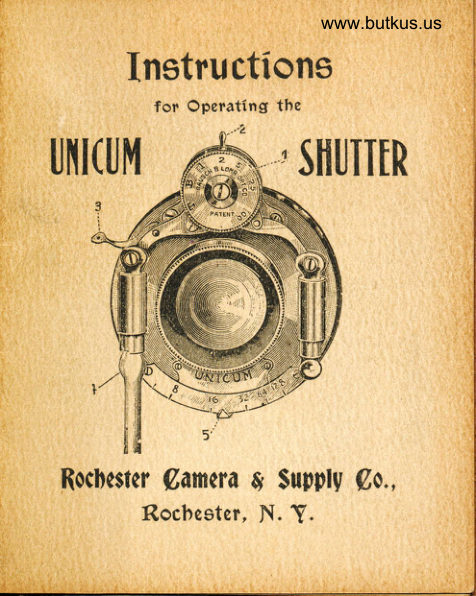
     Instru ctions
            for Operating tlte

UI{I(Ut|          'SIIUIIIR
       3


                                go., Rochcstcr (,amera g tuPply
       Rocbestm, N. Y.
View original page 1Page 2 · Read text
Digitally signed by Mike Butkus
                                                                                            DN: cn=Mike Butkus, o,
                                                                                                       ou=Butkus.org,                      Mike Butkus email=mike@butkus.org, c=US
                                                                                                            Date: 2024.10.12 17:59:40 -04'00'
         Instructions.

    The tlial at the *oo'"r'.orrter marked No. I
rnay be turned either to the right or left to any
Cesired position by use of the milled edge with
thumb and finger, and will he found to work
harder rnoving from B to T than elsewhere.
    Automatic exposures are made when the
dial is at I, 2,5, 25 or 100 ; the figure 1 meaning
one second; 2, one-half second ; 5, one-fifth sec-
ond  ; 25, one twenty-fifth and 100, one one-hun-
dredth part of a second. Should an exposure
of one-half second be wanted. turn the dial until
the figure 2 is at the top of the shutter on a line
with lever 2, as in the illustlation. After turn-
ing the dial to the required speed, turn lever 2
to the left as far as it will go, which sets the
sltutter. The exposure can be made either with
thc' pneumatic release by pressing bulb once, or
View original page 2Page 3 · Read text
Venmo @mike-butkus-camera  Ph. 2083
PayPal Name  Lynn@butkus.org      www.PayPal.me/lynnbutkus
View original page 3
Page 4 · Read text
www.butkus.us
    by hand, b5r pressing lever B down, when the
      shutter will open and close with one operation.
         Should a time exposure be desired, turn the
       dial until letter T is ar the top in line with Iever
       2, setting the shutter as before, when one pres-
      sure on lever 3 or bulb will open tlre slrutter.
    When sufficient time has been given the second
      pressure closes it.  Should a bulb exposure be
      desired, place letter B on the dial at the top,
     when one pressure of lever B or bulb will open
      shutter, when pressure is released it will close.
       The figures at the bottom of the shutter
q   indicate256 beingthethesizesmallestof the diaphragmand No. 8opening;the largest.No.
       'I'he diaphragm opening can be readily changed
    by moving lever b either to the right or left  ;
     the smaller openings being preferable for time
     exposures, the larger for instant&neous.
       As all lenses need wiping occasionally to
     remove dust, etc., they can be readily unscrewed
    from the shutter for this purpose, being very
      particular to get each in its same position wben
      replacing.
       f)o not use oil on the shutter.
View original page 4From the M. Butkus archive. Original publisher and archive notices are retained.
Check the model and edition against your equipment.
PDF verified 2026-10-10.