Movie cameras & projectors
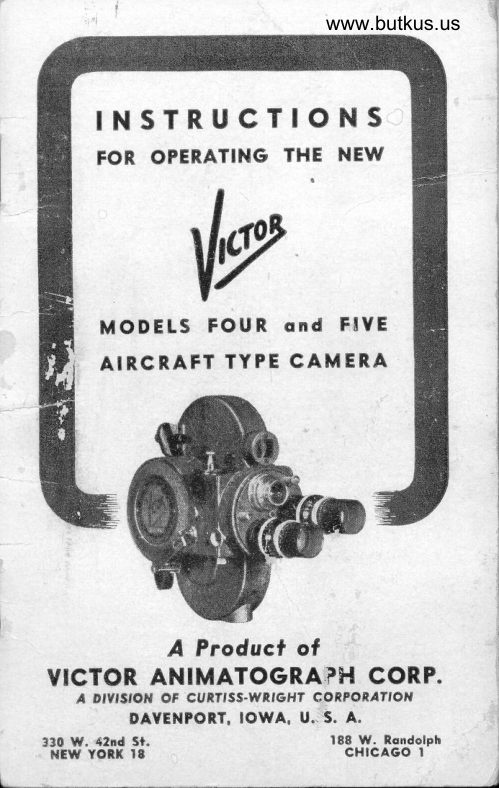
Victor Four and Five Aircraft Type Movie Camera User manual
User manual for Victor Four and Five Aircraft Type Movie Camera. 18 pages in English. Read the original PDF, download or print a copy without registration.
18 pagesEnglish4.2 MB PDF
Loading your manual…Open PDF directly
Document details
- Brand
- Victor
- Model / document
- Victor Four and Five Aircraft Type Movie Camera
- Document type
- User manual
- Language
- English
- Pages
- 18
- File size
- 4.2 MB
- Category
- Movie cameras & projectors
- Document date
- Not specified in catalog
Search available document text
Find a term, then jump to its page in the original PDF. Image-only pages may not be searchable; check the PDF for exact wording and diagrams.
Page 1 · Read text
www.butkus.us

  INSTRUCTIONS
    FOR OPERATING THE NEW
    MODELS{vFOUR ond FIYE
    AIRCRAFT TYPE CAMERA


      A Producf of
VICTOR ANIMATOGRAPfiI CORP.
   A Dfvfslol{ oF cuRrfss-wRloH7 conPoRlrrofl
        DAYENPORT, IOWA. U.is. A.
330 W. 42nd St.                       188 W. Rondolph N5WNEW YORI(lvln    18a9                     cHtcAGo I-                                            4
                                                                          d
View original page 1Page 3 · Read text
YEARVICTOR
GUARANTEE BOND
          rrrs document certi6es that Victor Cin6-Camera,
         Serial No...-.---.-...----has been constructed through'
        out to perform according to  all published ciaims
      made by the Victor Animatograph Corporation
        and that it is guaranteed against defective materials
for  life and workmanship  for a period of ONE YEAR
fiom  original date of  purchase fronr authorized Victor
distributor or dealer.
Adjustments or  replacements during the period of  this
guarantee, will be made by the manufacturer without charge,
prouided the owner's namc and serial number of the camera
are registered at the Ioctory; and provided the instrtlment
is returned transportation charges prepaid to the factory at
Davenport, Iorva, or  to one of the factory branches
New York or  Chicago. If  during the period covered-
by this Guarantee (one year from date of original prrr'
chase) any adjustments,  replacements or repairs may be made
at any authorized Victor service station at a cost to the user
of reasonable labor charges only, any new parts required
for replacement will be furnished Ly the factory at no cost.
Any alterarions, revisions or changcs of constructton made
by the user or damage caused by careless handling, cancels
the manufacturer's responsibility for the correct performance
of the instrument. Guarantee is otherwise unconditional
and will be fulflled s'ithorlt question on rlturn of camera to
factory.                                    (': .:
                                    ,5/t'o1,L
                                           pres
  V]CTOR ANIMATOGRAPH CORPORATION
  A DIVISION OF CURTISS.WRIGHT CORPORATION
          DAVENPORT, IOWA. U. S. A.
NOTE-This Guarantee is efiective only when the
VICTOR CAMERA is properly registered by owner
                  af the factory.
    SEND REGISTRATION CARD NOW!
View original page 3Page 4 · Read text
o ENERALwww.butkus.us
  IN STRUCTIONS
         Read Carelully !
WHEN LOADING THE CAMERA follow carefully
   the instructions given on pages i and 6 for threading
   the film, setting the film lootage meter, and locking
  the camera door. At the beginning o[ each roll of
   16 m/m reversible film there is attached approximate.
  lV 6Vz .feet of black and red opaque paper or ol    .
  opaqued film which is referred to as LEADER.
  This leader protects the filrn from exposure to light.
   Always \eep leader tightly wound about the film- on  the spool when loading or unloading.
  TEST TAKEUP SPOOL each time rhe camera is
   loaded. _ See speci{ic instructions on following pages.
  Bent takeup spools may cause the camera to jam ind
   result in spoiled film.
IHE CAMERA IS LOADED AT FACTORY with a
    sl'rort strip of leader to show correcc threading. Run
   this through camera by pressing operating bulton to
   observe film travel and the action of the film loops.
  LOCK DOOR SECURELY making cercain thar it
  is clear down in position all around. }\ever open^has  the camera door until the entire spool of film
  been exposed. If film has jammed because of incor,
.  rect threading take camera into dark room to unload
  and rethread.                                                                        c
    BEFORE OPERATING CAMERA BE SURE TO:
Checft lens for exposure setting and make certain that it
  has been properly focused for distance  if  it is a
  Focusing Mount Lens.
Chec\ setting of the speed regulating dial to insure
  that it is set for position at speed desired. If other
                  I1l
View original page 4Page 5 · Read text
lhan nortnal speed is used, check back on the ex,
    posure settlng of che lens. See Exposure Compensa,
     tion Table, page 10.

                                                                                                                                                                                                                1       WHEN OPERATING CAMERA
  Hold Came'ra Level and watch tire penduium level in                rl
    the front finder to prevent the taking of "up, or        .i
    down,hill" pictures. Press clear down on operating                 I
    buttott [o start the tnechanism. Hold button down
                                                                                                                                                                                                                                                                                      I     Jirmly as J'ur as it wtll go. Watch chis particuiarly
   when tnaking slow tuotion pictures. Do n<-rt depress   4
    or release operating button gradually. Instantaneous
     actiolr is esser-rtial to prevetrt slow starting and stop,
    ping. Orr tlre other hand, do rrol jarnb the button
  '.   Oowtl.

                                                                                                                                                                                                                                                                                                                                                                                                                                                                                                                                           i When punoranirtg (ruoving carnera in arc) for filming                                 I
    scenery or groups <-rf people, MOVE CAMERA                                   i   VIIRY SLOWLY. If you think you are tnoving
     slcrwly, ulone everl n'tore slowly. Pivot the entire body
    instead of moving only the camera or the arms. Us.     irrg tlre 2f or 32 opelating speeds pernrits ol ruak.   i
    iug smclother "pauoralns" than wherr operating at the
    l6 l'rame speed. Par-roraming should be avoided as                                     4     rnuclr ts possible and preferably used only when fol,
     Iowirrg a rnoving object.
 Do ttoL "Luedve" Lhe camera around or "bob" it up and
     dclwn.
  Meastwe dtwaLiotr of scenes. Short scer.res are besc and
    plevcnL unncccssary wast-e o[ {ihn.  'f,r.., ruuch "[oot-
    age" of oue scene is boresome whe.n the fiLn is pro,
    jected, unless there is soure plannecl cor-rtinuity in
    the acti<-ru. The average scene should be from ten
   to fifteen seconds duration.
 When ftlnting distant uie rus have solnc person or other
.    rnovir.rg object fairly closc tcl the cali)era in the fore,
   ground. Generally not more than one,third sky
     shorrld slrow in the picture area.
  lletuind lnotor spring after runlring filteen t() twenty
    ieet of film to prevent rurrning dowlr drrring some
    rmportal)t srrbsequent exposure.
                 127
                                                                                    II
View original page 5Page 6 · Read text
www.butkus.us
Do not point camera toward sun but always at an artgle
  whiclr will permit the shade on the front of the lens
  ro prevent direct sun,light from reflecting into the
   ter)s proper.
The best light f.or rnaking motion pictures is that period
  of the day between two hours after sunrise and two
  hours before sullset. If pictures are takert earlier or
   later, open the lens one or two stops larger, depend'
  ing ou tire hour o[ fiLning to insure sullicient ex,
  posure.         .
lu ntal{ng interior scenes, follow closely che special in.
   strr.rctions provided with supersensitive panchromatic
   {ihn, or with interior photolights for settirrg the lens
  stop to iusure the proper exposure for the atncltntt  ol'
   alti{icial illuurination available.
When using TeleplroLo lenses. particularly o[ four inch
  or greater focal length, the camera should be operatecl
   lrour a tripod as the use of long focus lenses exagger,
   irtes ar)y lnovement of the calne[a resulting {ronr
  hand,holding. Tripod socket will be found dircctly
   rrnder the body of the camera and fits the head screw
   ol' any ordinary wood or tnetal carnera tripod.

           CARE OF THE CAMERA
'The \/ictor Cuntera is o precisior"r.built  itwLruntertL an<l
   reqtrires reasorrable care atrd attention for best results.
   C)iling ancl cleaning should be done regtrlarly in ac.
   corclirncc with instrtrctious given. Speed oI the cam,
  era shorrlcl be checked olrce or twice a year, and regu.
   liried as per instructions given in the following pages.
DO NOT ATTEMTT TO TAKE CAMERA APART.   lI  for iuly reas()u rt is necessaly to clisassemble the
   irclnt trnit or to relnove the rnotrlr, MAKE CER,
 TAIN THAT THE SPRING IS COMPLETELY
  liLlN DOWN ircfore doing so.  Otherwi.se, the
   .'irrnerel rnal' be seriously damagccl and such darnage
   ls l'lot covered bv the quarantee
                  t3l
View original page 6Page 8 · Read text
www.butkus.us
           THREADING THE FILM
First wind the camera. Pull Winding Crank from clip
  and fold over until slot in crank arm engages lug on
  end of winding shaft. Revolve to right until stop in,
   dicates winding is complete. Open camera door by
   lifting up the folding "grips" of the door locks and  turning to "O". Lift up back of door to remove.
Load Camera in shadow, not in direct sunlight. Re,
  move film spool from box, carefully preventing film
  from loosening on spool.
                Refer to llluslraiion One
Place spool of film on upper shaft (B) so that leader
  unwinds from the bottom.
Leader (if paper) must be black side up, and on top
  of roller (C).
Raise knob (D) and pr:rll upper film.shoe to position
  shown.
Raise knob (F) and pull back film.gate to position
  shown.
Raise knob (G) and pull down lower film.shoe to posi.
   tton snown
Lay leader in place as shown, allowing upper and low,
   er loops to touch camera wall (See Illustration One).
Make sure that teeth on top of sprocket (E) engage
  the perforations (holes) on edge of leader; then  snap shoe (D) back into place. Close gate (F).
Make sure that teeth on bottom of sprocket (E) engage
   perforations of leader, then snip shoe' (G) lnlo
  Place'      See llluslration Two
The threaded film, with film
  shoes and film gate closed,
  should appear as shown.
With empty take,up spool
   ireld in hand with square
   hoie toward camera, attach
   enci of leader to slot in hub
  of spool. Turn spool two
  or three turns to right to
   firmly attach leader.
                   trl
View original page 8Page 9 · Read text
rEST TAKE.UP SPOOL
  BE^{f SPOOLS ftLay caLLSe film "snagging." When
   threading a new fiIm altt'a)s test the empty, or ta'\1e.
  up spool to see that both side.s are straig'ht and paral.
   lel to each other and that the lectder will nas.s be.
  tween  f reely.
Place take,up spool on lower shaft with scluirre hole fit.
   ting over square hub at base of shal't.
With operating button (Illustration 7) set at normal
  speed          _'16", press button for a rnornent only tr> ob.
  serve 1[n6;-pnper leader properly engages teeth  or.r
  top and bottom of sprocket--leader is exactlv irr the
  film channel behind the lens-leader is fiimlv  at.
  tached to take,up spool.
Threadir-rg is now completed. Replace carnera door arrcl
   lc,ck securely.

             SETTING FILM METER                                      fi
lmmediately after threading film and
  locking door, revolve knob of  film                                                           {jl
  meter (Illustration 3 ) in directiorr ol  arrow until indicator hand points to
  line between "10" and "100".
  Start motor by pressing operating but,       lllrrs.  -l'lrree  ton and run until meter indicator
  points to  :'100".  Paper leader hirs now been
  unrvound from film and fihn is in place in  aDer.
  ture ready for exposure. Avemge .."trts shoulcl liave
  a duration of 10 to li  seconds.

       BEFORE OPERATING THE CAMERA
Adiust Visual Focusing Finder. (As long as srrme per.  son is using cam@ra. the finder sigirt ne"d _L..tadjgggd       I
  only       Each user should. however, adjilsc*fotut,  rfg finder-once. for his particular evesight.) To-adjust
  finder, have a lens_in focusing position-irnrnediaiely
  belo'"v focusing sight tube when camera is held hori,
                   f6l
View original page 9Page 10 · Read text
www.butkus.us
          zorrtally (Illus. 5). The Lens Turret nray be revolved                                             post (Illus         in eit6lr'directioir by pulling up                                                                     <-rn _lock
       +) and by then pressing with thumb and torehng.er
          uil uttu two of t'he thrJe turret posts until the de'
          sired lbns is brought into the focus'
        ing position.
      Set the focr.tsirtg ring of the lens at
          "Infinity" which is usually indicat'                     !!oo       ed thus:     " or "INF".  Set tlre
         diaphragrn or exposure rirrg for the
         larfest lens opening-?.J, 2.9. 1.5.
                                                                                                ()r'                                                                                                                                                             I llrrs. Iiorrr          etc. --- according to the speed
        type of iens being used.
                                                                eltclt  user, screw  it    To set the focusing eyepiece for
                                                                 ol'         in or out until the "grail-l"
         the ground glass is focused sharp'
                                         irnagcs    I        lv. To avoid distracting    I       remove the lens or point  callrel'it
   I         against the sky.
      Focus Lens on Obiect to be Phttto'
ll         s.rabhed. Whilo viewing the ob'
          ie.f thtough the focusir-rg findcr'          lllus. Flve
           ievol.,'e thi focusing ring of the
          i"n,  (t1'," ring nearest catnera, ttstrally nutrl<ed,itt feet
        or meters) until central object itr scette is irt slrarpest
          possible foctrs.
           ,\or.u'oitito,,r-reuolue the tLlrret unLil the lens i's itt talling                                                            qit:u:1.:11'                                            canterct.                          Do                      ii  lrfi ii4,                                                            ,                                                                              '''ut'                                                                     turret'                                              revolving                                            wher-r                          lens"1setting
                          Press plunger locl< (Illustration 4)
                     down lnto-place to insure rigidity
                                                                          positior-r.                        of turret -t..,  lens is in
                     Consult ExPosure scale on Door,
                          preparatory to setting lels for ex'
                       po*t". (Iilustration -6)-. Push indi                           iator to the tyPe of duy, "Bright                                          -                      Sunn', Bright  CloudY", "Dull
                         Cloudy", oi "Very Dark CloudY",
                           Lt)
View original page 10Page 11 · Read text
according to the condition of light existing when
   picture is to be taken. Through the round openings
   read the number appearing above kind of pictuie
   to be taken, as shown in the six spaces on the lower
   half of the meter. This nurnber indicates the lens
   opening,- sometimes called the "stopn' or "diaphragrn
   opening", to be used.
 Set the Lens Opening to the corresponding figure. giv.
     by the-exposure meter. The Knurled ring on the  9n
   Iens barrel is revolved to set the ope.ing. Thi, d;a,                                "on  phragm                                     positiions                                                       different                   ^ Iing  is - in varying  makes ot Ienses, but is identified by the indicator and
   series of numbers which usually ir" o, follows: 16.   11, g, ,.6,4,3.1,2.g,  etc.
    (It  is. a good pracrice to keep the lens which is in
    s;roltrr"rg posirion ser at'1i feet and at Fg (on bright
  day) for making quick emergency shots that do iot
                                                                                                                                                                   ri   allow time for focusing o. ,.iti'g'lens-  i;;  ...p;rure.  )
                                                                                                                                                                                                                         1;
To^Set Operating Speed. The
   Uperating Burton (Fig 7) is
  marked with an arrow io seiect
  speed designations of g. 16.
  24 and 32 frames per second.
  plus ULTRA (apiroxirnarelv
  80 frames per..co.rd). When
  camera is not in use, arrow
  should be placed at LCjCK for
  protection  against unin,         Illus. Seven
  tentional film usage. To move
  operating Button, raise and turn to desired position.
  Io  operate, depress wlth firm downward fr".rrrr..  To. stop, releas.e- abruptly. Operating Button *u/  l"
  locked at 8-, 16 an[ i+ frame spEeds by o .ilght
  counter,clockwise turn after depressing.
To Run the Camera. Turn selecror arrow to speed de,
  sired and_depress the Operating Button with a firm
  .do.y"yqld pressure,.as   f ar as it will go. It must be  held fully dqpresscd during operatioi.
                  t8l
View original page 11Page 12 · Read text
www.butkus.us
         16, Normal Speed, (meaning 16 exposures or frames
         pgr second) is. the sleed at which natural action
           pictures are taken. The Exposure meter readings
F          give the "stop" or "diaphragm" to use at this .rormil
            speed.
1      8. conditionsHalf Normalare Speedpogr andis usedwhenatarimesparticularlywhen lightingdesired
            picture is to be taken. Half,speed doubles tire actual
                          eacl'r                     exposure.                             Comedy,                                                                                   re,                                        or quick,action
                     exposing  t        timesultsoflrorn                                  half,normal                           at                                       ipeed. When
           using this speed move the lens diaphragm to the next           smaller stop, than used for "Noimal-. (See Lens
n        Srop Compensation Table).
           24,- One and One Half Normal, is used for shooting
             fast moving objects, .which if shot at slower speeds ari
           blurred because of too rapid movement during each
            individual exposure. 24 frames per second geimuch
               si'rarper pictures of objects in rapid motion.
          Tt:: "stop" or diaphragm to use for this speed is
           rnid,way between the "Normal" stop and the stoD
          next larger._ Example: if F.8 for "Normal" set stop
         between F.8 and F  i .6 for 24 frames per .".o.,d.
                     ( See Table)   .
             3 2. Twice,Normal makes more perfect, sharper pan,
          oramic scenes and- may also be used for shooiing very
           rapidly moving objects.
       The "stop" for 32 frames per second is the next                                       -          larger than for "Normal".                                  Example: If F.g for          normal use F i.6 for 32 speed. (SeL Table).
  t      64,. Ulra1p_eed is used for taking pictures thar give
         the SLOW motion effect when projected on th.
          screen. The higher the rate of speed, the "Slower" I       the action in the projected picture.
      To take SLOW morion prctures wrth the Vicror
          Cin6,Carnera, turn the ipeed regulator to  "64
        Speed". Slow,mocion pictures must be made with
                       Iel
View original page 12Page 13 · Read text
stclPs wider open than when the lens set at two full
  "shooting" the same scene at normal speed.


    LENS STOP COMPENSATION TABLE
                         FOR
  CAMERA SPEEDS OTHER TI.{AN NORMAL, AND FOR FILTERS
(For use with regular speed 6lm only. When using Super.sensitive Panchromatic Film, follow
                           film manufacturers' special instructions.)
Numerals  in parenthe-ses indicate camera speed in frames per second.
Exposure indrcated  for
Normal Speed (t6)            F r.t   F2   F2.9     F3.5  F4          r)     F8    Fll  Fl6

Half Speed (8)                    2.t   3.5                 ,<        ) -o   t.6-8                     ll           I
                   'IimesOne      t/ One.Half
         (2+)                                                  l.t  ,2.2.9   '2.9.3.t    3.t      4     4.t  t.6.s   8-t I   l1.lNormal
Double Speed (32) or
2x Filter with 16 speed                        2    82.2.9    2.9     3.t             ).o      8     1l
Ultra Speetl.Slow Motion or
4x Frlter rvith I6 speed                                                                                         l -)     2  2.2.9     2         4     t.6      8
*Wherc tu'o figurcs are giverr, set thc lcns at half'x'ay betrveen the two stoPs indicated

           TAKING THE PICTURE

                                             sameHold the Camer4 close to the face in abottt the
  Dosition as shown in Illustration 10, with the second
  br thrrd finger of the right hand over operating. but'
  ton (?).  fiota the arms, elbows in. close to the.bo-d,t
  to pievent tiring and to promote steadiness in 6old'
  ing the camera.
                                                                        2Locate Scene in Finder. Notice that the readings,
  feet to infinit;' (8),'altetttut"on the Dist'a'sight rear finder                                                                          sca.lg'   (Illustration 8;        on both. sides. of
             Wittr all usual outdoor shots with
               one,inch 1ens, it is not necessary to set
               sight for exact distance. Leave it  at
                      " It  feet" for all except close'ups ot'
                objects at 6 feet (or less) djstance. Set   lllus. Eight                 aciurately when using telephoto lenses.
                   l10 l
View original page 13Page 14 · Read text
www.butkus.us
     The Front View F'inder (Illustratiorr 9) has 4 field
          areas. The whoie scene visible in
         the view firrder represents the area
         covered by thc rlgular one inch
          iocns lens. The three rectangular'
         areas etched on the finder reDre.
         sent the fields takerr in by lenses
         of longer focai length. The larg,
          est indicates the field covered by             lllrrs. Nine
             ir 2 inch focus lens. the next. a
        3 inch iens. aud the smallest, a ,$ inch lens. For in'
          stance, when using a 4 inch lens, only rvhat can be
           seetr in the srnalle.st etched rect:rngle rvill he exposed
       on the filrn.
      Hold Camera Leuel.  Pendulum in front 6nder (lllus.
                                      tration 9) will, i[ watched.
                               nrevent unintentional  tilt.
                             ing oi  cerffIera. Do  rrot
                                 "V/ea\re" or Inove calneril
                               about to get several difler.
                             ent objects in:rt  one ex.
                                       posure.
                              Press ctperating buLLott douvrt
                  AS FAR AS IT WILL
                   GO to start the rneclrarrism:
                        Illue. Ten          continued pressLtre l<eeps
                                                    it running: release oI  ttre
        button stops  ti're rneci'ranism instantlv.
     Length of Scene. The average scene slroulcl be from
      10 to 1i seconds duration. Estimate duration of
        scene by countir-rg slowly, each cou ltt representing
         passage of one second or exposrrre oi 16 frarles.
,      Entire fiIm  l'tas been exposed when "100" again showsI      on film meter (Illus. 3 ).  Before opening the door         continue  pressure on operating button for period
           sufficienr to permic passage of 5 {eet lnore of filrn to
        wind the trailer around the exposed filrn. Then open
        the dcior and remove film.
                                     [ 11 ]
View original page 14Page 15 · Read text
Camera rnay be loclled in operating position so that
  the operator can get into the picture and camera run
  unattended. This is done by depressing operating
  button and sliding over the lock lever as described
  on page 9.
To hand.driue the Victor Cin,i'Camera, the spring
  motor must be completely run down. Turn the
  speed dial to speed desired and lock down the
   operating button as described on page 9. To remove
  crank from winding shaft for hand cranking, re'
  volve to left until it comes loose. Remove protect'
   ing button just above winding shaft and attach wind-
  i"E crank to hand drive shaft. When driving hv
  hand, revolve crank to the right at a speed so the
  governor is just "dragging."
The Stop.Action is to expose but one -picture or   "frame" at a time; for trick tx'ork, or for making  animated cartoons. Set speed dial at 8. A quick                              -button,   pressure of the starting          instantly released.
   lllo*s but one "frame" to be exposed.
                                       f or Double Exposures or Lap'dissoluesTo Bacll.IJp'J Film                                                      cover   (Model      only ).  Remove hand'drivc shaft
   (just above ',viiding shaft) and insert se-parate crank  *Uch is supplied with camera. Cover' front of lens
   with lens cap or paln-r of hand to prevellt exposure
   of film.
  Hold crank to prevent revolving and lock operating
   button down at any speed setting. Turning crank
  backward (counter'cloikwise) backs up the film.
   Each revolution of the crank tllrns back seven frames
    ,rf film.
   Backing up tl're {ilm winds the motor spring. There'
    iore, oirly as rnuch film can be reversed as has beerl
'  exposed since the last full winding of the motor.
   After lap or double exposure has been made, reset
   fihn rneter to read the same as before 6lm was re'
    verseti.
                  [12]
View original page 15Page 16 · Read text
www.butkus.us
              CARE OF THE CAMERA
                         Oiling ls lmportant.


                                           l5
                                   Illustration  Eleven
?      Oil Camera euery t-hree o,r  f ourrnonths or after every
          ten or                       spools of film have been exposed. Threl                -morg I            iroles distribute_ oil to all imporrant beirings. With  I
       a smail screw driver remove two round heid screws.
        14, 1i  (Illus. Eleven). Put not rnore than three
         drops of oil in holes 13, 14 and lj  (sewing machine
         or equivalent) and replace scr€ws. Special VICTOR
         camera lubricating oil is recommended.
      Keep aperture plate clean. Emulsion from the film is
           consta.ntly being deposited on the aperture plate and
          ,should be removed after' exposing two or riore rolls
        oi film. Use a sharpened *ood stick. Never touch
        the aperture plate with metal, as scratches will cut
        and damage film.
     When l-oading carnera, clean out any accumulated dust
         or other matter before threading film.
      To^Checll Speed for correctness, open door (when no
          film is in camera), and with speed set at "Normal,';
         Press o-perating button while counting the revolu,
          tions of the red dot on the sprocket (E, Illustration
         One.,) The sprocket should revolve sixteen times in
         seven seconds. This is correct normal speed. If run,       ning too fasr, turn regulating diai (Illus. T )
                              13 ]                                   [
View original page 16Page 17 · Read text
slightly until the correct speed setting is obtained.
  Hold the takeup spindle to approximate closely the
  normal calnera load. Then mark the outer edge of the
  speed dial knob accordingly. The other speeds can
  be checked in the same manner. This check, how'
  ever, should     be necessary after long use or               .only  operation under exceptional conditions.
Do not uttenlpt to talle the Cant.era apart. The fr<-rnt
   casting, and the spring unit must never be removed
  from the Camera body until the spring is completely
  run down, otlterwise the mechanism may be ,.eriously
  damaged.
Caution, If Tahing Camera Apart,
  SPRING MUST BE COMPLETELT RUA{ DOWN
  before front casting or spring attachment is removed
  from the carnera body. When reassembling put on
   front first, making sure gears mesh correctly before
  tightening screws. Then reassernble spring motor
  attachment. Before tightening screws push operat'
  ing button down and insert crank in hand drive
  shaft and revolve tcl rnake sure all gears mesh. Then
  tighten screws.
If Repairs Are }\eeded, it is best to send Camera to the
   factory or authorized service station.
Camera Should be Seruiced at least every two years at
  the factory. For complete inforrnation, see "General
  Instructions" in front of book.
Successful operation of the Victor Cin6,Camera is very
   sirnple if the instructions in  precedir-rg pages are
  carefully followed until all points concerning oper:l.
. tion are thoroughly familiar. The Victor Animato.
  graph Corporation welcomes correspondence from Vic.
   tor owners and will provide any inforrnation desired
  in connection with adaptation or operation of Victor
   products.
VICTOR ANIMATOGRAPH CORPORATIOI\I
    A DIVISION OF CURTISS-WRIGHT CORPORATION
         DAVENPORT. IOWA., U. S. A.
                   [14]
View original page 17From the M. Butkus archive. Original publisher and archive notices are retained.
Check the model and edition against your equipment.
PDF verified 2026-10-10.