Film cameras
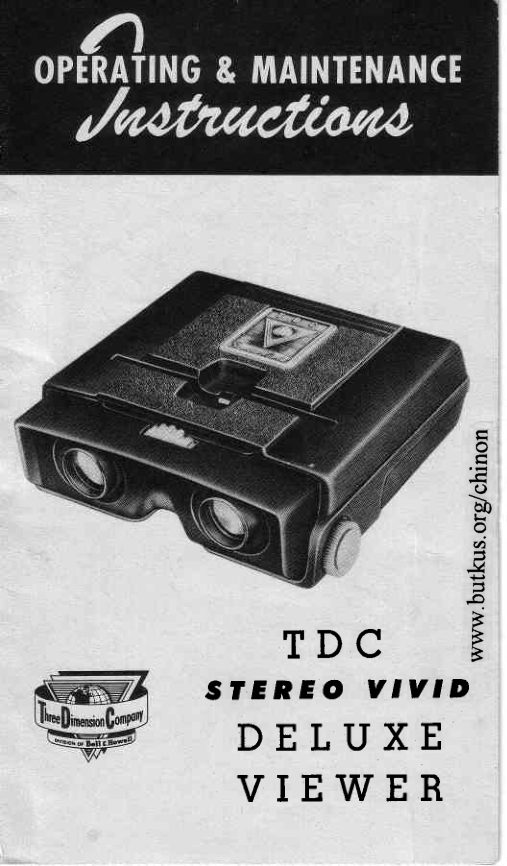
Viewer User manual
User manual for Viewer. 7 pages in English. Read the original PDF, download or print a copy without registration.
7 pagesEnglish0.4 MB PDF
Loading your manual…Open PDF directly
Document details
- Brand
- Viewer
- Model / document
- Viewer
- Document type
- User manual
- Language
- English
- Pages
- 7
- File size
- 0.4 MB
- Category
- Film cameras
- Document date
- Not specified in catalog
Search available document text
Find a term, then jump to its page in the original PDF. Image-only pages may not be searchable; check the PDF for exact wording and diagrams.
Page 3 · Read text
REFLECTOR


                               FOCUSING
                                KNOB
                tAMP

FOCUS
The two red knobs on the side of the TDC  Stereo
Vivid Viewer are the focusing knobs. Hold the viewer
close to the eyes and rotate either knob until sharp
focus is obtained.

INTEROCUTAR
The red knob with the white dot (on top of the viewer
and in the center)  is the interocular adjustment. If
you see more than one image when looking  in the
viewer, rotate this knob  in one direction, and then
the other, until you see only one image. Normally,
you will not have to change the position of this knob
once  it  is propedy  set. Effective adiustment  is from
61 mm. to 73 mm. separation.
View original page 3Page 4 · Read text
BATTERIES
                                          "D"TDC  Stereo Vivid  Viewer uses standard        cells.
To replace batteries, first remove screw in bottom  of
viewer.  Lift  off top of viewer, remove old  cells, and
insert new ones as shown on bottom plate of viewer.
In replacing cover, be careful that reflector does not
catch on slide slot. Replace screw in bottom of viewer.

LAMP
The lamp  is a 2.l-volt,  .3-amp. standard miniature
screw-baseflashlight lamp  (G. E. #14,  or equiva-
lent),  identified by a blue bead. To replace lamp,
femove cover as above, feplace lamp in  socket, utipe
lamp clean, and replace cover.

TENSES
The cemented achromatic lenses have an  efiective
focal length of 42.7 mm.  In  cleaning, use regular
lens tissue or soft, lintless cloth.

REFTECTOR
The reflector is specially designed to give maximum
light behind the slide. Under normal care and use, it
will  not be necessaryto clean the reflector. However,
if  it becomes necessaryto clean the refector, remove
cover as above, remove the  clip  spring below  the
refector, and slip reflector out of housing. Clean with
soft, slightly damp cloth. Do not replace before dry.
Replace cover as above.

On the bottorn pkte  of the oiewer is a space for yo*r
ndrrl€t and,also a rri|od socket f or stationarlt ntounting.
View original page 4Page 5 · Read text
TRANSFORilIEROPERATION
    You may wish to use your TDC Stereo Vivid Deluxe
     Viewer with regular house cument instead of batteries.
     This  is very easy to do, and provides many hours of
     viewing without worrying about battery replacement.
    Many ransformer  units are available, such as the
     Viewmaster Model  3 Transformer, and  all can be
     connected to the Stereo Vivid Deluxe Viewer by fol-
     lowing the simple directions below.

                    A + 9


                                                                                                                                                                                                           I
                                                                                                                                                                                                           I o                                                                                                                                                                                         I
€()
 a[  tr

  ,t)

.}4
 =,o
 FFB
    To connect transformer unit, first remove top of hous-
     ing as you would  to replace batteries, and then re-
    move the batteries. Loosen screws A and B, slip the
    open leads'on one end of the transformer cord under
     the screws, and then tighten the screws firmly.  Place
     the transformer  cord  in  the notch  at the  rear  of
     the'lower  housing. Before fastening .the top of the
     housing, be sufe the cord  remains  in  the  notch.
    CAUTION:     In  using  a  transformer,  connect  to
     110-115 volt alternating carrent only; do NOT  use
      direct current.
View original page 5Page 6 · Read text
TDC STEREOVIVID CAMERA
                                  Ultimate  in fine camera crafts-
                               manship.  Most  nearly  auto-
                                   matic  of  all stereo cameras-
                                    with TDC's exclusive Exposare
                                     Dial


 rDC SIEREOCOI.ORISTCAI'IERA
 Greatest  precision  stereo-cam-
 era value  ever  offered!  Rug-
 ged, lighnweight,  easy to  use,
  full   controls  offered.   All   at
 low $99.99.


TDC SIEREO              TDC STEREO
VIVID PROJECTOR          PROJECT-OR.VIEW                                  "KingThe  proven  choice  for  maxi-            size" viewing  for small
mum  brilliance.  Provides the   groups-screen   projection   for
best show in stereo projection.    large  groups.  Simplified  dual
Two  matched  113.,  lenses.   controls  for  both viewing  and
rUflith 5"  lens, only $169.50;    projection.  Minimum   of  ad-
with 4" lenses, fi179.50.          justing. Only $144.50.
View original page 6Page 7 · Read text
THREEDIMENSIONCOMPANY
          division of Bell & Howell
3512 NORTHKOSTNERAVENUE
c H t c A G o  4 1 ,  I L L I N O I S
View original page 7Related documents and language editions
From the M. Butkus archive. Original publisher and archive notices are retained.
Check the model and edition against your equipment.
PDF verified 2026-10-10.