Film cameras
Vivitar point and shoot User manual
User manual for Vivitar point and shoot. 50 pages in English. Read the original PDF, download or print a copy without registration.
50 pagesEnglish1.6 MB PDF
Loading your manual…Open PDF directly
Document details
- Brand
- Vivitar
- Model / document
- Vivitar point and shoot
- Document type
- User manual
- Language
- English
- Pages
- 50
- File size
- 1.6 MB
- Category
- Film cameras
- Document date
- Not specified in catalog
Search available document text
Find a term, then jump to its page in the original PDF. Image-only pages may not be searchable; check the PDF for exact wording and diagrams.
Page 2 · Read text
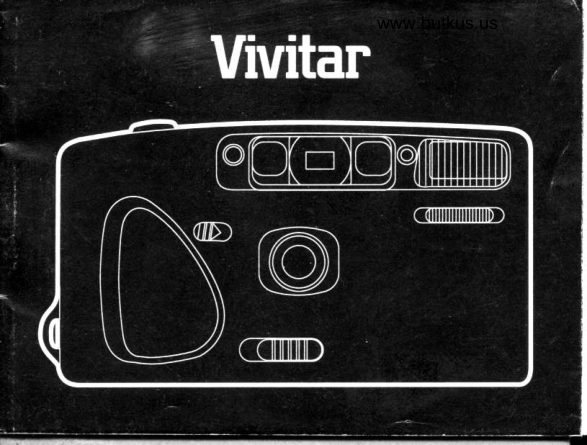
DESCRIPTION OF PARTS
 1. Shutter Button                   16. Film Check Window
 2. Frame Counter                   17. Back Cover
 3. Light Sensor                     18. Battery Chamber Cover
 4. Viewfinder                             Latch
 5. Autofocus Windows               19. Film Take-Up Spool
 6. Sell Timer Light                  20. Film Sprocket
 7. Built-in Flash                     21. DX Contacts
 8. Flash Switch                     22. Film Chamber
 9. Lens
10. Lens Cover Switch
11. Self Timer Switch
1 2. Back Cover Latch
13. Flash Charged Indicator
14. Viewfinder Eyepiece
15. Film Rewind Switch
View original page 2
Page 6 · Read text
DESCRIPTION OF PARTS             www.butkus.us
     1. Shutter Button                   16. Film Check Window
    2. Frame Counter                              1 7. Back Cover
    3. Light Sensor                     18. Battery Chamber Cover
     4. Viewfinder                             Latch
     5. Autofocus Windows               19. Film Take-Up Spool
                                                  Sprocketr   6. Self Timer Light                  20. Film
    7. Built-in Flash                        21 . DX Contacts
    8. Flash Switch                     22. Film Chamber
    9. Lens
   10. Lens Cover Switch
,  11. Self Timer Switch
   12. Back Cover Latch
   13. Flash Charged Indicator
   14. Viewfinder Eyepiece
   15. Film Rewind Switch
View original page 6Page 7 · Read text
I1. Loading the Batteries
1. open the battery chamber cover by pushing the battery chamber
   cover latch in the direction of "OPEN".
2. Load the batteries, making sure to place them in the correct *                                                       and -   order as indicated on the inside of the battery chamber cover.
3, To close the cover press  it down firmly, making sure the battery               1
   chamber cover latch clicks closed.
NOTE:
This camera will not operate without batteries. Use two new size AA alka-
line batteries of the same brand.
                 batteries can also be used, but their life is shorter'-carbon-zinc        do not use NiOad batteries.-Please
2. Loading the Film
1. Ooen the back cover by sliding the back cover latch up'


 2
View original page 7Page 8 · Read text
2. Insert the film cartridge into the film chamber.www.butkus.us
     3. Pull the film leader out until  it aligns with the symbol in the camera.
       Check to see  if the film is properly in place and that film slack does
I         not exist. Close the back cover.
     4. Open the lens cover and press the shutter button three or four times
           until it reaches "1" in the frame counter.
    3. Taking Pictures
     1. Position the autofocus frame on the main subject.
     2. Press the shutter button halfway; the green indicator lamp lights up
       and focus is locked.
     3. Gently press the shutter button completely to take a picture.

     For Focus Lock
      Position the autofocus frame on the intended subject and press the shutter
      button halfway.
View original page 8Page 9 · Read text
rJ
 With the finger still on the shutter button, reposition the picture as desired..      I
 Fully depress the shutter button to take the picture.                                            ,l
4. Flash Switch                                                            IAUTOMATIC
The camera utilizes an Automatic Sensor Flash System which is              I
designed to measure ambient light intensity and then activate and fire the
 built-in flash when needed.
FILL.FLASH
 lf the main subject has less light falling on  it than on the surrounding area
and background, under-exposure may result. In this case, use of the Fill-
 Flash feature is recommended. Push and hold the flash switch on the
 FILL position, then press the shutter button to take the fill-flash picture.
FLASH OFF
When you do not wish to use the flash at all, the Off flash mode should be
 activated. Push and hold the flash switch on the OFF position, then press
the shutter button to take the flash-off picture, even under dark
conditions.

4
View original page 9
Page 10 · Read text
www.butkus.us
 NOTE:
 1. The charge indicator  light disappears when flash unit is being
    charged. Do not take the picture until the indicator lights.
 2. For proper illumination keep the subject within the suggested range:
  lSO100/200 3 6-9 5 ft (1.1-3 m)
  lSO400     3.6-19  ft (1.j -6 m)
5. Red Eye Reduction
Your camera features a special system to reduce 'red eye' effect in
certain subjects' eyes. Depress the shutter button to shoot and hold  it at
the first pressure point (slighily depressed) for one second while aiming
the camera at the subject; after one second, shoot as usual. Red eve
reduction will help to greatly reduce 'red eye' but, like all such systems,
may not eliminate  it completely under all circumstances.
View original page 10Page 11 · Read text
6. Self Timer
puil the self timer switch in the direction shown by its shape. while
holding  it there, press the shutter button You now have about 10
secondsbeforetneshutterfires.Duringthosel0seconds,these|ftimer
light will glow.
                                                                                                                                 ,l
7. Rewinding the Film
1. slide the  f ilm rewind switch in the direction of the arrow to start rewind-
   ingTherewindswitchwi|||ockautomatica|ly.Theframecounter
   counts backwards during rewind
 2.Whenrewindingiscomp|etethemotorwi||automatica||ystop.open
    the back cover and unload the film'
View original page 11Page 13 · Read text
1. With the display in the Date mode, press
   the Y, M and D buttons to set the desired
   date.                      QjLo
2. With the display in the Time mode, press
   the Hr and Min buttons to set the desired
   trme.                         0:"t
3. Use the "-" mode when imprinting  is
    not desired.
                         pc o o
View original page 13Page 14 · Read text
9. Replacing the Data Back Battery (optional)www.butkus.us
1. Open the back cover. Remove the battery chamber cover by turning
   the screw with a small screwdriver.
2. rake out the old battery and insert a fresh one with tne "*"  side up as
   indicated on the battery chamber cover.
3. Insert the cover into place and fasten with the screw.
   Reset the date and time as shown in the Date lmprint Function
   section.
View original page 14
Page 15 · Read text
!1
                                                                                                                                                       : 10. Speclflcatlons                                                                                         I
 Type: 35mm fully automatic lens-shutter compact camera with auto
 focus
 Lens:35mm                                                      {
 Focus: Infra-red active auto focus system with focus lock
 Focus Range: 1.5 m (5 ft) to infinity
 Shutter: Mechanical shutter (1 /'125 sec.)
 Viewfinder: Reverse Galileo finder with picture area approx. BOo/0. Flash
 charged indicator LED (green)
 Film Transport: Automatic loading, automatic winding and power rewinding
 (operated with rewind switch)
DX setting: Automatic fitm speed setting (lso 100-4oo) with DX window
for showing the type of film inserted into the film chamber


10
View original page 15Page 16 · Read text
I
                                        www.butkus.us
      Flash: Built-in electronic sensor flash with 3 modes (Auto, Fill, off)
                                                                                      i 00) 1     Guide Number: 9 (meters/tSO  I       Recycling Time: Approx. 5 sec.
     Power source: Two 1.5v AA size alkaline-manganese batteries
     Dimensions:
      130.5 (W) x72.5 (H) x 48 5 (D) mm (S-1 /Bx2-7 /Bx1_T /B in.\
     DATE: 130.5 (W) x72 S (H) x 52 (D) mm (S-1 /8x2_7 /Bx2_3'/64  in.l
     Weight:
                  oz) without batteries|    220 g (7.6
     DATE: 230 g (7.9 oz) without batteriesI
View original page 16Page 17 · Read text
NOMENCLATURE
 1. D6clencheur                        14. Oculaire du viseur
 2. Compteur des Poses                  15.  Interrupteur de rembobinage
 3. Senseur de lumidre                   16.  FenOtre de contrdle du film
 4. Viseur                                   17. Dos
 5. FenOtres d'autofocus                  18. Verrou du couvercle du
 6. T6moin du retardateur                logement des Piles
 7. Flash incorPor6                        19. Bobine r6ceptrice
 8. Commutateur du flash            20  Roue dent6e d'entrainement                                     du film 9. Obyectit                                   21. Contacts de lecture DX10. Curseur du volet
     protdge-objectif                  22. Logement du film
11. InterruPteur du retardateur
12. Curseur de d6verrouillage du
    dos
13. T6moin de charge du flash


12
View original page 17Page 18 · Read text
www.butkus.us
 1. Mise en place des piles
 1. ouvrir le couvercle du logement des piles en poussant le verrou du
   couvercle vers le mot "OpEN" (ouvert).
2. Inserer les piles tout en s'assurant de les orienter correctement selon    les symboles * et    indiques a I'interieur du couvercle du logement.                   -
3. Pour fermer le couvercle, appuyer firmement jusqu'd entendre
    I'encliquetage du verrou.
REMARQUE:
cet appareil photo ne fonctionnera pas sans piles. Utiliser deux piles
alcalines neuves de taille AA de la mOme marque.
        possible                    d'utiliser                            les piles charbon-zinc, mais elles auront une-ll estduree     de           vie plus                 coune.
-Ne pas utiliser de piles Cd-Ni.
2. Chargement du film
1. Ouvrir le dos de I'appareil en faisant glisser le curseur de

                                                                                                   't3
View original page 18Page 19 · Read text
!
   d6verrouillage vers le haut'                              q
2. Ins6rer la cartouche de pellicule dans le logement du film'
3.Tirer|,amorcedufi|mdelacartouchejusqu'acequ'e||es'a|igneavec-.r"'v'no|edl'interieurde|'apparei|.V6rifierque|ape||icu|eest             {
   correctement placee et qu'il n;existe pas d-e jeu' Fermer le dos'
4.ouvrir|eVo|etprotdge-objectifetpresser|ed6c|encheurtro|Sou"   q*tr" tois iusqu'a         num6ro "1" se voie sur le compteur des                    "Lqr.ile   ooses.
3. Pour faire des Photos
 1. Positionner le cadre d'autofocus sur le suiet principal'
2. Presser le declencheur jusqu'd mi-course; le t6moin vert s'allumera et
    la mise au Point sera bloqu6e'
                                         fond pour prendre la vue' 3. presser le declencheur soigneusement  i


 14
View original page 19Page 20 · Read text
www.butkus.us
 Pour bloquer la mloe au point
 Positionner le cadre d'aurofocus sur le sujet d6sir6 et presser le
 d6clencheur jusqu'd mi-course.
 Tout en maintenant ra pression sur re d6crencheur, recadrer |image
comme voulu. Le sujet principal restera au point. presser le declencheur
 d fond pour prendre'la vue.
4. Commutateur du flash
AUTOMATISME
 L'appareil photo utilise un systeme de flash automatique  i senseur, qui
est conqu de fagon d mesurer |intensit6 de ra rumiere ambiante et
ensuite, s'il est necessaire, d mettre le flash en circuit et d le d6clencher.
FLASH D'APPOINT
si le sujet principal est moins eclair6 que les alentours et I'arriere-fond,   il
risquera d'6tre sous-expos6. Dans un iel cas,  il est recommand6  d'utiliser
la fonction d'6clairage d'appoint. pousser re commutateur du frash
lusqu'd la position "FlLL" (appoint) et le maintenir dans cetie position

                                                                 15
View original page 20Page 21 · Read text
pendant que I'on presse le d6clencheur pour prendre la vue avec
6clairage d'aPPoint.
FLASH HORS CIRCUIT
Si on ne veut pas utiliser le flash, on doit activer la fonction Flash hors
circuit. Pousser le commutateur du flash jusqu'A la position "OFF" (hors
circuit) et le maintenir dans cette position; appuyer alors sur le
d6clencheur pour prendre la vue sans flash, m@me en conditions de
faible 6clarrage ambiant.

REMARQUE:
1. Le t6moin de charge du flash restera 6teint pendant que le flash est
   en train de se recharger. Ne pas d6clencher jusqu'd ce que le t6moin
    s'allume.
2. Pour un 6clairage correct, S'aSSUrer que le sujet se trouve d I'int6rieur
   des plages suivantes.
  lSO100/200 1,1-3 m (3 6-9 5 Pi')
  lSO400      1,1-6 m (3.6-19  Pi.)

16
View original page 21Page 23 · Read text
7. Rembobinage du lilm
1. Faire glisser I'interrupteur de rembobinage dans le sens de la fldche
   pour actionner le rembobinage. L'interrupteur de rembobinage restera
   engage automatiquement. Le compteur des poses comptera d
   rebours pendant le rembobinage.
2. Lorsque le rembobinage est termin6, le moteur s'arr6te
   automatiquement. Ouvrir le dos et retirer le film.
8. Fonctionnement du dos dateur (en option)
                            Arricheur _tra  lo e1

                                                       Poussoir iour/minute      poussoir de s6lection du rn6ds      (/ 6,Vl 6,"l 6,VL-
                         -n         |          PoussoirPoussoir annee/heuremois
                                               -


18
View original page 23Page 24 · Read text
www.butkus.us
 Pour choisir le mode d6sir6, presser  le  poussoir de s6lection du mode. Les modes       lre ro ri
  affichds changeront dans la s6quence
  illust16e.                               trP - YB


1. L'affichage 6tant en mode Date, appuyer   sur les poussoirs y, M et D pour afficher       lre fs ei
                                           o o o    la date d6sir6e.                0
2. L'atfichage 6tant en mode Heure,
   appuyer sur tes poussoirs Hr et Min pour
   afficher I'heure d6sir6e.                       0:";
3. Utiliser le mode "-"  si aucune
   rmpression n'est d6sir6e.
                         po o o

                                                                       19
View original page 24Page 25 · Read text
9. Remplacement de la pile du dos dateur (en option)
1.  Ouvrir le dos. Retirer le couvercle du logement pile en d6vissant la vis
   d I'aide d'un petit tournevis.
2.  Retirer la vielle pile et ins6rer une neuve avec le c6t6 " *  " en haut,
  comme indiqu6 sur le couvercle du logement  pile.
3. Remettre le couvercle en place et fixer au moyen de la vis.
   Rdgler de nouveau la date et I'heure selon les instructions de la
   section 'Fonctionnement du dos dateur'.


20
View original page 25
Page 26 · Read text
1 0. Caract6ristiques techniques    www.butkus.us
Type: Appareil photo 24x36 completement automatique avec obturateur
 central et mise au point automatioue
Objectif : 35 mm
Mise au point: systdme autofocus  actif d rayons infra-rouges avec
blocage (memorisation) de la mise au point
Plage de mise au point de 1,5 m (5 pi.) d t,infini
Obturateur : M6caniqu e (l /125 s.)
Viseur: Viseur Galilee inverse avec champ de vue de B0o/o
approximativement. Temoin de charge du frash d DEL verte
Transport du film : chargement automatique, avance automatique et
rembobinage motoris6 (actionn6 au moyen d,interrupte* J"-rembobinage)


                                                                            21
View original page 26From the M. Butkus archive. Original publisher and archive notices are retained.
Check the model and edition against your equipment.
PDF verified 2026-10-10.