Camera accessories
Vivitar RS-1 Remote User manual
User manual for Vivitar RS-1 Remote. 8 pages in English. Read the original PDF, download or print a copy without registration.
8 pagesEnglish1.1 MB PDF
Loading your manual…Open PDF directly
Document details
- Brand
- Vivitar
- Model / document
- Vivitar RS-1 Remote
- Document type
- User manual
- Language
- English
- Pages
- 8
- File size
- 1.1 MB
- Category
- Camera accessories
- Document date
- Not specified in catalog
Search available document text
Find a term, then jump to its page in the original PDF. Image-only pages may not be searchable; check the PDF for exact wording and diagrams.
Page 4 · Read text
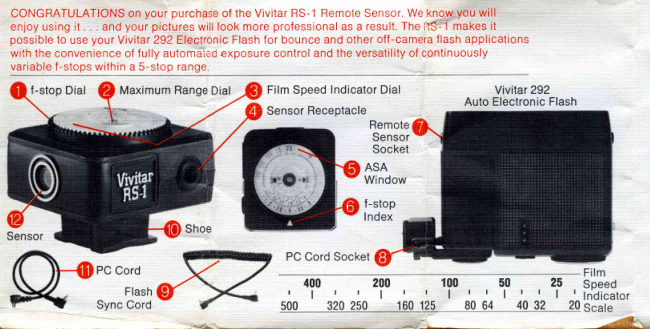
Gonnectingthe RS-l          cord allowsyou to hold the flash     Nofe. Check                    shou                              up to 3 feet away from the camera    the ASA-DIN                     g ramI  -  Slidethe RS-1 ontoyour                                                                                                                                                                                                                                 '                                       to provideextra soft bounce       Co nversio n                          tioncamera accessoryshoe. Be sure                                             lightingand d irectoff-camera      Scaleon the                       not b
to mountthe RS-1 with the Sensor                                   lightingfor enhancedmodeling.    back of the RS-1to convertDIN        is de         forward.@tacing                         Nofe;The VivitarPC-31 coiled       ratingsto ASA.                  use \
2 -  Plug the 3-foot coiled          cord providesthe maximum                                            units                                                   Settingthe maximumConnectingCord @ to the Sensor   allowabledistancebetweenthe
Receptacle(9 and the Remote           f lashand the RS-1.           rangedial                                                                           DetSensorSocket  on your flash       @                                                 For normal
unit.                                                                          The I                                                                    operation,set the
                            Setting the film speed        prongson the                  from3 -  Connectthe PC Cord @
to the PC Socket@ on the foot of    Set the correctASA f ilm speed     MaximumRange                                f -sto                 'X"                                                                                 expothe flashand the                   terminal      by holdingthe centerof dial cover    Dial @ of theon your camera.Nofe. lf an "X"           in placewhileturningouter     RS-1 in the                   you \                  @
terminalis not provided,set the      Rfiurlededge @ untilthe ASA       middleposition                 over
camerasynchronizationswitchto    numberof the f ilm you are using     as shownin dia-               To sr
"X." Referto your camera              is centeredin the window on the    gram "A." When                 F-St
instructionbookletfor specific       dial       lf the ASA of the f ilm you    usingyour Wide             num                             @.
informationregardingyour          are using is not printedon the       Angle Attach-                     arro
camera'sflash synchronization.     d ial,consult the FilmSpeedIndi-    ment,turn the                    stop
(Foraddedversatilitythe optional   catorScaleto determinethe        prongsclockwise                     is vis
VivitarPC-313-footcoiled PC       propersetting.                       to the position                Ther                              www.orphancameras.com
View original page 4Page 5 · Read text
shown in dia-                          in feet (blacknumbers)or meters
gram "B." Posi-                   (red numbers)oppositeyour            ' rC"tion    should                 chosenf -stop indicatesthe
not be used,as it              maximumdistancefor which the
is designedfor                 RS-1 automaticafly operatesat
use with f uture                       that f-stop.Remember,it is f lash
u n its.                                 to subjectdistancethat counts,
                                  not RS-1to subjectdistance.
Determiningthe exposure  When usingbouncelight,be sure                                       to calculatethe entireflashto
The RS-1 allowsyou to choose        reflectorto subjectdistancewhen
f rom a continuousrangeof up to 5    determiningthe maximumauto-
f -stopswith fully automatic         maticoperatingrange.
exposure control.This provides
you with added creativecontrol
overdepthof f ield.              Setting the camera
To selectan f -stop,turn the          Afteradjustingthe RS-1, set your
F-StopDial@ untilthe desired     camerato the f-stop you selected
numberis oppositethe white        from the f-stop Dial.Makesure
arrow         Note; The range of        your camerais set at the shutter    @.
stopsfor the f ilm you are using      speed recommendedin your
is visiblein the largewindowat                          camera owner'smanualfor                     @.
The corresponding n u m ber shown   electronic flashoperation.
View original page 5Page 6 · Read text
shownin dia-                          in feet (blacknumbers)or meters    Nofe:When using
gram "B." Posi-                   (red numbers)oppositeyour         the RS-1 the Auto/           ' 'tion C" should                 chosenf -stop indicatesthe         ManualControl
not be used,as it              maximumdistancefor which the     Switchon your
is designedfor                 RS-1 automaticallyoperatesat         Vivitar 292 Flash
use with future                       that f-stop. Remember,it is f lash    mustbe setto AUTO("A").
u n its.                                 to subjectdistancethat counts,
                                  not RS-1to subjectdistance.      Using the RS-l on flash
Determiningthe exposure  When usingbouncelight,be sure   When plugged                                       to calculatethe entireflashto          into you r 292
The RS-1 allowsyou to choose        reflectorto subjectdistancewhen    Auto Elec-
f rom a continuousrangeof up to 5    determiningthe maximumauto-      tronic Flash,
f -stopswith fully automatic         maticoperatingrange.             the RS-1 over-
exposurecontrol.This provides                                                                      ridesthe built-
you with added creativecontrol                                                                                  in sensorofoverdepthof f ield.              Setting the camera                                                                    the flash.This
To selectan f -stop,turn the          Afteradjustingthe RS-1, set your     allowsyou to
F-StopDial@ untilthe desired     camerato the f -stop you selected    chooseany
numberis oppositethe white        from the f-stop Dial.Make sure       f-stopwithin
arrow@  Nofe: The range of        your cameraisset at the shutter      the rangeon
stopsfor the f ilm you are using      speed recommendedin your         the RS-1dial
is visiblein the largewindowat                            cameraowner'smanualfor            for depth-of-field controlin               @
The correspondingnumbershown   electronicwww.orphancameras.comflashoperation.          d irectlighting.                                                                              il
View original page 6Page 7 · Read text
To mountthe RS-1 on your        Helpful hints
flash unit:                                 Off-camera di rect lighting
1 -  Snap the Shoe @ off                               Shootingwiththe RS-1 .                                   the flash off-
2   Plug the exposedterminal                            camerahelps
into the RemoteSensorSocket                                  eliminate
   on the flash unit.Nofe:When@                              harsh
usingthe RS-1 mountedon your                              shadows,
292 Flash,the f lash should                            washed-out
remainon the camerawith the                                  foregrounds,
Sensorfacingforward.                              and " red-
To place the                       eye." When usingdirectlighting,
Shoe back on the                       try holdingthe flash aboveand
RS-1 afteruse,                        slightlyto the rightor left of your
inserteither                       subjectto producebettermodel-
tongueof the                         ing. You can diffusedirectlight
Shoe into slot                          to achievea softertone by':A"    as shown,                     placinga handkerchiefover
and snap the                       the f lash unit.
otherside down
intoslot "B."
View original page 7
Page 8 · Read text
Bounce Lighting                good idea to use a white or gray
 Soft lighting                     coloredsurface.
with a mini-                 When f iguringf lashto subject
mum of harsh                    distanceusing bounceflash,be
shadowsis                      sure to considerthe fight absorb-
achieved by                          tion of the reflectivesurface.
bouncingthe                   Bouncingoff surfacessuch as
lightoff a                          curtains,for example,will add to
reffectivesur-                      the effectivedistancebetweenthe
faceontoyour                      flash,the reflector,and the sub-
subject.Lightcoloredwalls,          ject. To insureperfectlyexposed
ceilings,largesheetsof paper,or     pictureswhen bouncingoff light-
even bed sheetsmake ideal         absorbingsurfaces,alwaysuse
reflectors.This type of lightingis     the largestaperture(smallest
similar to goft,hazysun light or        f-stop number)that stillgivesyou
windowlight.Nofe:When using      the desireddepth-of-f ield.This is
colorfilm, be carefulaboutthe       especiallyimportantwhen using
color of the reflectivesurface,as      slidef ilm since its exposure
the bouncedlightwill take on the      latitudeis very limited.
color of the reflector.Unlessyou
are tryingfor specialeffects,it's a
                              www.orphancameras.com
View original page 8From the M. Butkus archive. Original publisher and archive notices are retained.
Check the model and edition against your equipment.
PDF verified 2026-10-10.