Film cameras
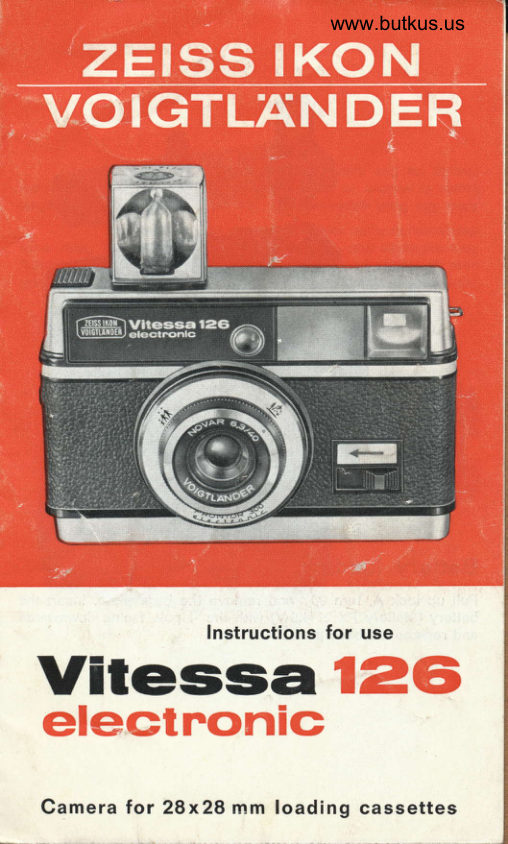
Voigtlander Vitessa 126 Electronic User manual
User manual for Voigtlander Vitessa 126 Electronic. 8 pages in English. Read the original PDF, download or print a copy without registration.
8 pagesEnglish2.0 MB PDF
Loading your manual…Open PDF directly
Document details
- Brand
- Voigtländer
- Model / document
- Voigtlander Vitessa 126 Electronic
- Document type
- User manual
- Language
- English
- Pages
- 8
- File size
- 2.0 MB
- Category
- Film cameras
- Document date
- Not specified in catalog
Search available document text
Find a term, then jump to its page in the original PDF. Image-only pages may not be searchable; check the PDF for exact wording and diagrams.
Page 1 · Read text
www.butkus.us


                   Instructions for use
          126-Vitessaelectnonic

Camera tor 28x28 mm loading cassettes
View original page 1Page 2 · Read text
Mike Butkus                                          Digitally                                                                                                                                           DN:c=USDate:cn=Mike2023.04.29signedButkus,by18:21:33Mikeo=ButkusButkus-04'00'camera manuals, ou=butkus.org, email=mike@butkus.org,

Battery loading
Pull up lock A, turn 90o and remove the base plate. Insert the
battery (Mallory PX 21 4.5V) with the + pole facing downwards
and replace the base plate.
View original page 2
Page 3 · Read text
www.butkus.us


Film loading
Open the camera back by means of slide B, insert the film
cassette and close the camera back. At the same time, this auto-
matically sets the film speed (DlN or ASA).
View original page 3
Page 5 · Read text
Turn ratchet wheel C as far as it will go. The number "1" will
now be visible in the control window in the back of the camera.
This indicates that the camera is ready for shooting. After each
exposure, turn the ratchet wheel as far as it will go.
After the final exposure, turn the ratchet wheel until no yellow
paper is visible in the window in the camera back. Only now
should the film cassette be removed.
View original page 5
Page 6 · Read text
www.butkus.us

  W
      ffi
Focusing
Set the red dot on the lens either at the group symbol (shoot-
ing distance from 1.5-6 m) or at the landscape symbol (shoot-
ing distance from 5 m    m).                      -
The bright-frame viewfinder outlines the picture that will be
exposed on the film. When setting at the group symbol the dis-
placed lines in the bright frame should be used as guide.
View original page 6Page 7 · Read text
www.butkus.us


Exposures
Sight the subject through the viewfinder and, at this stage, press
shutter release button D down to the pressure point only.
lf no red arrow appears above the finder frame, immediate
exposure is possible by pressing the release button right down.
The exposure time is electronically adjusted from t/roo to about
r/30 sec. lf a red arrow appears, however, which is automatically
illuminated under certain light conditions, move slide E in the
direction of the arrow as far as it will go and retain in this
position.
lf the red arrow disappears, exposure is possible whilst still
holding the camera.  lf it remains visible, however, there are two
alternatives:
a) Place the camera on a tripod or some other firm support.
   After depressing the shutter release, the exposure time is
   adjusted according to the available light up to 10 sec by
  means of the electronic shutter. There is no need to use
   slide E.
   Attach a cable release or self-timer in socket F.
b) Use flash for portrait or group exposures.
View original page 7
Page 8 · Read text
www.butkus.us


Flash exposures
Set the red dot on the lens ring at the group symbol, insert the
flash cube into the round socket G and move slide H on the
back of the cap to the right (flash symbol will become visible).
When taking group exposures move the slide as far as  it
will go and retain in this position during shutter release. Do not
use slide E for portrait exposures. After the shot has been taken
and the shutter released, the flash cube rotates automatically
until the next bulb is in position for the next shot.
Do not attempt to turn the flash cube by hand, as this is liable
to damage the mechanism. When the four bulbs have oeen
"fired", pull out the flash cube and, if necessary, insert a new
one.

Favourable flash ranges:
19 DIN . . . from 2.5 to 4  m:
Colour negative film 19 DIN . . . from 2  to 4.5 m;
Black/white film    22 DIN . . . from 3  .to 7  m:
Colour reversal film 23 DIN  . . . from 3.5 to 6.5 m;
For daylight flash exposures move slide H on the back of the
cap to the left. (Flash symbol not visible.)
View original page 8
From the M. Butkus archive. Original publisher and archive notices are retained.
Check the model and edition against your equipment.
PDF verified 2026-10-10.