Film cameras
VP TWIN User manual
User manual for VP TWIN. 5 pages in English. Read the original PDF, download or print a copy without registration.
5 pagesEnglish1.1 MB PDF
Loading your manual…Open PDF directly
Document details
- Brand
- Various brands
- Model / document
- VP TWIN
- Document type
- User manual
- Language
- English
- Pages
- 5
- File size
- 1.1 MB
- Category
- Film cameras
- Document date
- Not specified in catalog
Search available document text
Find a term, then jump to its page in the original PDF. Image-only pages may not be searchable; check the PDF for exact wording and diagrams.
Page 2 · Read text
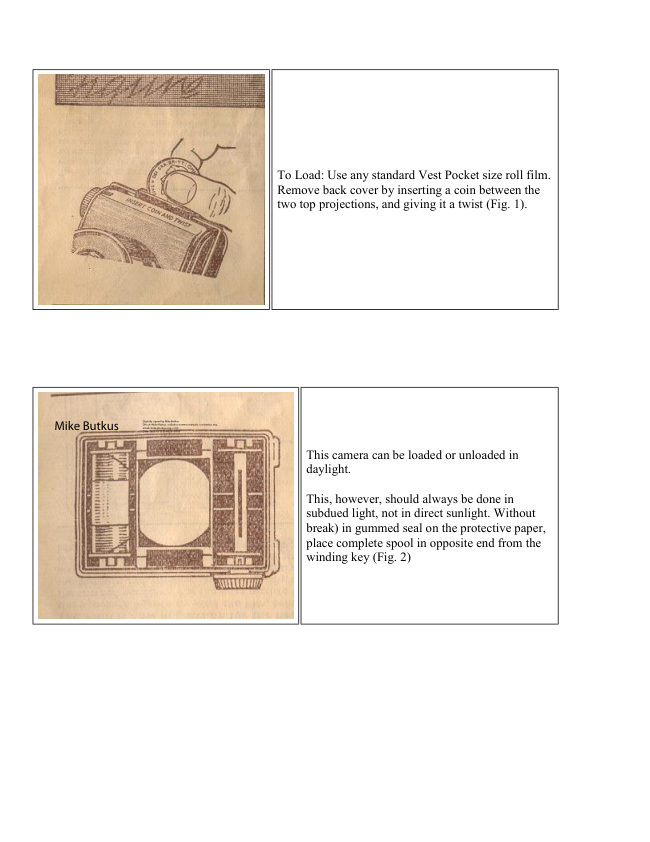
To Load: Use any standard Vest Pocket size roll film.
                                Remove back cover by inserting a coin between the
                                   two top projections, and giving it a twist (Fig. 1).


                                                                                  Digitally signed by Mike Butkus
                                                              DN: cn=Mike Butkus, o=Butkus camera manuals, ou=butkus.org,
                                                                   email=mike@butkus.org, c=USMike Butkus                    Date: 2023.05.18 09:48:56 -04'00'

                                             This camera can be loaded or unloaded in
                                                   daylight.

                                                 This, however, should always be done in
                                          subdued light, not in direct sunlight. Without
                                               break) in gummed seal on the protective paper,
                                               place complete spool in opposite end from the
                                          winding key (Fig. 2)
View original page 2Page 3 · Read text
www.butkus.us


                                            Holding spool in cradle with one hand (Fig. 3),
                                                   bread. gummed seal on ! full spool and draw out
                                           end of protective paper until it reaches spool in
                                                 opposite cradle with about half-inch to spare.
                                           (Red side of protective paper must be to the back
                                                  of the camera.)


                                       Thread end of protective through the wider slit in the
                                    empty spool (Fig,4) as far as it will go. Care must be
                                           exercised when this is being done, so that the
                                             protective paper is started straight on the re-winding
                                             spool. Do not unroll too much protective paper from
                                             the full spool, or the film will be fogged and spoiled.
                                     Give the winding knob two or three forward turns (fig.
                                            4) to bind paper securely on the spool . Then securely
                                            replace back cover of camera.


Note. - When inserting empty spool In the winding key end watch that the driving spindle is upright. The
winding key only works in one direction - i.e. the direction of the Arrow an the knob.

                                   Watching the Red Window, turn the winding knob
                                                  until the warning sign appears through the bottom red
                                  window then turn the knob very slowly until the figure
                                                       I appears in the centre of the bottom red window (Fig.
                                                  5).

                                 The Film is now in position for the first picture.
                                           After this exposure be sure to wind the film, bringing
                                              figure I into the top red window. For the next picture
                                           bring figure 2 into the bottom red window, and so on.
                               By this, two separate pictures are taken on each V.P.
                                               size negative. Wind slowly , as if the number goes past
                                             the window it is impossible to wind back, the winding
                                      key being non-reversible.
View original page 3Page 4 · Read text
MAKING THE SNAPSHOT

                                 The V.P. Twin is strictly a snapshot camera.

                                   The same rules which govern Snapshot Photography
                                         with any other camera should be followed. The subject
                                         should be in broad, open sunlight, -but the camera
                                     must not. The sun must be behind your back or over
                                        your shoulder.

                                  Open the Wire View-finder which rests In back cover
                                                  until it rests on top of camera in a perpendicular
                                             position (Fig. 6).


                                          Place the back of the Camera against your face in order
                                               to steady Camera at the moment of snapping the
                                                picture.

                                                             It is important to hold the Camera still while taking the
                                                picture.

                                      Looking through the view-finder , locate your subject
                                            or field inside the wire view-finder (Fig. 7), then,
                                          holding Camera perfectly steady against the face, press
                                          shutter lever in one direction only to make the
                                          exposure.

                                           Fingers must be kept away from the light opening in
                                               front of Camera.


Whatever appears in view through the view-finder will be on the picture, as in Fig. 7. Move closer or further
away from your subject until it is perfectly framed in the wire view-finder just as you wish it to appear on the
picture. Be careful to hold Camera steady against your face at the moment of exposure. many pictures are
spoiled by the Camera being moved when the photograph is being taken.
View original page 4Page 5 · Read text
www.butkus.us


                         To make pictures with long dimension of picture vertical
                                      (Fig. 8), simply follow previous instructions, holding Camera to
                                    face in horizontal position instead of vertical, see Fig. 9. Best
                                       results are had by keeping the Camera on the same level as the
                                      subject: thus if a picture of a child or dog is desired, the
                                   operator should assume a kneeling positions to bring the
                            Camera to the same level as the subject or place the subject on
                               an elevation to the same level as the Camera.


MAKING PORTRAITS


                           Portraits may be made with this Camera as long as the subject is not less
                       than four feet away from the Camera. For other pictures eight to ten foot is
                         the best distance. Due to the special design of the V.P. Twin lens, anything
                     beyond this distance will be in sharp focus. Thus it is possible to select a
                        picturesque or Scenic background for your portrait Subject and thereby
                         greatly enhance the beauty of your picture.


Removing the Film: After the last film has been exposed, turn the winding knob until the end of the protective
paper passes the top red window. Then give several additional turns to make sure that all the protective paper is
wound around the spool. Turn winding key until the driving spindle is upright, now remove spool from cradle,
moisten gummed seal on protective paper, then seal, being careful to wrap spool immediately for protection. it
is now ready for d. development. This may be done by a photographer or by yourself. Films should be
developed at earliest possible moment after removal from Camera. The quality of the image on all sensitized
products is retained by prompt development after exposure.

Before replacing back cover of Camera, the empty spool should be transferred to opposite cradle to be in
position for next loading of Camera. Here again watch that the driving spindle is upright and that the empty
spool is correctly located on the driving spindle.
View original page 5From the M. Butkus archive. Original publisher and archive notices are retained.
Check the model and edition against your equipment.
PDF verified 2026-10-10.