Film cameras
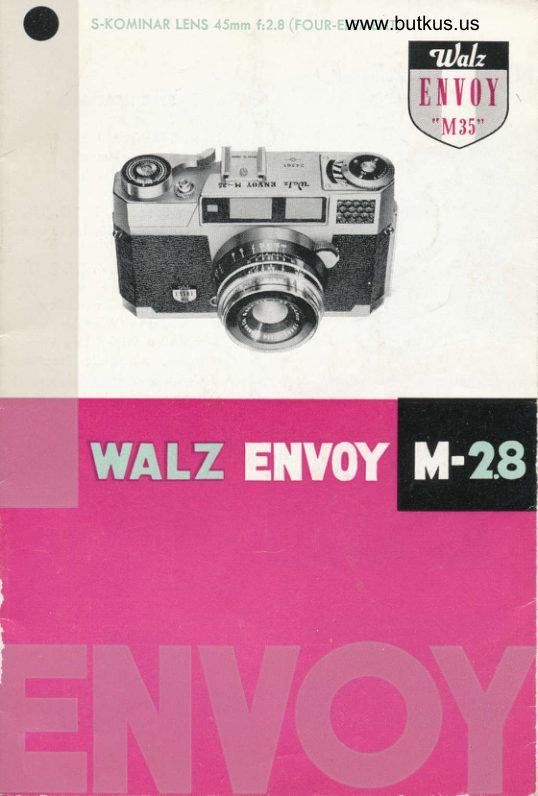
Walz Envoy M-28 User manual
User manual for Walz Envoy M-28. 25 pages in English. Read the original PDF, download or print a copy without registration.
25 pagesEnglish6.0 MB PDF
Loading your manual…Open PDF directly
Document details
- Brand
- Walz
- Model / document
- Walz Envoy M-28
- Document type
- User manual
- Language
- English
- Pages
- 25
- File size
- 6.0 MB
- Category
- Film cameras
- Document date
- Not specified in catalog
Search available document text
Find a term, then jump to its page in the original PDF. Image-only pages may not be searchable; check the PDF for exact wording and diagrams.
Page 2 · Read text
WALZ ENVOY
   Mt8    Your WALZ 35mm ENVOY M 2.8 Comero is on outstonding
    ochievement in odvonced mechonicol ond opticol design
    ond precision.
    Before using your WALZ ENVOY M 2.8 Comero study the
    operoting instructions corefully. The WALZ ENVOY M 2.8 is
   o modern high speed precision comero with o high speed
     precision lens ond with highly precision meter. Proctice
    the operotions of your comero with o few triol rolls of
    film before using for your first importont picture toking
    event. Become thoroughly fomilior with eoch operotion
    ond function of the comero ond then you're reody for oction.

                                                                                                                                                                                                                                                                                                                                                                              I    There ore mony wonderful doys of superb picture-toking
    oheod for you with your WALZ ENVOY M 2.8 comero -o
     delightful componion ond precision photogrophic instrument
    of which you will olwoys be proud.

O rhe FoUR-ErEilENT s-KoMtNAR rENs F: 2.E
   The "Heort" of your comero is the fomous 45mm S-Kominor
       f :2.8 Lens. One of the world's finest lenses, the S-Kominor
      { 2.8 is hordcooted ond   f ully color-corrected. New rore
    eorth opticol gloss Four-Element formulo provides needle-
    shorp crisp piciures ond high resolving power with compoct
    lens construction.
                       L
View original page 2Page 4 · Read text
Venmo @mike-butkus-camera  Ph. 2083
PayPal Name  Lynn@butkus.org      www.PayPal.me/lynnbutkus
View original page 4
Page 6 · Read text
L  PVJUT s   rYrsrsr;       I rr9rr   Jgrr)tt   tvg I       www.butkus.usPhoto Cell. Will occommo-
        dote omplifier for dim light
           situotion.
       Film Winding: One Stroke lever
         obvonces   f ilm, ond cocks the
          shutter in one oction.
     Double Exposure Prevention
       Device.


www.butkus.us
View original page 6Page 7 · Read text
SPECIFICATIONS

Lens: S-Kominor Lens 45mm
   f: 2.8 (four-element)
shutter: coPAL with x
   synch ro n izotion
Shutter Speed, B, l,  112, 115,
      I /l o, 1125,  I /50, 1/1oo ond
    1 /300.
Diophrogms: 2.8, 4, 5.6, 8, I l,
   16.
Coupled Viewfinder ond Ronge-
f inder' Three Windows with
  true-view Bright Line View-
  finder. Automotic Porollox
   Correction.
Exposure Meter: High sensitive
  Photo Cell. Will occommo-
  dote omplifier for dim light
   situotion.
Film Winding' One Stroke lever
  obvonces   f ilm, ond cocks the
   shutter in one oction.
Double Exposure Prevention
Device.
View original page 7Page 8 · Read text
www.butkus.us

         Loodlng the cqmerq

   Stondord 35mm film |or 24 X 36mm negotives is commer-
    ciolly ovoiloble os block-ond-white os well os color film in
   doylight looding cossettes of 36 or 20 exposures. Although
   the cossettes ore light-tight,  it  is odvisoble not to expose
   them to strong light. Moke o point therefore of olwoys
   looding ond unlooding the comero in the shode-even the
   shodow of your own body will do.


O Opening the bock
    First lift up the bock cover
    lotch ond swing open the bock
   from the body. (Fig. l)
                                                          (Fig. l)


O tnserting lhe Cossette
    Insert the film in the cossette
   chomber. The shoft of  the
   rewind m ust properly engoge
   the cossette, otherwise you
    will not be oble to close the
   comero bock. (Fig. 2)
                                                            (Fis. 2)
View original page 8Page 9 · Read text
Drow out the trimmed end of
                           the film o short length from
                                 the cossette, ond push into the
                                                 slit of the toke-up spool os for
                           os it will go (Fis. 3)
  (Fis.3)


                    Now wind the wheel of the
                              toke-up spool until both spro-
                                   ckets engoge in the perfcrotion
                            of the film. (Fis. 4)
  (Fig. a)
I   Glosing lhe Comero Bock


                          Swing bock the Comero bock
                      ond slightly press the bock.
                        The bock will lock outomoti-
                                     colly. (Fis. 5)
  (Fis.5)
View original page 9Page 10 · Read text
www.butkus.us

O Sering the Film Counler
    Everytime the  f ilm is odvonced,
   the film counter shows the
   number of exposed fromes. lt
   thus odvonces from S (Stort)
   to 37.
    After the  f ilm hos been inser-
   ted, set the film counter by
   iurning the milled knob onti-
   clockwise until the (stort index)
   oppeors in the window ond
   oligns with the white triongle.
    (Fis. 6)


   Advonce the ropid winding lever
   three times ond ot ihe some
   time check to see if the red
   dot on the Film winding  in-
   dicotor locoted on the bottom
   of the comero turns simulton-
   eously with the winding lever.
   This is to check if the film  is                    (|s. 7)   properly wounded. The Num-
   ber I on the fi!m counter will
   oppeor in the window oligned
   with the triongle. Now the                                 *
   film is reody for  ihe  first          /-. - a,(^ u/^\   exposure. \rrg.,/
   %
                                                         (Fis.8)
View original page 10Page 11 · Read text
The Shulfer-Speed Setting.

Shulfer speed:
  The Shutter is set by bringing the red mork on the
milled ring of the shutter into register with the desired
speed engroved on the collor of the shutter housing.
(Fis. e)


                                                      (Fig. e)
     Lens dicphrogm:

  The lens operture or diophrogm is set by meons of
bringing the red mork on the diophrogm milled ring of the
shutter into regisier with the white line ot whotever setting
is required. (Fig. l0)


                                                 (Fig. '10)
View original page 11Page 12 · Read text
www.butkus.us

Focusing lhe subiecl


            is porticulorly eosy with the WALZ
       ENVOY M 2.8 comero. In the center
         of the bright-line frome finder you
       con see the bright squore ronge
           finder field.
        When the ronge finder is not correctly
         focused on the subiect, the lotter
          oppeors with double-outlines in the
            rongef inder field (See Fig. I 'l)
          Turn the focusig lever until the double
           outlines in the rongefinder field com-
        bine into one. This sets the lens
         exoctly to the meosured distonce.
           (Fis.  I 2)
          Since the comero is equipped with
          outomotic porollox correction there  is
        no need for porollox correction. The
          finder will  outomoticolly shi{t to
         compensote for porollox,


                              'fiii,t:t:'

                      W.;lti:i;
                   ll)                          (Fis. I2)
View original page 12Page 13 · Read text
The True-Vlew
                  Brlghr-Llne Viewfinder

This reolly unique bright line  viewfinder not only shows the
subiect in full noturol size  but olso hos o  morvellous
brillioni imoge frome which
cleorly outlines the exoct field
of view.
Note thot subiect musi be
centered within the  inside
line of the Bright-Line.
                     (Fis. l3)
                                                            l3)


       The Rcpid Wlndlng Lever


One full movement of the  lever cocks the shutter, ond
odvonces the film ond the film  counter. A spring then returns
the lever to its originol positi-
on. An outomotic lock prevents
the ropid winder from being
operoted o second time before
the shutter is releosed. Con-
versely, the shutter con only
be releosed ofter operoting
the ropid winding lever. This www.butkus.us
prevents both double exposu-
res ond blonk fromes. (Fig.
l4)
View original page 13Page 14 · Read text
www.butkus.us
      How fo Use fhe Exposure Meter


  Set the ASA or DIN exposure
 index of your {ilm in  the
 windows provided on the diol
                        (Fig. l5)
                                                     (Fis.  l s)
1  The Intermediqte Volues
   on ASA Scole
                            o                    'ta,ql                                                                                          -
                                              I6      n                            'LE
                                         JZ
                                         80   00                      l5
                                         \60
 Next turn the f/stoo number            'rh"  j'  diol  until the block lined
  triongle ([)   oligns with the
 chonnel (light intensity scole)
  indicoted by the needle. lt is
 recommended thot to  ooint
 the comero ot the sublect
  motter downword slightly to
  ovoid excessive overheod sky-
  light or sun which moy effect
  the reoding. Now you moy
  select whichever combinotion
 you desire omong the shutter-
  time ond f-stop numbers indi-
  coted on the diols.  (f ig.  t 0)
                                                         (Fis. l6)
View original page 14Page 15 · Read text
O Wolz Amplifier (Auxiliory Phoro Gell)


                                  In cose of DIM light ond when
                                   needle reoding connot be token
                    4                      ottoch the omplifier (Auxiliory
                              photo cell) to the occessory
                                     clip of the comero. Be sure
                                  thot the omplifier comes ro o
                                      click stop. Set the red triongle
                            (A) on the outer diol to olign
  (Fij.  r z)                      with the chonnel indicoted by
                              the needle ond select which-
                               ever combinotion you desire
                       omong the shutter-time ond
                                      f-stop numbers indicoted.  (Fig.
                                                             r z&r 8)
                         CAUTION : Amplifier is ovoi-
                             loble seperotely ond is  not
                                included with the comero.


 (Fis.  I B)

        Unlooding


  After the lost {rome the exposed film must be rewound from
 the toke-up spool into the doylight cossette:
 Push bock the reversing lever ond the rewind cronk will
 spring up. Now pull up the rewind cronk ond turn the
View original page 15Page 16 · Read text
www.butkus.us

 cronk in the direction of the orrow (clockwise). Just before
the rewinding operotion is completed o more morked
 resistonce will be noticeoble indicoting thot the end of the
film is still held by the toke-up spool. A few more turns
will wind the film completely into the cossette. The cossette
con then be removed from the comero.  (f ig.  t 9 & 20)
                                                          #;ii,.  . . ::r:::


                                                                                            i;t(ris.i:i iu  tlr ;:,::  ,: ril r)ii i!lt:                             (Fis.2c)


        Flcsh Shots

The WALZ ENVOY M f :2.8
is equipped with COPAL X
synchronized shutter. The shu-
tter ollows electronic floshes
io operote with shutter speeds
from I  sec., to l/300 sec.

M type  f losh bulbs ore ignited
with shutter speeds of  i  sec.,
to l/25 sec.
                                                        (ris. z r )
View original page 16Page 17 · Read text
F type flosh bulbs ore ignited from I  sec., to l/50 sec.
Smoll light-weight units such os the WALZ FLASH MASTER
M5-25 bottery-copocitor flosh gun con be fitted directly
into the occessory shoe of the comero. Lorger flosh guns
or the flosh holders of electronic   f losh units ore generolly
fitted to the side of the comero by meons of o  speciol
brocket. The  f losh coble completes ihe electric circuit bei-
ween the flosh unit ond the comero shutter. Push the plug
of the floshcoble into the flosh terminol. (Fig. 2l )

       Aperture ond Depfh of Fleld

The depth of field covers thot port of the subiect oreo in
front of ond behind the focused distonce which oppeors
occeptobly shorp in the picture. The extent of this shorp
zone is by no meons constont: it increoses the more you
stop down the lens, ond decreoses the lorger the lens operture.
The ovoiloble depth of field zone is eosily determined.
After you hove set the lens to the correct subiect distonce,
look ot the depth of field scole. This corries two series of
operture numbers orronged symmetricolly to the left ond to
the right off the red dot index. The depth of field extends
from the distonce morking opposite one of the left hond
operture figures to the distonce morked opposite the corre-
sponding right hond operture (fig. ZZ)
View original page 17Page 18 · Read text
www.butkus.us

In short:   Lorge opertures (e.
           s.Ilz.8) yield limi-
          ted depth of field;
          Smoll opertures  (e.
           s. tl16) yield sreo-
           ter depth of field.

                       (fis. 22)

      WAIZ Lens Hood

This indispensoble comero occessory protects the lens ogoinst
objectionoble side light, simplifies the selection of shooting
posilion ond increose picture brillionce.  lt  is especiolly
effective os o shield when toking snow, roin ond woter
sport pictures. The WALZ ENVOY M2.8 will toke o  size
43% (# I 27 Screw-in) lens hood.  lt moy be oitoched in front
of the lens. (Fig. 23)


                                              (Fis. 23)
View original page 18Page 19 · Read text
WALZ Filters

    In order to produce better pictures,  it is recommended thot
   you use filters. You moy ottoch ony of the WALZ FILTERS
    (Size a3fi # 127 screw-in) to the front of the lens.
   Here ore some of the WALZ FILTERS ovoiloble:

   For Blqck qnd Whlte fllmg:

  WALZ YELLOW FILTER or wY2' Normol controst correction
      for Pon ond Ortho films. For White clouds ond dorker
     sky. ldeol for londscopes ond sunsets.
  WALZ RED FILTER or wRl: For dromotic controst. Pronounced
     cloud eftects. Excellent for fog, hoze, ond mist. Use with
     Pon or Infro Red films.
  WALZ GREEN FILTERS or wG: Correct tonol rendering of
      flowers, scenics, folioge, trees, etc. Use with pon films.


As scene oppeors to   Appeoronce   when   Appeoronce when
the eyes.            photogrophed  with-   photogrophed  with
                     out filter.         WALZ Yellow Filter
                                         or wY2.
View original page 19Page 20 · Read text
www.butkus.us

O fot Color Fllms:

  WALZ SKYLIGHT FILTER  (l A): Use in open shode or on
     cloudy doys to eliminote hoze ond obsorb ultro-violei
    ond blue with doylight color films.
  WALZ TYPE F FILTERS (85C), Use to convert Type F color
      films to doylight use.
  WALZ CLEAR FLASH FILTER BZ (80C) or Wolz Flosh: Use
     to convert doylight color films to use with cleor flosh
        b ul bs.
  WALZ MORNING & EVENING FILTER (82A), Use with
      doylight color   f ilms before l0 A.M. ond ofter 3 P.M. to
     reduce redishness. Also use to convert Type F color
      films to use with Photo Flood Lomos.
  WALZ TYPE A FILTER (85) or Wolz Doylisht (A), Use to
      convert Type A color films to doylight use.
View original page 20Page 21 · Read text
Gcre of rhe Gqmerc crnd Lens


Successful resulis ond long life of your WALZ ENVOY M2.8
depend lorgely on proper core ond correct operotion.


  @ Therefore olwcys hondle the comero gently, ond
        never use force. In porticulor, protect ihe comero
        ogoinsi hord knocks, ond do not drop it.   lf you
         trovel by cor, do not keep the comero in the glove
        comportment or on the reor porcel ledge.


       ffi To protect your Lens from DUST, etc. lt is recom-
       mended thot you olwoys hove on WALZ SKYLIGHT
         FILTER.


  Q For cleoning the lens use only o soft flufiless cloth.
       However, first remove coorse porticles of grit (or
      sond ot the seoside) corefully with o soft soble
       brush. Finger morks or other troces of greose on
       the lens surfoce con be removed with o piece of
        cotton wool moistened with pure ether.


  @ In the cose of ony trouble consult your photo deol-
          er, or moil your comero to the Wolz ogent in your
         co u nIry.
View original page 21Page 23 · Read text
ACCESSORIES for WALZ ENVOY M 2.8

   O   wArz AUToFLASH
is the lotest development in photogrophic electronics ond
will provide you with o lifetime light source for  color,
blcck-ond-white, ond Poloroid Lond Photogrophy. lt is on
economicol permonent flosh unit for oll fill-in shodowless
doylight color photogrophy.


   o   wA[z B. G. tilcRoFLAsH s-l
                 wlth P. G. Gord


                                Speciolly designed for use with
                      AG-l floshbulbs. Operotes on
                                                               I 5 volt bottery ond copo-
                                        citor.
                              Sofety shield to protect sublect
                       ond photogropher from shot-
                               tered gloss in cose bulb should
                               exp lode.
View original page 23Page 24 · Read text
www.butkus.us


                                   r.ENsEs   o   wArz coNvERsroN


Add extro coveroge to  the
stondord lens. Hord cooted.
color-corrected precision lenses.
No odopters needed. Eoch
set complete with ouxiliory
telephoto ond wide  ongle
lenses, ond motching view-
 f inder.


                                                                tvl S-25   o   wAtz FtAsH tiAsTER        ffiD$


Extemely compoct. Efficient
3-]// diometer reflector fon
folds into self contoined
cose. Clips-onto comero's
shoe. B. C. Circuit. Test
lomp. Bulb Eiector. Flosh
Exposure diol.   Custom-
designed for the new tiny
M-5 ond M-25 zirconium-
filled floshbulbs.
View original page 24From the M. Butkus archive. Original publisher and archive notices are retained.
Check the model and edition against your equipment.
PDF verified 2026-10-10.