Film cameras
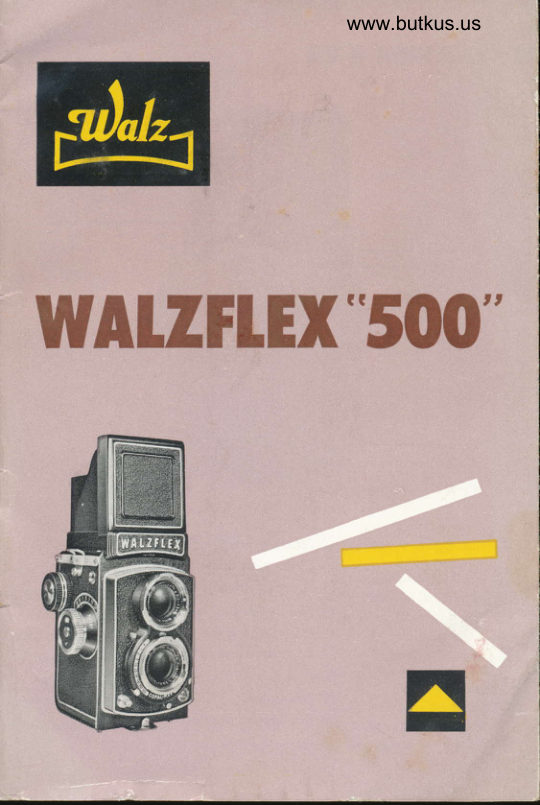
Walzflex 500 User manual
User manual for Walzflex 500. 25 pages in English. Read the original PDF, download or print a copy without registration.
25 pagesEnglish8.8 MB PDF
Loading your manual…Open PDF directly
Document details
- Brand
- Walz
- Model / document
- Walzflex 500
- Document type
- User manual
- Language
- English
- Pages
- 25
- File size
- 8.8 MB
- Category
- Film cameras
- Document date
- Not specified in catalog
Search available document text
Find a term, then jump to its page in the original PDF. Image-only pages may not be searchable; check the PDF for exact wording and diagrams.
Page 3 · Read text
I
    THE            F
  wAtzFtEx          rT'                  It                     "          5          0 0                                    't ,fl     The WALZFLEX "500"                                  is ovoiloble                                                models                                           in two
            WALZFLEX "500" Model llA
            WALZFLEX "500" Model  llB
       All WALZFLEX "500" comeros hove the some ideniicol feotures
     ond specificotions except thot the Model llA hos o 3 element lens
     ond the Model llB hos o 4 element lens.
     The WALZFLEX "500" monufoctured by WALZ COMPANY, LTD..
       is o deluxe precision twin-lens comero enobling its user to solve
      most of his photogrophic tosk.  lt will be the steody componion
      of omoteur photogrophers os well os professionols. The vost ex-
      perience ond knowledge of WALZ COMPANY technicions ond
      engineers hove been fully employed in designing ond monufoctur-
      ing the WALZFLEX "500". Every owner of o WALZFLEX "500"
       will be delighted with the shorpness ond perfection of his WALZ-
      FLEX "500" photos. lt is the ideol comero for color photogrophy
      becouse its lens, the world known KOMINAR, is highly corrected
      for both color ond block-ond-white films.  The comeros ore
       speciolly provided with o Fresnel Lens (Field Gloss) for moking                                   rl
       focusing eosy ond occurote.
                                     JiFm![                                                         b
      This instruction booklet is intended to furnish the owner of the
     WALZFLEX "500" with essentiol ond occurote instructions on how
      lo operote his comero.
                                                                                                                                                        I
        It is recommended thot o thorough study of these directions be        tse
     mode before looding ond using the comero.


L                                                                                 -ditrr'i-_^-
View original page 3Page 6 · Read text
N  OF PARTS


                                Focusing hood   @ Selftimer lever O fitm frome counter @
    window     @  Direct view finder flop @ Bock lock clip
 @ Depth-of-field scole 6D Shutter setting lever                       @ Neck strop holder @ Film winding knob   :                       Viewing-lens  @ Accessory Shoe @ Winding knob ,"l"or" @
                                                                         knob @ Distonce scole   @ MX setting lever  @ Toke-up spool
 @ nsl Film speed  @ Boyonet mount  @ Film spool knob
      Number               f-stops      @ Mognifying gloss @ Focusins knob            RsY/ Toking-lens   @ Viewfinder window @ Shutter speeds                                  pointer                        @ Focusing hood releose @ shutter speed pointer @ Diophrogm
 @ Shutter releose button @ Flosh terminol              button
View original page 6Page 7 · Read text
Venmo @mike-butkus-camera  Ph. 2083
PayPal Name  Lynn@butkus.org      www.PayPal.me/lynnbutkus
View original page 7
Page 8 · Read text
www.butkus.us

HOW TO USE THE
   wAtzFtEx *5()()"

       REMOVING
           THE CAMERA


   Fis.  I


             Roise the two metol lock slides
         on the cose. (Fig.  I )


   Fis. 2
           Spreod the sides of the cose
           slightly ond pull  comero
            forword. (Fig. 2)


         Remove front element of the
         cose by snopping oft  the
            buttons on bottom of the cose.
             (Fig. 3)
View original page 8Page 9 · Read text
LOADING AND FIIM
         TRANSPORT


To open: push oside the bock
locking lever ot the bottom of the
comero. (Fig. a)
                                        Fig 4


Lift the bock lock clip ond oPen
bock, using the clip os o hondle.
(Fie. 5)
                                                     Fis. 5


 Ploce toke-up spool in the upper
spool chomber by pulling out the
                                        www.butkus.us
toke-up spool knob. (Fig.6)
                                                      Fis. 5
View original page 9Page 10 · Read text
www.butkus.us


Close bock ond  lock lhe  clip.
(Fis. I0)


Turn the winding knob clock-wise
until the film {rome counrer reoos
"  ,| ". (Fis. I I )  The film winding
knob will lock outomoticolly.


After eoch subsequent exposure
releose the button ond wind the
knob until the counter clicks to o
                                 a\srop. (Frg.   rrli
                                                  Fig. 12
View original page 10Page 11 · Read text
TAKING PICTURE


                           Open focusing hood by lifting rhe
                                   reor edge of the focusing hood
                                          cover. (Fig. l3) (to close pull bock
                                      focusing hood)


                          To set the diophrogm, move the
                               diophrogm poinier lo the required
                                        setting. (Fig.  I a)
            Fis. 14


                             To set the shutter speed, move the
www.butrkus.us                  shutter speed pointer to   the
                                    desired speed. (Fig.  I 5)
View original page 11Page 12 · Read text
www.butkus.us


To cock the shutter press down
the shutter setting lever. (Fig.  I 6)
NOTE' Shutter setting lever will
  outomoticolly return to    its
  normol position ofter  it    is
   cocked.


Releose the shutter gently ond
deliberotely without ierking  it,
moving the first finger only ond
not the whole hond. (Fig. l7)

                                                   Fis. 17
   FOCUSING


Roise focusing hood ond pull up
the Mognifying gloss. (Fig. l8)
Use the mognifying gloss os close
to the eye os possible.
                                                                                       Fi g.  l8
View original page 12Page 14 · Read text
www.butkus.us
   DIRECT VIEW FINDER


To open (oiter  roising the
mognifying gloss) push down the
direct view finder flop inwords
until it snops into ploce. (Fig. 22)


To close, press the releose button
on the bock of the hood.  The
direct view finder ponel will im-
mediotely return to normol posi-
rion. (Fis. 23)

                                                                                            I
                                     i


The sublect  is viewed ot eye-level
through the direct view finder.
View original page 14Page 15 · Read text
SETFTIMER


                                                                   lf  the photogropher himself
                                      wonts to oppeor in the picture,
                                    the  selftimer is  employed.
                                                                                                          self timer  I                             The oction of  the
                                      ollows the photogropher op-
                                           proximotely l0 seconds before
 J                                         the shutter opens for the previ-
                                           ously selected exposure time.
                                 With the excepiion of B  oll
                                                 shutter speeds from I to  I i 500
                     Fis. 24                   sec. moy be used.
           Set the MX setting lever to X.  Push the selftimer lever towords
               left, focing the comero, until  it clicks io o stop. (Fig. 2a)

         NOTE' Selftimer connot be used with M synchronizotion.

 I
                 CABLE REIEASE
T

         Your WALZFLEX "500" will toke o  Leico-type coble releose.
           Simply screw-in the coble releose to the ihreod provided on the
            shutter releose button.
View original page 15Page 17 · Read text
FTASH
        PHOTOGRAPHY


The new COPAL MXV shutter  is
fully synchronized for flosh ond
enobles you to set the lever in                   Fis. 27
ony desired position, before ond
ofter cocking the shutter. One of
the most odvonced flosh unit ever
mode is  the WALZ FLASH
MASTER. (Fis. 28)


                                                    Fis. 28
                               For "M" type bulbs, set the MX
                                     setting lever to M.  In this posi-
                                       tion, the M-type flosh lomps ore
           Fis. 29                 ignited with shutter speeds of  I
                                sec. to  1 /500 sec. Setting M
                             connot be used for  eleclronic
                                      floshes. (Fis. 27)
                             For "F" type bulbs, set the MX
                                    lever to X.  Shutter speeds only
                          up to I  sec. to l/50 sec. con be
                                  used. (Fis.29)
                               For electronic flosh, set the lever
                               to X position. In this posiiion
                                      electronic flosh shots con be token
                               ot ony shutter speeds from I sec.
                               to l/500 sec. (Fig. 30)
         Fis.30                           lf no flosh unit is ottoched the                                   shutter operoles normolly.
View original page 17Page 18 · Read text
www.butkus.us
           FITTERS


 In order lo produce betfer piciures, it  is recommended io use
 filters.. You moy ottoch ony of the WALZ FILTERS (Boyonet size
 304) rc rhe inrer boyoner ring. (fig. 3l)
 Here ore the list of WALZ FILTERS ovoiloble.:
For Block ond Whlre fllmsr
WALZ YELLOW FILTER (KZ) or wY2: Normol controst correction
  for Pon ond Ortho films. For white clouds ond dorker sky.
   ldeol for londscopes ond sunsets.
WALZ RED FILTERS (25A) or wRl: For dromotic controsts.
  Pronounced cloud eftecis. Excellent for fog, hoze, ond mist.
  Use with Pon or infro red films.
WALZ GREEN FILTER (Xl) or wG: Correct tonol rendering of
   flowers, scenics, folioge, trees, etc. Use with pon films.
For Golor Fllms r
WALZ SKYLIGHT FILTER (ln), Use in open shode or on  cloudy
                        doys to eliminote hoze ond  obsorb
                               ultro-violet ond blue with  doylig ht
                            color films.
                 WALZ TYPE F FILTERS (85C) or Wotz
                            Doylight (F)' Use to convert Type F
                          color films to doylight use.
                 WALZ CLEAR FLASH FILTER 87 (8OC)
                        or Wolz Flosh: Use to convert doy-
                             light color films to use with cleor
                              flosh bulbs.
                WALZ FLOOD LAMP FTLTER (gZn) or
                     Wolz Morn. & Eve: Use to convert
                             doylight color films to use with photo
                          flood lomp.  Also, use morning &
                           evenings with doylight color films to
                            eliminote excessive  reds.
                WALZ TYPE A FILTER (85) or Wolz
                            Doylight (A)' Use to convert Type A
                           (Tungslen Type film) color film to
       Fis. 3l               doylight use.
View original page 18Page 20 · Read text
www.butkus.us
            EXPOSURE METER


                       To delermine the  exoct
                             exposure time  exposure
                          meter  is  recommended.
                          Over ond under exposing
                                       of color films ond block ond
                                white films con be prevent-
                               ed by determining the exoct
                             exposure time with  on
                          exposure meter.    The
           Fis. 33


CORONET B deluxe on ex-
ceptionolly compoct meter
monufoctured by  WALZ
COMPANY, LTD. which is
lhe some monufocturer  os
the WALZFLEX "500" sives
you on  occurote direct
reoding with one hond
moflon...      \rtg./?,     JJ/a^\
View original page 20Page 21 · Read text
TO REMOVE THE FILM


                          After the   I 2th ond lost
                           exposure turn the winding
                        knob ond when neoring the
                      end, the  resistonce  will
                               lessen, ind icoting thot the
                             film is fully wound on the
                           toke-up spool. Now open
Fig.34                          the bock of the comero  in
                         the shode, pull out upper
                             spool knob ond remove the
                             film   f rom the some side.
                               (Fis. 3a)
                          Fold under o good portion
                          of the bocking poper (for
                        eosier  opening  when
                           developing) ond seol.  Put
                           lhe exposed film bock into
                       the light-proof protective
                      cover of  the   originol
                             pockoge.
View original page 21Page 22 · Read text
www.butkus.us
   DEPTH-OF.FIEtD

                        The depih-of-field scole indicotes
                              for ony distonce ond lens opening
                                 set, the neor ond for distonces
                           which will be shorply reproduced
                        on the film. The smoller the lens
                             opening, the greoter the depth of
                                 field. For this purpose there ore
                           engroved on the focusing knob
                                the f/stops. For instonce,  in setting
                            the lens for o disionce of l0 feet
        Fis. 35              (3  meters), while using o  lens
opening of ll8, you con reod off from the depth-of-field  scole
opposite the f/8 the distonce 7 leet (2 meters) ond |5feet(+.5
meters), showing thot ony obiect within o distonce from 7 feet
to I5 feet from the lens will be shorp in the picture. (Fig. 35)
The use of this depth of field scole con moke your WALZFLEX
"500" os o fixed focus comero. In this cose, set the infinity mork
on the distonce scole opposite the lens operlure you ore using,
lf the operture is f/8 you will notice thot oll obiects from obout
l5 feet to infinity will be shorp.

 HOW TO CARE YOUR CAMERA
lf the lens is dusty or dirty, never rub it.   Dust it with o fine
brush or wipe it gently with o soft, cleon linen cloth. Once in
o while olso cleon the inside of the comero with o soft brush,
porticulorly the film guide ond spool chombers.
Seriol numbers ore engroved iust below the nome plote of the
comero.  lt is odvisoble to keep o record of these two numbers,
in cose lhe comero is lost or stolen.
View original page 22Page 23 · Read text
THE PRECISION FAMITY
                 of
   PHOTOGRAPHIC PRODUCTS


            WALZ COATED FITTERS
                           for Block ond White ond
                           for Color FilmsW
            WAIZ EXPOSURE METER
                      Coronet B Deluxe with
                            Super-Sensitive Booster.
                        For ovoiloble light photo-
                          grophy  !W
            WAIZ FTASH MASTER
                      The modern flosh gun thot
                            folds compoctly to fit your
                           pocket   !@
            WALZ COLOR I,IETER
                      An oll-yeor 'round necessi-
                        ty for oll color photo-
                           grophers   ! ffi
View original page 23From the M. Butkus archive. Original publisher and archive notices are retained.
Check the model and edition against your equipment.
PDF verified 2026-10-10.