Film cameras
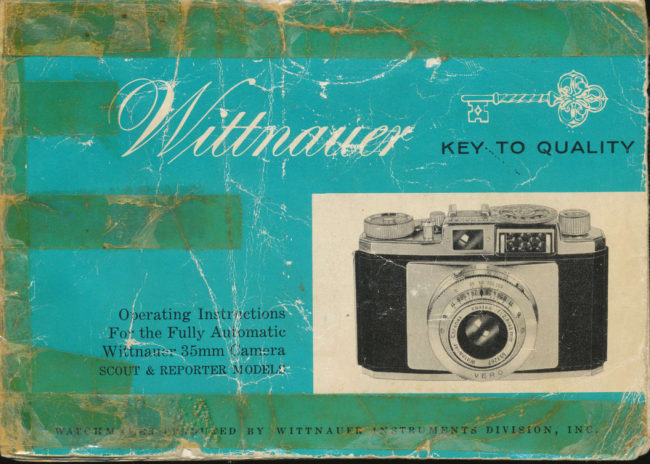
Wittnauer Scout and Reporter User manual
User manual for Wittnauer Scout and Reporter. 26 pages in English. Read the original PDF, download or print a copy without registration.
26 pagesEnglish11.4 MB PDF
Loading your manual…Open PDF directly
Document details
- Brand
- Wittnauer
- Model / document
- Wittnauer Scout and Reporter
- Document type
- User manual
- Language
- English
- Pages
- 26
- File size
- 11.4 MB
- Category
- Film cameras
- Document date
- Not specified in catalog
Search available document text
Find a term, then jump to its page in the original PDF. Image-only pages may not be searchable; check the PDF for exact wording and diagrams.
Page 4 · Read text
+l.:
                        .s:i
     9NGRATULATT6NS on your choice of the fully automatic Wittnauer
       camera. Your new camera will repay you manyfold with years of
        fine photography. For here, truly, is the perfect blend of optical and
engineering automation. Made with wATcHMAKER skill and precision,
the outstanding Wittnauer 35mm camera offers every advanced and useable
photographic feature.
The new Wittnauer "high definition" CHRoNEX lenses have been computed
with the most modern mathematical formulas and are ground to exacting
specifications to insur e razor-sharp clarity and full color fidelity. All glass
     surfaces are coated to reduce internal reflections and assure brilliant-airpictures. Wittnauer quality cameras are versatile enough to meet the most
demanding photographic assignments.
On the following pages you will find a full description of the many features
designed to make Wittnauer picture-taking more successful. Please read
this booklet carefully before using the camera.
                          qfrrr*n* @t n rrr*n @t ao, @-".
                       THE LONGINES-WITTNAU ER BUILDING
             t          5AO FIFTH AVENUE, NE\^/ YORK 36' N. Y.                          www.butkus.us
             ,;
View original page 4Page 5 · Read text
Operation o.f the Fttll,y Atttotrtrttit:: lV ittttu ttet.  ,J Smm Camera
  I'. Advance film and wind shutter by moving rapid wind lever once.
 2. Measure light value with
     built-in meter (on Reporter
   and Legionnaire models
     only).
3. Choose most desirable shut-
    ter speed.
4. Adjust diaphragm.
5. Focus and view subject.
{6. Release shutter-
   take picture.
View original page 5Page 6 · Read text
To Open the Camera

PulI out the back panel cover latch located directly
below the rapid wind lever. When the locking bar
has been disengaged, the back panel will swing out-
wards. The back panel can then be fully opened and
pivots on a hinge on the left side of the camera. Do
not put excessive strain on the back while open as it
has been carefully fitted at the factory and proper
alignment is important to correct closure and long
life.
   a. pressure plate holds fi,lm perfectlg flat and,
         i,n f ocal plane dut"ing erposure.
    b. cartridge retaining spring.
    c. reuind post.
   d. fi,lm plane guide channels.
    e. fi,Im aduance sprocket.
     f. film take-up spool.

                         www.butkus.us
View original page 6Page 7 · Read text
opet'cttiott o.f the Fu.tt y Atrtotnatit: writtttcr.u(,], ,rsmm cemera
      l '     Advance film and wind shutter by moving rapid wind lever once.
   2. Measure light value with
        built-in meter (on Reporter
     and Legionnaire models
       only).
   3. Choose most desirable shut-
       ter speed.
  4, Adjust diaphragm.
  5. Focus and view subject.

   G;. Release shutter_
      take picture.


2
View original page 7Page 8 · Read text
I ns ertittg
            the Filnt

Pull out the rewind knob as far as it will go and
insert a fresh cartridge into the empty chamber.
The cartridge is inserted so that the long projection
is towards the bottom of the camera. Push the
lewind knob back into its original position, turning
it gently at the same time so that the slot in the
rewind post engages the crossbar of the film spool.
Modern emulsions are extremely light sensitive and
even the most calefully constructed cartridge
should be protected from the direct rays of the
sun. Load and unload the camera in the shadow of
a tree or building. If no shadow areas are avail-                           ...-/
able, turn your body so that your own shadow
will offer protection.                                                                                                                                                                                                                                                                                                        I
Protect film cartridge from physical damage or'
abuse. Rough usage may tend to distolt the car-                                            ,-////ll\         ,/  /   I    t.tridge and destroy its light-ploofing ability. Tofurther protect film, do not allow loaded cartridges                     /
to be stored at high temperatures.                          N)/      ll,t                                                                                                   \'/l             l
                                                                                                                                                                                                                                                                                                                                                                                                                    ;                                                                                                     v/,ut              tI      I
                          www.butkus.us
View original page 8Page 9 · Read text
The headings were printed in light
blue, so they do not scan well.
       7'o Atta,ch Filnt rtnd Cunryslcte
            tlte LricLdin g Opercttiri,it
       Advance the lapid wind lever. thus winding the
      empty spool until the slot mar.ked with the white
         line becomes visible. Now, pull out enough of the
       tlimmed film leader so that the end can be inser.ted
        into the slot of the take-up spool. After. the film
       has been inserted into the take-up spool, hold the
        shutter lelease button down as far.as possible and
       opelate the i'apid wind lever', thus pulling mor.e
         film leadel flom the cartridge. Continue operating
        the lapid wind level until the sprockets on the film
       advance wheel engage the perforations of the film.
      Enough extla film has been supplied by the manu-
        factulel to provide fol the leadel used when load-
        ing. The colrect number of exposures still remain
        in the caltlidge. Now, close the camera back. A
         slight plessule will be felt when the back is almost
         closed. This is nolmal and is the result of the action
        of the pl'essule plate which folces the film into the
        con'ect focal plane. With the back held fir'mly
        closed, snap the covel' latch into position and the
       camela is made completely light tight.
View original page 9Page 10 · Read text
To Sct the E,xTtoslLt,e Counter
The exposur.e counter is located near. the     to its nor.mal position. Pr.ess the shutter re_
rapid wind lever and is of the SUBTRAC-     lease button. This opei,ation is repeated aTION TYPE. It will count backwar.ds to     total of two times. Advancing these two
show, at a glance, the number of UNEX-    flames r.emoves film that may have been
POSED FRAMES still available.            "fogged" dur.ing the loading process and
                                                  leadies the camela for pictur.e-tiking.
The subtraction counter.is of special value
to the photogr.apher.who uses var.ious types     Before taking the first pictui,e, set the ex-                                          posure                                                   means                                                       counter. by                                                                                   toothed     loadsand                                                                  the                                                             of                                  longei.                                        neces-                         foi. it is no          of film -                                           wheel                                                      undet.neath                                                                                r.apid                                                                the                                                               wind                                                                                  levei.andsary     to lemember.                 whether                         the                           camela                                     has
                                                                                onbeen loaded with a twenty or a thir.ty-six     set the number' 36 opposite the i.ed dot                                            the camera_body. (When using a 20-expo-exposure cat.tr.idge.                                               sure cartlidge, set 20 opposite the red dot.)
Now, advance the r.apid wind lever fully and    The counter will now r.egister automatically
lelease. The lever.will automatically return     each time the r.apid wind lever.is advanced.


                         www.butkus.us
View original page 10Page 11 · Read text
7'ltc, Ilap[d II'irrd l,,ai'cr qtttl Fil nt Tre n spo),t II ct:,ltcrttisnt,
  A single rotation of the rapid wind lever.:     exposules). The lewind knob will tur.n if
        1. Advances the film to the next unex-    the film is tr.anspolted ploper.ly. Complete
         posed flame.                          functioning of the camer,a takes place only
       2. Winds the shutter..                 when film is inselted. To test ilie shuttei.
                                                without film, open the camer.a and tur.n the       3. Counts the exposur.e.                                                     film tlanspor,t spr.ocket wheel in the dilec-
       4. Unlocks the double exposut.e pleven-     tion of the film take-up spool until the white         tion mechanism.                        dot on the spr.ocket is opposite the white dot
  Using the thumb, push the lever. to the    on the camela housing.  If you now actuate
   light as far. as it will go. Then allow it to    the i'apid wind lever., the shutter will be
   letuln to its oi'iginal position. The exposure    cocked and can be r.eleased in the nor.mal
  can now be made by pressing the shutter     mannel'.
   lelease button. The shutter. r'elease can be    IMpoRTANT: When the camer.a is loaded  opelated ONLY if the wind lever has been    with film, the lewind knob must not be  FULLY advanced (thus preventing double     tulned until all exposur.es have been made.


Rcr,pid Wintl Le'uer.
  A. Rest posi.tion
  B. Partiallg
     aduanced
      position
  C. Fully
      aduanced
      position
View original page 11Page 12 · Read text
7'o {'tt rxtd
When the last flame has been exposed, the    and the film replaced-with an unexposed
exposure countet' indicates the number. 1.     cartridge.
Do not continue to advance the film be-                                                        REwrNDrNc,                                      wHEN                                                      MAKE suRp rHEyond this point                ol it may be toln fi.om its    NOTE.'                                                                                                                        ..8,,.                                      SHUTTER                                                          IS NOT                                                          SET ONprotective            cartlidge.
Exposed film should be r.ewound into the
cai'tridge so it may be taken flom the
camela in ordinary room or daylight. To do
this, depless the shuttet.r.elease lever.as far.
as it will go. Make sur.e the shuttet, is not
set on "B". At the same time, lift the r.ewind
knob slightly and tur.n it in the dir.ection
indicated by the englaved al.t.ow until all
film has been lewound. The shuttel r.elease
button must be held down duling the entir.e
lewinding pl'ocess. When r.ewinding has
been completed, you will "feel" a definite
slacking in the r,esistance of the r,ewind
knob. In addition, you can "hear'" the film
leadel as it slips off the take-up spool and
retulns to the caltr.idge. When completely
rewound, the camei.a's back may be opened
                           www.butkus.us
View original page 12Page 14 · Read text
Fttcu-x[1g (tnfl V|e ping

            St'tttr t rttrrl Ilt' 1to  t'! t r,llo,lt  ls
    The distance fr.orn the camera
    to subject-estimated  or estab-
     lished by means of an accessory
    rangefinder.-is blought into
    registel with the black dia-
    mond-shaped mar.k in the center
    of the "depth of field" i.ing by
    rotating the milled r.ing on the
    flont of the lens mount. The
    lens tulns smoothlyin its mount
    and may be set at any distance
   from 3 feet to infinity.
      Atl t't'ttt  tt rc r  tt tttl Ltr1io tt  tr,t i,'<'
                      JI orlt,ls
    Sight through the viewfinder.
   window. In the cenber of the
    field of view, you will see a
   bright amber colored circle.
   This is the rangefinder image
   and since the rangefindei'is in-
    ternally coupled to the lens, set-
   ting the findel automaticallv
   adjusts the lens for. perfeci
    focus.                         www.butkus.us10
View original page 14Page 18 · Read text
7'ri Set tltc Diaytht,a,qttL Opettitr,g
       'Ihe lens diapht.agm is set by means of the     gleater'"depth of field,, and greater over_
      level on the uppet. side of the lens mount.      all shalpness. For.a mole detailed explana_      Bling the ar.r'owhead on the lever.into r.eg-     tion of "depth of field,, see page 16.       ister with the selected diaphragm opening.
      Note, the larger number,s indicate a smalleq.
     diaphlagm opening...which admits less
      light to the film. Thus, f :16 represents a
       smaller' "opening" than f :2.8.


    Each full diaphi.agm adjustment  r.epr.e-
      sents a 700/o change in light. F:11 r,epr.e-
      sents twice as much light (under,constant
     shuttel conditions) as f :16. Diaphr.agm
     openings and shutter. speeds for.m the
      infoi'mation needed for. cor.r.ect exposule.
     Since a larger. diaphr.agm opening Ldrrrit,      m9i'e ligJrt, it rnay be used in conjunction
     with a fastel shutter. speed to ,,slop,, ac-      tion. In the same way, a slower. shutter.
     speed used in conjunction with a smaller.
    diaphlagm opening would result in a
74                             www.butkus.us
View original page 18Page 19 · Read text
To Set th,e Slttttter Speed

The Wittnauer Velo Shuttei' has been sub-      l'acy. The shutter is automatically wound
jected to ligolous tests and examinations     each time the rapid wind lever is advanced.
and is capable of a high degree of accu-
                                        Exposule times are indicated as fractions
                                            of a second on the shutter speed ring. The
                                       numeral 25 represents 1,/25 of a secondl
                                         50 represents 1/50 of a second, etc. To set
                                   a particular shutter speed, turn the large
                                                 miiled ring until the selected speed is oppo-
                                                          site the diamond-shaped mark on the "depth
                                       of field scale". Shutter settings may be
                                made either before or after the film is
                                               advanced.                              \
                                                               represents bulb. When set on                                                                 \l            The Ietter "B"
                                                    f               "8", the shutter will remain open as long
                                         as the shutter release button is depressed.
                                         With the use of a Wittnauer "Iocking" cable
                                                   release, extremely long time exposures can
         ;Erg                    betemptedmade. unlessTime exposuresthe camerashouldis firmlynot besup-at-
                                             ported on a tlipod or other suitable object.


           -{ffiiii:{sn$*!i;
View original page 19Page 20 · Read text
Deptlz o.f fieW

       When you focus on this

                                 Some Hints
                                           When your principal subject has
                                                       great depth-use a small opening
                                                  and achieve overall sharpness.
                                           When the background is disturb-
         prH oF FrELD  -->                             ing-eliminate it by using a large         | <- De        Pieture ruill be sharp  f ront                                 opening...offering a shallow depth            I      l+Here...to   ..Here;                                 of field-and allow the background
    ...you are actually in focus throughout an                 to become blurred and out of focus.
    entire zone. This area is called the DEpTH
  OF FIELD.
   The Depth of Field varies according to the
   diaphragm opening selected. A small dia-
   phragm opening will provide great depth
    of field. A large opening will offer a shallow
    depth of field.
16                             www.butkus.us
View original page 20Page 21 · Read text
'l'('11.*                                                               --l t'r tr of !'ot"lt.s .lo t' Ii t'(i'!/ I'ict  ttt't'$  I)apth of tr'.ir,&1 Scrr l(

   t   First focus on the most impoltant subject.
    Then the zone of shalpness may be l'ead
     flom the scale englaved on the lens mount.
     Example:
    Assume the exposule selected lesults in a
     diaphlagm opening of  f :8.0, r'ead the en-
     glaved footage markings opposite f :8 on
     each side of the lens mount. One side will
     plovide the closest, and the othel the far-
      thest limit of shalpness. To adjust the depth
      of field, merely change the diaphi'agm open-
      ing. (Adjust the shuttel speed to maintain
      collect exposules while changing the shat'p-
     ness zone.)
View original page 21Page 23 · Read text
,' t' ,            H elPf til
                                                                               y. ,.'               rn,1'  1,;ur                                                               ,; i;   ,'  f t,','1,,1'''  "':it..l ,.

      WATCHMAKER-MADE WITTNAUER CAMERAS
      ARE VERSATILE ENOUGH TO MEET EVEN
      THE MOST DIFFICULT PICTURE-TAKING
       ASSIGNMENT.
         Coupled with today's high speed films, your
        camera can become the tool through which
       you may find an important new vista of
          artistic expression.
      When photographing, hold the camera
          firmly in both hands and release the shutter
         gently and deliberately without moving the
        camera. Firm pressure is especially impor-
        tant when slow shutter speeds are used.
       Watch for "peak" action to capture excit-
         ing moments and fleeting expressions. When
        photographing under extremely adverse
         light conditions using long exposure times
          (1 second to 7/I5 second) use of a tripod is
        recommended. In this way, vibration due to
         pressure on the shutter release is eliminated
         assuring sharp, crisp pictures.
Ii
View original page 23Page 24 · Read text
ARE for your Wittnauer camera as you would a fine
          watch. The lens should be cleaned periodically, but only with
        a soft camel's hair brush or lintless lens tissue. Never use
            eyeglass tissues as they will remove the delicate anti-reflection
            coating. Keep the camera in its ever-ready case and
         from unnecessarv shock.
          Get to know your camera well. You will find it a
         and competent companion.
       q/,fr-r,-efrl/orrr,.,r,rt               at/?rr.                                  @i,rjrant,
       LONGINES-WITTNAUER BUILDING, NEW YORK, N.Y.


20                            www.butkus.us
View original page 24From the M. Butkus archive. Original publisher and archive notices are retained.
Check the model and edition against your equipment.
PDF verified 2026-10-10.