Film cameras
Yashica 16 User manual
User manual for Yashica 16. 9 pages in English. Read the original PDF, download or print a copy without registration.
9 pagesEnglish1.7 MB PDF
Loading your manual…Open PDF directly
Document details
- Brand
- Yashica
- Model / document
- Yashica 16
- Document type
- User manual
- Language
- English
- Pages
- 9
- File size
- 1.7 MB
- Category
- Film cameras
- Document date
- Not specified in catalog
Search available document text
Find a term, then jump to its page in the original PDF. Image-only pages may not be searchable; check the PDF for exact wording and diagrams.
Page 2 · Read text
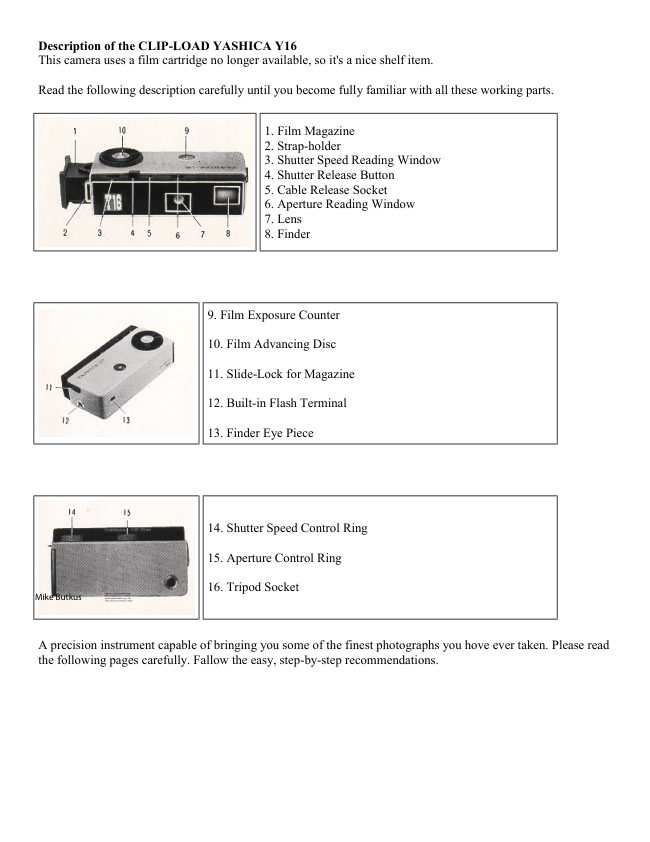
Description of the CLIP-LOAD YASHICA Y16
 This camera uses a film cartridge no longer available, so it's a nice shelf item.

Read the following description carefully until you become fully familiar with all these working parts.


                                                1. Film Magazine
                                                2. Strap-holder
                                                3. Shutter Speed Reading Window
                                                4. Shutter Release Button
                                                5. Cable Release Socket
                                                6. Aperture Reading Window
                                                7. Lens
                                                8. Finder


                                    9. Film Exposure Counter

                                 10. Film Advancing Disc

                                 11. Slide-Lock for Magazine

                                 12. Built-in Flash Terminal

                                 13. Finder Eye Piece


                                 14. Shutter Speed Control Ring

                                 15. Aperture Control Ring

                                 16. Tripod Socket
Mike Butkus                              Digitally                                                                    DN:email=mike@butkus.org,Date:cn=Mike2023.05.18signedButkus,by09:56:20Mikeo=ButkusButkusc=US-04'00'camera manuals, ou=butkus.org,


A precision instrument capable of bringing you some of the finest photographs you hove ever taken. Please read
 the following pages carefully. Fallow the easy, step-by-step recommendations.
View original page 2Page 3 · Read text
www.butkus.us

HOLDING THE CAMERA


                                The YASHICA Y16 is held between the forefinger and
                                         the thumb of the right hand, with the forefinger placed on
                                         the Film Advancing Disc and the thumb on the bottom of
                                         the camera. The camera is also held with the left hand in a
                                          similar manner as above. The Shutter Release Button is
                                       operated with the middle finger.


LOADING THE CAMERA

16mm roll film

24 exposure per roll in the CLIP-LOAD MAGAZINE

10 X 14mm size negative

Black and White or Color


                                            1. Insert a new CLIP-LOAD MAGAZINE (loaded with
                                      black and white or color film) into the YASHICA Y16.

                                            2. Make sure the side with the cogwheel is on top.

                                            3. Advance the film by turning the Film Advancing Disc
                                      counterclockwise until it stops. Press the Shutter Release
                                       Button.


                                           4. Repeat twice the operation of advancing film with the
                                   Film Advancing Disc and pressing the Shutter Release
                                      Button. The Exposure Counter will indicate "S" (start)
                                      opposite the white triangle. Now advance the film again,
                                  and the Exposure Counter Dial will register figure 1, which
                                         indicates that the film is in position for the first exposure
                                  and the camera is ready to take the first picture.
View original page 3Page 4 · Read text
The CLIP-LOAD MAGAZINE houses the film transport
                                mechanism and 24 exposures of film. The magazine will
                                       take both the perforated and non-perforated type of 16mm
                                          film, available in black and white or color.

                                  Using additional magazines and loading them with different
                                       types of film will enable you to take photographs under all
                                       conditions with the YASHICA Y16.

                                 Changing magazines is done in a matter of seconds:
                                   advance the last exposed frame of film by turning the Film
                                 Advancing Disc, push the Slide Lock forward and the
                                  magazine will pop out from the camera, then insert the new
                                  magazine into the slot and you are ready to shoot.


PICTURE TAKING PROCEDURE


                                 1. Turn the Aperture Control Ring to the left or to the right until the
                              desired number appears in the Aperture Reading Window.

                                 2. Turn the Shutter Speed Control Ring and set the predetermined
                               shutter speed. The shutter speed should appear in the Shutter Speed
                          Reading Window.

                                 3. Sight the subject through the viewfinder and when you have
                        composed your picture gently press the Shutter Release Button.
View original page 4Page 5 · Read text
www.butkus.us


                                The shutter speed controls the duration of the exposure.
                                         Shutter speeds on your YASHICA Y16 with its metal
                                       plane shutter are 1/25. 1/50, 1/100, 1/200 of a second and
                                                          'S'. The 'S' setting is for taking pictures with an exposure
                                        longer than one second. Use a tripod or brace when using
                                         the 'S'. It is advisable to set, before you advance the film
                                   and wind the shutter by turning the Film Advancing Disc.


              VARIABLE SLOW SHUTTER SPEED AND TIME SETTING

When the Shutter Speed Dial is set at "S", the fine metal plane shutter of the YASHICA Y16 offers variable
slow shutter speed and 'Time' setting, with its double tension action Shutter Release Button. If the Shutter
Release Button is depressed to the bottom in one gentle continuous action, shutter speed will be about 1/10 of a
second. Thus, variable slow shutter speeds are possible by the pressure application and time lag between the
first and second tension on the button. For 'Time', the pressure on the button is removed after the shutter blades
are open and then re-applied after the required exposure is made.

The Shutter Speed Reading Window, Aperture Reading Window, and Film Exposure Counter are
conveniently arranged on top of the camera, permitting you at a glance to check for any possible errors
in the settings before clicking the shutter.

                             FILM WINDING


                                         The Yashica Y16 incorporates an unique method of
                                                    film winding. The film is wound by holding the
                                             camera between the forefinger and the thumb of the
                                                         right hand, with the forefinger placed on the winding
                                                     disc and the thumb on the bottom of the camera. The
View original page 5Page 6 · Read text
camera is then pushed forward with the left hand
                                                           until it clicks.

                                                Bringing the camera back to its original position, the
                                                       shutter release will be approximately under the
                                              middle finger of the right hand, and you are ready to
                                                  shoot in an instant. This operation transports the
                                                        film, winds the shutter, and sets the exposure
                                                  counter all automatically. This action prevents
                                               double exposures.


                          UNLOADING FILM

When the Exposure Counter indicates 24, IT IS THE LAST EXPOSURE.


                                     Before removing the CLIP-LOAD MAGAZINE from the
                                     camera, advance the last exposed frame of film by turning
                                         the Film Advancing Disc and clicking the shutter. Repeat
                                              this operation once again. Then push the Slide Lock
                                     forward and the magazine will POP out.


Immediately wrap with the original wrapper, the CLIP-LOAD MAGAZINE, without removing the exposed
film from it, and replace it in the film carton. This will prevent any possible light leakage and damage to the
film.

Note: When the Slide Lock is released, the Exposure Counter will reset automatically to "S", or start.
View original page 6Page 7 · Read text
www.butkus.us


 The lens aperture controls the amount of light that will
  pass- through the lens onto the light-sensitive film.
 YASHICA Y16, with its Yashinon lens, offers openings at
  f3.5, 4, 5.6, 8, 11 and~ll6). Notice that the lower the
  number, the larger the opening. f3.5 is the largest opening,
  and~lfl6) the smallest. To set the lens opening, turn the
  Aperture Control Ring by setting the desired number in
  the Aperture Reading Window.


TAKING FLASH PICTURES


  Your YASHICA Y16 offers X synchronization
  As you become more proficient at taking pictures, you will
   want to acquire accessories that increase the versatility of your
   camera. One of the first accessories you will want will be a
   flash unit. Synchronization for flash is built-in.

  A standard FC connector plugs into the flash terminal. The
  YASHICA Y16 Flash Gun attaches to the camera with a
   bracket that screws into the tripod socket


    SELF-TIMER


    A Cable Release or a Self-Timer can be fitted to
       your YASHICA Y16. Screw the Cable Release into
        the Socket provided beside the Shutter Release
        Button. Your camera dealer will supply the proper
       Cable Release for your Y16.
View original page 7Page 8 · Read text
FILTERS

Initially, you will find a yellow filter ideal for bringing out clouds in landscape pictures and for general uses. An
UV filter is suitable for color photography and also to protect the lens. As you become more advanced, you will
want to use various filters, such as orange, green, etc.. for different effects. (Special type of slip-on filters are
available for your YASHICA Y16.)

Y16 ACCESSORIES & EQUIPMENT - for the YASHICA WAY of 16mm photography


FILM: (loaded in daylight CLIP-LOAD
MAGAZINE)
Y16 Black and White Film              FOR ENLARGING:
Y16 Color Film                                Magnifier Printer
                                                Enlarger
FOR PICTURE TAKING:
Filter                           FOR PROJECTING:
Flash Gun                                        Slide Viewer
Table Tripod                                     Slide Projector

FOR FILM DEVELOPING:
Developing Tank
Transparent Negative Wallets


EXPOSURE

Exposure means finding the right combination of lens-opening "aperture) and shutter speed in relation to the
sensitivity (ASA) of your film. (ASA indicates American Standard Association. For example if you are using a
film of ASA 100 sensitivity, your correct exposure will be according to the following table.

DAYLIGHT EXPOSURE TABLE

Your speed will be 1/100 with aperture numbers shown below.

                                                                Cloudy-Dull or
                    Bright Sun      Hazy Sun      Cloudy-Bright
                                                      Open Shade (4)

 Light Subject
                        f/16              f/11                f/8                f/5.6
       (1)

   Average
                        f/11                f/8                f/5.6                f/4
  Subjects (2)

 Dark Subject
                           f/8                f/5.6                f/4                f/3.5
       (3)
View original page 8Page 9 · Read text
www.butkus.us

(1) Light Subjects: Distant landscapes, near-by people with sea, beach and snow scene. in the background.

(2) Average Subjects: Near-by people, houses, gardens, buildings and places not in the shade. Advisable to use
this class when light and dark objects are in about equal proportions.

(3) Dark Subjects: People in cork clothing: trees, flowers, animals and large buildings,

(4) Open Shade: Subjects shaded from the sun but lighted by a wide area of open sky. The less the open sky the
larger the lens opening.

If you are using an ASA 50 film, you will make a larger lens-opening or lower your shutter speed (1/50). When
in doubt, follow the film manufacturer's recommendations, and you will be assured of good pictures.
View original page 9
Related documents and language editions
From the M. Butkus archive. Original publisher and archive notices are retained.
Check the model and edition against your equipment.
PDF verified 2026-10-10.