Film cameras
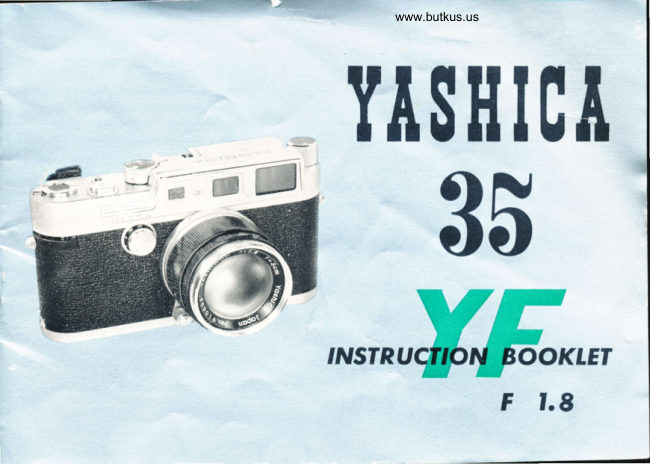
Yashica 35 YF User manual
User manual for Yashica 35 YF. 22 pages in English. Read the original PDF, download or print a copy without registration.
22 pagesEnglish4.4 MB PDF
Loading your manual…Open PDF directly
Document details
- Brand
- Yashica
- Model / document
- Yashica 35 YF
- Document type
- User manual
- Language
- English
- Pages
- 22
- File size
- 4.4 MB
- Category
- Film cameras
- Document date
- Not specified in catalog
Search available document text
Find a term, then jump to its page in the original PDF. Image-only pages may not be searchable; check the PDF for exact wording and diagrams.
Page 6 · Read text
PICTURE TAKING                 Determrne lhe correct exposure combrnotron lo be 531 on thc conrero
                                    Turn the Lens Aperture Control Rinq to the desrred number.      PROCEDURE                                     Set the Shutter Speed    '
                               o  When using high shutter speeds  I 30 to   I 1000 sec.  ser the Slow
                                    Shutter Sp--ed Diol to "30"   red figure     lift up tlre Hiqh  Shulrcr  Spet-.d
                                       Diol ond set the desired figure opposile fhe white triongle.
                                    Nole,   The Diol will  sink inro position only when the shurter sprcd    rs
                                                  correclly   s-.t.
                               b  When usrng slow shulter speeds  I  to   I  l5  s:c.  set the Diol to the
                                    desired figure, ofter  odiustirq rhe High Speed Diol to 30X red fiqure
                             4   Advoncc the film ond cocL the  shutler wrlh onc  slroke  of  tht-'  Irlnr
                                    Advoncing Lever
                                    Focus the subject with the focusrnq Lever   see  nexl  po!JC
                                       Press lhe Shutter Releose Bulfon.
                                   Note  ,      I hc shuttcr spce d sellrnq con bc   chrtrtcted   crlhcr     trelotr'      ()r
                                                            o{lc.r film hos becn rrcJvorrced


                                                                       www.butkus.us
View original page 6Page 7 · Read text
www.butkus.us

     VIEWING AND FOCUSING

The single window combines the view-rongef inder,
which enobles you to  sight, focus ond   f rome the
piclure quickly. The extro lorge viewing window
feotures o bright line  f rome indicoting cleorly the
field of th-- 50mm stondord lens. When you compose
your picture wiihin the fromes you ore ossured of
gelting the some picture you ore seeing through the
viewf inder. To focus, superimpose the smoll pink
reciongle on the subiect ond move the Focusing Lever
until the lwo imoges overlop ond form one cleor.
imoge. The comero is now in focus
View original page 7Page 10 · Read text
UNTOADING FILM


        After  toking  o  full   roil   o{
          film,  it  is nece;sory to rewind                        lhc  Rcrvrnclrnq Kn9$  r:nrj 'wrnd thrs Inob   rrr  lhr'
        the exposed film  bock  into                        of orrow  untrl no resrstor)ce rs {elt  ()n thc  lnob
        the   ccrtr!dge   or   cossette                      neccssorv to push down thc  Reversr,rrt tlutlon whrlc
        before Tsrngving tire exposed
                     f ilm {rom the comero.


www.butkus.us
View original page 10Page 11 · Read text
www.butkus.us
    FILiI TRANSPORT TEVER         CABTE RETEASE


                                A stondord screw-in type coble releose con be
                                                      ottoched to your Yoshico YF. lt is odvisoble to use
                                      o coble releose when you toke pictures ot shulter
                                                   speeds slower thon 1160 sec. Your Yoshico deoler
                                        con supply the proper coble releose   f or  your
                                                      Yoshico YF.


The Film Tronsport Lever of your Yoshico YF
is uniquely designed. This single siroke lever
hos the odvontoges ol  tronsporting  the
exposed lilm, cocking the shutter for the next
exposur3 ond preventing double exposure.
The exposed film moy be odvonced by giving
the lever severol short slrokes, if desired.
View original page 11Page 13 · Read text
www.butkus.us
         THE IENS OPENING                  SELF.TITIER
                                                     For toking  self -portroits or group pictures in
                                                              which you wish to oppeor, you con ottoch o
                                                                             self-timer in the hole of the Shutter Releose
                                                             Button. A screw-in type self-timer will operote ooCIsf t.t       i 2.8     (1         f 5.6                the shutter. Your Yoshico deoler con supply the
                                                             proper self-timer for your Yoshico YF. Using the
                                                                               self-timer, you should mount the comero on o
                                                                       tripod or broce  it firmly.  sss6f!        f rr      f t6

      The lens operture controls the omount  ol
h        light possing through the lens onto the film.
       Yoshico YF, with its  Yoshinon lens, offers
         openings ot f : 1.8, 2, 2.8, 4, 5.6, 8,  ll,  16,
 r      22. Notice the smoller the number, the lorger
        the opening.  f , 1.8 is the lorgesl , ond I :22
        the smollest. To set the lens opening, move
        the Aperture Control Ring to set the desired
        number opposite the block dot.
View original page 13Page 14 · Read text
SHUTTER SPEED                          TIAKING DOUBTE EXPOSURE
The shutter speed controls the durolion of the exposure. Shutler      After exposing one frome in  thi
speeds on your Yoshico YF with ils occurole focol plone shutter      ordinory monner, turn lhe high shutter
ore 1, tf2, t14, t18, 111s, 1130, 1160, 11125, tl25o, l/500,                                                   speed diol  in o   counler-clockwisel/1000 of o second ond Bulb. The high speed diol is on lhe
top of the comero body, while the slow speed diol is on the       without lifling  il. This motion chorges the
front of ths comero body. The high shutter speed setting  is       shutter without odvoncing the exposed
mode by lifting up the diol slightly ond turning it to the desired      film ond the comero is reody for
number opposite the white triongle. ln this cose the slow speed
                                                                                   intenlionol double exposures. The shutterdiol should be set on the red figure 30. The 30X on the high
shutter speed diol indicotes o shutter speed of  l/30 sec. ond     speed con be chonged either before
ol this selting the flosh synchronizer is outomolicolly switched      or ofter the double exposure setting
to X type synchronizolion. The slow shulter speed setting  is        is mode.
mode by turning the diol lo the d:sired number, ond setling lhe
high shulter spee.d diol to 30X.

              Comero moy be Hond held
       Averlg3 Piclures             Action Piclures
       1130, t160, tlt25          11250, 11500, l/t000
                   .Use o Tripod or Broce
       Tj13                    Slow Speed              !geosure
                   tBt             I sec., 112, t/4, t18, llts
View original page 14Page 15 · Read text
www.butkus.us
                  EXPOSURE

Exposure meons finding the right combinotion of lens-opening (operiure) ond shutter speed in relotion to the
sensitivity (ASA) of your film. (ASA indicotes Americon Stondord Associotion). For exomple  if you ore using
o film of ASA 100 (XX type) sensitivity, yovr correct exposure will be occording to the following toble   '

                               DAYIIGHT EXPOSURE TABLE
  Your shutter spaed will be 1/125 with operture numbers shown below.
                                     Bright Sun        Hozy sun  i  ctouby-Brisht  3'i"'ltrnoJj'""U,
      Light Subiects (l)                 flt6                    fllt                   fl8                                      f 15.6
     Averoge Subiects (2)             fll1                   tl8                               r 15.6                    fl4

                                                                                                                                                                                                                                 r 14                                                           f 12.8     Dork Subiects (3)                                                   f 18                               { 15.6
   ( I )  Light Subiects , Distoni londscop-.s, neor-by people with seo, beoch ond snow scenes in ihe
         bockgrou nd.
    ( 2 )  Averoge Subiecis  , Neor-by people, houses, gordens, buildings ond ploces not in the shode.
         Advisoble to use this closs when light ond dork obiects ore in obout equol proportions.
   ( 3 )  Dork Sublects : People in dork clothing, trees, flowers, onimols ond lorge buildings.
  (4 )  Open Shode : Subiects shoded from the sun but lighted by o wid: oreo of open sky. The less
        the open sky the lorger the lens opening.

lf you ore using on ASA 50 film. you will moke o lorger lens-opening or lower your shutter speed (l/60)
When in doubt, follow the film monufocturer's recommendotions, ond you will be ossured of good pictures.
View original page 15Page 16 · Read text
CHANGING THE IENS

I he Yoshico YF with the threoded screw lens mount
provides for inlerchongeobility of lens. Mosl lenses
with threoded screw-in mount con be used with the
Yoshico YF ond ihe lens will couple with the built-in
rongefinder. lnnumeroble possibilities ore offered by
the interchongeoble  lens system ond will considerobly
increose the scope of  octivities in  the  field  of
photogrophy. A wide ongle lens will cover o wide field of view; lhe telephoto lens will bridge the
distonce ond drow the subiect closer. The Yoshico YF will meet o voriety of requiremenls for the
scientific qnd industriol fields os well os for the procticol needs of the professionol photogrophers. To
chonge lenses. hold the comero firmly in the left hond, grip the lens borrel with the right hond with
thumb on the focusing lever ond turn to the left (counterclockwise). The lens borrel will come off the
body of lhe comero ofter obout lhree complete lurns.
Note  : Do not chonge lenses in direct sunlight.
View original page 16
Page 17 · Read text
www.butkus.usr   INFRARED PHOTOGRAPHY               AUTOMATIC PARALLAX
                                              CORRECTION
                                                                    Th-.re is o difference in whot lhe viewfinder ond
                                                      comero lens see when subiects ore photogrophed
                                                            ot  close ronge. This difference in  porollox  is
                                                           compensoted for outomoticolly in the Yoshico YF.
                                              When the focusing lever is turned, the bright white
                                                           frome in the viewfinder moves diogonolly occording
                                                                lo the comero to subject distonce ond correcling
                                                                    porollox so thot picture token is the some os whot
                                                                                   is seen through lhe view-rong:find:r.
         ln oddition to the distonce index mork, Yoshinon
         lens hos onother index mork wilh the letter   R.
        This index mork is used in cose of  infrored
         photogrophy, or, in other words, when exposures
        ore to be mode utilizing on infrored lilm or:d
          filter. ln cose of infrored photogrophy,  sirnply
        determine the ronge to the subiect in the monner
        given in the preceeding instruclion; then, s?t th?
        distonce scole to the R index mork. ln ihis woy,
      on occurote focus con be secured for infrored
        photogrophy. This odjustment  is necessory becouse
        the infrored roys ond ordinory visible roys hove
      o different rotio of refroction, ond therefore,
      o slight diflerence in focus orises.
View original page 17Page 18 · Read text
DEPTH OF FIETD

When you focus the comero on o subject there is o cerlotn disionce in front ond bock of
the subieci wiihin which other obiects will olso oppeor shorp. This is known os the "Depth-of-
Field", ond it vories wiih the lens operture, the smoller the operture the greoter the Depth-
of -Field ;  it is much lorger ot f , l6 thon ot f ' I.8.
The Depth-of-Field scole will be found on the lens mounl in the front port of the comero. You
will notice ihot on either side of the f  1.8 figure                                                                               '
is o similor set of numbers which represent the lens
opertures. When the comero is focused on your
subiect, look for lhe operture you ore using on
either side  of  the scole to  determine the
D:pth-of-Field. Thus,  if the comero is focused ot
 l0  feet ond the lens op-'rlure is   f , 8,  ihe

shorp is from obout 7 ft. to l5  ft.
You con olso use the Depth-of-Field to use your Yoshico YF os o frxed-focus comero. ln this
cos3 set the distonce scole to 20 ft. ond the lens operture to f :8.  You will notice on the
Depth-of-Field thot onything from oboul II  leet to infinity will bc in focus.
View original page 18
Page 19 · Read text
www.butkus.us
                                         YASHICA CASSETTE
                                                                l.  Sofety Lock
                                      2.  Opening                                       ( 3 )  lnsert the center spool
                                      3.  lnner Shell Button                         into the inner shell.
                                      4.  Spool Chomber                                                                                                     (.4 )  lnsert the inner shell into                                      5.  Center Spool Knob
                                      6.  Spool Slot                           the outer shell ond drow
                                                                       out  the     f ilm    f rom the
For thore who wirh to ure bulk film,                                                        opening.
Yorhico Cosetle ic ovoiloble from                                                                       ( 5 )  Close the  opening by
your Yorhico dezler. The ute of                                            cotching the  button of
cor3ette tendr to  reduce fllm                                               inner shell ond turning  it
ccrotch.                                                                                                    until siops.


    To open the cossette, turn the inner  shell clockwise pushing  its
      button ond the sofety lock of the outer  sh e ll.
 2,   lnsert the tip of the film into rhe slot of the center spool ond wind
     the film tightly with the emulsion side       f oci.rg the spool in  the
      direction of the orrow on the spool.
View original page 19Page 20 · Read text
HOOD AND FILTERS

ln order to prevent flore os well os hormful refleclion of light within the lens borrel which will spoil the
pictures, olwoys use lens-hood when shooting.
To toke good picture, you moy use fillers.  lnifiolly, you will find o yellow filter ideol for bringing out
clouds in lond-scope pictures ond for generol uses. An UV filter is suitoble for color photogrophy ond
olso to protect the lens. As you become more odvonced, you will wont to use vorious filters, such os
oronge, green, etc., for different effecfs. Your comero deoler will give you complele informotion.


                                  .   Noilce
                                                                     '     Be sure to reploce the lens Cop lvhen your comero is not in use. Keep     .
                                                                     '     your comero owoy from dust ond moisture. For cleoning the lens surfoce
                                                                     '     lo remove dust or dirt, olwoys wipe very lightly by using cleon gf,uze or
                                                                     '       l.n, cleoning cloth. Do not wipe lens with o dirty hondkerchief. When you
                                                                     '     ore nol using your comero for o long period do nol leove the shulter set.
                                                                     '        such coses ploce the tens Cop over the lens to ovoid exposure, ond
                                                'nreleose the shutter.
View original page 20Page 21 · Read text
www.butkus.us
                            CAMERA IDENTIFICATION
        REVIEW  :                                As soon <r3 possible ofler you purchose your Yoshico YF,
                                                                                fill in rhe informolion required below. Keep this booklet ino.   Select your exposure combi-
                                  o sofe ploce. ln cose of loss or theft fhis informotion moy     notion
                                             prove voluoble in recovering lhe comero.
b.   Set the lens opening (operturel
C.  Set the shutter speed
                                            YASHIGA YF Serial llumber
d.  Cock the shulter
e.  Compose your picture lhrough
                                                       YASHlll0ll  f : 1.8 50 mm lens ilumber
    the viewfinder
f.  Toke the picture
                                      PURCHASE0 at
g.  Advonce the  fllm  for   the                            (Nome of Firm)
    next exposure.


                                                                                           (Address)


                                                    IIATE ol PURCIIASE
View original page 21From the M. Butkus archive. Original publisher and archive notices are retained.
Check the model and edition against your equipment.
PDF verified 2026-10-10.