Film cameras
Yashica A User manual
User manual for Yashica A. 11 pages in English. Read the original PDF, download or print a copy without registration.
11 pagesEnglish0.9 MB PDF
Loading your manual…Open PDF directly
Document details
- Brand
- Yashica
- Model / document
- Yashica A
- Document type
- User manual
- Language
- English
- Pages
- 11
- File size
- 0.9 MB
- Category
- Film cameras
- Document date
- Not specified in catalog
Search available document text
Find a term, then jump to its page in the original PDF. Image-only pages may not be searchable; check the PDF for exact wording and diagrams.
Page 2 · Read text
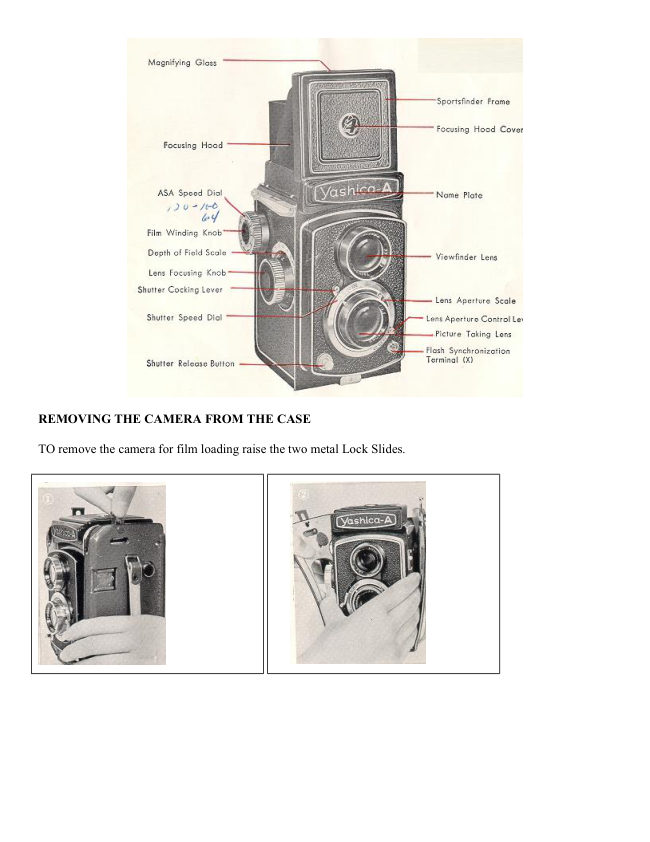
REMOVING THE CAMERA FROM THE CASE

TO remove the camera for film loading raise the two metal Lock Slides.
View original page 2
Page 3 · Read text
Spread the sides of the case apart and lift
the camera free.

Just snap off the bottom when removing
the entire front element of the carrying
case.

Your Yashica camera comes complete
with a deluxe, leather eveready case.
While the camera is in the case, all
working parts are visible and ready to use.
All you need to do is open the back-snap
and lift the top of the case forward.


LOADING FILM

* 120 size film

* 12 pictures per roll in the popular 2 1/4 X 2 1/4 size

* Black-White or Color


                                  (1) To unlock back cover, turn the tripod socket in the
                                  direction marked '0'. Then open the Back Cover by
                             swinging it out.

                                  (2) Remove the Take-Up Spool in the Lower Film
                          Chamber by pulling out the Lower Film Spool Locking
                                Spring.

                                  (3) Place the Take-Up Spool in the Upper Film Chamber
                           by pulling out the Upper Film Spool Locking Spring.

                                  (4) Place a new roll of size 120 film in the Lower Film
                           Chamber.
View original page 3Page 4 · Read text
(5) Gently draw out the film leader. Thread the film leader into
the wider slot of the Take-Up Spool in the Upper Film Chamber,
then turn the Film Winding Knob. Make sure that the film leader
is placed evenly.

(6) Turn the Film Winding Knob three or four times so that the
film leader is held securely on the Take-up Spool.

(7) To close the Back Cover. turn the lock in the 'C' direction
(clockwise) until it stops.

(8) Carefully and gently turn the Film Winding Knob until the
Film Counter Window shows number '1'. You are now ready to
take the first picture.


Caution: When loading or unloading film stand in a shadow-- never in strong, direct sunlight.
View original page 4
Page 5 · Read text
PICTURE TAKING PROCEDURE


(1) Open the Viewfinder
Hood by lifting it at back.
Press the Viewfinder Hood
down to close it.

(2) Set the Lens Aperture
Control Lever to the desired
number on the Lens
Aperture Scale.

(3) Set the Shutter Speed
Dial on the required speed
to the Shutter Speed
Indicator.

(4) Push down the Shutter
winding Lever. Be sure not
to change Shutter Speed
after the shutter is wound.


                                                                  (5) Now gently release the Shutter by
                                                              pressing the Shutter Release Button.


                             Assures more accurate
                                      focusing
 MAGNIFYING GLASS
                                 (A) Raise the Magnifying Glass
                              by pressing the front of the
                                 Focusing Hood Cover inward.
                                   holding the Focusing Hood so that
                                                       it does not close.
                          When using the Magnifying
                                     Glass, place your eye as close to
                                      the Magnifying Glass as possible.

                                  (B) Always make sure that you
                                 have first lowered the Magnifying
                                   Glass before closing the Focusing
                               Hood.
View original page 5Page 6 · Read text
SPORTS FINDER

                               Sight your subject through
                                 the Sportsfinder Window.

                            Push the Release Button
                             when close it.


Depress the Focusing Hood
  Cover until it click into
 place. Lift the Yashica to
      your eye level.                                           Push the Release
                                                              Button when closing it.


TAKING FLASH
PICTURES
As you become more
                                        CABLE RELEASE
proficient at taking pictures,
                                    A standard, overlap-type Cable
you will want to acquire
                                                           Release can be fitted to your
accessories that increase the
                                                            Yashica. Simply unscrew the
versatility of your Yashica.
                                                               Shutter Release Ring and screw in
One of the first accessories
                                                                the Cable Release. Your camera
you will want will be a flash
                                                                dealer will supply the proper
unit. Your Yashica is ready
                                                        Cable Release for your camera.
and waiting.
Synchronization for flash is
built-in. A standard PC
connector plugs into the
flash terminal. Your camera
dealer will be glad to supply
the proper flash attachment
for your camera.
Your Yashica A offers X
synchronization for short
peak bulbs-- SM and SF--
and for Electronic Flash.
View original page 6Page 7 · Read text
To calculate exposures for
                                 flash pictures, follow the
                                               S E L F T I M E R                              bulbs manufacturers simple
                                               To be attached to the Shutter
                            recommendations.
                                                           Release Button after unscrewing
                                                                the Shutter Release Button Ring.
                       (Web master: Any automatic
                                                                                       It enables you to take self-
                                 flash will work with this
                                                                        portraits, group pictures with you
                           camera so long as it has a
                                                                   in them, which gives you ample
                     PC cord and handle. A
                                                          time to move from behind the
                             handle can be purchased
                                                      camera into the picture. Naturally,
                                separately with hot-shot
                                                                the camera must be mounted on a
                                      abilities.)
                                                                 tripod or braced on a support.


A flash with an "auto" setting, you just choose the F-stop available on the flash. Set the ASA of your film on
the flash, Set the shutter to higher then 1/125 and the flash will state what F-stop to use depending on the
"color" chosen on the flash. Depending on the price of the unit, some will only have 2 settings, some will have
4 settings. The flash will show the "exposure range" in feet and meters with that F-stop setting.  These "auto"
units will use their electric eye to determine how much light it should let out. The flash will usually save the
batteries in the unit by only discharging the needed amount of light. So the unit does not have to recharge from
zero. Most times the exposure is perfect but if only one person, far away in a dark setting may not reflect back
enough light to the electric eye and over expose that person.


      UNLOADING FILM


                               SIGHTING THE SUBJECT AND FOCUSING

                               You see the picture before taking

                                    Your Yashica is a twin-lens reflex camera. The lower lens
                                             takes the picture. The upper lens is for focusing and
                                      composing on the ground glass viewing screen.

                                 To begin, open the Focusing Hood by lifting it at the
                                            back. Now point your Yashica at the subject.
                                           Rotate the Focusing Knob until your subject on the
                                       ground glass screen is sharp. At the same time compose
                                         your subject on the ground glass as you would like to see
After taking all 12 pictures turn the Film                                                                   it in the final picture.
Winding Knob about 6 turns, to take up
the remaining film. Then open the camera
and remove the film.
View original page 7Page 8 · Read text
COMPOSING

                                                     Is unusually simple as the Yashica's ground glass
                                         viewing screen. The 4 red guide lines help you
                                            properly composing your pictures.


In addition to focusing, there are two other basic adjustments on any fine camera: the LENS APERTURE or
OPENING and the SHUTTER SPEED

                            THE LENS OPENING

The Lens Aperture controls the amount of light that will pass through the lens onto the light- film. Your
Yashica-A, with its Yashimar lens, offers openings at F 3.5, 4, 5.6, 8, 11, 16, 22


Notice that the lower the number, the larger the opening 3.5 is the largest opening, f :22 the smallest. To set the
lens opening, move the Aperture Control Lever to the desired number on the Aperture Scale.

                                                Shutter Speed

The Shutter Speed controls the duration of the exposure. Shutter speeds on your Yashica - A with its fine Copal
Shutter are 1/25, 1/50, 1/100, 1/300th of a second and B. The ' B ' setting is for taking pictures with an exposure
longer than 1, 25 second. Use a Tripod or Brace when using B. When you press the Shutter Release Button on
the "B" setting the shutter stays open until you release pressure on the button. It is advisable to set the shutter
speed before you wind the shutter at all times.
View original page 8Page 9 · Read text
Camera may be Hand Held Use a Tripod or Brace        Use Tripod or Brace
 Average Pictures Pictures
                                Action Pictures           Time Exposures
        Exposure

                                    1/300                     "B"
      1/25 1/50 1/100

                             EXPOSURE

Exposure means finding the right combination of lens-opening (aperture! and shutter speed in relation to the
sensitivity (ASA) of your film. (ASA) indicates American Standard Association). For example, if you are using
a film of ASA 200 (Tri-X type) sensitivity your correct exposure will be according to the following table:

                      DAYLIGHT EXPOSURE TABLE


               Your shutter speed will be 1/100 with the aperture numbers shown below.

                                                        Cloudy-        Cloudy-Dull or
                            Bright Sun     Hazy Sun
                                                              Bright        Open Shade (4)

              Light
                                 f/32             f/22             f/16                 f/11
            Subject (1)

            Average
                                 f/22             f/16             f/11                   f/8
            Subjects (2)

             Dark
                                 f/16             f/11               f/8                   f/5.6
            Subjects (3)

            (1) Light Subject: Distant landscapes, near-by people with sea, beach and snow scenes in
           the background.

            (2) Average Subjects Near-by poeple, houses, gardens, buildings and places not in the
           shade. Advisable to use this class when light and dark objects are in about equal
            proportions.

            (3) Dark Subjects People in dark clothing; trees, flowers, animals and large buildings.

            (4) Open Shade: Subjects shaded from the sun but lighted by a wide area of open sky.
         The less the open sky the larger the lens opening.


If you are using on ASA 100 film, you will make a larger lens-opening or lower your shutter speed 1/50 sec.

But if you never want to make a mistake, use an exposure meter. Be sure to consult your local camera dealer.
View original page 9Page 10 · Read text
HOLDING THE CAMERA


        When fences or other
           obstructions are in your                                 For low objects rest the
        way you can hold your                                 Yashica on the ground.
          Yashica over head,
           focusing and viewing from
          below.


                                  Hold the camera steady,
                                       then gently, push the
                                         Shutter Release Button.


          Steady the camera on your
          knee when taking a picture                                                        Use the sportsfinder for
          from a lower level.                                                                      taking pictures on the eye-
                                                                                level.


DEPTH-OF-FIELD

When you focus the camera on a subjects there is a certain distance in front and back of the subject
within which other objects will also appear sharp.
This is known as the " Depth-of-Field", and it varies with the lens aperture.
The smaller the aperture the greater the Depth-of-Field; it is much larger at f 22 than at f 3.5.
View original page 10Page 11 · Read text
At the focusing knob is a scale which will indicate the Depth-of-Field
                      when the camera is focused at various distances. You will notice that an
                                either side of the f 3.5 figure is a similar set of numbers which represent
                              lens apertures. When the camera is fecund on your subject look for the
                             aperture you are using on either side of the scale to determine the Depth-
                               of-Field. Thus, if the camera is focused at 10 feet and the lens aperture is f
                               :8 the Depth-of-Field Area in which all objects are sharp is from about 8 ft.
                               to 13 ft.


You can also use the depth-of-field scale to use your Yashica as a fixed-focus camera. In this case set the
infinity mark on the distance scale opposite the lens aperture being used. If the aperture is f 8 you will notice
that all objects from about 25 feet to infinity will be sharp.

                                 FILTERS

Your Yashica-A accepts sunshades and filters adapter rings in convenient push-on mounts that readily fasten to
the 'taking' lens. A complete range of filters and supplementary lenses are available in the popular 32 mm size.

Initially, you will find a yellow filter ideal for bringing out clouds in landscape pictures and for general uses. As
you become more advanced, you may want to use various filters, such as orange, green, etc. for different
effects. Your camera dealer will give you complete information.


Notice!
Be sure to replace the lens Cap when your camera is not in use. Keep your camera away
from dust and moisture. For cleaning the lens surface to remove dust or dirt, always wipe
very lightly by using clean gauze or lens cleaning cloth. Do not wipe the lens with a
dirty handkerchief. When you are not using your camera for a tuna period do not leave
the shutter set. In such cases place the lens cap over the lens to avoid exposure, and
release the shutter.

REVIEW:
a. Select your exposure combination
b. Set the lens opening (aperture)
c. Set the shutter speed
d. "Wind" the shutter
e. Focus on the ground glass screen
f. Compose Ion the ground glass or through the sports finder)
g. Take the picture. Advance the film
View original page 11Related documents and language editions

From the M. Butkus archive. Original publisher and archive notices are retained.
Check the model and edition against your equipment.
PDF verified 2026-10-10.