Film cameras
Yashica AF Mini User manual
User manual for Yashica AF Mini. 9 pages in German, French, Spanish. Read the original PDF, download or print a copy without registration.
9 pagesGerman, French, Spanish1.2 MB PDF
Loading your manual…Open PDF directly
Document details
- Brand
- Yashica
- Model / document
- Yashica AF Mini
- Document type
- User manual
- Language
- German, French, Spanish
- Pages
- 9
- File size
- 1.2 MB
- Category
- Film cameras
- Document date
- Not specified in catalog
Search available document text
Find a term, then jump to its page in the original PDF. Image-only pages may not be searchable; check the PDF for exact wording and diagrams.
Page 2 · Read text
www.orphancameras.com - =

OR KYOCERA —
ag

one

KYOCERA CORPORATION

‘piel Equipment Division

ate) 70r a8

2F8°8 crore Snqumge Sibu Au, Toko 180, Jaen

YASHICA ING, USA Main Otie
20 Rantalgh Rose. C6902, Sorenet, New Jone 088754812

YASHICA ING, Westen Regional Office
toms Aaran Genoa Caran 91208, USA

Teeter

YASHICA Kyocera GmbH
Erteats 96,0000 mtu 26, West Geary
‘run 2516070
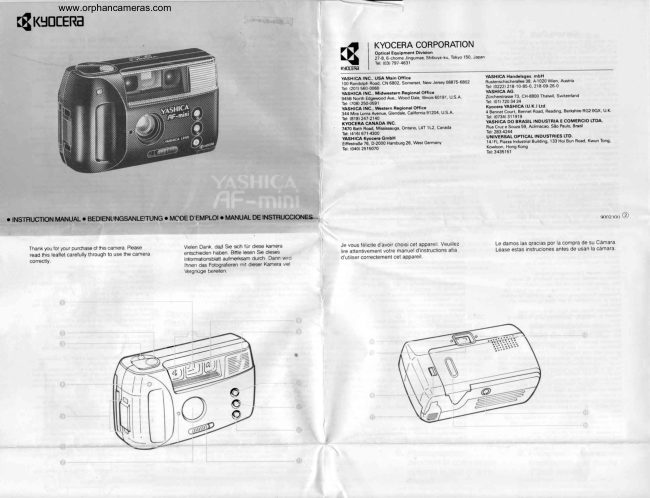
¢ INSTRUCTION MANUAL ¢ BEDIENUNGSANLE'TUNG ® MCDE D'EMPLO! # MANUAL DE INSTRUCCIONES-..
‘Thank you for your purchase of ths camera. Please Vien Dank, da Sle sch fur dese Kamera Je vous fie avoir choisl cet apparel, Veuilez
‘ead ts leatet carefully through to se the camera fertsciedon haben ito leson Se dieses ire atentvement votre manuel instructions aia
correctly Inlomatonebat auimerksam durch. Dann vc <usleercorrectoment cet apparel,

rinen das Ftograleen mt deser Karna wel
\ergruge bereten

Miswracuchoes 3; 27020 Wn, A

‘gtlgen ave 0 50,218.00 260

‘ashton AG

Theta 7, CHEB00 Tab, Swen

‘Sere Cr ans Rng Beta R200. UK
‘YASHICA D0 BRASILINDUSTRIA E COMERCIO TOA.
Tus cure seu, Acne, So Pal ra
UnivensAt orricaL noustaes L10.

Le damos las gracias por la compra de su Camara.
{dase estas instruciones antes de usanla camara
View original page 2Page 3 · Read text
www.orphancameras.com

Names of the Parts

© Vowringer
@ Shultor Release
© Exposure Counter
@ Sothtime LED
rap Holder

LUght Sensor

ns Cover,
utoocus (AF) Window
Flash

aime Buton
No FlashNight Scone Button
Daylight Fash Buton
‘ens Cover Knob
Fed Lamp (Fash Emission and Recharging
Incieator
@ Viewinder Eyepiece
{® Camera Back Rotease Lover
{@ Batery Companment Cover
© Groen Lamp (Auto Focus and Focus Lock

Inceaton)
© Tripod Socket
@ Film Check Window

Beschreibung der Teile

@ sicher
@ Ausiosotaste
‘© Bilézaniwork
(© Setsausiocer Anzeige (LED)-

Nachtaufnahmen )
© Tagesicnibite Taste
laupchaler und Seheber for Objktvactutz
ote Anzeige wahrend Blitz und Auftadung
Sucherokular
dokwandentiegelung
Battoritachdecke!
© Grine Anzeige fir Autofokus (AF) und AF-
Specher
Stativgewinde
@ Firmkontoltenster

Nomenclature des organes

© Viseur
@ Déciencheur

‘© Compiour de wes

‘@ Rotardatver a LED

{@ Obilet de fixation de couroie
‘@ Capteur ce iumisre

Déclencheur automatique
ans flash’Bovton pour use de uit
ton oe flash de jour

yuisseau de protection dobjectt

de recharge)
@ Ceviaio do visour
Lever de déverrouilage du dos de apparel

‘Couvercle du compartment des piles

‘umiere vere (indicateur de mise au point et
‘Sarbt de mise au point).
@ Taraudage pour repied
@ Feneive du corde du Hm

Nombres de las partes

© Gortador de exposiciones
{@ Dsparador automaico a LED

© Cubierta del objetivo

@ Vertana de enfoque auiomatico (AF)

OFiash

{@ Botin de disparador automstco

@ Sin flastiboten por fotos de noche

© Boton por fash oe cia

@ BoIén de proteccion del objetivo

© Luz roa (Incicador de emision del fash y de
‘ecargo)

@ Ceasar 0 visor

{@ Palanca para ariel respaldo dela cémara

{@ Tapa de comparimiento de is plas

{@ Luz veroe (indcador de enfoque y de parada
e enoque)

@ Fosca para tripode

@ La vontanila de conto! do la pelicula

1. Battery Loading

‘Open the batery compartment cover by
Sestng tin tw drecton of te arom
Free tte bane and make sur he
Pelry (math Sovecty he marengs
‘nace he Comparmort cover

‘Thon cose the balry compartment
tea avium batery (CRI29A or
DL23a) Otter pos of bares cannot
be used

<Battery Check>
‘Open the lens cover and press the
shutter release half way. If the green.
lamp lights up, the battery is functional

<<Replacing the Battery>

‘When i takes 8 seconds oF longer forthe
fed lamp to ight up again after lash
‘emission the Battery should be replaced,

1. Batterie einlegen

Ofinen Sie den Batterietachdeckel, indem
Sein n Pamttung ache, Acton
Se ban Eniogon der Batre ul
fchige Poung dr mit Pus ()
Dezachnte Boi my nach oben zien!

Lithium Baterien (CR 123 A oder DL 123,
.

<< Batterie dberpriifen >
Erinogen Sie den Dbjekiwerschius une
‘rockon Sie den Ausser hala Wonn io
(gone Anzeige leche, t ie Batterie in
Sranung

<Wann muB die Batterie ersetzt
werden?>

‘Wenn es vom Bitzen bis zum Erbschen
er roten Bitzanzeige 8 Sekunden oder
langer davert, muB vine frische Batterie
eingelegt werden.

1. Mise en place des
piles.

Cuvrirle couverce du compartment des
piles en appuyant dans la direction do la
feche.

Introduire ls pes et s'assurer que les
ples (+) et -) sont plac selon
Frndieaton dans le compartment
Remette ensue le couverle du
compartment des piles.

+ User une ple au thium de 3V (C1234
‘0u DL123A). Los autres types des ples ne
peuvent pas dire usés.

<Vérification des piles>
‘Our Fobject et appuyer surte
sdéclencheur jusqu'a i-chemin. Sila
lumiere vere salume, les ples foncton-
rent bien

-<Remplacer les plles>
‘Quand a umiére a besoin do 8 secondes
(U pls pour s'alumer de nouveau depuis
{e Femission ou ash, on dot remplacer
les pes.

1. Carga de las pilas
bila tape dl compare de as
faus onpeyose en crocs oa
fecha

Incas psy asaguars que foe
foe xen pucss soponeeactn
fl conparmient.

Foporer sap dl comparimiero do ts
ise

"Df una pia lo de 3 (CRI29A 0
DLH23A) Groton ce pss no pose

‘<Control de las pilas>
‘Air el objetvo y presionar

‘el aisparador a mado camino. Sila uz
verde se enciende, las plas funcionan
bien,

<Cambio de las pilas>
‘Cuando ia uz necesta 8 segundos o mas
por encenderse de nueva después de ia

‘emisin del flash, se debe moda as plas.
View original page 3From the M. Butkus archive. Original publisher and archive notices are retained.
Check the model and edition against your equipment.
PDF verified 2026-10-10.