Film cameras
Yashica Auto Focus Motor User manual
User manual for Yashica Auto Focus Motor. 13 pages in English. Read the original PDF, download or print a copy without registration.
13 pagesEnglish1.5 MB PDF
Loading your manual…Open PDF directly
Document details
- Brand
- Yashica
- Model / document
- Yashica Auto Focus Motor
- Document type
- User manual
- Language
- English
- Pages
- 13
- File size
- 1.5 MB
- Category
- Film cameras
- Document date
- Not specified in catalog
Search available document text
Find a term, then jump to its page in the original PDF. Image-only pages may not be searchable; check the PDF for exact wording and diagrams.
Page 2 · Read text
Congratulations on purchasing the finest automatic camera available today, the Yashica "Auto Focus Motor''.
     This handy camera features automatic focusing and exposure setting so that all you need to do is train your
     camera on the subject and press the shutter. And its built-in electronic flash unit lets you get beautiful shots
     even indoors and at night. Anyone can enjoy easy picture taking with this fully automatic camera that takes care
      of film loading and film advancing before shooting and film rewinding afterwards. Before using this camera,
      please familiarize yourself with the operating instructions in this booklet so you will be able to use it properly
     and enjoy long usage.


      Description of Parts 6                     Using Flash Indoors 34

      Inserting Batteries 10                    Rewinding the Film 42

     Film Loading 14                         Using the Self-Timer 46

     Film Speed Setting : 20                  Camera Care 50

      Picture Taking 22                           Battery Precautions 52

     Prefocusing with the Focus Lock 30          Specifications 54


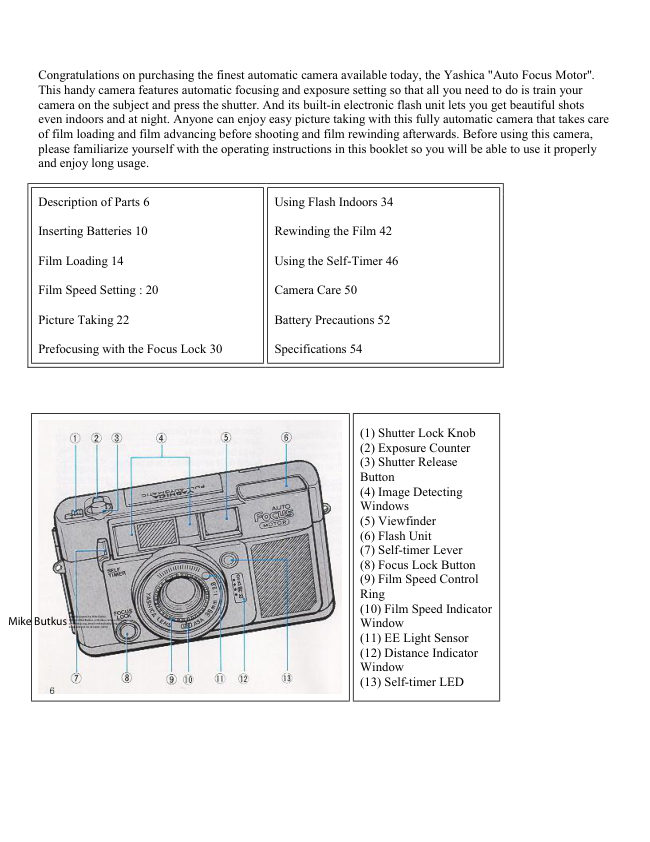
                                                                       (1) Shutter Lock Knob
                                                                       (2) Exposure Counter
                                                                       (3) Shutter Release
                                                             Button
                                                                       (4) Image Detecting
                                                  Windows
                                                                       (5) Viewfinder
                                                                       (6) Flash Unit
                                                                       (7) Self-timer Lever
                                                                       (8) Focus Lock Button
                                                                       (9) Film Speed Control
                                                         Ring
                                                       Digitally signed by Mike Butkus                                                (10) Film Speed Indicator
                                         DN: cn=Mike Butkus, o=Butkus camera manuals,
                                                          email=mike@butkus.org,                                                                      c=USMike Butkus ou=butkus.org,Date: 2023.05.18                                                                14:16:59 -04'00'                                                Window
                                                                  (11) EE Light Sensor
                                                                  (12) Distance Indicator
                                                Window
                                                                  (13) Self-timer LED
View original page 2Page 4 · Read text
Partially depress the shutter release button with the lens
                             cap on or with the light sensors on lens mount front
                                covered. If the red LED in the viewfinder goes on, the
                                    batteries are all right; otherwise, replace both batteries
                                 together with the same type.

                                        · When the exposure counter registers "S", pressing of
                                 the shutter release button will always wind on the film
                                     until the counter registers "1".


FILM LOADING


                           The "Auto Focus Motor" features a convenient system
                                  that automatically advances the loaded film to the first
                               frame.

                          1.Open the Back Cover
                         Open the cover by sliding the lock release knob in the
                                  direction of the arrow.

                                    2. Insert the Film Cartridge
                                   Insert the film cartridge into the film chamber, facing it
                                  in the way illustrated, and fit it onto the shaft in the
                             chamber.


Make sure the film cartridge port is correctly positioned as shown in the illustration on the left.
View original page 4Page 5 · Read text
www.butkus.us


                                     3. Place Leading End of Film on the Take up Spool
                                Place the film so that it tracks within the pair of outer
                               guide rails and its leading end is positioned alongside
                                  the bar mark '-----'

                                 (A) Take-up Spool

                               (B) Guide Rails


                                     4. Close the Cover

                              Close the cover and press until it snaps into place.


                                                5. Press the Shutter Release
                                   The camera will automatically advance
                                         blank film until the first frame is reached
                                      and then set the exposure counter to "1".
                                   Your camera is now ready to shoot.
                                                        If the film is being properly advanced, the
                                            film transport indicator will rotate.

                                                       · Once the film begins to advance, remove
                                        your finger from the release button.


Whenever the rear cover has been closed, depressing of the shutter release button will always cause the camera
to advance blank film.


Film Speed Setting
View original page 5Page 6 · Read text
The film speed number is vitally important in
                                 obtaining correct exposure so make sure that the film
                               speed is set properly. The film speed is always
                                  indicated on the outside of the film box.

                             Turn the film speed control ring until it is matched
                                with the ASA rating of the film in use. Make sure
                                      that the film speed number clicks into place to assure
                                 proper exposure. The ASA film speed numbers on
                                   the film speed control ring are as shown in table
                                below.


Picture Taking


                               With the "Auto Focus Motor' the focusing,
                                  exposure and film advancing functions are all
                                done automatically. Place the main subject within
                                      the focus composition frame and simply press the
                                         shutter. Anyone can easily take beautiful shots
                                   with this camera.

                               1 Peer into Viewfinder and Set the Range
                                    (A) Picture Area Frame
                              Use this frame for shooting subjects beyond 15
                                     meters.

                                    (B) Parallax Correction Frame
                              Use this frame for shooting subjects between 11
                                and 1 5 meters away.

                               2 Placing Subject Within Focus Composition
                           Frame for Optimum Focus
                                   (C) Focus Composition Frame
View original page 6Page 7 · Read text
www.butkus.us


3. Pressing Shutter Release Gently to Take Photo


                          When the shutter release button is pressed, the
                                camera focuses with a mechanical meshing sound,
                                       activating the shutter almost simultaneously.
                          When the finger is released from the button, the
                                     film is automatically advanced with the meshing
                                   sound.

                                              · When the shutter release is depressed, the
                                      pointer in the distance indicator window will
                                   simultaneously indicate the camera-to-subject
                                       distance. The pointer will disappear upon release
                                     of the finger from the shutter release.

                                              · Keep your fingers free of the image detecting
                              windows while shooting so as not to obstruct the
                                    auto focus system.


<Shutter Lock Knob>


                            To lock the shutter release button, slide the shutter
                                    lock knob in the direction of the arrow until the
                                             letter "L" comes into view. When not taking
                                         pictures, make it a point to lock the release button
                                     as much as possible.

                                   Since the Auto Focus Motor's focusing
                               mechanism is of the double-image converging
                                       type, there may be situations where it will be
                                           difficult to focus such as when focusing on walls
                                   with no contrasting features, dimly lit subjects,
                                and orderly, repetitious lines and patterns. Since
                                       dirtying of the image distance windows with
                                        fingerprint marks and the like will impair the
                                    camera's focusing performance, make it a habit to
                                     replace the lens cap when not using the camera.
View original page 7Page 8 · Read text
Capturing the Decisive Moment


It is very difficult to take pictures of moving objects such as children at play in a playground. However, there is
nothing to it with the `'Auto Focus Motor". All you need to do is sight your subject within the finder and capture
the decisive moment.

· When taking sequence shots, gently press the shutter release button, and then release finger pressure from the
button making sure that the meshing sound is heard after each shot


Prefocusing with the Focus Lock


                                     Depending upon the composition, frame
                                    and focus your subject away from the
                                            picture frame center. In this instance, you
                                      must use the focus lock button. This will
                                        enable you to keep the main subject in
                                       sharp focus anywhere in the picture area.

                                                1. Select the composition you want to use.
                                   Then train the focus / composition frame on
                                       your main subject and press the focus lock l
                                          button After making some sound, the
                                     camera will pre-focus on main subject and
                                          lock in the focus.

                                                2. Then revert to the composition you 2 had
                                              in mind and press the shutter button. The
                                    main subject, placed to one side in the
                                               picture, will be in sharp focus.
View original page 8Page 9 · Read text
www.butkus.us


                       When taking shots of two persons lined abreast with
                          some open space between them in the center of the
                                    picture, pre-focus on either one of the subjects before
                            composing your picture. This will assure you of
                                   getting your subjects in sharp focus.


When the focus lock button is not used, the distant background scene will be in focus and the main subject will
be blurred as is evident from the accompanying illustration.


Using Flash Indoors


                               When shooting indoors, and in dim lighting
                                            conditions, partially depress the release
                                         button If the red warning lamp inside the
                                          viewfinder lights, use the built-in flash unit
                                              for beautiful, bright pictures. Naturally, you
                                     can let the camera take care of the focusing
                                   and exposure setting.

                                               1. Pop Up the Flash Unit
                              When you see the red warning lamp, press
                                            the top of the flash unit. The flash unit will
                                   pop up and automatically switch on.

                                               2. Readying of Flash Unit When the flash
                                        ready lamp comes on, the camera is ready
                                              for flashing.


                                3. Gently Press the Release Button for Flash Shots
                       The flash unit will light for flash shooting.
                       Use the flash unit within its effective flash range from
                           about 1.1 to 3 meters. its : i i

                                4. Putting away the Flash Unit
                             After you have finished using the flash unit, depress the
                               flash unit into its housing so it will shut off and prevent
                              battery drain. Press down flash unit until you hear it snap
                               into place in the off position.
View original page 9Page 10 · Read text
· If you release the shutter before the flash ready lamp comes on, the flash unit will either fail to go off or will
be too weak to produce properly exposed shots.

· When you want to capture the mood indoors in dim lighting and outdoors in the evening, take available-light
shots without any flash. In these instances, use a tripod to avoid camera shake, and couple it with the use of the
self-timer for greater safety.

When shooting with camera in vertical position, have the flash unit on the upper side.

Even for Daylight Flash


                                               Taken without flash


When shooting subject against a bright window or with backlighting, use the built-in flash to bring out details of
the subject. Daylight flash is effective from about 1.1 to 3 meters.

Also effective in following situations
(1) When subject's face is fully or partially shaded by trees.
(2) For portraits at dusk or dawn, or under overcast skies such as on a rainy day.

Rewinding the Film


                                               If the shutter release and film transport do not
                                   function when the shutter release is pressed you have
                           come to the end of the film roll. Use the film rewind
                                 switch for automatic film rewinding.

                                      1. Set the Rewind Switch to "REWIND"
                                  Slide the green rewind switch till the letter "R" ap
                                    pears. The film will be automatically rewound At this
                                   time, the film transport indicator will spin along and
                                   the exposure counter will revert to the "1" reading.
View original page 10Page 11 · Read text
www.butkus.us


                                      2. When Finished Rewinding Film, Reset the Film
                          Rewind Switch
                           The film transport indicator will stop spinning when
                                   the film has been fully rewound. Then reset the film
                               rewind switch to the e mark to switch off the rewind
                                motor.

                                           If the film rewind switch is not switched off, the
                               rewind motor will continue running.

                                      3. Open the Back Cover and Remove the Film
                            Send out the unloaded film for processing as soon as
                                    possible.


Using the Self-Timer


                                   Use the self-timer when you wish to
                                             include, yourself in a group picture or take
                                    a picture of yourself.

                                                1. Set the Self~timer Lever
                                   Lower the self-timer lever as far as it will
                                            go.

                                                2. Press the Shutter Release Button
                                         This will cause the self-timer to flash its
                            LED for about 9 seconds before
                                           automatically activatingthe shutter. The
                            LED flashes at a faster rate about two
                                        seconds before shutter release.


When taking pictures of yourself with the self timer Select a spot that is about the same focusing distance
from where you will be situated when the picture is being taken, and prefocus on it.

· The self-timer can be cancelled at any time by resetting the lever to its original position.
· Use a tripod to steady the camera
· When not using the flash unit for extended periods, test flash it occasionally to help maintain capacitor
performance.
· If the image detecting windows are fingerprint stained, do not attempt to rub off the stain but lightly wipe it
off with lens cleaning tissue moistened with some lens cleaning fluid. Use a blower to remove dirt and dust
from the glass surfaces.
View original page 11Page 12 · Read text
· In summer, avoid leaving the camera in the heat at the beach or in storage compartment of car as it will not
only affect film and battery performance but also the camera mechanism as well.
· Always clean the camera carefully after using it at the seaside or in the mountains. Salt air has a corrosive
effect on the camera, and sand and dust can be harmful to the camera's mechanism.
· The camera carries a high-voltage circuit which is dangerous. When the camera malfunctions, NEVER
dismantle it in an attempt to repair it.

Battery Precautions
· When not using the camera for extended periods, remove the batteries to avoid damage from battery leakage.
· Battery performance is affected at very low temperatures. When shooting in such conditions, make it a point
to keep the batteries warm or carry spare batteries, keeping them warm in your pocket or other suitable place.
· When installing batteries, wipe both ends clean. Oily smears on the battery contacts could cause poor
electrical contact.
· Do not use NiCd batteries.


Specifications:
Type: 35 mm programmed shutter EE camera with built in flash unit.

Lens: Yashica Lens 38 mm f/2.8: 4-element, three-lens group composition.

Shutter Programmed electronic shutter.

Self-timer Electronic (approx 9-second delay); LED flashes during operation (accelerates about 2 seconds
before shutter release as a warning signal); cancelable even while in operation.

Exposure Control: EE type, programmed shutter with SPD sensor. EV range from EV 6 (f/2.8 1/8 sec.) to EV
17 (f/16, 1/500 sec.) at ASA 100; when value under EV 8.5 (f/2.8, 1/45 sec.), a red warning lamp lights up.

Film Speed Scale: ASA 25 to 400

Viewfinder Albada-type, direct-viewfinder (with parallax correction frame) magnification of 0.42 with focus
composition frame and red warning lamp incorporated inside. Auto Focus System: Auto focusing system. Auto
focus range from 1.1 to infinity. Provided with focus lock button Film Advance: Motor driven automatic film
advance (operated with shutter release button)- provided with film transport indicator. When film has been
advanced, the system automatically stops and switches itself off.

Film Rewind: Motor driven automatic film rewind system (operated with film rewind switch).

Film Loading: Auto-loading type; automatically advances film to frame number "1" on exposure counter.

Exposure Counter: Auto resetting, additive type.

Number of Exposures: Without using flash-- over 30 36-exposure rolls of film: using flash-- over two rolls of
36-exposure film; (When using fresh alkaline batteries, at normal temperatures )

Built-in Flash: Electronic pop-up flash; GN 12 (ASA 100, in meters); with flash-ready lamp; daylight synch
capability
View original page 12
Page 13 · Read text
www.butkus.us


Recycling Time: Approx. 8 sec (at normal temperatures, using fresh alkaline batteries).

Power Source: Two 1.5 V M-size batteries. Battery check by means of red warning lamp inside viewfinder.

Filter Size: 40.5 mm diameter

Size and Weight: 131 (W) x 74 (H) x 52 (D) mm; 380 grams (w/o batteries).

Specifications and external design are subject to change without advance notice.
View original page 13
From the M. Butkus archive. Original publisher and archive notices are retained.
Check the model and edition against your equipment.
PDF verified 2026-10-10.