Film cameras
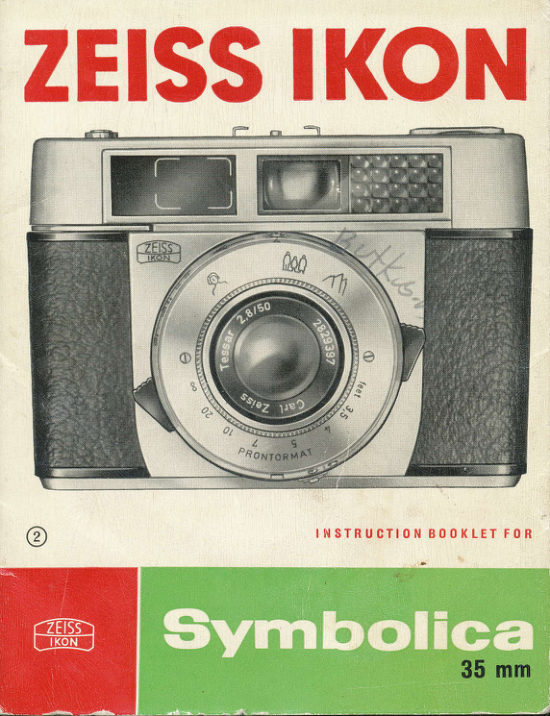
Zeiss Ikon Symbolica User manual
User manual for Zeiss Ikon Symbolica. 15 pages in English. Read the original PDF, download or print a copy without registration.
15 pagesEnglish7.7 MB PDF
Loading your manual…Open PDF directly
Document details
- Brand
- Zeiss Ikon
- Model / document
- Zeiss Ikon Symbolica
- Document type
- User manual
- Language
- English
- Pages
- 15
- File size
- 7.7 MB
- Category
- Film cameras
- Document date
- Not specified in catalog
Search available document text
Find a term, then jump to its page in the original PDF. Image-only pages may not be searchable; check the PDF for exact wording and diagrams.
Page 3 · Read text
I  Keys for exposure setting
 2 Distonce-setting mork
 3 Externol indicotor of exposure meter
 4 Sofety plote for flosh connection
 5 Releose knob
 6 Frome counter
 7 Accessory shoe (for floshgun, etc.)
 I  Setting mork for doylight ond flosh
 9 Viewfinder
l0 Cotch for comero bock
lI  Locking powl for flosh ronge
12 Film speed setting knob
13 Tripod bush
14 Locking knob for rewind cronk
I5 Rewind cronk spindle
l6 Rewind cronk
17 Film speed setting mqrk
t8 Film type indicotor
l9 Ropid wind lever
View original page 3
Page 5 · Read text
finRA       A
                        ^l'  ^4.
                                                                                   | Daylight pictures            |''f                                    tl First set the subfect-distonce, by turning t{e lens-r#rg until the
 setting mork (2) clicks-in ot the oppropLiote suliect-symbol
 (poriroil, group or londscope).        ,         I                         i
The mork 8 (sun-symbol with orrows to the right ond left) indi-
 cotes the doylight exposure ronge. The ropid wind lever shourd
be tensioned:  if it is not, swing the lever (19) to the right, until
 it stops.
Now hold the comero in both honds. On looking through the
viewfinder, you will see the subiect wiihin the brightline frome,
 iust os it will oppeor on the film. In the upper port of ihe view-
finder field, you will see the pointer of the exposure meter ogoinst
o white bockground.
This pointer moves when you iurn the exposure-setting ring by
meons of the two keys (1).
As soon os ihe pointer is cenlered within the triongulor gop,
the exposure control is set correctly ond you con toke your picture
by pressing lhe releose knob (5) with the index finger of the
right hond. You con olso wotch the exposure-meter pointer in
the window on top of the comero (3) ond set the syMBoLlcA
View original page 5Page 6 · Read text
N      in thot woy. lf it should hoppen thot the pointer connot be set
      ogoinst the setting mork the light conditions ore poor to ollow
      correct exposure.
     The releose knob should be depressed slowly, not ierkily. After
iiiii      eve!'y exposure, swing the ropid wind lever (.|9) once ogoin, until
         it stops. The SYMBOLICA is then reody for the next picture.
     Flash pictures
      After removing the sofety plote (4), the connector plug of the
     fKOBLITZ 4 con stroightowoy be inserted into the two plug
      sockets (Fig.6 on poge l3). Other types of floshgun (ond electron-
        ic flosh lomps) with ottochment feet con be secured in the occes-
      sory shoe (71 ond their coble fitted to the connector nipple under
      the sofety plote.
     The sofety plote con be occommodoted in the evereody cose.
    Now turn the ex    ure-control ring by meons of the two keys
     on to                           the smoll powl lever ('11) beneoth
      the len                      1 Turn the exposure-control  ring so
      thot the                        ints to the guide number of the flosh
       in use (for               This guide number should be obtoined
      from the flosh         bplied with oll flosh equipment ond bulbs.
View original page 6Page 7 · Read text
4
l2  t5   t8     24 27 30  33
Using the distonce-sett        bol for groups (.|0 ft.), you con
now toke flosh pictur        pictures of o distonce of op-
proximotely l0 feet will         ectly exposed. lf you wont to toke
flosh pictures of portroit      e symbol for portroit ond the mork
 (B) ogqinst the doubled       umber of the flosh source.
Using filters               ffis#**{n8r
The filter corrector mus         f before 'meosuring' the exposure
with the exposure mete        of the outomotic exposure control
mechonism con toke t         foctor into occount. To do this,
move the knob (12) t      e film speed figure ogoinst the
fifter-foctor number (2 or 4) olongside the setting mork. For other:
filter foctors, use the oppropriote intermediqte volue. Then
meosure ond set the exposure os usuol. When you remove the
filter, re-sef the film speed figure to the triongulor mork. So os
not to forget the speed of the film in use, olwoys set the film
type indicotor disc correctty.
Golour pictures
For toking pictures on colour reversol film in bright sunlight,
the fjlt  speed setting given for the film should be set exoctly
View original page 7Page 8 · Read text
os for block-ond-white film. In overcost weother, or for ogoinst-
the-light pictures, set the film speed figure ogoinst the figu re 2
(not to the triongulor mork). This opplies only for reversol
colour  fi lm.
Loading the camera
The SYMBOLICA con be used with otl stondord minioture film
cortridges, for either 36 or 20 pictures 24x36 mm in size. The
film should be looded in subdued light.
Press downwords the cotch (10) on the norrow side of the
comero: the bock will then spring open. Then ploce the film
cortridge into the film chomber, with the beginning of the film
pointing towords the toke-up spool (Fig.  I ). The bottom of the
cortridge should be inserted first, so thot the slit in the prong
engoges with the bor in the cortridge core. Then turn the flonge
of the toke-up spool until the slot in the spool foces upwords.
Push the beginning of the film fcr enough into the slot so os to
hook the smoll lug into the 3rd or 4th perforotion hole (Fig.2).
Continue turning the flonge of the toke-up spool until the
teeth of the tronsport sprocket engoge with the film perforotions
on both sides (Fig. 3). Now close the SYMBOLICA by pressing
View original page 8
Page 10 · Read text
ris. s )


on the bock. Turn the milled ring of the frome counter disc  (6)
in the direction of the orrow so os to set the morker ogoinst
fhe red mork before the number which is printed on the filnr
corton. Now swing the ropid wind lever ond releose the sutter
twice. Remember to check whether the spind le of the rewind
crqnk (15) rototes whilst winding the film: this proves thot the film
is odvoncing correctly (Fig.4). With the third swing of the ropid
wind lever, the morker of the frome counter will indicote either
36 or 20, ond the comero is reody for the first exposure. After
every exposure, the frome counter diol will show the number of
fromes remoining.
lmmediofely ofter looding the comerq, the speed of the film in
use must be set by depressing knob (.|2) ond turning it to set the
film speed figure ogoinst the triongle mork (17).This is o mosf
importont operotion, since the outomotic exposure control will
not work properly if the film speed setting mork is set to on
incorrect speed figure.
Also set the film type indicotor disc (lB) on the comero bock, to
remind you of the type ond speed of the film in use. The film
type indicotor is only o useful reminder, ond hos no effect on
the exposure.
View original page 10
Page 11 · Read text
-*'\                          *      ,;'^   ''F
Unloading the film
When the frome counter indicotes the figure'l ond the shutter is
releosed, the lost frome hos been exposed: the film must now be
re-wound bocl< into the cortridge, so thot it con be token out in
doylight. To do this, first depress the locking knob (.|4) in the
bose of the SYMBOLICA, os for os it will go. This will couse the
rewind cronk (.|6) to pop out (Fig.5).Unfold the cronk, ond turn it
in the direction of the orrow until you feel o resistonce, which
indicotes thot the film hos leff the toke-up spool. Then press the
cotch (10) fo open the comero bock, ond toke out the film
cortridge. Finolly, fold the rewind cronk bock ogoin, cousing
the locking knob ('14) to sno p out visibly.
Tips
You con olso set the SYMBOLICA to definite distonces in feet.
Beneoth the lens mount there is o setting mork opposite o footoge
View original page 11Page 12 · Read text
Upp",: frqme limit ot 3 ft. ll  in. shooting
                                  d istonce


bcole. Turn the lens until the oppropriote distonce figure is set
ogoinst the mork.
In the bose of the SYMBOLICA there is cr tripod bush (13), for
fitting the comero to o tripod.
When toking pictures of distonces closer thqn 4 ft., keep the
subiect in the viewfinder below the two notch morkings.

Accessories
The evereody cose will protect your SYMBOLICA from domoge.
The comero is fostened into the cose by screwing the fitted
screw into the tripod bush, ond it need not be remove'd for
toking pictures.
ZEISS IKON Precision Filters. To improve the tone volues in
block-ond-white pictures, ZEISS IKON Precision Filters (diom.
27 mm) con be screwed on to the lens. Yellow, green, oronge,
red ond ultrg-violet filters ore ovoiloble. For colour photogrophy
there ore the lkolor Filters A, B, C ond F, with which full
instr.uctions ore provided. When using filters, the filter. foctor
must be ollowed for when setting the  fi lm speed. The  fi lter
View original page 12Page 13 · Read text
foctor of otl ZEISS IKON filters is engroved on the filter mount.
The lenshood prevents flore ond fog in your pictures when
shooting into the light. ln bod weother,  it protects the lens
ogoinst roin ond snow. Both metol ond rubber lens hoods ore
ovoiloble: the lotter con remoin on the cqmero when the ever-
reody cose is closed.
The IKOBLITZ 4 copocitor flqshgun con eosily be ottoched to the
SYMBOLICA. This unit is remorkoble for its high light output.
The reflector con be folded uP, moking the floshgun eosy to
corry.
View original page 13
Page 14 · Read text
SUPPLEMH{T TO SYIABOTICA  II
                    fiTSTRUCTtONS
Re: Flosft Exposures
The Symbolica II instruction booklet epecifies that you take
flgsh expo_sures with the 'Group" settihg at approx. t0 ft.fhere_ is also the possibility oI uiing the dportraitb (S ft.) or"Landscape"_(20 ft.) settings for flash. At 5 ft., double'the
recommended  g]rifle                   _number, and halve it when shooting at
20 ft. Then set this adjusted guide number on rhe shutter. The
chart on the reverse side gives recommended guide numbers
{or th-e 'Gqoup'l setting, and below, the adjustid equivalentefor 5 ft. and 20 ft. distances. Disregard metric flash guide num.
bers (under "Flash Pictures") an-d use numbers (3S to 200)
on camera. AIso disregard DIN numbers on following page.
        TEsry
     RI            I-t

                                                         \               a        b(
View original page 14From the M. Butkus archive. Original publisher and archive notices are retained.
Check the model and edition against your equipment.
PDF verified 2026-10-10.