Film cameras
360 WXD User manual
User manual for 360 WXD. 11 pages in German, French, Spanish, Dutch, Swedish. Read the original PDF, download or print a copy without registration.
11 pagesGerman, French, Spanish, Dutch, Swedish0.8 MB PDF
Loading your manual…Open PDF directly
Document details
- Brand
- Various brands
- Model / document
- 360 WXD
- Document type
- User manual
- Language
- German, French, Spanish, Dutch, Swedish
- Pages
- 11
- File size
- 0.8 MB
- Category
- Film cameras
- Document date
- Not specified in catalog
Search available document text
Find a term, then jump to its page in the original PDF. Image-only pages may not be searchable; check the PDF for exact wording and diagrams.
Page 2 · Read text
NrlslsiN


INSTRUCTIONSFOR USE
ANLEITUNG
MODED'EMPLOI
INSTRUCCIONES
GEBRUIKSAANWIJZING
BRUKSANVISNING
View original page 2
Page 4 · Read text
EN GL I S H
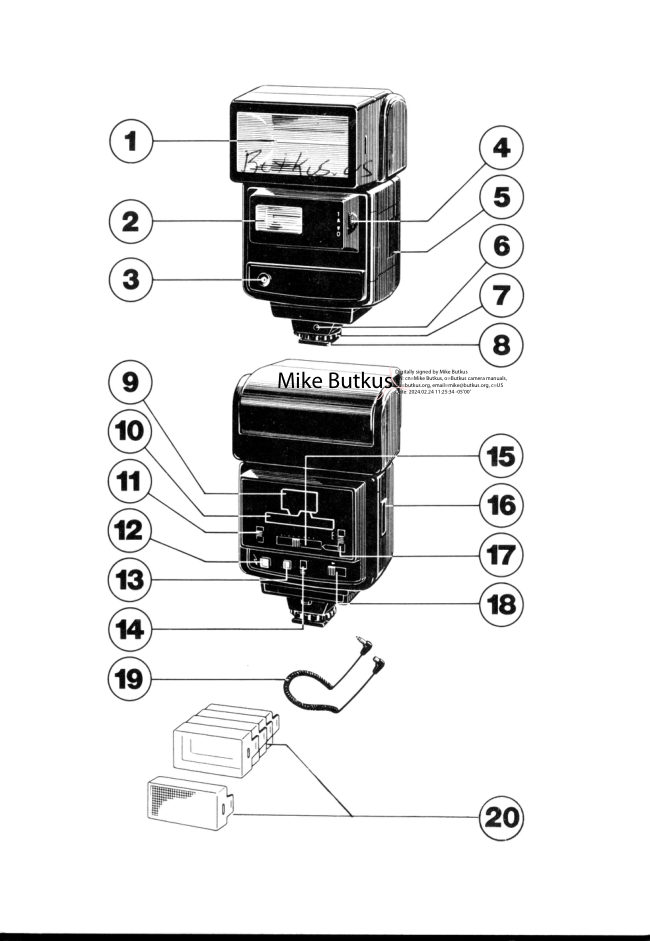
Description  of Flash Unit Elements

 1 .  Main-Reflector
 2. Sub-Reflector
 3.  Light Sensor
 4.  Sub-ReflectorSwitch
 5.  Battery Com partment Cover
 6.  Synchro Cord Socket
 7.  Lock Ring
 B. Mounting Foot
 9.  F . Stop  I nd icato r
10.  DistanceRange Indicator
11.  Film SpeedSelector
12. Ready Lamp/Test Button
13. Auto Checker
14. TTL/O Mode Selector
15.  DistanceSelector
16. Power Pack Socket
17.  Auto/M anual Selector
18. On/Off Switch
19. Synchro Cord
20.  Filter Kit
View original page 4
Page 5 · Read text
Insertingthe Batteries
Remove the Battery Compartment Cover @ and
insert 4 AA size batteries according to the diagram
inside. (Caution: Incorrect insertion of the bat-
teries will  prevent proper operation of the flash-
gun, and may causedamage.)
Close the Battery Compartment Cover.


Attaching Your Flashto the Camera
Loosen the Lock Ring @.  Insert the Mounting
 Foot @ of your  flash lnto the camera's accessory
shoe clip. Then tighten the flash with  the Lock
 Fing.
Set the shutter speed of your camera to the proper
setting for electronic flash use, or to 1/60 seconds.
(Read your camera owner's manual for details on
the flash synchronization.) lf you use the Nissin
Dedicated Adaptor  (Please refer on page 7  for
Optional Accessory) with your  flash, your dedi-
cated flash unit ensures that the camera sets the
correct shutter speed and gives viewfinder indica-
tion automatically.
 lf your camera has a hot shoe contact, your flash
 is now fully synchronizedwith the camera through
the centre contacts in the camera's shoe. ln this
case, the Synchro Cord is not necessary.
 lf the camera has not the hot shoe contact, use the
Synchro Cord @which comes with your ftash unit.


Battery Operation
Slide On/Off Switch @  to the "On"  1"9" mark)
position and then F. Stop lndicator and Distance
Range lndicator glow. In a few secondsthe Ready
Lamp@ should glow, indicating the flash is ready
to shoot.
Push the Test Button @ to make sure your flash
unit works properly.  lf the flash discharges,then
wait until the Ready Lamp glows again.
                      www.orphancameras.com
View original page 5Page 6 · Read text
Manual Operation
1. Set the TTL/O Mode Selector @to  "o"  posi-
    tion.
2. Set the Film Speed Selector @ to the position
    of the f ilm speed used.
3. Set the AUTO/MANUAL SelectorOto "MAN-
   UAL" position.                                       I   {  g:') un
4. Focus your camera and estimate the distanc€
   from  the flash to subject and set the distance
   by DistanceSelector@.
5. Read the proper F. Stop from F. Stop Indicator
  O and set the F. Stop on Your camera.
6. Aim your camera at the subject and take the
    picture when the Ready Lamp @ glows.

Thyristor SystemAutomatic Operation
 1. Set the TTL/O Mode Selector@to  "O"  posi-
    tion.
2. Set the Film Speed Selector @to  the position
    of  f ilm speed used.
3. Set AUTO/MANUAL  Selector @  to  1, 2, or
      position                                         required.             according                           to the flqlh range   3
                                        the               range indicator(gshows                                         maxi-     !   (  =:') un   The        distance
  mum and minimum distancesfor the automatic
   range selected. Pleaserefer to the table below
    for the three automatic flash ranges.
4. Set the aperture (F. Stop) of F. Stop Indicator
  @ on your camera.
 5.  a) For Bounce Flash Operation, use twin-flash
    with Sub-Reflectorswitched on ("1" position).
    b) For  Direct Flash Operation, slide the Sub-
    Reflector Switch to off ("0" position).
6. Focus your camera and take the picture after
    the Ready Lamp @ glows.
 7. The auto checker @  will glow after a picture
   has been taken  if the subiect was within the
   automatic range selected. This can be checked
    before  taking a  picture  by  pressing the  test
    button @  first.   lf  the auto checker does not
    glow,  another  automatic  range should  be
    selected.
                                                                                                                                                                    I{
                                                                                                  I
View original page 6Page 7 · Read text
F. Stop    Auto                                             Automatic
    Switch     ASA50/64  ASA100/   AS4400/     F lash
    Position   D r N 1 8 / 1 9 D I N 2 l    D I N 2 7      Ranges
                                               0.7-3.3m      1                      I          1 1       22                                               Q.3-11 ttl
                                                 1 -6.5m
      2           4          5.6       1 1         (3.3-21ft)

                                          1.5-13m      3          2          2.8        5.6         (4.9-42ttl

 lf your camera has TTL dedicated flash system, set
 AUTO/MANUAL Selector@ to MANUAL position
and TTL/O Mode Selector @ to TTL position and
then F. Stop Indicator@and DistanceRange lndi-
cator @ goes off, and you must use Nissin Dedi-
cated Adaptor (Pleaserefer on page 7 for optional
accessory). Read your camera owners manual for
details on  the  flash synchronization, such as                                              I
shutter  speed,  f lash-readiness, aperture number
indication in camera'sviewfinder.                                                                                                  I{


Auto Shut-Off
Your flash is designed to automatically shut off
the power supply to save the battery energy. Whenthe unit  is switched on, the F. Stop lndicator@                l,
and  Distance Range  Indicator   (i) come  on  to
indicate the start of charging. Afteisome  time, the
both indicators go off to indicate the power supply
has shut-off and the charging stopped, if the unit
is  left unoperated. The Ready Larrp @ stays on
until the charged energy runs out. You can fire
your unit as long as the Ready Lamp is on, and the
unit,  if fired, resets to the original state. A short
push of the On/Off switch (Reset Button) @ can
also charge the unit again. (lf neither the Ready
Lamp nor the F. Stop lndicator come on after theOn/Off  switch  is turned on, push the On/Off          I1
Switch to reset the flash unit.)
                       www.orphancameras.com               4l
View original page 7Page 8 · Read text
Bounce Photography
Use bounce flash when you desire to make a softer
effect and-to eliminate the shadow on your sub-
ject. When taking flash pictures indoors, bounce
the light off the white or reflective colored walls,
ceiling or reflective f lat surfaces.You can tilt the
Flash Head in horizontal direction by 160" to the
right and 180" ^to the  left as well as in vertical
direction by 90" upwards.  lt  is recommended to
operate your  flash in the automatic operation for
bounce flash. For bounce photography, it is very
important  to remember that the automatic flash
range should  refer the  total  distance of flash to
reflector to subject.

You  can enjoy  dual  flash  light  with  the Sub-
Reflector @.  StiOe the Sub-Reflector Switch @
to "1"  position. Both the flash lights from Main-
Reflector @ and Sub-Reflector will  give you a
variety of flash techniques as illustrated. lf you do
not  want  to  use the  Sub-Reflector,  slide  the
Sub-Reflector Switch  to  "0"  position. Use twin-
flash with Sub-Reflector switched on for bQunce
flash operation. Single flash with Sub-Reflector
switched off  is desirable when shooting directly
at your subject.

Note:  For Bounce Dual Flash Photography in
Automatic Operation.
As  the Subreflector gives always the same light
output, you shall determine the camera lens aper-
ture according to the Subreflector's guide number
(G. Lto. 12 ASA1OOl2lDlN). In order to get the
clear efficiency of shadow from bounce lighting
you can set the flash by one F-stop bigger.
Example:With ASA1 OO/21DlNfilm.
Subject distance3m from the camera.
Subreflector G. No.12 + 3m = F4. (Camera lens
apertu re ) .
Flash Auto s6tting to be F5.6.


                                                                                             .  . .:  S. .:{    ::i                                                         "r'O"r
View original page 8Page 9 · Read text
Hints for Maintenanceand Better Flash
Photography
The use of flash eliminates squinting and shadows
and help bring out  natural facial expressionson
the subject. When taking pictures, against highly
 reflective surfaces like  mirrors, glass or glittering
water, use automatic operation.
When not  in use, switch the  unit  off. Take the
 batteries out when the  f lash unit is being stored or                                                                                ij j
when it will be carried for a long time. Keep your                      1j
flash unit away from dust and moisture to prolong
 its life.
Do not try to open or repair your flash unit since
 the electric circuit inside carries a high voltage. lf
 your flash needs repair or does not work correctly,
 take  it  to where you bought  it from. opening
 the unit voids the warranty.

 Filter Kit
 Your flash light can be widened, lengthened, or
 colored with this filter kit.
    28mm lens         85mm lens        35mm lens
  Wide Angle Diffuser      Telephoto Filter     (Red,Color Blue,Filters& Yellow)


       N+i.r'.d        n                   ffi

       Fl:i;;!
   +              E+                          ffi+
   ffi                   ffiffi                 ffi
Automatic Operation Range
   ASAlOO/DIN21    Wide Angle Diffuser     Telephoto Filter
          f2.8           1.3-9m (4.3-29ftl     2.0-15m(6.6-49ft)
          f5.6           0.7-4.5m(2.3-14ftl    1.5-7.5m(5.0-24ft)
        1 1 1          O.5-2.2m(1.7-7ttl     1.0€.8m (3.3-12ft)
                       www.orphancameras.com
View original page 9Page 10 · Read text
Optional Accessory
a) Nissin DedicatedAdaptor
lf your camera has a special flash dedication sys-
tem, use Nissin Dedicated Adaptors corresponding
to your camera system. Nissin Dedicated Adaptors
can be simply replaced as shown in the following
procedure.                                      UseScrew
                                                           DriverTake the Mounting Foot @ off .
1. Remove the screw for Shoe Lock Plate with
   screw driver.
2. Remove the Shoe Lock Plate.
Slide the DedicatedAdaptor onto the flash unit.
Following dedicated adaptors are availableat your
nearest camera stores.

 Adaptor Model       Adequate Camera
                      for Canon A-1, AE-l, AV-l
    CA       & AT-1 Cameras (Usable for
                  Standard Cameras,too)
                      for Nikon FE & EM Cameras
    NE        (Usablefor Standard
                 Cameras, too)
                      for Minolta XD & XG Series
   MX       Cameras(Usablefor Stan-
                  dard Cameras, too)
                      for Pentax ME Super, MV &
    PK       MV-1 Cameras(Usablefor
                  Standard Cameras,too)
                      for Olympus OM-1N, OM-2N
   OM       & OM-10 Cameras(Usable
                      for Standard Cameras,too)
                      for Ricoh XR-S, XR6, XR-7
    RS       & KR-10 Cameras(Usable
                       for Standard Cameras, too)
                   for ChinonCE5,CGs,CE-4&
    CE      CE-4SCameras(Usable
                    for StandardCameras,too)

 lmportant:  Do  not  use the dedicated adaptors
with other non-matching cameras. lf used, it may
cause damage.
b) Power Pack
                                                                                                                                                                                                              lj
                                                                                                                                                                                                                                                      l
                                                                                                                 ,..r'                   .   l.J
View original page 10Related documents and language editions
From the M. Butkus archive. Original publisher and archive notices are retained.
Check the model and edition against your equipment.
PDF verified 2026-10-10.