Film cameras
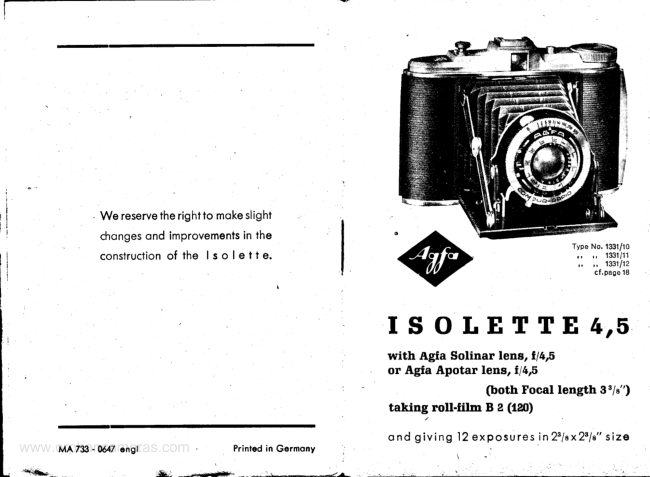
Agfa isolette 4x5 User manual
User manual for Agfa isolette 4x5. 35 pages in English. Read the original PDF, download or print a copy without registration.
35 pagesEnglish2.1 MB PDF

Loading your manual…Open PDF directly
Document details
- Brand
- Agfa
- Model / document
- Agfa isolette 4x5
- Document type
- User manual
- Language
- English
- Pages
- 35
- File size
- 2.1 MB
- Category
- Film cameras
- Document date
- Not specified in catalog
Search available document text
Find a term, then jump to its page in the original PDF. Image-only pages may not be searchable; check the PDF for exact wording and diagrams.
Page 3 · Read text
Ai the end of tlre directionsfor use
you will find o combinotion of
hints, which you should know
with regord to the blocking de-
vice preventingdouble exposure
    built into the lsolette 4,5.


         www.orphancameras.com
View original page 3Page 4 · Read text
I.Loading  the   I S O  t E T T E with
   roll.film B 2 (120)
Filmsmcy be loodeC into the comero in subdued
doylight.Once the fllm hos been removed f rorn
its wroppings,it should never be ploced where
the direct light of the sun con reoch it, ond in
g e n e ro li t sh o u ldb e sh ie ldedfrom light os much
os possible.
The comero bock is fl rst opened by pushingthe
locking button I  (flg. 1) on ihe top edge of the


Fis. I
Opening
lhe bo*
of lhe comero
View original page 4
Page 5 · Read text
comero in the directionof the orrow, ond then
swingingthe bock open on its hinges.


                       Fis.2
          Swingingoutthespool-holder

lnserfing fhe new spool. The spool-holder3 (fig.2l
is gripped by the bent tob ond swung out of its
chomber,the hinged flop4 (fig.21being then turn-
ed outwords os shown by the orrow.

4

                      www.orphancameras.com
View original page 5Page 6 · Read text
T h e f u l l s po o l is p io ce dirrt l r e  l o w e r s p o o l - h o l d e i '
 i n t h i sm o n n e r :t h e h o l e i n i t s c o r e  i s p l o c e d o v e r


                                                                                 I\

                                                              _   P6?2- a
                        F i g . 3
           looding on unexposed spool o f  f i l m

the flxed peg, oild the hirrgedflop 4 (flg 3) swung
b o ck s o t ho t it s p e g h o ld s the other end of the
s p o ol f i rm ly. Th e e n t ire spool-holderwith the
lo o d e d s p o o l co n t h e n b e swung bock into the
c h o m b e ro f t h e c o m e r o
View original page 6Page 7 · Read text
lmportont r The spool must be looded the right
woy round.As shown in I'lgs.3ond 5, the topered


 tig.4   Wrongly                       Correctly   Fig.5

                  looded spool of fif m


end of the bocking poper mustolwoys point to-
words the empty spool ot the other end of the
c ome ro .
T he g u mme d st rip h o lding down the end of the
bocking poper on the full spool must then be
broken,ond the end of the poper d rown ocross

6

                    www.orphancameras.com
View original page 7Page 8 · Read text
t h e c ome ro o n d p lo ce d in t o the lo n g e r of the
two slots in the core of the empty spool (fig. 6l'.
The broken piecesof gummed strip ore then core-
f u lly removed.


   Threod''    o.:* F i s . 6       er sIot
         ?"'1n"":?iffi  I,T,'l:ii"
By turningthe fllm winding knob 6 (f'ig.7l severol
timesto the right,two or three loyers of bocking
poper ore wound on to the empty spool.
View original page 8Page 9 · Read text
lmportont: The bocking poper mustbe eosed up
o n d d o w n s o t l r o ti t w i n d so n o c c u r o t e l y  b e


                       Fis.7
           Tighfeningthebockingpoper

tween the florrgesof the empty spool, without                                      'l-he
chofing or rubbing ot the edges.    comero
bock con novvbe closed,core being token to en-
sure thot the cotch holding it shut snops cor-
rectly into ploce. In the co mero bock is the red
window for exoinirringthe progressof the film

I

                    www.orphancameras.com
View original page 9Page 10 · Read text
th r o u g ht he co me ro (se e f i g. 8). The window 9
showi the numbers of exposuresmode in the
sq u o rel s o le t t esize2 %x2 'A".


                        F i s . 8
          Winding on the film ond exomining
            the red window  in ,the comero bock
As the fllm is wound on, o worning mork first
o p p e o rs i n t h e sh o p e o f o hond followed by o                                                                  ttnumber of dots. Af ter thesesigns, the f igure   ltt
oppeors, ond when it is in the center of the red
View original page 10Page 11 · Read text
window the first section of film is reody to be ex-
 posed insidethe comero.

 After exposing eoch picture, the film should 6e
wound on of once until the next higher number
 lppeors  in the red window, indicJting thot o
 fresh sectionof film hos been brought inlo ploce
 insidethe comero.


l 0


                    www.orphancameras.com
View original page 11Page 12 · Read text
II. The lens and shutter
l. Opening the cqmerq front
  B y p r e ss i n go n t h e k n o b 1 2 ( f i g . 9 1o n d h o l d i n g
  the comerotilted slightlyforword,the front will
  open, ond the lens springf orword into position
    f o r exposing.


                     ?,1   ,raI J     7*


                      h d trg ,of*,*
               Fig. 9   Opening the comerofront

     l ^ p o r t o n t : W h e n o p e n i n g o r c l o s i n gt h e c o m e r o ,
  do not press the knob l3  (flg. 9l reieosing the
  shutter,or  f he shufter will refuse to work loter on.
    I h e b l o c k i n g d e v i c e p r e v e n l i n gd o u b l e e x p o s u r e
  thus becomes CIccicientlydefective.   How  to
  remedy blockingof the releosesee poges 2) ond 30.

                                                                                                         l l
View original page 12Page 13 · Read text
2. Focussingthe lens
  The lsoiette4,5 is fitted with either on Agfo Soli-
   nor*1f /4,5 onostigmot,or on Agfo Apotor*l f 14,5
  onostigmot,both with the some focol length of
   3'it", ond in eoch cose the focussingis orronged
   to cover oll distoncesbetween 3 feet ond infinity.
  The meosurementof the distonceond the setiing
   of the focussingscole must be occurotely done,
   porticulorlywhen the full (lorgest)operture of the
   lens is in use.
  The focussingscole is set to the distonceot which
  shorp focus is requiredby turning the front mount
   i4 of the lens {flgs.lO ond  ll on the flysheetof
   this booklet). This front mount beors o scole of
  distoncesin feet, ond the mork ogoinstthe oppro-
   priote distonceis ploced ogoinstthe index line l5
   (figs.l0 ond ll) next to the mount itself.
  A simplifiedfocussing- so colledTwo-Pointfocuss-                                                         ,|4.  ing-forsnopshotisdescribedon the pogesl3ond
3. The lensAperture
  The scole of lens opertures (fig. i2) is so ploced
   thot it con be reod when the comero is in positiorr
   for exposure.In fig. 12,thescole is set to on oper-
  ture volue of f / B. The oblique edge of the pointer
  23 (flgs.l0 ond l2) should be ploced ogoinstihe
  desired operture number. (ln the Compur ond
  C-ompur-Ropidshutiersthis is done by o lever 22
    llg.lll  on the u n d e r side of the shuiter cosing).    '1     see poge 18.

  1 2

                       www.orphancameras.com
View original page 13Page 14 · Read text
The lorgestopertureis f 14,5ond fhe smollestf 122.


A toble of depth focusot differentoperturesond
focttssingdistoncesis given on poge 16.


            Fig. 12   Settingthe lens qperture
Two Poinf Seffing
NumberB on the diophrogmscole is morkedin
red. When setiirrgtire pointerof the opertureot
numberB o simplifiedtocussing- Two pointSett-
ing - is possibleos describedon poge 14.
                                   r3
View original page 14Page 15 · Read text
Sefting "Neor".lf  the obiects ore ot o distonce
between B feet ond l5 l'eetfrom the lens,use the
setting "Neor". For this purpose turn the front
mount of the lens so thot the red number l0 is
opposite the index mork l5 for focussing(figs.10
crnd I I ).
Seffing "For"is oppiied if the obiects to be pho-
togrophedore within ronge between lS feet'ond
oo. For this frequentlyused settingturn to num-
ber 30 (olso morked in red) oppositethe index
mork 15 (figs.l0 ond  ll  on rhe flysheet).
With the two settings,l0 feet for "Neor", 30 feef
Ior "For", the entire ronge from 8 feet to oo con
be focussed.This simplifiedmethod con be proc-
tised with greot odvontoge for oll snopshots.
The moin esseniiolfor the obove describedTwo
Poini Setting is:
Alwoys set the lens operture to the red dot be-
tween f /8 ond f / I I (or lorger operturenumber).
fimeofexposure.The lens operture ond the time
of exposure ore intimotely connected with one
onother. Other conditionsremoiningthe some,
the exposuretime must be doubled if the lens
opertureis chonged to the next smollersize (i. e.
n e x t l o r g e r  n u m b e r )  o n  t h e s c o l e .T h u s ,i f
t/toth      of o second were the correct shuiter time
                   1fzr1l1ot on operture f lB,      of o second would be
needed if the operturewere reducedto f/l l. The

1 4

                     www.orphancameras.com
View original page 15Page 16 · Read text
beginner is recommendedto stort ot first with
                                'iuoththe shutterspeed olwoys set to       of o second,
ond io set the operture scole to  f/8, f/11, or
f/l6 occording'to the light ruling ond the sub-
iect of the picture.
Where the obiects in the picture ore moving
ropidly, ii is often essentiolto use o shorter ex-
                  t/uo                     sec. ond to increosetheposure time thon
lens operture occordingly.
The exposuredotes ore to be used occording to
sensitivityof flim ond obiect brightness- i. e. the
shutterspeed ond the opproprioie operture ore
evoluoted with the help of on exposure time
toble, or better by meons of o photoelectricex-
posure meter.
 lf there is ony doubt which o'pertureto use, the
lorger (i. e. smollernumber)should be chosenof
two. Over-exposure generolly hos very  little
effect on the negotiv, but under-exposuresmov
leod to bod results.
Those who hove used this method ot first, ond
hove obtoined some experience,will hove no
 di{ficulty in exposing on dorker obiects such os
 people indoors.ln this cose,the full lensoperture
 will be used,ond the comero ploced on o tripod
 for o iime exposure. The correct exposure for
 vorying conditionswill be given by the exposure
 guide or exposuremeter.
 Exposuresin ortiflciol light ore olso very ottroc-
 tive cnd ore not very hord to toke.
                                                                   t 5
View original page 16Page 18 · Read text
4. Prqctisingthe shutter
  The Agfo lsolette4,5 is deliveredin the following
  modelsAgfo Apotor Anostigmotf 14,5in Prontorll
   or in Compur-Ropid*)shutter,ond
  Agfo SolinorAnostigmotf  | 4,5 in Compur-Ropid
   shutier*){see figs. l0 ond  ll  on the flysheetot
   the end of ihis booklet)
   Blocking device prevenfing double exposure
  One of the Agfo Billy-Record4,5 odvontogesis
   the built-in blocking device preventingdouble
   exposure,which prevents o piece of film to be
  exposed twice, if you foil to wind the fllm. The
   blocking becomesoutomoticollyeffectivewhen
   pressingthe shutter releose button l3  (fig. l0)'
  The blocking preventingdouble exposureis re-
   leosedonly by winding on the fllm (cf.olso poge
   291.Ihe blocking indicotor 26 (fig.9) shows red
  when blocked, ond withe when the comero is
   reody for exposure.
  G e n e r o l   n o t e s . W h e n t h e s h u t t e ir s s e t t o                                   t/'oth                                        of o second'   o longer exposuretime thon
   the comero should be ploced on eiiher o tripod
   or o rigid support.Under oll circumstonces,shok-
   ing of t-heco*uto during exposuremustbe ovoid-
                                 i s b e s t t o s c r e w o  f l e x i b l e  c o b l e
   d r : . O j t
       t) Type No, of Aqfa lsolette 4,5
    Type No. 1331/10   with Solinar and Compur-Rapid
    Type No, 1331/11    with Apotar and Compur-Rapid
    Type No.1331/12   with Apotar and Prontor ll

       l 8
View original page 18Page 19 · Read text
releoseintothenipple of the releosebuiton ofter
unscrewingthe cop ond to releosethe shutter
by this meons (see 13, figs. lO ond  ll  on the
flysheet)

o) Prontor ll shulfer
(fi9. 10 on the flysheetof this booklet).Prontor ll
shutteris set by turning the ring lB (fig. l0) until
the red mork l9 is oppositethe desiredexposure
time. The numbers 250-.l00-50-25-5-2-1 meon
1/zsotfi,1/rootft,t/roth                                     '/,                                    . . .                     ond  I second.-   "8"
is o setting for short time exposures (for o few
seconds)
For long time exposures the blocking device
"f" 22 (fig.9) is used 1"1":Time).
After settingthe ring 18 (fig. l0) to letter "B" the
shuttermust be set.Then the shutteris releosed-
best by using o coble releose ofter unscrewing
the cop l3 (lg. l0)-ond  kept open by pushing
the locking device "f" 22 {fig. 9) in the direction
of the orrow. The exposureis terminotedby mo'r-
 ino the hlockincrdevice "T" bock. The obove
 oction ollows the releose button to spring up-
words ond the shuiterto close.

Sefting of  the shuller is necessorybefore eoch
 exposure,by pushingthe lever l6  (fig. l0) in the
 directionof the orrow.
                                   r9
                       www.orphancameras.com
View original page 19Page 20 · Read text
Releosing the shuffer,ofter winding it up, is done
by pressingon the shutter releose l3  (fig. l0) ot
the flexible wire releose.In the snopshotspeeds
(1/zrotIto  I second) the shuttershutsoutomqtic-
olly ofter the correct time hos elopsed. - At the
setting"8"  it opens os the releoseis pressedond
remoinsopen until the pressureis removed from
the releose knob.

The deloyed-ocfion shutler releose moy be used
for oll the snopshotexposures,but not with "8".
To wind up the mechonism,the lever 24 (fig. 10)
is moved in the directionof the orrow until itwill go
n o f u r t h e r b u t o l w o yo sf t e r s e t t i n g t h e s h u t t e r
speed. As usuol,the mechonismis storted by o
simple pressureon the shutterreleosel3 (fig. l0).
The deloyed-oction mechonismwill then run by
itselffor some l0 seconds,offer which the shutter
will open ond give the exposurein the usuolwoy.
The shuttermustthen be wound up once more if
on ordinory exposure is to be mode, by lever 16.
 lf o seconddeloyed-octionexposureisto be mode,
do the some;the lever 24 mustbe wound up once
more os well.

b) Compur ond Compur-Ropid shuffers
(Seefig. I l.) Theseshuttersore set by turning the
ring 18 until the triongulor index mork over the

20
View original page 20
Page 21 · Read text
word "Agfo" is ogoinstthe desiredexposuretime.
The numbers1, 2,5, 10,25,50, 100,250ond 500
                           rlz',t/uth... l/rootftsecond.imply exposuresof 1,
Theshortestexposuregivenby the Compur-Ro p id
                                  1/rooth         t/uooth                                              of o                  of o second, snclshutter is
second by the ordinory Compur.

Iime exposures. For exposuresof more thon one
seconddurotion,the shutteris set to "B". Wiih this
setting,the shutter opens when the releose is
pressed,ond shutswhen pressureis removed.
For long time exposuresthe locking device "f " 22
(fig.9) is used 1"T"-Time).
After settingihe ring l8 (fig. 1l) to letter "B" the
shuttermusibe sei.Then the shutteris releosed-
best by using o coble releose ofter unscrewing
the cop 13 (fig. l0)-ond  kept open by.pushing
the locking device "I" 22 (fig.9) in the direction
of the oriow. The exposure is terminoted by
moving the locking device "T" bock. The obove
oction ollows the releose button to spring up-
words ond the shutterto close.

Snopshol exposures. With the Compur.shutters,
intermedioteshutterspeedsore possiblebetween
              1/roo1[                       of o second by selting the1 second ond                                           1/zrring 1B to intermediotepositions.Thus,for     1[
secono exposure,the index mork is ploced be-
       t/uothond 1/rootfisecond on the ring 18.iween
                                            2t

                       www.orphancameras.com
View original page 21Page 22 · Read text
W i i h o l l e x p o s u r e s t sh he u t t e r m u s t b e w o u n d
  u p ofter setting the speed before it will work.
  F o r t h i sp u r p o s e l,e v e r l 6  t f i g .l l ) i s m o v e d o s f o r
  os it will go in the direction of'the orrow. The
  exposure is then mode by pressing the releose
  knob l3 (fig.I l), or by the flexible releose'

5.The view-finder
  Theviewthroughthe finder will coincidewith the
   fleld coveredby the comero.-  In use,the comero
  should be held in front of the eye, close to the
  foce, so thot the flnder eyepiece is obout holf on
  inch from the eye itself.Core must be token thot
  the front ond bock portions of the flnder ore
   s y m m e t r i c o l l y  p l o c e d w i t h r e s p e c tt o e o c l t
  other, ond not skewed,otherwisethe picturetoken
  by the comero will  not qorr€s.pondwith the
  imoge seen through ihe finl'ei eyepiece.
  Where very close obiects,such os portroits of 3     *I
   feet, ore being token, the view seen through the
   finder will not obsolutelycoincidewith thot co-
  vered by the comero on occountof "the p o r o | -
      l o x  e r r o r " . S i n c e t h e  f i n d e r i s h i g h e r  u p
   thot the lensof the comero,it will tend to include
   o  littletoo much ot the top of the picture,cnd
   notquite enough ot the bottom.The error involv-
  ed  is eosily corrected by moving the comero
   slightlyupwords.
  22
                                                                                                                                                                                                                                                                                                                                                      i
                                                                                                                                                                                                                                                                               \ i

                                                                                                                                                                                                                                                                                                              !i
View original page 22Page 23 · Read text
Fis.l3
            Holdinglhe comerocorrectly

IU. Making the exposure
Holding the comero cor rectly
The best woy of holding the comero during ex-
posure is shown in fig. I 3.
It is very importont to press the shutter releose
gently ond evenly' this is most simply done by

                                 23

                         www.orphancameras.com
View original page 23Related documents and language editions

From the M. Butkus Camera Manual Library. Original publisher and archive notices are retained.
Check the model and edition against your equipment.
PDF verified 2026-10-10.