Film cameras
Black and White User manual
User manual for Black and White. 17 pages in English. Read the original PDF, download or print a copy without registration.
17 pagesEnglish5.6 MB PDF

Loading your manual…Open PDF directly
Document details
- Brand
- Black
- Model / document
- Black and White
- Document type
- User manual
- Language
- English
- Pages
- 17
- File size
- 5.6 MB
- Category
- Film cameras
- Document date
- Not specified in catalog
Search available document text
Find a term, then jump to its page in the original PDF. Image-only pages may not be searchable; check the PDF for exact wording and diagrams.
Page 6 · Read text
We recommend that you read this book over carefully.  lt contains simplified steps to perfect
pictures as well as detailed information. Before you take pictures of a special event or go
on a trap, try  taking pictures both outdoors and indoors with  flash for Dracrrce.

        FILM ADVANCE LEVER
       V I E W F I N D E RE Y E P I E C E


EXPOSURE INDICATORWI NDOW


           TRIPOD SOCKET


             DOOR LATCH


     BATTERY COMPARTMENT


                         www.orphancameras.com
View original page 6Page 7 · Read text
Jor perfect outdoor pictures automatically    rI

Open the hingeddoor by moving the Door Latch in  the
direction of arrow.Drop in the film cartridge,then close
the door. The cartridgeautomaticallysets the  electric
eye for the type of film you have selected.
Move wind lever to right and allow it to return. Repeat
until it locks (abo u st  i x f u l l s t r o k e s )f .i l m   i s n o w a t  f i r s t
picture,and NUM B E RO N E w i l l a p p e a ri n e x p o s u r ei n d i -
cator window.
A circle can be seen in the center of viewfinder when
looking through viewfinder eyepiece. By turning lens
focusingring an object can be seen clearly when properly
focused.
Composesubjectin viewfinder,checklocationof indicating
needleof exposuremeterthen slowly press shutter release.
Move wind lever throughone full stroke and you're ready'for    the next picture.
More complete informationon each of these steps will
be found on the following pages.For information on tak-
 ing FLASHPICTURES,see instructionson pages12 and13.
View original page 7
Page 8 · Read text
r-]
            f i l m    t o  u s e

       Film cartridgesfor your Keystone
      K-lO2O are  available atmost
       everywhere. Ask  for  size 126
      Kodapak film,  in  one  of  the
       following types:


      Kodachrome-X . . . . . . (KX- 126)
                                 for 20 color slides
      E k t ac hro me -X . . . .  . . (EX- 126)
                                 for 20 color slides
      Kodacolor-X. . . . . . . . (CX- i26)
                                 for 12 color prints
     V e r i c h r o m ep a n . . . .   ( V p - 1 2 6 )
                                for l2 black-and_
                          white prints
     ASA160    can also be used when EE photographing.


                               www.orphancameras.com
View original page 8Page 9 · Read text
loading   the  camera

Slide the door latch up and turn the camera over
t o o p e n t h e d o o r .D r o p  i n  t h e  f i l m  c a r t r i d g e ( w i t h
the  largest end toward the door latch).  Be sure
i t s e a t s p r o p e r l y a n d  l i e s  f l a t w i t h i n  t h e c a m e r a .
CIose the door by pressing it against the body until
i t  s n a p s c l o s e d "

After  Ioading cartridge, move the wind  lever  to
t h e  r i g h t a n d a l l o w   i t   t o  r e t u r n . R e p e a t u n t i l    i t
l o c k s   ( a b o u t 6   f u l l  s t r o k e s ) . T h i s p o s i t i o n s  t h e
f i l m   f o r   t h e  f i r s t p i c t u r e .
A f t e r  e a c h p i c t u r e     i s   t a k e n ,  m o v e   t h e w i n d
lever through a  full stroke. The exposure indicator
window on the camera back shows the number of
the exposure you are on (one or two  of the same
number may appear) and also shows you the type
o f   f i l m  y o u h a v e  i n  t h e c a m e r a .
N E V E R F O R C E T H E W I N D L E V E R .
View original page 9
Page 10 · Read text
lii'  ir  ,,-:rt:t,:; ti r;l;1"
 ( A l l  s c e n e s t a k e n w i t h o u t  f l a s h )
T h e  f o c u s i n g l e n s o n  t h e K - i 0 2 0 a s s u r e s s h a r p p i c t u r e s a t a n y d i s t a n c e
c i r c l e m i c r o - d i a - p r i s m c a n b e s e e n f r o m v i e w f i n d e r e y e p i e c e . w h e n a n o b r e c t r s n o t c l e a r
t h r o u g h t h i s c i r c r e , t h e d i s t a n c e r s n o t p r o p e r r y a d j u s t e d .  T u r n i n g  f o c u s  r i n g can  adJust
t h e d i s t a n c e a n d w h e n t h e d i s t a n c e i s c o r r e c t  t h e o b j e c t  I o o k s c l e a r .


                        www.orphancameras.com
View original page 10Page 12 · Read text
I n b r i g h t  l i g h t ,  f o r e x a m p l e , i f  e x p o s u r e m e t e r n e e d l e i n d i c a t e s a b o v e F g , s e t  t h e u n i v e r s a l
f o c u s m a r k  t o  t h e  f o c u s  r n o e x m a r K .
A l l o b l e c t s r e g a r d l e s so f d i s t a n c e w i l l  b e s h a r p  i n y o u r p i c t u r e .


       U N I V E R S A LF O C U S M A R K


                                                      3NC]-L9"\3X

                        www.orphancameras.com
View original page 12Page 13 · Read text
c()Il.pose    and   shoot       !

                          Look throughthe viewfindersquarelyand compose your subject
                                   just the way you want it to look in the picture.
                          Exposuremeter needleis locatedon right hand of viewfinder.
                      When the exposuremeter needle indicates within the rangeof
                           F 2.8 (smalldot belownumber4) to F 22 (seconddot above number
                              11) correctexposureis set automatically.Whenthe needleindicates
                           below F 2.8 (underexposuremark) flash is necessaryfor  proper
                         exDosure.
                            Small dot and numberson right hand of the viewfinder indicates
                           aoert u re.
                 Signal.      Warning
                     mark)        Press the shutter release down slowly to take the picture.        (over exposure
                                                   lf  ii won't go down,the n t h e f i l m h a s n 't b e e nw o u n d t o t h en e x t
       Exposure lvleter Needle        picture.Makeit a prac t i c et o w i n d t h e f i l m a f t e r e a c h e x p o s u r e '
                            Helpf ul hints-  your pi c t u r e sw i l l a l w a y s t u r n o u t b e s t i f   t h e
    W a r n i n g S i g n a l .           sun is behindyou or slightly to the side of your back'   Don't       (under exposure mark)                             attempt to take pictures when the sun is shining into the cam-
                             era lens.

UnlOad     Before  door  is opened, and after you have taken the last picture,  move  the wlnd
_ i n p f                   l e v e r u n t i l   i t    l o c k s . T h e  f i l m ' s p a p e r b a c k i n g w i l l d i s a p p e a r f r o m   t h e w i n d o w . P u s h
             the door latch UP and tip  the camera so the door opens and the cartridge falls  into
            your hand. Have the exposed film  processed immediately. 1.1
View original page 13Page 14 · Read text
fr;l [r.i Lng-';d' {:rs h  5ri,r_"-[r:,aii-,es

T w o  " N "  s i z e b a t t e r i e s a r e n e e d e d t o   t a k e F L A S H p i c t u r e s .
Ask your dealer for Mallory Mn 9100, Eveready E90, philco
P 9 1 0 0 ,B u r g e s s A L - N , o r e q u i v a l e n tT. o   i n s t a l l   t h e  b a t t e r i e s ,
slide open the battery compartment door (on camera bottom)
a n d p u t   t h e b a t t e r i e s  i n , o n e w i t h    I     t i p u p a n d  t h e  o t h e r
w i t h     l    t i p d o w n . C l o s e t h e c o m p a r t m e n td o o r . H a v e t h e b a t -
t e r i e s c h e c k e d o c c a s i o n a l l yt o b e s u r e  t h e y a r e s t i l l    i n g o o d
c o n d i t i o n .


                        www.orphancameras.com
View original page 14Page 16 · Read text
s:?sszs   ffffffffffffffffffffffffffffffffffffl fffffffftrSJh+:?s#:s:ts:?s
J?tr:ar         GUARANTEEREGISTRATIoNcARDs+:?s                                                                                                                                                                 9,..-:ZFH


 FILL OUT REGISTRATIONCARD AND MAIL TODAY.YOURCAMERA
     SERIAL NUMBERIS ON THE BOTTOM OF THE CAMERA.


                       www.orphancameras.com
View original page 16Related documents and language editions
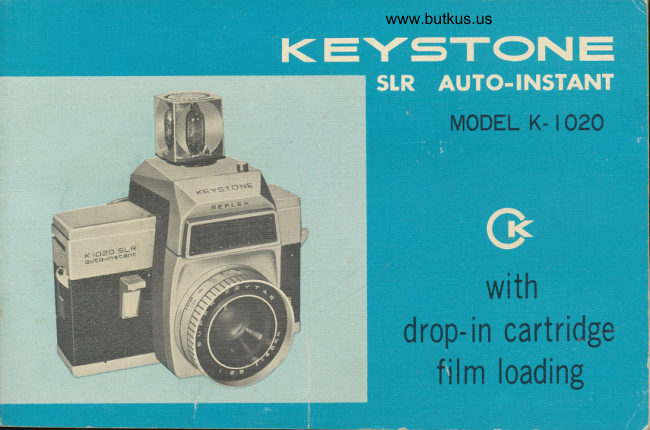
From the M. Butkus archive. Original publisher and archive notices are retained.
Check the model and edition against your equipment.
PDF verified 2026-10-10.