Film cameras
CALUMET 4x5 Roll Film User manual
User manual for CALUMET 4x5 Roll Film. 3 pages in English. Read the original PDF, download or print a copy without registration.
3 pagesEnglish0.7 MB PDF
Loading your manual…Open PDF directly
Document details
- Brand
- Calumet
- Model / document
- CALUMET 4x5 Roll Film
- Document type
- User manual
- Language
- English
- Pages
- 3
- File size
- 0.7 MB
- Category
- Film cameras
- Document date
- Not specified in catalog
Search available document text
Find a term, then jump to its page in the original PDF. Image-only pages may not be searchable; check the PDF for exact wording and diagrams.
Page 2 · Read text
www.orphancameras.com


                                                                                                                                                                     N. Y. SALFSROOM
                                                                                                                                         S U I T E 3 5 0 2
                                                                                                                                         E M P I R E S T A T E B L D G
                                                                                                                              N E W Y O R K . N . Y . I O O O ' I
                                                                                                                                                                                     (2r 2) 69b-4780

                                                                                                                                               CALIFORIiIIASALES DIV.
                                                                                                                                            434 NORTH LaBREA
                                                                                                                            LOS ANGELiS. CAI.IFORNIA 90035
                                                                                                                                                        213 933-5735              '        '*     Ca.lurrnet                                                                             PHONE


                                                                                                                                                                                                                                                                                                                                                                                                                                                                                                                                                                                                                                                                                                                                                                                                                                                                                                                                                                                                                        I         scientific,        inc-

           1 5 9 0  T O U H Y  A V E .      .  E L K  G R O V E  V I L L A G E ,       I L L .   6 O O 0 7     3 1 2 - 4 3 9 - 9 3 3 0
                                                                            www.orphancameras.com
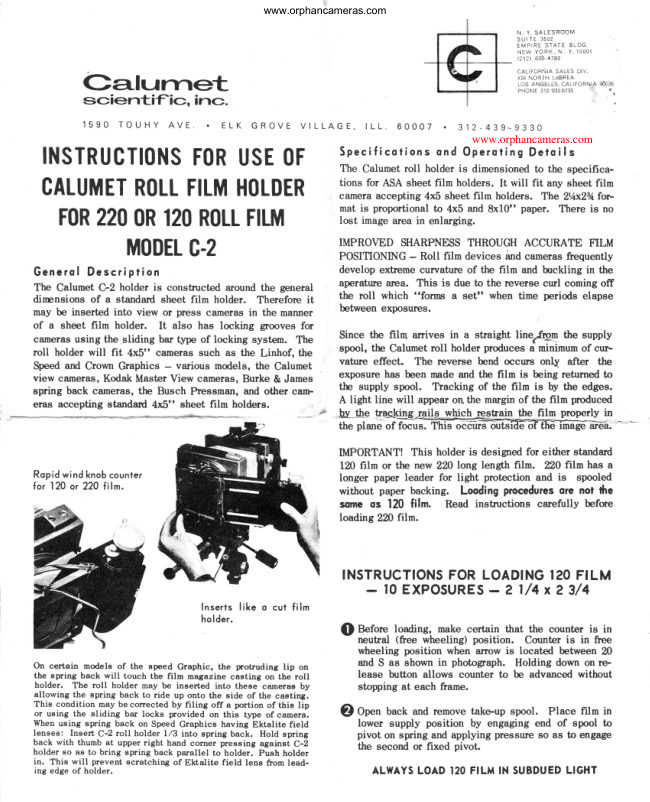
                                               Specificoiions ond Op"roting Detoils INSTRUCTIONSF()RUSE(lF    The Calumet roll holder is dimensionedto the specifica-
                                                                tions for ASA sheet film holders. It will  fit any sheet film CALUMETR(ILLFILMHOLDERcameraaccepting 4xb sheet film holders. The 2r/ax23/efor-
                                                        nnatis proportional to 4x5 and 8x10" paper. There is no         (lR                                       lost image area in enlarging. FOR220  120R(ILLFILM
                                         IMPROVED SHARPNESSTHROUGH ACCURATE FILM     MODELC.2                 POSITIONING- RolI film devices ind camerasfrequently
Generol Description                                develop extreme cunrature of the film and buckling in the
The CalumetCrZ holderis constructedaroundthe general   aperaturearrea. This is due to the reverse curl coming off
                                                           the roll which "forms a set" when time periods elapsedinensions of a standard sheet film holder. Therefore it
                                                   betweenexposures.may be inserted into view or press camerasin the manner
of a sheet film holder.   It also has locking grooves for
                                                        Since the film arrives in a straight line$gF-  the supplycamerasusing the sliding bar type of locking system. The                                                                 'spool,                                                                 the Calumetroll holder producesa minimumof cur-roll holder will  fit 4x5" camerassuch as the Linhof, the
Speedand Crown Graphics - various models, the Calumet     vature effect.  The rcverse bend occurs on\   after  the
                                                      exposure has been rnadeand the frlm is being returned toview cameras,Kodak Master View cameras,Burke & James
                                                           the supply spool.  Tlacking of the film is by the edges.spring back cameras,the Busch Pressman,and other canF
                                           A light line will appear on the margin of the film producederas accepting standad 4x5" sheet film holders.
                                                by_thet qsl[&_gt$#trIghain      the film properlyin                                                                                                     'I'hrs                                                           the plane of EEus.     occurs

                                            IMPORTANT! This holder is designedfor either standard
                                                   120 frlm or the new 220 long length film.  220 fllm has a
Ropidwind knobcounter                                     Ionger paper leader for light protection and is  spooled
for 120 or 220 filn.                                                            without paper backing. Looding proceduresore not lhe
                                             some os 120 film.  Read instructions carefully before
                                                           loading 220 film.


                               INSTRUCTIONSFOR LOADINGI20 FILM
                                                                        -  l0 EXPOSURES-  2 l/4 x 2 3/4
                                Inserts like o cut film
                                 holder.
                                                    $  Before loading, make certain that the counter is in
                                                                    neutral (free wheeling) position.  Counter is  in free
                                                            wheeling position when amow is located between 20
                                                      and S as shown in photograph. Holding down on re-On certain models of the epeed Graphic, the protruding  lip on
the epring back will touch the film magazine casting on the roll          lease bufi,on allows counter to be advanced without
holder.  The roll holder may be inserted into theee camerae by         stopping at each frame.
allowing the spring back to ride up onto the side of the casting.
This condition may be corrected by filing  off a portion of this lip
or using the sliding bar locke provided on this type of camera.      €) Op"n back and remove take-up spool. Place film in
When using spring back on Speed Graphics having Ektalite field         lower supply position by engaging end of spool to
lenses:  Ineert C-2 roll holder 1,/3 into epring back. Hold spring          pivot on spring and applying pressureso as to engage
back with thumb at upper right hand corner pressing against C-2          the second or fixed pivot.holder so as to bring spring back parallel to holder. Push holder
in. This will prevent scratching of Eld,alite field lens from lead-
ing edge of holder.                               ALWAYSLOAD I2O FILM IN SUBDUEDLIGHT
View original page 2Page 3 · Read text
www.orphancameras.com
I NSTRUCTIONS (Continued)

     Insert paper leader, black side down, under movable         ing the release button momentarily allows advance to
     pressure plate.  Insert take-up spool.  PuIl enough         next exposure. Do not hold down on release button.
     Ieader until the end of the leader may be engagedin
     the take-up spool.  T\un film advance until starting
    arrow on back of paper is centeredin openinglocated          After  10th exposure, hold release button down and
      in pressureplate.                                         wind up paper leader.  Film  wilt be properly wound on
                                                                      the spool when frame counter reads 18. Proper adjust-
    Close back. T\rrn counter wheel stightly until  it stops        ment of hold down spring is indicated when hold down
           ttStt               position.                                                 spring on take-up spool is  lightly  touching the paper       at
                                                             backing of a fully wound up roll.  IMPORTANT! AI-
    Advance frlm the first frame by turning winding knob.        ways load 120 frlm in subdued light conditions. Load-
    The counter automatically stops at frame 1.  Each          ing of back in bright  sunlight  will  result  in fogging
     additional ftame is automatically positioned. Press-           of first frame.


                                                                                                                                                                                                                                                                                                                                                             *
                                                                                                                                                                                                                                                                                                                                                                                     ,,,:    ;rrti:;1ji$;;:;tu,s;is';';+rt"*'*;f
 Before looding moke certoin counter    For 120 film, line up orrowin pressure  Engogepoper leoder in toke'up spool
 is in neutrol position (between20 qnd    piote hole. For220 line up doitecl-line  open ond close hold down boil overp
  r r   s " ) .                            ond fof low speciolinstructionslor2N.    toke-up.
  LOADING  INSTRUCTIONS  FOR  220  FILM      20  EXPOSURES

 IMPORTANT!  220 frlm has a longer paper leader and  BRIGHT LIGHT LOADING PROCEDURE: D0  film mav be
 hailer.  Follow inshuctions carefully on loading. There   loaded in bright sunlight without fear of fogging.  The pro-
 are two proceduresallowable. One is a fast loading pro-   cedure is as follows:
 cedurewhich mayb  followed in subduedlight. The second
 is a procedurewhich may be followed in bright sunlight    o.  Line  the dotted line running across the paper backing
 to allow extra leader protection.                                        in the opening of the pressure plate.  The dotted line
                                                             appears approximately \Yz" bfore  the normal starting
 FAST LOADINGPROCEDUREFOR 220 FILM                 arrow and therefore affords extra protection.  Close the
 a. Follow general instructions for L20 film.   Line up       back.  T\rrn the film advance knob five complete revolu'
    starting anow on paper backing with leoding edge of        lions  before energizing the counter.  Turn the counter
    pressureplate rather than hole in pressureplate as for        to '3S" and advance to  first  frame.
   120 frlm.
 b. Close back. Do not engage        Turn film winding  GROUND GLASS MASK: A plastic mask is furnished with
    knob 2 complete turns.  (This"o,inrur.must be done before   each roll holder for the camera ground glass.  This may be
    counterwheel is set to"S".  Alocating mark is stamped   located under the glound glass retaining  clips.  You will
   on top of the winding knob).  Turn counter wheel to     find a mask for hand cameras are available  for the 2%x23A
    "S" start. Advancefilm to first frame in normal manner.   format from the camera manufacturer.  These are suitable
                                                                          for use on the Calumet roll holder.
 e. On 220 fiLm the counter will  automatically go into a         www.orphancameras.com
    neutral position after the 20th exposure. Approximately
    15 revolutions of the film advance knob are sufficient   PROCESSINGEQUIPMENT: Reels, processing tanks and
     to wind up the protective paper trailer. The wind-up of    reel racks for 372gallon tanks are available to process 220
     hailer will be indicated by a complete absenceof ten-    film. These are listed in the Calumet camera catalog avail-
    sion on the windingknobplus about five additional furns.   able on request.
View original page 3Related documents and language editions
From the M. Butkus archive. Original publisher and archive notices are retained.
Check the model and edition against your equipment.
PDF verified 2026-10-10.