Film cameras
Canon Wireless LC-2 User manual
User manual for Canon Wireless LC-2. 16 pages in German, Spanish. Read the original PDF, download or print a copy without registration.
16 pagesGerman, Spanish1.9 MB PDF
Loading your manual…Open PDF directly
Document details
- Brand
- Canon
- Model / document
- Canon Wireless LC-2
- Document type
- User manual
- Language
- German, Spanish
- Pages
- 16
- File size
- 1.9 MB
- Category
- Film cameras
- Document date
- Not specified in catalog
Search available document text
Find a term, then jump to its page in the original PDF. Image-only pages may not be searchable; check the PDF for exact wording and diagrams.
Page 2 · Read text
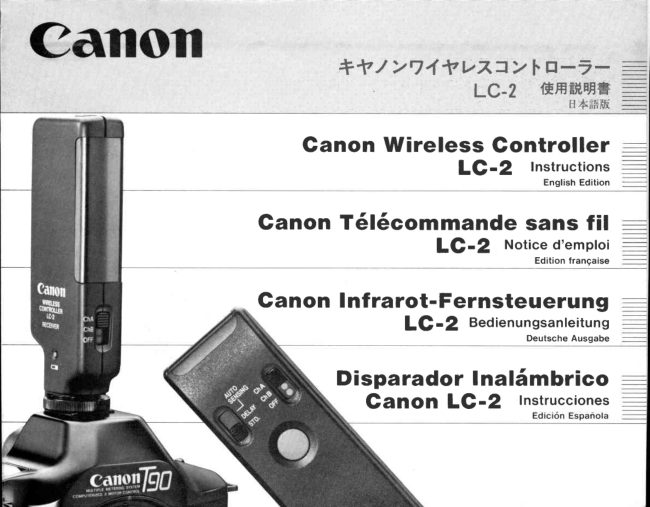
*f    t  Y'lIf   VTrJ?   Ii n;*'l!

   Ganon Wireless Gontroller
             LC-2 '"il,:::,..,.1

Ganon T6l6commande sans fil
                   LC-2    Noticed'emploi

Ganon Infrarot-Fernsteuerung
              LC -2  Bedienungsanleitung
                                                 Deutsche Ausgabe

      Disparador lnalSmbrico
         GanOn  LC-2    Instrucciones
View original page 2Page 3 · Read text
Canon WirelessController LC-2

 Especiallydesigned for Canon's T-series cameras,the Canon Wireless Controller
 LC-2 is a remote control device using infrared rays to control the camera from a dis-
 tance.

 The Wireless Controller LC-2 consists of the transmitterand the receiver and can be
 used in three modes: first the standard mode, which operates as soon as the trans-
 missionswitch is pressed;second the delay mode,which makes the camera release
 the shutter 2 seconds after the switch is pressed;and third the auto sensing mode,
 which activates when an object blocks the light path between the transmitterand the
  receiver. Since the Wireless Controller has two channels, you can also control two
 camerasalternatelyby alternatingchannels.
 You will find the LC-2 very useful for wildlife photography, news coverage and
 numerousother fields.


r6                         www.orphancameras.com
View original page 3
Page 6 · Read text
1. Loading Batteries

L o a d t h e b a t t e r i e si n t o b o t h t h e  t r a n s m i t t e ra n d
t h e r e c e i v e r

T r a n s m i t t e r -  U s e  t w o n e w  s i z e - A A a l k a l i n e -
m a n g a n e s eb a t t e r i e s
1 ) S l i d e t h e b a t t e r yc h a m b e r c o v e r i n t h e d i r e c -
      t i o n o f t h e a r r o w t o o p e n  i t ,
2 ) L o a d  t h e b a t t e r i e s s o   t h a t   t h e i r  t e r m i n a l s
      f a c e   i n  t h e d i r e c t i o n s i n d i c a t e d b y  t h e d i a -
   g r a m i n s i d et h e b a t t e r yc h a m b e r
3 ) O n c e t h e b a t t e r i e sa r e  l o a d e d , s l i d e t h e b a t -
      t e r y c h a m b e r c o v e r b a c k


 1 )                                                              3)


                                                                                                                                                      t 9
View original page 6Page 7 · Read text
Receiver- Use one of  the batteriesl i s t e d   Notes
  belowor an equivalentof anotherbrand.         o  Incorrectloadingmay cause batteriesto ex-
                                                p lode.
  Lithium6V     D u r a c e l lP X 2 B L               Remove the batteries if you do not expect to
  A l k a l i n e -      E v e r e a d y( U C A R )                  u s e e i t h e r t h e  t r a n s m i t t e ro r  t h e  r e c e i v e r f o r
  m a n g a n e s e 6 V   No.A544, IEC 4LR44                  th ree weeks o r longe r.
                 E v e r e a d y( U C A R ) N o . 5 4 4 ,         B e s u r e  t o   t u r n  t h e m a i n s w i t c h e s o f   t h e  S i l v e rO x i d e               D u r a c e l l P X 2 8 , I E C 4 5 R 4 4                   t r a n s m i t t e ra n d  t h e  r e c e i v e r O F F w h e n  t h e y
                                                       a r e n o t  i n u s e .
  1) S l i d e t h e b a t t e r y c h a m b e r c o v e r  i n t h e d i r e c -    W h e n  t h e b a t t e r i e s o f  t h e  t r a n s m i t t e r w e a r
          t i o n o f t h e a r r o w t o o p e n  i t ,                          out, replace both at the same time with new
  2 ) L o a d t h e b a t t e r y s o  t h a t  i t s t e r m i n a l s f a c e  i n       o n e s o f t h e s a m e b r a n d .
          t h e d i r e c t i o n s i n d i c a t e d b y  t h e d i a g r a m  i n -
     s i d e t h e b a t t e r y c h a m b e r .
  3 ) S l i d e t h e b a t t e r y c h a m b e r c o v e r b a c k .

  1 )                                                 2)


?a                         www.orphancameras.com
View original page 7Page 8 · Read text
2. Checking Batteries                   3. Setting Channel

Rece iver                                         1 ) Set both the trartsmitterand the receiver to
1 ) S e t t h e m a i n s w i t c h t o e i t h e r C h . A o r C h . B .                  t h e s a m e c h a n n e l         i f t h e  t r a n s m i t t e ri s s e t
2) Press the red battery check button on the        to Ch.A, the receiver m ust be set to Ch.A too,
    s i d e o f  t h e  r e c e i v e r .l f  t h e o p e r a t i o n c o n f i r -      Otherwise correct operation of the Wireless
  m a t i o n  l a m p  l i g h t s u p e v e r y t i m e y o u p r e s s     C o n t r o l l e rL C - 2 i s n o t p o s s i b l e .
      t h e b u t t o n ,t h e b a t t e r y p o w e r i s s u f f i c i e n t .
                                                2)  lf you want  to  control two cameras onto
Note                                            which two separate receivers are mounted in
o  A b a t t e r y c h e c k b u t t o n f o r  t h e  t r a n s m i t t e ri s        s e r i e s r a t h e r t h a n s i m u l t a n e o u s l y ,w i t h o n e
   n o t p r o v i d e d . l f   t h e o p e r a t i o n c o n f i r m a t i o n      transmitter, set each receiver to a different
        l a m p o f t h e r e c e i v e rl i g h t s u p w h e n t h e t r a n s -       c h a n n e l   o n e m u s t b e s e t t o C h . A a n d  t h e
  m i s s i o n s w i t c h  i s p r e s s e d ,t h e b a t t e r y p o w e r       o t h e r t o C h . B   a n d c h a n g e t h e c h a n n e l o n
        i s s u ff i c i e n t                                                                              t h e t r a n s m i t t e ri n s u c c e s s i o n .


                                                                                     ? l
View original page 8Page 9 · Read text
4. Mounting Receiveron Camera

  3)  lf you use two separate sets of the Wireless    1 ) L o o s e n t h e   l o c k n u t a n d s l i d e t h e  r e c e i v e r
    C o n t r o l l er L C - 2  i n t h e s a m e  f i e l d , m a k e s u r e        into the camera's accessory shoe.
          t h a t e a c h  i s s e t t o a d i f f e r e n tc h a n n e l .          2) T i g h t e n t h e  l o c k n u t .

  4 ) W h e n y o u  t r y  t o  c o n t r o l o n e c a m e r a w i t h
     p l u r a l t r a n s m i t t e r s t, h e r e  i s a p o s s i b i l i t yt h a t
          t h e W i r e l e s s C o n t r o l l e r L C - 2 m a y n o t  f u n c -
          t i o n  i f y o u p r e s s t h e t r a n s m i s s i o ns w i t c h e s o f
   m o r e t h a n o n e t r a n s mi t t e r a t t h e s a m e t i m e .


22                           www.orphancameras.com
View original page 9Page 12 · Read text
o When usingthe standardmode
 CAMERA         S I N G L EE X P O S U R E          CONTINUOUSEXPOSURE
   T50                                           Continuousexposuresat  about 1.2   T70                  (none)                                             framesoer second.   TBO
                                            High mode: Continuousexposuresat             Afterexposurethe cameraautomatically                                              about2.5 f ramesper second.   T90    advancesthe film and then stops.                                      Low mode: Continuousexoosuresat
                                              about2 framesoer second.
o When usingthe delay mode
 CAMERA        SINGLEEXPOSURE            C O N T I N U O UESX P O S U R E
   T50                                           Continuousexoosuresat intervalsof    1 7 0                  (none)                                              about2 secs.   TBO
    T O n     Continuousexposuresat intervalsof about 2 secs. (in both the single exposure
         mode and the continuousexposuremode.)
Thefirst shutterreleasebegins2 secs.after pressingthe transmissionswitch.
Notes
.  With  the Wireless Controller LC-2, the      r When a   f lash unit  is mounted on  the
  cameracan be controlledfrom a distanceof      camera'saccessoryshoe,it is possibleto at-
  approx.5t  (t6.4ft) on a straight-linecourse     tach the WirelessControllerLC-2 to the
   orovidedthat there are no obstacles.How-     camerawith the accessorybracket.
   ever.sinceenvironmentalconditionssuch as        .  Cover the eyepiece to prevent stray light
  temperatureand sunlightmay shortenthe            f rom entering at the rear. lf an eyepiece
   distance,be sureto checkwhetheror not re-      coveror shutteris not available,use a black
  mote control photographyfrom the desired      clothor somethingsimilar.
   distanceis possiblebeforeshooting.
                                                                     25
View original page 12Page 13 · Read text
:
                                                                        h  6. Auto Sensing Photography
  The WirelessControllerLC-2 is equippedwith     2) With the extensionCord 1000T3(optional),  an auto sensingmode which makesthe camera      connectthe receiver'sconnectingcord with    FfI
  releasethe shutterautomaticallywhen a subject       the camera'sremotecontroltermnal.      +  blocks the light path between the transmitter      J )  Put both the transmitterand the receiveron
  and the receiver.                                 a tripod,table or otherflat surface.
                                                    4) Place them at an appropriatedistanceso
    1) Make sure that the main switch of the        that they squarelyface each other as  il-
     camerais set to OFF.                            lustrated.


        Extension                                                                        Transmitter         1000T3
                                                                       Tripod


26                           www.orphancameras.com
View original page 13Page 14 · Read text
5) Compose the picture and focus on where     9 ) T u r n t h e m a i n s w i t c h o f t h e c a m e r a O N .
       you expect the subject to come.               1 0 ) E a c h t i m e a c e r t a i n s u b j e c t b l o c k s t h e  l i g h t
     6 ) S e t t h e s a m e c h a n n e l o n b o t h t h e t r a n s m i t -       path between the transmitter and the re-
         ter and the receiver.                                  c e i v e r a s  i l l u s t r a t e dt,h e s h u t t e r i s a u t o m a t -
     7 ) S e t  t h e   t r a n s mi t t e r  t o   t h e  a u t o  s e n s i n g                    i c a l l y r e l e a s e d .
     m o d e . A t  t h i s s e t t i n g ,t h e p o w e r i s s u p p l i e d
        a n d   t h e W i r e l e s s C o n t r o l l e r i s   r e a d y  t o   Notes
       shoot.                                        o  Cover the eyepiece to prevent stray light
    B ) C h e c k t h a t t h e o p e r a t i o nc o n f i r m a t i o nl a m p      from entering at the rear.
                   l i g h t s u p :  i f t h e  l a m p  l i g h t s w h e n y o u b l o c k    o W h e n u s i n g t h e T B 0  i n c o m b i n a t i o n w i t h t h e
               t h e  l i g h t p a t h b e t w e e n t h e  t r a n s m i t t e ra n d      A C   l e n s  i n  t h i s m o d e , b e s u r e t o  f o c u s  t h e
               t h e r e c e i v e rw i t h y o ur h a n d , t h e o p e r a t i o ni s        s u b j e c t b y f o c u s i n g t h e  l e n s m a n u a l l y b e f o r e -
      o.K.                                            h a n d .


                                                                             21

i
View original page 14Page 15 · Read text
7. Storage                                8. Specifications
   Removethe batteriesif you do not expectto   Type: A wirelesscontrollerusing infraredlight
    use the Wireless ControllerLC-2 for three   emittedby an infraredLED.
   weeksor longer.                                          Usable Cameras: CanonT-seriescameras.
    Storethe WirelessControllerLC-2 in a cool,
     dry,dust-freeplace.                      Operation Range: Approx.5m (16.4ft)in a
    Pleaseavoid storingthe WirelessController  straight-linecoursewithoutobstaclesin the light                                                path. lf the angle betweenthe transmitterand    LC-2in the followingplaces:
             '  "Hot spots" such as the trunk, rear win-   the receiveris 10', the range is approx.4m                                                                             ( 1 3 . 1f t ) ; l 2 0 ' , a p p r o x . 3 m( 9 . B f t ) .      dow shelfor glovecompartmentof a car.
         .  In directsunlight.                       Conditions: Clear weather (with sun no more
         .  Laboratoriesor other such areas where   than 30'f rom zenith),no obstaclesbetweenthe
      chemicalsmay causecorrosion.           transmitterand the receiver,and no highly re-
                                                    flectiveobjectsin their immediatevicinity.
                                        Mode: Standardmode -  operatesimmediately
                                         whenthe transmissionswitchis pressed.
                                                Delay mode   operates2 secs. after
                                                 pressingthe transmissionswitch.
                                               Auto sensingmode -  operatesimme-
                                                         diately when an object blocks the light
                                                   path betweenthe transmitterand the re-
                                                        ceiver.
                                    Number of channels: 2 (Ch.Aand Ch.B)


                                                                                                            \1


28                           www.orphancameras.com
View original page 15Related documents and language editions
From the M. Butkus archive. Original publisher and archive notices are retained.
Check the model and edition against your equipment.
PDF verified 2026-10-10.