Film cameras
Kodak Jiffy Series II User manual
User manual for Kodak Jiffy Series II. 13 pages in English. Read the original PDF, download or print a copy without registration.
13 pagesEnglish2.4 MB PDF
Loading your manual…Open PDF directly
Document details
- Brand
- Kodak
- Model / document
- Kodak Jiffy Series II
- Document type
- User manual
- Language
- English
- Pages
- 13
- File size
- 2.4 MB
- Category
- Film cameras
- Document date
- Not specified in catalog
Search available document text
Find a term, then jump to its page in the original PDF. Image-only pages may not be searchable; check the PDF for exact wording and diagrams.
Page 2 · Read text
www.orphancameras.com

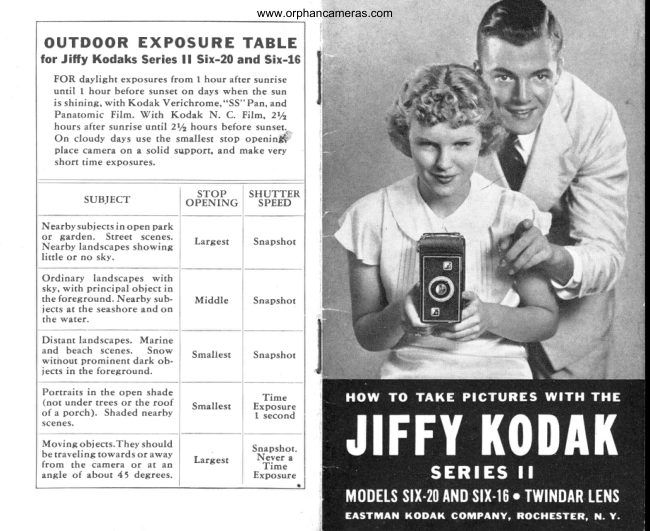
O U T D O O R E X P O S U R E T A B L E
for Jiffy Kodaks Series ll Six-20 and Six-16
  FOR daylight exposures from   t hour after sunrise
    until   I hour before sunset on days when the sun
    is shining, with Kodak Verichrome,"SS" Pan, and
   Panatomic  Film.  tVith  Kodak  N.  C. Film, 2Yz
   hours  after sunrise until 212 hows  before sunset.-
  On cloudy days use the smallest stop onenin$'
   place camera on a solid support, and make very
   short time exposures.

                       STOP   SHUTTER
       SUBJECT         OPENING   SPEED

Nearbysubiects    in open  park
or   garden.    Street   scenes.                                     Largest      Snapshot
Nearby  landscapes  showing
little  or no  sky.

Ordinary    landscapes   with
sky, with  principal   obiect  in
the foreground.   Nearby  sub-     Middle      Snapshot
 iects  at the seashore  and on
the water.

Distant  landscapes.   Marine
and  beach  scenes.   Snow      Smallest      Snapshot
without   prominent   dark  ob-
iects  in  the foreground.

 Portraits              in               the open                      shade                                         Time (not  under              trees                      or  the                              roof      Smallest     Exposure
of a porch).   Shaded  nearby                                   t second
scenes.

Moving   obj ects.They  should                                               Snapshot.
be    traveling             towards                           or
from        the  camera                         or                               at"wayan      Largest        NeverTime  a
angle   of  about  45  degrees.                   Exposure
View original page 2Page 3 · Read text
www.orphancameras.com


                                      ACTUALslzE of picture(2% x 3% inches)made
                                                             yt_,'hJitry Kodak SeriesII Six-20.A represenrative
                                                                 Jltry picturemadewith Kodak VerichromeFilm.


ACTUAL  SlzE  of  picture (2%  x 4%  inches) made
with  the Jiffr' Kodak  Series II  Six-16. A  tvpi cal Jiffy
snapshot made with Kodak "SS" Pan Film.

F O R  B E S T  R E S U L T S ,   L O A D  Y O U R   KODAK WITH KODAK  FI LM  (See Page 20)
View original page 3Page 6 · Read text
www.orphancameras.com
How to take SNAPSHOTS with            ject6. Forin athesnapshotopen,of ora nearbya nearbysub-
the J I FFY KODAK SERI ES  I I          landscape showing   little  or no
                                                          sky, use the largest lens open-
TO take snapshotswith the Jitry Kodak       pusbedingr   utitbin  asthe fardiapbragmas  it  will slidego.SeriesII, observethesesimple rules and
you'll  get good  pictures  from  the  start.               For an ordinary   landscape  in
                                                    which  sky shows, with  a prin-
L. Vhen  ready to take a snapshot, press tbe but-         cipal obiect  in the foreground,
ton on the side of the camera, and the camera       use the middle  lens opening.
front  will  automatically  "pop"  out to the cor-          Pull  tbe diapbragnz  slide halftuay
rect picture-taking  posltlon.                               out, until the middle  lens open-
                                                                       irg   is centered  in  front  of the
2. Set tbe indicator  leaer on top  of the camera         lens, where   it  will  carch.
front  at position   "I."
                                                            For distant  landscapes, marine
3. Reoolae tbe lens so the white  dot on the flange         or  beach scenes, or  for snow
is at the arrow marked "Beyond  ro Feetr" or at       scenes without  dark obiects in
the arrow marked  "5  to 10 Feetr" depending         foreground,   use  the  smallest
upon the distance between camera and subiect.         lens  opening.   Pull   tbe  dia-
4. See tbat  the sun is bebind your bach or  over        pbragm  slide out as far  as  it  uill
your  right  or  left shoulder. Do  not  let the sun        go, where   it  will  catch.
shine directly  into the lens.                           7 . Locate tbe object or scene you wish  to photo-
5.  Your  sabject should be in  tbe open sunlight.         graph   in either  the aertical  or borizontal  f.nder.
Satisfactory snapshots can often be made with       Be sure to hold the camera level.
subiects in open shade with  clear sky overhead;          8. Hold  tbe carnera steady, and press tbe exposure
and even on slightly  cloudy  days.                        leaer downward  once, uj  far as?t will  go. bo not
                                                                    jerk the leaefr'press   it slouly.
How  to hold  the Jiffy to      How  to hold the Jiffy to
take a  vertical  picture.        take a horizontal  picture.          9.  After  each picture,  push  the metal  slide on
                                                          the back of the camera  in rhe direction  of the
                                                        arrow  and  turn  the utinding  knob  until  a new
                                              number appears in the red window.
                                                            10. Keep tbe lens clean and  occasionally  wipe
                                                         out the inside of the camera.
                                                      1 1.  If the subiecr is below normal  height,  like
                                                      a child  or a dog, the Kodak  should  be held
                                             down  level with  the cenrer of the subiect.
View original page 6Page 7 · Read text
www.orphancameras.com
HOW TO UNLOAD
the J I FFY KODAK SERI ES  I I
TO unload the Jitry Kodak SeriesII  after
the last picture on a roll  of film has been
made, t,tin the winding knob until the end
of the paper on the roll passesthe red win-
dow on the back of the camera.
   In  a subdued light,  open the back  of
the camera. Hold  the end of the paper taut
and turn the knob until  all the paper is on       Service Department  will  be glad  to send
the roll (Figure  l).   If the sticker folds un-       you, upon request, complete instructions
der the roll, turn the knob to bring  it up.        for developing and printing.                                        Remove the empty spool  in the camera  Take hold  of the end of the protective
paper and sticker to prevent the paper.from       by pushing one end of the spool  to one
ioorettitg. Draw ouCthe winding knob and       side, at  ttre same time pressing back the
remove  ihe  film  (Figure  2).  Fold  under
about one-half inch of the protective paper,
and fasten it with  the sticker.
  The film  is now  ready for development,
which should be done as soon as possible.
You may have the work  done by ^ pho_to-                                         Keep a roll  in  the camera and  it  will  befinisher, or you may do   it  yourself. Our                                                ready at   all times  to  take  pictures.  (See
                                        Page  20, "What   Film  To  Use  in  Jitry
                                         Kodak SeriesII and Why.")

                                              IMPORTANT:     After removing  the film
                                                        from  the l(odak,  do  not wind  the  film
                                                                       tightly  with  a twisting  motion,  or   it may
                                                become scratched.
View original page 7Page 8 · Read text
www.orphancameras.com
DAYTIME PORTRAITS INDOORS     the finder. Turn the lens so rhat the white
                                                 dot is at the arrow marked "5 to 10 Feet,"With J I FFY KODAK SER I ES  I I                                                     or at the arrow marked "Beyond 10 Feet,"
TO make an indoor  portrait  by ordinary      dependirg upon the distance between the
daylight,  srmtlar to that shown here, have      subject and the camera.
the subiect stand or be seated in front of an      When ready to take the picture, steady                                           t'I
unshaded window,  with  the body  prefer-      the camera to keep  it  from  moving  and
ably at a diagonal  to the camera.              press the exposure lever once to open the
  Place a reflector (a sheet or table-cloth       lens. After one or two seconds-depending
thrown  over a screen or  chair  will  do) a     upon  the  quality  of  the light-press   the
few  feet from  the sub ject and at the angle      lever agarn to close the lens.
               shown  in  the  dtagram.              If  in doubt  as to  the proper exposure,
                  This is to reflect lighr  ro      take  two  pictures . of  the same subigcr,
                   the shaded side of  the      allowing  twice as long an exposure time
                    face.                              for the second picture as for the first.
                    Set the indicator lever
                 on  top  of  the  camera
                     front  at  "T.  " The  dta-    Time Exposure
               phragm  slide should be   PORTRAITS OUTDOORS
                          all  the  way   in;   this
                   brings   tl.   largest. lens   CLOSE-UPtime exposurescan be made
                openlng lnto poslr1on.     outdoorswith the sunshiningbrightly, by
                    Place  the  camera  in      placing  the sub ject  in  the shadow  of a
                    either a YertLcal or hori-       building  or  a large tree, but  with  clear                    z o n t a l  p o s i t i o n  o n a  ilil and  unobstructed   sky  overhead.  This
                    solid  support  a   little      avoids unpleasant shadows on  the  face.
                   higher  than an ord rnarv
                      table. The  camera must
                   not be more than two or
                   three  inches  from   the
                edge of the support.
                    Locate  the sub lect in     one to two seconds for the exposure.
            T2                                          I3
View original page 8Page 10 · Read text
www.orphancameras.com
SNAPSHOTS and other              shown  in the illus tratLon, one about three
 f N D O O R P I C T U R E S A T N I G H T  r   feet from the subject; the other about four
                                                     feet from  the sub ject.by Artificial  Light                                             Replace the regular shades on the lamps
                                                  with  inexpensive Kodak Handy Reflectors,TO take snapshots or other indoor pictures
                                         Model  B,  and place a No.  2 Photoflood at ntght with  the Jltry Kodak Series II, you
need only  a  roll  of Kodak  Film,  a few    bulb in each of the lamps.
                                          See that  theKodak Handy Reflectors, and a few Photo-
                                                  indicator  leverflood or Photof,a-rh bulbs. The bulbs can be                                          on  rop  of  thescrewed into  aIl regular lamp sockets.
                                          camera front   is
               PhotoFLOOD  gives a steady light  of     set at  "Ir " and
                   great  brilli  ance. Comes in two  sizes    be sure that the                      for  the amateur: No.  1, 25 cenrs;
                 No. 2, 50 cents. The No. 2 bulb gives     diaphr agmslide
                   twice the lighr and lasts three times      is pushed in as
                  as long.                                far as it will  go.
                                      Compose your               PhotoFLASH  gives an instantaneous
                     flash;  it  is good  for one picture. No     subiect in either
                smoke, no noise. Comes in two sizes     the  vertical  or
                      for  the amateur: No.  10, 15 cenrs;     horizontal   finder  of the  camera and press
                 No. 20, 25                              cents.                               The                                      No.                                         10 size is     the exposure lever _fust as you would  to                   suitable                                for                           most                                     indoor                                              shots.
                                               take a snapshot outdoors. The sublect must
                                          be close to a ltght-colored  background.
                                                        After  each picture  be sure  to  turn  theSNAPSHOTS with PHOTOFLOODS                                              winding  knob  until  the next number  ap-
TO take snapshotsat night with the Jitry    pears in the red window  on back  of. camera.
Kodak SeriesII in roomswith light-colbred   CAUTION:  Photoflood  lamps, especially
wails, load cametawith Kodall "SS" Pan    the No. 2stze, become quite hot and should
Film . '\rrange rwo bridge-rype lamps* as    not be kept burnitg  any longer than neces-
                                                sary to take a picture. Do not permit  the
*Rooms with  dark-colored  walls  usually  require  the     bulbs to come into contact with  the fabric
use of additional  Photoflood  lamps and refleclors.         of shades on home lamps.
               L6                                         I7
View original page 10Page 12 · Read text
www.orphancameras.com
W h a t F I L M T O U S E  i n  J I F F Y     U s e f u l A C C E S S O R I E S f o r  t h e
K O D AK S E R I E S  I I a n d W H Y        J I FFY KODAK SER I ES  I I
THE kind of Kodak Film to use in your                             Kodak  Portrait  Attachment
Jitry Kodak SeriesII largely dependsupon                                    SlipJitrV itKodakover andthe maklense ofclear,the
the kind of picturesyou wish to take. The   *                              detailed  "close-ups"  of peo-
films referredto here will  fill every pLcture-                                    ple, and  sharp,  short-range
takrng need.                                                                             pictures  of  flowers,   art  ob-
                                                                                iecm and other  still-life  sub-
Kodak Verichrome  Film-The     finest all-purpose  film.                                       iects. With  white  dot on lens
Has great speed and is well balanced for recording  tone                                        at arrow marked "Beyond  10
values of various  colors  in  a black-and-white   print.         Feet,"  place objects  exactly  3 feet 6 inches from  the
Its  double  coating  guards  agarnst over-  and  under-         lens. With  the dot at the arrow marked "5 to 10 Feet, "
exposure. 8 exposures. V616, 35 cents;Y620,30  cents.        place objects exactly 2feet 8 inches from  the lens. Size
Kodak  Super  Sensitive Panchromatic   Film  -  Gives        No. 7A  for  Jitry Six-16; 6A  for  .litry  Six-20. 75 cents.
correct  color  ualues in  a black-and-white   print.    It       Kodak  Diffusion  Portrait  Attach6lsnt-Fits      over the
lengthens the snapshot  day.  Its speed makes  it  ideal        camera. lens and works   like  the  above  attachment.
for taking  pictures at night  by  arcificial lighr,  and our-       Adds a charm  to pictures by giving  them  a pleasing
door snapshots in  the shade. 8 exposures; 55616, 40        softness. Size No. 7A  for,liffy  Six-16; No. 6A  for Jitry
cents; 55620, 35 cents.                                        Six-20.  $1.50.
Kodak Panatomic  Film-It     records  color  aalues cor-       Kodak  Pictorial  Diffusion  Disk-For    softening scenic
rectly  in  ablack-and-white    print.   It has an especially         pictures. Size No. 7A for Jiffy  Six-16; No.  64. for Jitry
fine  grain  enabling  the  making   of  enlargemenrs  of        Six-20. $2.50.
astonishing  size from  Jitry Kodak  negatives. 8 expo-
sures. F616, 40 cents;F620,35  cents.                      Kodak Sky Filter-A     special  disk  that   fits over  the
                                                        camera lens, half  yellow,   half  clear. Beaurifies scenic
Kodak  N.C. Film-The    stand-by  of millions  of ama-                                                                    pictures  by causing  clouds  to show  up more  clearly
teurs  for  more  than   thirty   yearc. A  film   that  has                                                                     igainst a blue sky. Colored part of disk nrust be turned
sufficient  speed  for  avera"ge use. 8 exposures.  616,                                                                          to correr the upper  half  of the lens. Size No  . 7 A  for
30 cents;620, 25 cents.                                                                                      Iitry Six-16; No. 6A for  Jitr1' Six-20. $1.50.
                                                               Garrying gsss-$aves   wear  and  tear on the camera.
                                                                     Sturdilv  built.  For Jiffy Six-16, $1 .85. For Jiffy Six-20,
                                                        $1.65
                                                       Kodak  Negative  Album   -  A  transparent   envelope
                                                       album  for storing  100 negatives. Protects them from
                                                                 loss and damage. $1.25.
                                                                        7I
View original page 12Page 13 · Read text
www.orphancameras.com
                         Darkroom Outfits-All
                             the necessary supplies
                                                     f o r d e . v e t o i i l g ' " n d    *                          p r i n t i n g  a t h o m e .         A T Y O U R S E R V I C E
                        Kodak                              Darkroom                                            Out-                                   The Service Department                                             fit                                                      2,                           No. 1,                                    $8.75;No.
                           $3.2S. Other outfits as
                          low as $2.25.
Eastman Albums-Keep  your prints in an album-           -T.HOUGH     the essential directions  for
safefrom loss and damig6. Easr'manalbums are good                            I   obtaining  good  pictures  with   the
looking and make your prints appear at  their best.                                                                                       Jitry Kodak  Series  II  are given  in  thisMany stylesto choosefrom-in  abroad range of prices.                                                                 manual,  further  information  on  any sub-
Kodak Snap-Stisftsys-Mount your prints with Kodak                ject discussed, or  any other  subject  in
Snap-Stickers.Gummed on both sides rhey are first             photogr aphy, may be obtained by writing
attached to the print, then to the album page where
they hold the picture firmly. In books of 800. 10 cents.             our Service Dep artment  Send vour  neg-
                                                                          atives and  prints  to  the department  for
                                                                            helpful,  constructive   criticism   of  your
Every Picture Taker Should Read             work.  There  is no charge-no   obligation.
IIHOWTO                                               You  are also invited  to send for a free       MAKE GOOD P ICTURES''                                                            copy of  "At  Home  with  Your Kodak,"
                      A PHOTOGRAPHIC            and     ' 'Picture  Taking   at  Night,'    '  two                                                                             ' 'best                                       seller." Explains            booklets  containing  suggestions and dia-
                                 in non-technical lan-                                                           grams for taking  interesting pictures both                       guage every phase of
                         photography in which             indoors and outdoors.
                              the amateur is apt to be
                                                                  i n t e r e s t e d ,i n c l u d i n g
                        methodsof making pic-
                                                     t u r e s . , d e v " J o p r . n g ,                  Address     all  Conzrnunications
                          p r i n t i n g , € D l a r g i n g ,                                                       SERVICE  DEPARTMENT                              coloring, interior pho-
                            tography,  hog.                                                                      - po.r-    EASTMAN KODAK COMPANY                                traiture, etc. Profusely
                                illusrrated. 50 cenrs at                 ROCHESTER,  N. Y.
                          your dealer's.
All  prices   in  tbis  manual   are  sabject  to cbange  utitbout   notice.
                                                                                                      r -38-.JPS-loo
                22
View original page 13Related documents and language editions
From the M. Butkus archive. Original publisher and archive notices are retained.
Check the model and edition against your equipment.
PDF verified 2026-10-10.