Flashes & lighting
Minolta Off Camera cable OC-1100 / Shoe OS-1100 User manual
User manual for Minolta Off Camera cable OC-1100 / Shoe OS-1100. 6 pages in English. Read the original PDF, download or print a copy without registration.
6 pagesEnglish0.7 MB PDF
Loading your manual…Open PDF directly
Document details
- Brand
- Minolta
- Model / document
- Minolta Off Camera cable OC-1100 / Shoe OS-1100
- Document type
- User manual
- Language
- English
- Pages
- 6
- File size
- 0.7 MB
- Category
- Flashes & lighting
- Document date
- Not specified in catalog
Search available document text
Find a term, then jump to its page in the original PDF. Image-only pages may not be searchable; check the PDF for exact wording and diagrams.
Page 4 · Read text
OFF-CAMERACABLEOC-l100,OFF-CAMERASHOEOS-
          Off-Camera Cable OC-110Oand Off-Camera Shoe OS-11OOare
        designed for connecting an off-camera Minolta Program/Maxxum/
         Vectis flash unit to a Minolta Dynax/Maxxum/Vectis camera (except
        9OOO/7O00/5O00).Through-the-lens (TTL) off-film control of flash
         duration and sufficient-exposure signaling are maintained, providing
iw':         accurate and easy operation for:
                .  Close-upand macrophotography-  Leavingflash mounted on
       cameramay produceunevenlightingif subjectis not fully within
         flash'sangleof coverage.
        o  Directionalflash techniques-  With Off-CameraCableOC-1100
       and up to five Cable EXs, flash unit can be placedas far as 6m
        (about 20 ft.) from camerato control shadowsby lightingfrom de-
        siredangle.            .,.
@ri*.*   o  Bornce flash at #r"r.   angles'than  is nornrallfffossibl€i--with-
        the flash unit.
        o Placing flash at an angle to glass,mirror, or other reflective
        surfaceto avoidunwantedreflectionsfrom f lash.
        o Avoiding"red eye" in peopleand animalpicturesby placingflash
       awayfrom lensaxis.
        o  Multi-flashwith up to three flash units and Triple Connector
       TC-1000 to obtaining desired modelingeffect by lighting subject
*        fi'om variousangles(seeinstructionsheetof TC-l000).                                                                                      ,r{r,   q6
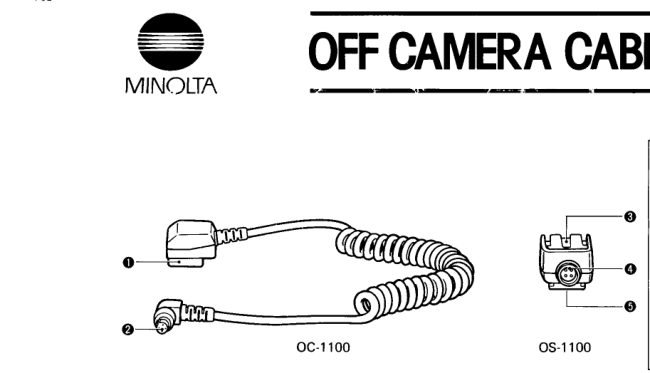
      NAMESOF PARTS
      O Mounting foot       €) Accessoryshoe
     O Ptug       @ cableterminal
                   O Tripod socket

      ATTACHINGAND REMOVING
          1. With the cord pointing towardsthe front of the camera,slidethe-'   a-'T:*        mounting foot  of Off-CameraCable OC-1100 into the accessory
       shoeof the camerauntil it clicksin place(A).
         To removeOff-CameraCableOC-l100 from the camera,slidethe
        mountingfoot of the cableout of the camera'saccessoryshoe.
View original page 4Page 5 · Read text
1100
  2. Align the guide on the plug of Cable OC-l100 and the guide on
 the socket of Off-CameraShoe OS-1100. Push plug fully into socket
 and secureby tightening the outer ring (B).
  3. Slide the mounting foot of flash unit into the accessoryshoe of
 Off-CameraShoe OS-1100 until  it locks in place (C).                           :
   To remove Off-Camera Shoe OS-1100 from flash unit, press the
 lock-releasebutton of the flash unit and slide the mounting foot of
 the flash unit out of the Off-CameraShoe OS-1100.
 o AF illuminator on flash unit will not light.
 o  Flash unit can be held in your hand or mounted on a tripod (or in
 accessoryshoe of bracket grip, etc.) When mounting on a tripod, do
 not overtighten tripod screw.
  .  The socket of Off-Camera Shoe OS-110O can be turned 18Oo to
 enable moving the flash unit- freely without placing strain on the
 cable.
 o  Cable EX can be used to  position the flash further from the
 camera than  is possible with Off-Camera Cable OC-1100 alone. Up
 to five Cable EXs may be used, giving a combined length (including
 Off-Camera Cable OC-l100)  of approximately 6 meters. Operation
 may not be correct if more than five Cable EXs are used.
  .   Triple Connector TC-1000 can be used to connect up to three
  flash units

 FLASH OPERATION
   Operationof one off -cameraf lashunit connectedwith Off-Camera
 CableOC-1100 and Off-CameraShoeOS-1100is as explainedin the
 instructionmanualfor the flashunit.
 Note that:
 o  Flash-readysignalingand auto X-syncsettingare maintained.
  .  Autoflash ranges(as indicatedin flash'sinstructionmanual)and
 flash distancesand correspondingaperturesin manual mode are
 basedon f lash-to-subjectd istance,not camera-to-subject distance.
 o Flash-readysignal(t  ) in viewfinderwill blinkwhen exposurewas
 sufficient.
 o Operationmay not be correct if more than six cables(including
 Off-CameraCablesOC-l100 and EX) are used.


                               www.orphancameras.com
View original page 5Page 6 · Read text
CLOSE.UP AND MACROPHOTOG RAPHY
    A-mode TTL  is recommended to enable choosing any aperture
   for  controlling depth of  field. TTL  control makes operation easy
  even when using close-up accessories,since light passingthrough lens
  and accessoryis metered off film to control flash duration.
  o    lf  flash  is closer to subject than applicable minimum distance
  given in flash's instruction manual, photo may be overexposedeven
  though flash-distance signals indicate exposure was sufficient. Do
  not take photos closer than the applicalbeminimum distance.
  o When using cloqe-up or macro accessoriesbetween camera and
  lens, find  applicable flash range by  using f-number determined
  according to lens extension. For details, see flash and/or accessory
  instruction manual.
^ -rou*rE             -*r  :l****"                                                   ,Jlb'--**iftga
         FLA'H
    Aim flash so light will strike bounce surface {preferably white,
  especially for  color photos) approximately halfway between flash
  and subject. lf some lightfrom flash directly strikessubject, illumina-
  tion may be uneven.
     Flash rangesfor bounce flash are for flash-to-reflector-to-subject
  distance and may be reduced if bounce surface has low reflectance.
  Viewfinder flash-ready signal will blink if exposure was sufficient. %
  NOTE:
  o Off-CameraCableOC-l 1OOcan also be connecteddirectlyto flash
  units with an accessoryterminal or to Off-CameraShoe for use with
  Minolta Program/ Maxxum Flash  OOOAF/28OOAF/18OOAF.
  However,flash unit's AF illuminatorwill not light.
  o PX-seriesor X-seriesflash units cannot be used.
z.f,i*frmn*                                                                        -ffih
View original page 6Related documents and language editions
From the M. Butkus Camera Manual Library. Original publisher and archive notices are retained.
Check the model and edition against your equipment.
PDF verified 2026-10-10.