Camera accessories
Nikon FA-FE2-FM2 focusing screen instructions User manual
User manual for Nikon FA-FE2-FM2 focusing screen instructions. 4 pages in English. Read the original PDF, download or print a copy without registration.
4 pagesEnglish1.5 MB PDF
Loading your manual…Open PDF directly
Document details
- Brand
- Nikon
- Model / document
- Nikon FA-FE2-FM2 focusing screen instructions
- Document type
- User manual
- Language
- English
- Pages
- 4
- File size
- 1.5 MB
- Category
- Camera accessories
- Document date
- Not specified in catalog
Search available document text
Find a term, then jump to its page in the original PDF. Image-only pages may not be searchable; check the PDF for exact wording and diagrams.
Page 1 · Read text
Nikon www.butkus.us
         .FlM 2* Focusing ScreensIFA. Ftr U
Three different types of focusing screens are avail-
able for use with the Nikon FA, FE2 and FM2.
cameras. The Type K2 screen comes with the cam-
era as standard equipment.
Although these focusing screens are designed
especially for the Nikon FA, FE2 and FM2., they
can also be used with the Nikon FE and FM2, but
exposure compensation is required. With the Nikon
FE, set the ex posure compensation dial at + 112.
Because the Nikon FM2 does not have an exposure
compensation dial, you must reset the ASA/ISO
film speed dial to a value 1/3 lower than the actual
 f ilm speed.(For example,  if you are using ASA/ISO
100  f ilm, reset the dialto ASA/ISO 80.)
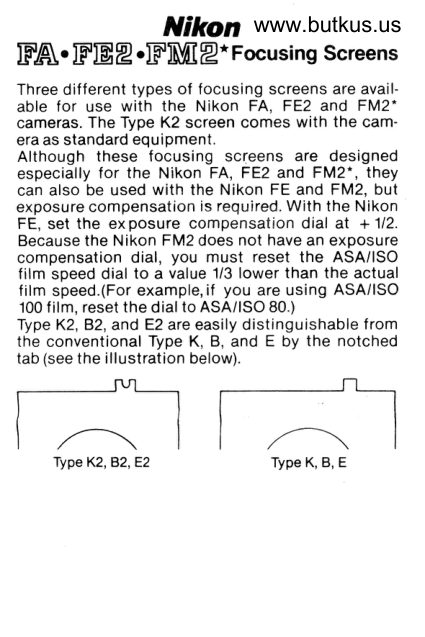
Type K2, B.2, and E2 are easily distinguishable   f rom
the conventional Type K, B, and E by the notched
tab (see the illustration below).
View original page 1Page 3 · Read text
After removing the lens from the camera body, look
into the mirror box (see illustration A). At the top
front of the mirror box casting, there is a latch for
snapping open the focusing screen frame holder.
Insert the tip of the tweezers (provided with the
accessory   f inder screen) under the latch and pull  it
outward to spring open the holder. Take the screen
out of the holder by grasping the small tab with*he
tweezers (see illustration B). To avoid getting
smudges or  f ingerprints on the screen's optical sur-
faces, do not remove the screen with your fingers.
To mount a screen, carefully place it into position
with the flat side facing downward and the tab out
(closer to the right side, facing the camera), then
push the front edge of the holder upward until it
clicks into position.


                                                                                                                                    mike                                                                                                                                                  butkus
                                                                                                                      cn=mike                                                                                                                                       signedbutkus,by
                                                                                                                                          ou=29,                 mike                 DigitallyDN:o=orphancameras,email=mike@butkus.org,Date:                                                                                                                                         2018.05.02                                                                                                                                                         19:15:38                  butkus                        c=US-04'00'
View original page 3Page 4 · Read text
www.butkus.us

k   Focusing Screen Selector Guide
p     Refer to the following guide for types of focusingtr    screens available according to their optical con-
t.    struction and suitable applications.
e
t                      TYPE K2: Matte/Fresnel with horizontal
n                             rangefinder and microprism
a                               Matte/Fresnel  field with central 3mm-diameter
g                              split-image rangef inder (horizontally  ali gned)
                           surrounded by 1mm-wide microprism band.
                             This screen colrbines the split image and the
                           microrism for quick and accurate focusing,
1                                 particularly with lenses of brighter maximum                               aperture. With PC-Nikkor or lenses having a
t                      maximum aperture slower than fl4.5, the split-
'l                           image rangef inder or micro-prism collar is dim.
                                                               matte                                       case,                                         focus                                         on the surrounding                                 In thist                                                                                 posi-                                                 provided                                                          with centrally                                 area.                                  Screen                                           also
                                                                           t ioned,  1 2mm-diameter  etched  ref erence  ci rcle
                           denoting area of center-weighting TTL ex-
                           posure measuroment.  Excellent  for general
                             phoiography, the Type K screen is standard
                           equipment on all Nikon cameras.
                       TYPE 82: ItatterFrosnel wlth locuslng spoi
                           Matte/Fresnel    f ield with central 12mm-
                          diameter fine-ground matte focusing spot.
                       Absence of central rangefinder/microprism
                               aid makes tor less distraction when viewing
                         and focusing, particularly with ultra-wide or
                             supertelephoto lenses. Focusing spot corre-
                        sponds to area of cenler-wetghted TTL ex-
                         oosure measurement. Rated excellent with
                                         all lenses, this screen proves especially good
                         with lenses having small maximum aper-
                                 tures, such as Ref lex-Nikkors, as well as for
                             close-up photography appl ications.

                       TYPE E2: lUatterFresnol  wlth focuslng spot
                           andgrld
                           Matte/Fresnel     f ield with central 'l2mm-
                          diameter fine-ground matte focusing spot
                         and etched grid. Focusing spot corresponds
                         to area of center-weighted TTL exposure
                        measurement. Rated excellent with all
                               lenses, this screen proves especially good
                           tor exacting reproduciion work, such as
                           copying, as well as for architectural photo-
                           graphy with PC-Nikkor  lenses.
    *FM2 with synchronization speed of 1/250 sec.
View original page 4Related documents and language editions
From the M. Butkus archive. Original publisher and archive notices are retained.
Check the model and edition against your equipment.
PDF verified 2026-10-10.