Film cameras
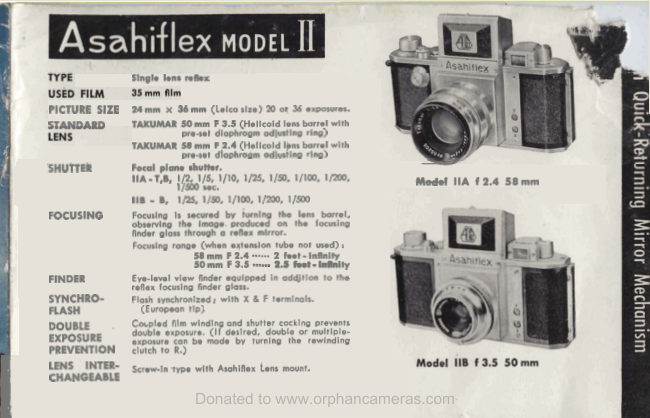
Pentax Asahiflex II User manual
User manual for Pentax Asahiflex II. 40 pages in English. Read the original PDF, download or print a copy without registration.
40 pagesEnglish5.2 MB PDF

Loading your manual…Open PDF directly
Document details
- Brand
- Pentax
- Model / document
- Pentax Asahiflex II
- Document type
- User manual
- Language
- English
- Pages
- 40
- File size
- 5.2 MB
- Category
- Film cameras
- Document date
- Not specified in catalog
Search available document text
Find a term, then jump to its page in the original PDF. Image-only pages may not be searchable; check the PDF for exact wording and diagrams.
Page 3 · Read text
. .                                      -Hood lock
Hood  for  focusing  finder  glass
High speed shutter did
Film winding & shutter cocking knob
Exposure coun!er did
Shutter release button         1-
Slow speed  shutter  dial
Lens
Fdm rewinding knob
Rear Cover lock
Eye-level view finder
Synchronizer terminal F
Synchronizer ternrinal X
Distance scale ring
Diaphragm-     -   adjusting ring   /"1
Pre-set adjusting ring                1Pre-set diaphragm index           -
View original page 3
Page 5 · Read text
INSTRUCTIONS FOR
 Y OUR ASAHIFLEX
           Before taki--  7ictu---
          Loading  fill     . .
          Unloading film  . . . .
          Taking pictures . . . . .
           Setting diaphragm
           Setting shutter spe
         Composing pictures
        How to hold your camera  . . . . 19
           Flash synchronizer  .  . .  .  .  . . 25
           Interchanging lens   .  . .  . . . . 25
           Close-ups . . . . . .    .  . . . . 53
          Reproduction . . .  . . .  . . . . 34
View original page 5Page 8 · Read text
Open the back of the camera by pulling


  lace the film cartridge into  its position @,

  few inches of the film and insert it into the
   it of the take-up spool @.  Slowly turn the
film winding knob Q clockwise and make
sure  that  both  sprockets @ have  properly
caught the  perforations  of  the  film.  Again
yake sire  that  the  film  is being properly
transported on to the take-up spool, and then
cIose the back uushing down the rear cover
View original page 8
Page 12 · Read text
Before focusing through the focusing  l-1           Bnder glass, be sure that the shutter
           has been cocked  first.".d#              Remove the lens protector cap, and erect the 4 1
             focusing finder hood by pushing up the hood
             lock      Focusing will be made by obserling        a.
            the image on the focusing glass while turning I I
            the distance scale ring @.  When the image on
            the focusing glass becomes clearest, an accurate
             focusing will be obtained, and the same image
              will be produced on the film plane as the shut-
               ter is released.
             To ensure accuracy in focusing, a magnifier
     @ is attached  to  the  rear  finder hood.  The
            magnifier may  be  set  parallel to the focusing
              glass by holding the nipple on top of the mag-
                nifier.  When observing through the magnifier, l
           keep your eye close to the magnifier.
View original page 12Page 14 · Read text
-         .
                           At distance 15 it. with 50 mm lens
          and at the following diaphragm setting, the range of
            distance shown below is in the same depth-of-field.11


           On each of our TAKUMAR lenses, different depth-
              of-field guide numbers are shown according to its focal
             length.
               Hence, when taking two or more objects of different
             distance,  it  is necessary to adjust the diaphragm piro-
             perly in order to bring these objects simultaneously in
            focus as illustrated by the photograph.
              With ASAWFLEX, you can clearly ske what is in
            the depth-of-field on the focusing glass,  You will also
            see the extent  of  blurs that  will be produced on the
View original page 14Page 16 · Read text
PRE-SET DIAPHRAGM

               It is sometimes hard in single lens reflex camera
         to obtain  correct focusing when the diaphragm is set
        prior to focusing because of the darkness of the focusing
        finder glass.   Hence, focusing is usually 'secured with
        the diaphragm full open, and adjusting it after focusing.
         To eliminate  this inconvenience  of keeping your
        eyes  off  the  focusing  glass  to  set  the  diaphragm,
     ASAHIFLEX  is equipped  with  a  pre-set diaphragm
i       ring      First, set pre-set diaphragm ring at the desired      m.
       diaphragm number, and focusing  will be made on the
        bright focusing finder  glass with  the diaphragm  full       To adjust th-  +e-set  4iaphragm ring :
        open.  P r p  to  shutter  release,  turn  the  diaphragni        For 58 mm  f 2.4  lens--Turn  the pre-set dia-
        adjusting ring until it stops at the pre-set desired dia;           phragm  ring and  set  the  desired
                                                                   diaphragm number  of  this  ring to       phragm  dial number.  Using this pre-set diaphragm                                                                              the red dot.
         ring, you need not remove your eyes off the focusing        For 50 mm f 3.5  lens-Turn   the per-set dia-
       when setting the diaphragm.                                 phragm  ring and  set  the  desired
                                                                    disphragm.  .  number  of  this  ring to
                                                                              the red line.
View original page 16Page 18 · Read text
The shutter has now been set, and your
       ASAHWLEX  is ready  for taking p i c t u t e . a -
         What remains is releasing the shutter.  Thc
              letters B and T on the shutter speed  dialr
            function as follows :
                  3J (Bulb)-The   shutter is open as long as "f'                         the shutter button  is pressed.
         T (Time) -The  shutter is open even if your
                           finger leaves the shutter buttor
                           after  pressing.  To  close  thc
                          shutter curtain, turn the  slolr
                       speed shutter dial towards the
                                                                      is              shutter will be full open as long as the                            dial number 112. This settinn:-
                        used for long exposure timing.              shutter button is pressed ; however, the
        MODEL IIB                                   Model IIB has na slow speed shutter    .
             1   Turn the shutter cocking knob clock-             with T setting. When a long timing
                  wise until  it stops.                                        is desired with Model IIB, unscrew the
                  2.   Lift the shutter speed dial, turn to the              shutter ring and fix a shutter release
                    right or the  lef;  and  set the desired             cable with locking attachment.  Thus'I           speed number to the index.                       long exposure timing may be  easily
              As the shutter  dial  is set at  B, the             obtained with this Model.
View original page 18Page 26 · Read text
To obtain satisfactory synchronization with electronic
flash,  it is preferable to set the shutter speed slower than
1/25 of a second.     -
                      ;:$JK7:

                               S  When using a synchronized flash at daytime as well as at
              nigh6 time or in dark placer, you can always obtain a
               bright  picture  OS  shotpr, by the photograph  even when
             taken again86 the main lighc.


                                                             Token with synchronized A a r ~
View original page 26Page 30 · Read text
").)k p r oWhenp mt&mrepsadwingmdwnmn&,in clo9t:-upseta-, M
   ing to tbe ~ i a e0f the e  b   j  ~Reprod~etion~
   maxy be whieved ~uoe8mf~tllyby o W n g
  &K faausing $;l= s d adjwing  'tkie com-
   po&tion @athe L a ~ ~ i n$hisCg      It h &&IY
  rtxommmdsd in tkh       to W A ~ H I -
  FLEX Ra)smdot:tisa ISit capable of giving
  men iIllurnka%iion over tbs l objear.  The W-
   ryiag &W  af th$~kit m m rrs reproduotim
   mat, m whieh a @W and pntagraph am
    erected mdy, The camera may be lifted or
   lamred simply togethw wjth the panurgraph.,
    thcilitadng focuaing and eompasition.  Fur-
   themore, the pan~rrgnlphon which tbe camp    ra  izc k e d caa be wition-od 8t ;aaQ $~d6t
   and ck?f~-upsof small o b j m ~at my angle
 -  may be abtained up  to  life-sizeiaeAJMI-
         Rep~oduczionEit is rmommended for
   copying beoke, daslunent9, drawin@ at&

                                                       F '
View original page 30Page 32 · Read text
Standard TAKUMAR 5 8 mm F 2.4


                                                          ~I- I
     Lens element          5
     Mininiun~lens aperture   f 22

      Distance scale           2 ft-50   f t and infinit?
     Angle of tiew           31"
     Weight               7 oas (200 gra)
     Equipped wit11 pre-set diaphragm adjusting ring.

               Sensational s t a n d a ~ d lens  of  f2.4  eiel
              produced  xlth 5  lens  elements.    'lhe
                focal  length  1s deslgned  at 58 mm   f o ~
                slngle lens ~eflexcamera, haxiny excel-
                  lent  resol\ lny  poner.    Espec ]all\  de
              s~ylled for    t olor  photoylaphg  het auie
                of  the  lntrra*lng  popuiatlt)   of  tolor
               p ~ c t ~ l t e s
View original page 32Page 34 · Read text
When taking distant objects, or using sloffi
                              .     .   -                                           speedcable isshutter,recommendeduse  of  t oourpreventshurte~vibrationrelease
Lens element          2                                                    of your camera or blurs on your pictures.                                                                            See page 16 for details of attaching a release
Minimum lens aperture  F 16                                    cable to your camera.
Distance scale
   25 ft-1000,  and infinity                                         .
Angle of view    5'  -

Equipped  with  rack-pinion
focusing adjustor.


Comparatively light, small and portable  for  its long focal
length of 500 mm.  Capable of taking ~nterestingand unique

that other lenses may not be !ble  to represent.
View original page 34Page 36 · Read text
I  TAKUMAR l00 mm F 3.5 Ions focal length
L
           Lens element          3
         Minimum lens aperture  F 16
           Distance scale             4.5 ft-100   ft, and infinity
           Angle of view           2 P
          Weight                     9.8 ozs (280 grs)
           Equippccd with pre-set diaphragm adjustir

                    Although  composed  of 3 elements,
                      aberrations are satisfactorily corrected.
                  Recommended  for  taking  sceneries,
                          portraits, news pictures, etc.
View original page 36Related documents and language editions


From the M. Butkus archive. Original publisher and archive notices are retained.
Check the model and edition against your equipment.
PDF verified 2026-10-10.