Film cameras
Pentax BG-3 User manual
User manual for Pentax BG-3. 8 pages in English. Read the original PDF, download or print a copy without registration.
8 pagesEnglish1.2 MB PDF
Loading your manual…Open PDF directly
Document details
- Brand
- Pentax
- Model / document
- Pentax BG-3
- Document type
- User manual
- Language
- English
- Pages
- 8
- File size
- 1.2 MB
- Category
- Film cameras
- Document date
- Not specified in catalog
Search available document text
Find a term, then jump to its page in the original PDF. Image-only pages may not be searchable; check the PDF for exact wording and diagrams.
Page 2 · Read text
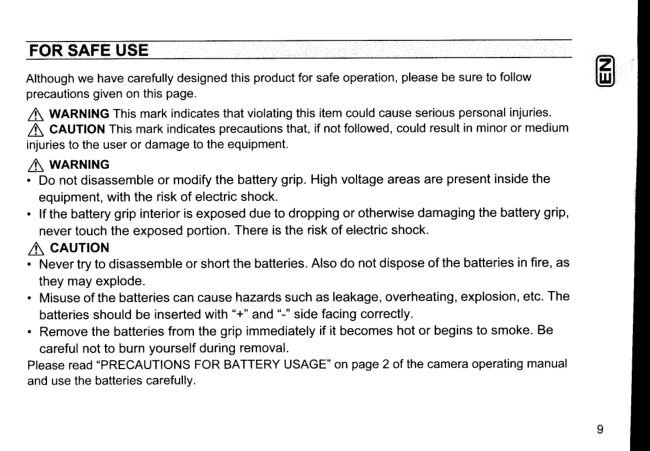
FOR SAFE USE
Althoughwe have carefullydesignedthis productfor safe operation,pleasebe sure to follow
precautionsgiven on this page.
l\  WlnrulNG This mark indicatesthat violatingthis item could cause seriouspersonalinjuries.
 l\  CAUTIONThis mark indicatesprecautionsthat, if not followed,could resultin minoror medium
injuriesto the user or damageto the equipment.
 l\ WARNTNG
. Do not disassemble or modify the battery grip. High voltage areas are present inside the
  equipment,with the risk of electric shock.
.   lf the battery grip interior is exposed due to dropping or otherwise damaging the battery grip,
  never touch the exposed portion. There is the risk of electric shock.
a CAUTTON
. Nevertryto disassembleor shortthebatteries.Alsodo notdisposeof thebatteriesinfire,as
  they may explode.
. Misuse of the batteries can cause hazards such as leakage, overheating,explosion,etc. The
  batteriesshould be inserted with "+" and "-" side facing correctly.
 . Remove the batteries from the grip immediatelyif it becomes hot or begins to smoke. Be
  careful not to burn yourself during removal.
Pleaseread "PRECAUTIONSFOR BATTERYUSAGE"on page 2 of the cameraoperatingmanual
and use the batteriescarefully.
View original page 2
Page 3 · Read text
NAMESOF WORKINGPARTS                   L


                                                 Shutterreleasebutton
                                                       Main switch
   Attachmentscrew
       :G


     Batterycover
     unlocklever            AE-L button
                  Battery cover                                   Attachmentwheel


                         www.orphancameras.com
View original page 3Page 4 · Read text
IN$TALLINGTHE BATTERIES

Use four AA batteriesof the same type (lithium/Ni-MH/alkaline).


 .f  Openthe batterycover.
   Turn the batterycover unlock lever down, towards v and open the batterycover.
 # Insertthe batteries.
   Be sure to insertthe batterieswith the "+" and "-" sidesfacingthe correctdirections.
 # Ctosethe batterycover.
   Pressthe cover untilyou hear it click and make sure that the cover is properlylocked.
a Memo
. Forthe numberof recordableimagesand playbacktime,see the charton page15.


                                                                                   1 1
View original page 4Page 5 · Read text
ATTACHINGTHE BATTERYGRIPTO THE CAMERA

    s

       f Openthe batterygrip connectioncoveron the camera,and removethe interface
      pins cap on the batterygrip.    ^
       / Attachthe batterygrip to the cameraby fittingthe interfacepins and attachment
     screwof the batterygrip to the batterygrip connectionterminaland tripodsocket
       of the cameraas shownabove.
   3 Securethe batterygrip by turningthe attachmentwheelfirmlyin the directionof
      the arrowas shownabove.
   a cAUTroN
       . Make sure the cameraand the batterygrip are turnedoff beforeattaching.
       . Leavethe cap on when not usingthe batterygrip. Do not touchthe interfacepins with the cap off.
       . You can storethe batterygrip connectioncoverof the camerain the cavityof the batterygdp afterremoving
     from the camerain step 1 (see illustrationin step 2). When storingthe cover,push it down straightwith
     yourboththumbs.12                         www.orphancameras.com
View original page 5Page 6 · Read text
TAKINGPICTURESWITHTHECAMERAINTHEVERNCALPOSITIOI{

     5€*   y


 Usethe shutterreleasebuttonon the    Makesureto turn on the batterygrip
 batterygripwhentakingpictureswith    beforeattemptingto operatethe shutter
 the camerain the verticalposition.      releasebuttonor the AE-L buttonon
                                     the batterygrip.However,the camera
                                can stillbe operatedby its own control
                                even if the batterygrip is turnedoff.

a Memo
 . lt is recommendedto turnoffthebatterygripwhenusingthecamerain a positionotherthanthevertical
  positionastheswitchmayaccidentallybe pressed.


                                                                          1 3
View original page 6Page 7 · Read text
L
  R
   The AE-L buttoncan be operatedin the
   same manner as that of the camera.


1 4                          www.orphancameras.com
View original page 7
Page 8 · Read text
{ SPEGIFICATIONS

   Gamera:K2ooD
    Bafteries: Four AA lithium/Ni-MH/alkalinebatteries
   Dimensions(W x H x D): Approximately133.5x 32.5 x 75.5mm/5.3x 1.3 x 3.0 in.
     (excludingprotrusions)
    Weight: Approximately175 g (6.2 oz)
    Specificationsandexternaldimensionsaresubjectto changewithoutnotice.
    Approximateimage storage capacity and PlaybackTime
   (when the same types of batteriesare used in the cameraand battery grip)
      Batteries                                                   Flash photography                                                  recording                                 Playbacktime                (ambienttemperature)Normal          50% usage     100% usage
                            (??,9)  2200 mages    1090images    680 mages    1400minutes    AA LithiumBatteries                                (0'c)   1780 mages     860 mages      480 mages     1200 minutes
    AA RechargeableBatteries (23'C)   1400 mages     780 mages     470 mages      960 m nutes
    (NIMH2700mAh)         (0"C)   980 images     540 mages      360 images     800 m nutes
                          (??,91  380 images     1 5 0 mages      90 images     600 minutes    AA AlkalineBatteries                                (0'c)  Not applicable    Not applicable    Not applicable    400 minutes
        . The imagestoragecapacity(normalrecordingandflashuse 50%)is basedon measuringconditionsin
      accordancewithCIPAstandardsandthe othersare basedon PENTAXmeasuringconditions.Somedeviation
      fromthe abovefiguresmayoccurin actualuse dependingon shootingmodeand shootingconditions.
         .  Bafteryperformancedecreasesin low temperatures.In cold environments,it is recommendedthat you
       carryextra batteriesand keep them warm in your pocket.Bafteryperformancewill recoverwhen the
      surroundingtemperaturereturnsto normal.
         .  Carryextra batterieswith you when travelingoverseas,taking picturesin cold environmentsor taking a
         lot of oictures.                                                                     1 5
View original page 8Related documents and language editions
From the M. Butkus archive. Original publisher and archive notices are retained.
Check the model and edition against your equipment.
PDF verified 2026-10-10.