Film cameras
Ricoh 500G User manual
User manual for Ricoh 500G. 9 pages in English. Read the original PDF, download or print a copy without registration.
9 pagesEnglish1.2 MB PDF
Loading your manual…Open PDF directly
Document details
- Brand
- Ricoh
- Model / document
- Ricoh 500G
- Document type
- User manual
- Language
- English
- Pages
- 9
- File size
- 1.2 MB
- Category
- Film cameras
- Document date
- Not specified in catalog
Search available document text
Find a term, then jump to its page in the original PDF. Image-only pages may not be searchable; check the PDF for exact wording and diagrams.
Page 2 · Read text
Features you'll like

· Compact and light weight: Ricoh 500G is so small that you can carry it in your pocket with ease. Nevertheless
it's a GREAT camera with up-to date features packed.

· Electric eye: The built-in CdS electric eye automatically sets correct lens opening for optimum result at any
time. Also manual lens-opening setting is possible if you so desire.

· Coupled Rangeflnder: Just bring two images together for a crisp, detailed photo. The parallax correction mark
will help to prevent an accidental cropping of subject.

· Single-stroke Film wind lever: One motion advances film, winds the shutter, counts exposure and prevents
double exposure.

·Sharp, fast Rikenon f2.8 40mm lens: Always assures you of corner-to-corner sharp photos.

· Built-in self-timer: Lets you get yourself into your photo.

· Hot shoe: The direct-contact type accessory shoe enables you to use direct-contact type flash unit electronic
flash unit without difficulty..

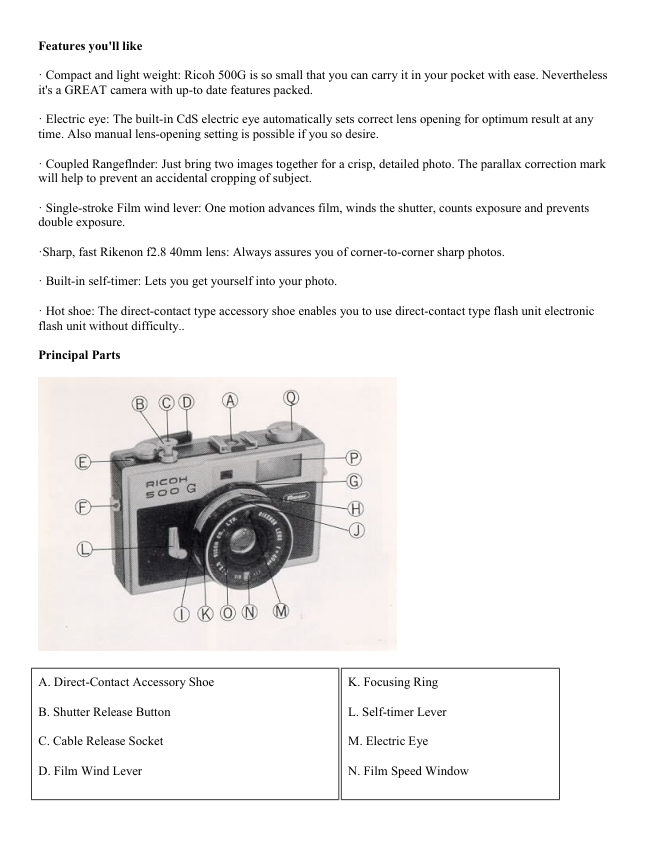
Principal Parts


A. Direct-Contact Accessory Shoe                      K. Focusing Ring

B. Shutter Release Button                                 L. Self-timer Lever

C. Cable Release Socket                          M. Electric Eye

D. Film Wind Lever                                 N. Film Speed Window
View original page 2
Page 3 · Read text
www.butkus.us


E. Film Counter                         Q Film Speed Selector

F. Eyelet (2)                                                P. Rangeflnder

G. Auto/Manual Ring                                Q. Film Rewind Knob

H. Shutter Speed Ring

1. Shutter Speed Knob (2)

J. Distance Scale


                                         Mike Butkus               Digitally                                                                                                                                                                                                                                                  DN:email=mike@butkus.org,Date:cn=Mike2023.05.17signedButkus,by14:27:18Mikeo=ButkusButkusc=US-04'00'camera manuals, ou=butkus.org,


R. Flash Synchronization Socket
                                   W. Film Pressure Plate
S. Film Rewind Spindle
                                           X. Film Rewind Button
T. Film Chamber
                                           Y. Tripod Screw
U. Film Take-up Spool
                                                 Z. Electric-eye Battery Chamber
V. Sprocket Teeth
View original page 3Page 5 · Read text
www.butkus.us


Correct exposure


Open Electric-eye Battery Chamber (Z) with a coin by
turning the cover counterclockwise, put a mercury battery
with the plus "+" side up and replace the cover (Fig 5). The
mercury battery is the power source for the electric-eye and
will last for a year approximately. For replacement use 1.35v
type Eveready EPX 675, Mallory, PX675 or equivalent. See
this link on a Wein Air replacement battery.


(Webmaster: this is a mercury battery, not available for sale in the U.S.
Check my web page for Mercury Battery Replacements. There are several options.

To set the exposure meter for the film you are using, turn Film Speed Selector (O) either to the left or right until
the same film speed number as your film appears in Film Speed Window (N) (Fig. 6). Check the instruction
sheet packaged with your film for the correct film speed setting. Next set Auto/Manual Ring (G) at "A" (Auto).
Your camera is now set for automatic exposure control (Fig. 7).
View original page 5
Page 6 · Read text
Manual override

If you want to operate your camera manually, you can do so. Simply rotate Auto/Manual Ring (G) and set the
desired lens opening number at red marker. The instance you rotate Auto/Manual Ring (G) off "A" (Auto), the
letter "M" will appear in the viewfinder indicating your camera is set for manual use.

Setting shutter speed


Lightly hold Shutter Speed Knobs (I) and rotate Shutter Speed
Ring (H) until the desired shutter speed comes opposite red
marker (Fig. 8). The Shutter speed setting governs the amount
of time the film is exposed to light. '60" (1/60 second) is
recommended for subject not in motion. Where motion exists, a
shutter speed ranging from 1/125 to 1/500 should be used.


Look into the viewfinder and you will observe two red zones, one at the upper right-hand corner and the other
lower right-hand corner, and lens opening numbers in between. The upper red zone is warning mark for
overexposure. If the exposure meter needle is in the red warning mark, set Shutter Speed Ring (H) at faster
speed (Fig. 9). If you find the needle in the lower red warning mark, use slower shutter speed (Fig. 10). If the
needle stays on or between numbers, this is correct exposure and the number, such as 2.8 or 4 or 5.6. . .
indicated by the needle tells you the lens opening at which you are going to make exposure.
View original page 6
Page 7 · Read text
www.butkus.us


Viewing and focusing

Look into viewfinder to compose your picture and focus the lens. Rotate Focusing Ring (K) until the double
image in the rangeflnder (center of viewfinder), has merged to a single image (Fig. 11). . . your subject will now
be in sharp focus.


When composing your picture, keep your subject within the bright-frame outline of the viewfinder.. When you
shoot a close-up, keep your subject within the inner bright-frame so that your subject may not be cropped. To
take the picture, hold the camera either vertically or horizontally as steady as you can and press Shutter Release
Button (B) slowly and smoothly all the way down.

Flash pictures

Your camera has synchronization designed to permit flash pictures with flash bulbs and also electronic flash.
You may use a flash gun or electronic flash.

The flash gun attaches to the Direct-Contact Accessory Shoe (A) of your camera. If your flash unit has no direct
contact, the flash connecting cord of the flash gun should be attached to Flash synchronization Socket (R) of
your camera.
View original page 7
Page 8 · Read text
For No. 5, 5B, 25, 25B, M5, M5B, M2, M2B, AG1, AG1B Flash bulbs shutter speeds from 1/30 through 1/125
second may be used.

For Electronic Flash any shutter speeds from 1/8 through 1/500 second could be used. However, the shutter
speeds ranging from 1/60 up to 1/500 second are recommended for better flash picture.

(Webmaster: this is a leaf shutter, meaning at any instant all of the film is exposed at any given shutter
speed. So this camera can have shutter speeds above the 1/30 to 1/125 sec of normal 35mm cameras.)

Setting the lens for flash pictures

To determine the lens opening, divide the distance in feet (or meter) from flash to subject into the flash bulb
guide number for the film used. Check the chart on the flash bulb carton for the guide number.

EXAMPLE: Flash Bulb Guide Number: 66ft.
            Flash-to-subject distance: 6ft.
          66 divided by 6 = 11; use lens opening f:11

Rotate Auto/Manual Ring (G) off "A" (Auto) and set the obtained lens opening number at red marker.

(Webmaster: most current flash units are "automatic", you set the camera to it's "flash" or "sync"
speed, which on this camera is 1/500 sec. [ most are 1/60 ], check the back of the flash unit you will use
and it will have a chart. Depending on the ASA of the film, the flash will show an F-stop to set the lens
diaphragm to. The flash will also show you the range in distance you can photograph. This is usually 4
feet to some 15 feet or more. Some flash units have two or three F-stops to choose from. Depending on
the power (size) of the flash, that determines the F-stop and longest distance from your subject.)


The self-timer

By using the Self ltimer, you can also get into the picture. Merely move the Self-timer Lever (L) away from the
lens. When you press Shutter Release Button, there will be about 8-second delay before the Self-timer
automatically releases the shutter. Camera should be placed on tripod or other sturdy support.

Unloading film

Always unload your camera in the shade, never in bright light.

After the last picture on the roll has been taken, press Film Rewind Button (X). Lift up crank on Film Rewind
Knob (Q) and rotate crank clockwise until the entire roll of film has been rewound . . . tension on the crank will
decrease noticeably (Fig. 12).

Open the camera back, pull up the Film Rewind Knob and remove the film cartridge. Push Film Rewind Knob
down all the way and return crank to closed position.
View original page 8Page 9 · Read text
www.butkus.us

Tips for better pictures

· Read the instruction booklet carefully.

· Before you go on a trip or photograph a special event shoot a practice roll of film.

· Keep fingers and strap clear of the camera lens and electric eye.

· When you reach the end of the roll of film (check Film Counter), the Film Wind Lever becomes harder to
advance . . . don't try for " just one more shot". It's time to rewind.

· When the camera is not in use, set Shutter Speed Ring at "B" (bulb) and protect lens with lens cap, which will
prevent unnecessary consumption of exposure meter battery.

· Protect your camera from dust, dirt and rough handling - do not expose camera or film to excessively high
temperatures such as in a closed automobile under a hot sun.
View original page 9
Related documents and language editions
From the M. Butkus archive. Original publisher and archive notices are retained.
Check the model and edition against your equipment.
PDF verified 2026-10-10.